There is no 1x model yet, so could be 4k source does not work and going to 8k is no option, this would increase time by factor 4. As it is I think you can forget 4k 60fps source anyway when many and long vids are planed to do with local Hardware at this state of Starlight mini. Focus on lowres sources is better choice at the moment.
If you can see 0.0fps does not mean it’s not working, it could be just below 0.1 fps. I do 1080p to 4k now, 25fps source and 3min long takes one day with 4070ti, ok I can double the speed when purachsing a 5090 but then its still 12h, and you have 60fps not 25fps, so factor 2.4x which gives you round about 28 hours…for 3min vid, with a HighEnd consumer card
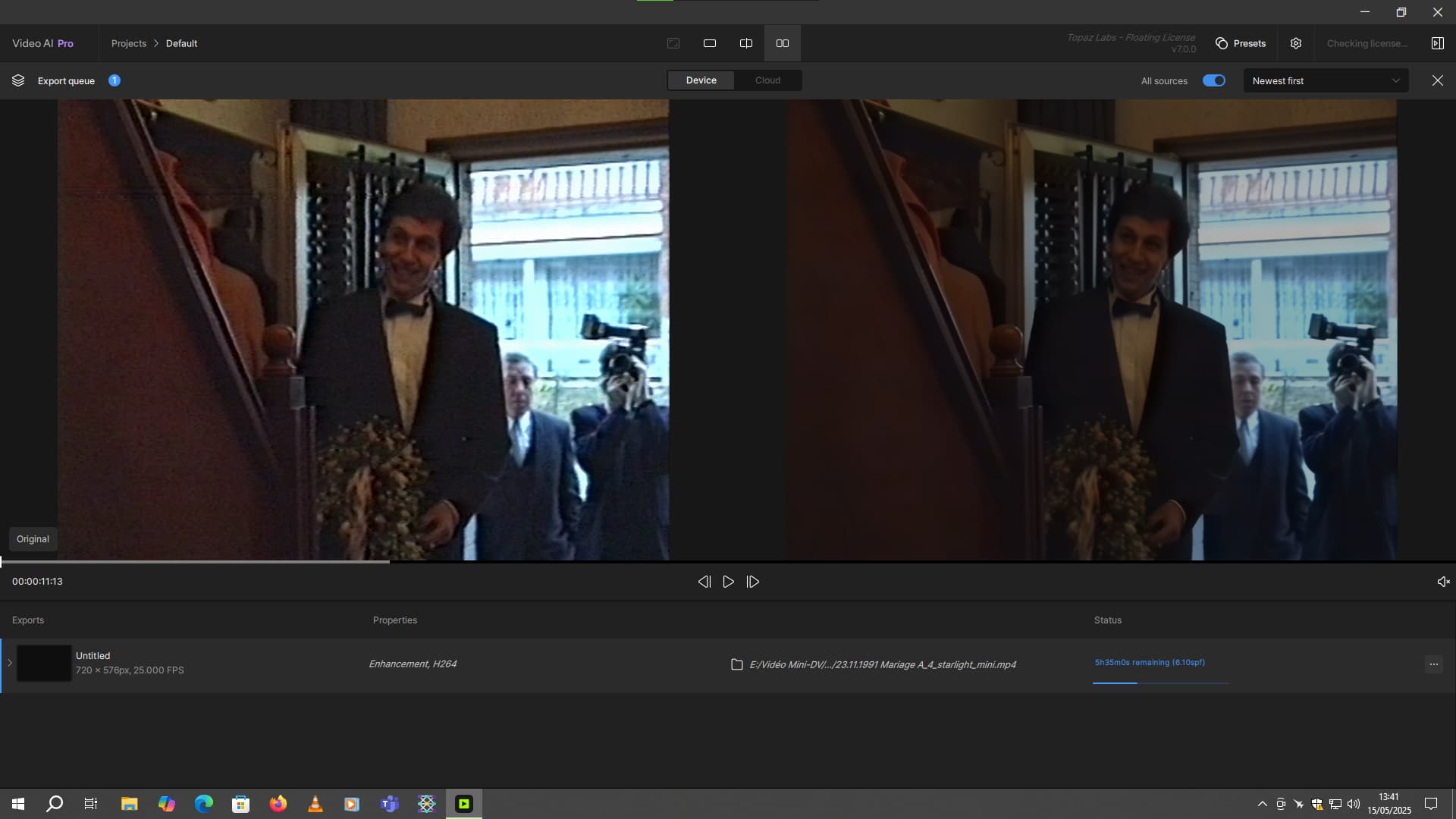
OMG With my 8 GB VRam RTX 3070 Ventus, I’m getting a speed of 6.87 to 7 seconds per frame. And just by opening my web browser, it’s gone up to 7.92 seconds per frame. The Starlight model is really mega-powerful. For 24 seconds defined in the video sequence, it estimates 1h02 of rendering . I hope this new model will one day be better optimized, because although the quality is far superior to the rest of the current models, I can’t do a complete rendering of an old family movie that lasts just over 1h00. Otherwise, I’ll be at it for days. Or even weeks hahaha. The input video is in 720x576 resolution. And the default output resolution is 1280x1024.
By the way, for the story about the darker output sequence with Starlight, I have a hypothesis, I have the impression that the model integrates the HDR10 model in its configuration files because it’s the same dark aspect as if I use the SDR to HDR model. I made a comparison on the same clip.
Why do the 100% VRAM and 80% VRAM versions look so dull? If this is a known bug with Starlight Mini, I guess I’ll hold off on getting a license, at least until this is fixed.
Hi, I dont think SD mini has a dark color tone issue, unless some users did some extra post-processing for comparison. Cause we did many times experiments, i’m pretty sure that there is no color shift compared with the input videos
I don’t understand your response. Your other models work on Apple and AMD hardware . There is something about the starlite model that is being blocked from usage by both companies?
Yey u manage to discover that im poor. Actually it’s just the watermark. I did have to cut or enlarge the video to manage to ignore the watermark so dosent show up
In other words, TL is still working with Apple & AMD to figure things out. This shouldn’t be a surprise by now, though from Apple at least. If a company is not on Apple’s so-called “elite lists of partners” e.g. Adobe, ect. well, it seems like everyone else goes on the back-burner.
In the older versions you could set the timelilne header where you wanted, then select settings and render time. It would render and you could then hit play and it would play just that portion, (not continuing to render the clip as you try watch). You could also loop it.
It seems the way it works now is the same except don’t hit play after the render preview, rather open the Preview queue tab then select preview in explorer. That opens a folder with the temp render file which you can preview in yoour media player.
Its just an extra step or 2 but the same result. If you clear the Preview queue the temp files are deleted.
I tend to open the folder after a render and just leave it open, then as I do more previews I just click on the file generated in the folder.
I understand there are development issues where Topaz may need Apple and AMD’s assistance navigating. It’s more likely prioritization for CUDA development was decided over Metal (for Apple) and OpenCL (for AMD). I guess for me it’s just frustrating. I’ve been waiting for this model so I can run it locally on my machine. Honestly, it was somewhat irritating to see the announcement place AMD and Apple users as “Still can use it in the cloud” (which isn’t free), while Nvidia users have this nice new model to use at no cost.
 With my 8 GB VRam RTX 3070 Ventus, I’m getting a speed of 6.87 to 7 seconds per frame. And just by opening my web browser, it’s gone up to 7.92 seconds per frame. The Starlight model is really mega-powerful. For 24 seconds defined in the video sequence, it estimates 1h02 of rendering