AMD’s PR team - now with 40% increased bullshit!
They only exaggerated by about 10x, the actual gains over Zen 4 are about 4%,
Sorry, but whats the point of posting random performance speculations from 6 months ago?
If u look at serious Ryzen 9000 reviews, they show performance increase of about 10% for most applications. Which isn’t great and less than AMD stated but not a complete disaster.
The most disappointing part of Ryzen 9000 release for me was the stagnation for the memory controller because high RAM speed is important for any TVAI upscaling task. Here there is 0% increase in RAM speed over Ryzen 7000. And it’s the main reason Intel CPUs with fast RAM will perform better in scaling tasks than any AMD CPU.
Here for example is a review of the 9950X in tha Machine Learning/AI category:
https://www.techpowerup.com/review/amd-ryzen-9-9950x/7.html
I was trying not to get in a debate with you due to just your misinformation about RAM, ect. for all applications in a previous thread but… it needs to be said, clearly.
You are just incorrect about just throwing faster RAM will bring STABLE performance, especially with this Zen5 mess.
There are huge compatibility issues using higher speeds with many applications (and many applications just throw errors everywhere due to higher frequency RAM).
Oh, one more thing, what you claim about the 4080SUPER matching the performance of a 4090, I wasn’t totally clear enough… the 4080 SUPER were matching a 4090 with the exact same hardware (CPU, RAM, OS, SSD, ect).
BTW, that TPU review, you need a much better reliable source because many other reviews has blasted it since then. 
You are right that AMD systems dont’really benefit running RAM speeds over 6200/6400 because u have to run the infinity fabric asynchronously which essentially negates the performance gains from faster RAM. Intel systems benefit more from 7000-8000 RAM speeds because there is no penalty in another part of the CPU for it.
Personally, I run 6200CL30 RAM timings (and optimize sub-timings) @ 1.4v since more than a year completely stable with a 7950. That’s with a couple of hours TVAI processing almost daily. I am very happy with that.
If u look at my benchmark scores u can see that it outperforms all other 7950 + 4090 combinations when any scaling task is involved. Even with the CPU throttled to 70 Watts. The only possible reason are the optimized RAM settings. And u can also see that there are some Intel systems with high speed RAM which outperform my system in scaling tasks. If they use standard RAM speeds they are slower.
Just to show how full of shit the leakers are, and the websites for perpetuating the lies.
As a 7950x owner, I’ll be skipping Zen 5. Maybe Zen 6 will be a worthwhile upgrade.
The problem sounds more complicated than that. May be the leakers got true informations, but lately AMD saw than getting more cycles and keeping the clock was a headache.
7950X were very easy to clock, you just to let the thermal throttling do its job. With Zen5 they deeply changed PBO behaviour and introduced the fuc*** TFMAX as a limiting factor : To be clear the CPU overheat.
It runs at full abilities ONLY if under 35°C, meaning never …If you massively chill it sound to be the key, else it will deeply throttle either on cores load or frequency.
Currently people search a way to hack the TFMAX, one has be found, and may be some hacks will be introduced through firmwares.
Topaz Video AI  v5.3.3
System Information
OS: Windows v11.23
CPU: AMD Ryzen 7 7700 8-Core Processor                27.689 GB
GPU: NVIDIA GeForce RTX 3070  7.8301 GB
GPU: AMD Radeon(TM) Graphics  3.9745 GB
Processing Settings
device: 0 vram: 1 instances: 1
Input Resolution: 1920x1080
Benchmark Results
Artemis		1X: 	14.18 fps 	2X: 	10.36 fps 	4X: 	03.68 fps
Iris		1X: 	13.96 fps 	2X: 	08.61 fps 	4X: 	02.66 fps
Proteus		1X: 	13.59 fps 	2X: 	10.15 fps 	4X: 	03.71 fps
Gaia		1X: 	04.81 fps 	2X: 	03.32 fps 	4X: 	02.23 fps
Nyx		1X: 	05.74 fps 	2X: 	04.84 fps
Nyx Fast		1X: 	11.25 fps
Rhea		4X: 	01.86 fps
4X Slowmo		Apollo: 	19.85 fps 	APFast: 	59.34 fps 	Chronos: 	10.90 fps 	CHFast: 	17.90 fps
16X Slowmo		Aion: 	23.95 fps
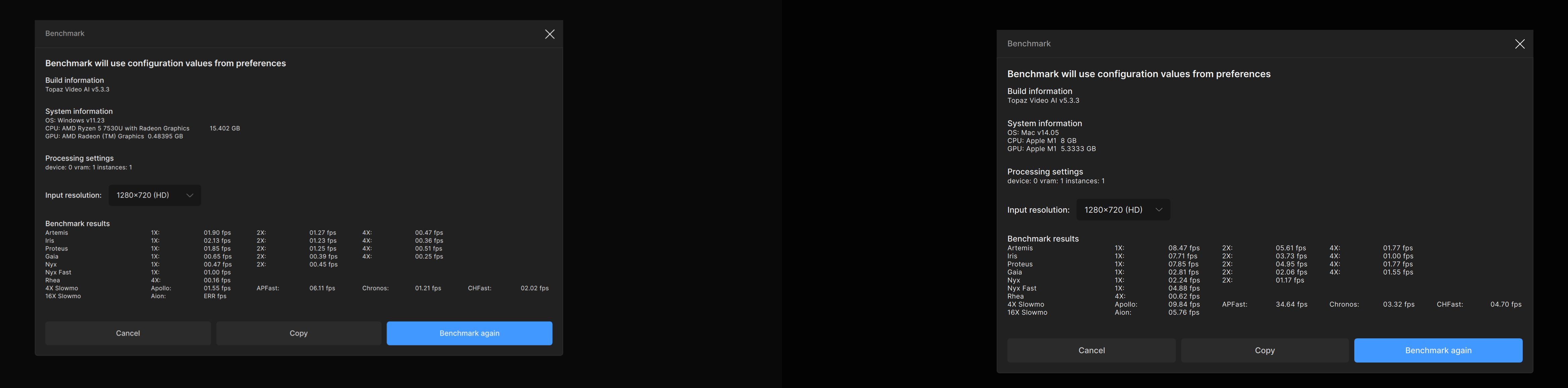
Could you please explain me what is going on here? Why is the performance so low on the Vega 7 machine??
I updated to latest AMD Radeon drivers, I deactivated from autostart every other process and restarted the computer, Windows got just today updated and still so poor results?! I thought Vega was king in iGPUs…
Asus Zenbook UM3402 with Ryzen 5 7530U vs. Macbook Air 2020 with Apple M1
The AMD GPU on your Windows machine has 0.5gb of VRAM and Video AI requires a minimum of 6gb.
Wooow you are right, I just checked the system requirements and they are crazy for Windows 
This opens some question marks that if someone wants to buy a Windows laptop for Topaz should not go below 32GB RAM on an iGPU laptop.
But what really impresses my the performance of the Apple M1! Apple may do bold claims about their memory efficiency but still it is fascinating to see what it is possible with lower overall RAM on their system.
An iGPU on a Windows laptop will never be fast running TVAI. You’d be better off with the cheapest Apple M1 MacBook.
The minimum Windows laptop GPU would be the Nvidia RTX 3080—but be warned: the laptop will most likely burn out after not long.
I don’t think any of the Vega cards ever ran TVAI fast. They were build for a different kind of load.
Actually I own both the Macbook Air 2020 M1 as well as the Asus Zenbook UM3402 AMD Ryzen laptop. Besides I have a Ryzen 7 5800x3D RTX 3070 Desktop so actually that is the rig I use for Topaz.
I am just puzzled that the difference is so vast between the 2 laptops in Video AI as I have not noticed such a big difference in Adobe apps for example.
What I am looking for in the future the equivalent of the Apple M Macbooks on Windows with the same battery life and at least relatively close performance(I don’t like macOS), hence I like to experiment with these hardware. 
The battery life comes from using ARM CPUs. There are new Windows laptops that came out this year with ARM CPUs. I have no idea how well they can run TVAI.
It was discussed here actually and the current stance is ARM on Win is unfortunately not supported yet as requires AVX to run which the Snapdragon X does not have: Any Support for Windows Arm/Snapdragon Coming?
But as someone commented there allegedly Topaz are exploring the possibilities and they are looking into it atm.
Topaz Video AI Beta  v5.3.4.4.b
System Information
OS: Windows v11.24
CPU: AMD Ryzen 7 2700 Eight-Core Processor            15.927 GB
GPU: NVIDIA GeForce RTX 3060 Ti  7.8359 GB
Processing Settings
device: 0 vram: 1 instances: 1
Input Resolution: 1920x1080
Benchmark Results
Artemis		1X: 	12.93 fps 	2X: 	07.45 fps 	4X: 	02.11 fps
Iris		1X: 	11.75 fps 	2X: 	07.41 fps 	4X: 	02.08 fps
Proteus		1X: 	11.55 fps 	2X: 	07.94 fps 	4X: 	02.31 fps
Gaia		1X: 	04.02 fps 	2X: 	02.76 fps 	4X: 	01.80 fps
Nyx		1X: 	04.92 fps 	2X: 	04.08 fps
Nyx Fast		1X: 	09.65 fps
Rhea		4X: 	01.65 fps
4X Slowmo		Apollo: 	16.98 fps 	APFast: 	31.86 fps 	Chronos: 	09.23 fps 	CHFast: 	14.73 fps
16X Slowmo		Aion: 	20.66 fps
Windows 11 Pro 22h2 debloated
No Antivirus or cleaner programs
ASUS-PRIME Z790-A WIFI (Bios 1663)
i9-13900K + Kraken AIO
4090 drivers + 561.09 studio drivers
128 Gig DDR5-4800 UDIMM 1.1V CL40
Motherboard bios all auto no OC
Running Quick CPU
Core parking 100%
Frequency scaling 100%
Turbo boost 80%
Corsair HX1200 PS
4 onboard Nvme 4th gen drives
Topaz Video AI  v5.3.3
System Information
OS: Windows v11.22
CPU: 13th Gen Intel(R) Core(TM) i9-13900K  127.75 GB
GPU: NVIDIA GeForce RTX 4090  23.576 GB
Processing Settings
device: 0 vram: 1 instances: 1
Input Resolution: 720x480
Benchmark Results
Artemis		1X: 	188.38 fps 	2X: 	78.06 fps 	4X: 	23.59 fps
Iris		1X: 	174.55 fps 	2X: 	107.66 fps 	4X: 	31.03 fps
Proteus		1X: 	226.85 fps 	2X: 	123.35 fps 	4X: 	30.67 fps
Gaia		1X: 	88.52 fps 	2X: 	58.23 fps 	4X: 	27.08 fps
Nyx		1X: 	51.14 fps 	2X: 	48.85 fps
Nyx Fast		1X: 	95.71 fps
Rhea		4X: 	25.20 fps
4X Slowmo		Apollo: 	223.65 fps 	APFast: 	361.68 fps 	Chronos: 	162.02 fps 	CHFast: 	196.73 fps
16X Slowmo		Aion: 	130.00 fps
Topaz Video AI  v5.3.3
System Information
OS: Windows v11.22
CPU: 13th Gen Intel(R) Core(TM) i9-13900K  127.75 GB
GPU: NVIDIA GeForce RTX 4090  23.576 GB
Processing Settings
device: 0 vram: 1 instances: 1
Input Resolution: 1920x1080
Benchmark Results
Artemis		1X: 	40.95 fps 	2X: 	20.33 fps 	4X: 	04.67 fps
Iris		1X: 	39.56 fps 	2X: 	19.82 fps 	4X: 	04.93 fps
Proteus		1X: 	41.50 fps 	2X: 	20.49 fps 	4X: 	05.11 fps
Gaia		1X: 	15.75 fps 	2X: 	10.87 fps 	4X: 	04.47 fps
Nyx		1X: 	17.67 fps 	2X: 	14.62 fps
Nyx Fast		1X: 	31.24 fps
Rhea		4X: 	04.21 fps
4X Slowmo		Apollo: 	40.85 fps 	APFast: 	74.43 fps 	Chronos: 	33.39 fps 	CHFast: 	35.63 fps
16X Slowmo Aion: 31.45 fpsTopaz Video AI v5.3.3
System Information
OS: Mac v14.07
CPU: Intel(R) Xeon(R) W-3245 CPU @ 3.20GHz 128 GB
GPU: AMD Radeon RX 6900 XT 15.984 GB
GPU: AMD Radeon Pro W5700X 15.984 GB
GPU: AMD Radeon Pro W5700X 15.984 GB
Processing Settings
device: 3 vram: 1 instances: 1
Input Resolution: 1920x1080
Benchmark Results
Artemis 1X: 10.50 fps 2X: 04.48 fps 4X: 01.56 fps
Iris 1X: 10.65 fps 2X: 05.97 fps 4X: 01.21 fps
Proteus 1X: 14.25 fps 2X: 10.15 fps 4X: 01.75 fps
Gaia 1X: 04.34 fps 2X: 03.02 fps 4X: 02.15 fps
Nyx 1X: 06.72 fps 2X: 05.31 fps
Nyx Fast 1X: 14.95 fps
Rhea 4X: 01.94 fps
4X Slowmo Apollo: 11.28 fps APFast: 30.70 fps Chronos: 01.39 fps CHFast: 02.92 fps
16X Slowmo Aion: ERR fps