Absolutely! That’s what having a GUI-based application is all about.
Marty,
Sorry you misunderstood. As an old-time (retired) dev guy, I know my system stuff pretty well.
I did install The WhoCrashed application as suggested by Lee Keels (If I remember correctly.)
So I am now set up to catch the error, should it happen again.
Update on the system crashes/restarts and warm Windows restarts I encountered last Thursday.
Using the WhoCrashed program, I have now been able to read the several dumps that occurred whilst using the VEAI 3.0.0.1.b beta and attempting to run Windows Power Shell Admin. WhoCrashed reports repeated error entries from that time by the Nvidia Video Driver and the DirectX kernel. - Perhaps this may help explain part of the slow performance problem, to0. (I hope)
I also read that Nvidia has released a new driver set over the weekend fixing several problems.
Accordingly, I will do a clean reinstall of my Nvidia Drivers. I will also do a reinstall of the VEAI beta, enable detailed logging and see if I can duplicate the problem I had back on Thursday.
I will add something to this post when/if anything happens.
salut , ça date pas d’hier ce truc !! ;).
did you tried to convert your Avi file in Mp4 / H264 and see if it does the same issue ? so in case it’s related to the original codec or something else in the picture which disturb the software ?
Toute mon enfance:-)
converted to mp4 using AVIdemux same results! also same bug with Artemis. Gaia and Theia do not have issues with this clip
Edit: just found the blu-ray version on amazon for ~$9 so I purchased the set! Still I think it’s interesting to understand why this is happening.
1 Like
Proteus = artemis.
gaia and theia are different model. maybe a pattern in the picture make a bug in the processing by Artemis models. would be interesting to send a clip of the episode to the devs to see why it’s doing that ! do you have the same issue with 2.6.4 using proteus ou artemis ?
2.6.4 works fine. I posted the clip I made on dropbox so the developers can test it
1 Like
I sent it via DB…the file name is “2022-08-08-09-28-34-Main.tzlog”
I just tried that. Same error.
I get the same error even when I downgrade to the last Alpha. Do yo have a list of all files installed (or an uninstall script), so that I can start clean?
Earlier, I mentioned retrying a video rendering job that was running very slowly when I opened Windows Power Shell and a system crash occurred. I couldn’t make it happen again, but I did observe two things which may be related to the amazingly low frame rate. (Besides Nvidia Video Driver and the DirectX kernel errors noted above.
I discovered that my rendering frame rate went up considerably when I increased the output bit rate. However, doing so caused a very telling change as you can see in this clip from HWMonitorPro.
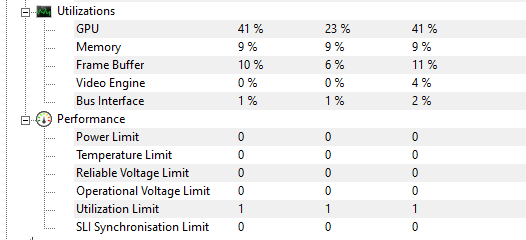
I was deinterlacing 853x480 (yadif) and using Proteus Auto with a few boosted params and upsizing to 1280x720p.
The GPU rate has always hovered around 30-40% since I started beta testing VEAI 3,x.b Increasing the bit rate from the default “0” to 180 caused the output to be much better and somewhat faster than previous attempts, but it nailed the 3090’s Utilization Limit.as well. - I think there may be some sort of bottleneck there.
VEAI 2.x was able to render this at a faster frame rate but wouldn’t allow me to use Proteus and deinterlace in the same process.
1 Like
I asked this Question 1000times, but never get an Answer:
Always comes up an Message, if I try to render a “Preview”:
No accelerated colorspace conversion found from yuv420p to bgr48le.
How this Problem could be solved?
Can someone explain me how to install the “Topaz Video AI Redistributables 5.1.0.1” for Mac? Maybe this is required but I don’t know how to install this…
Re Stabilizing: Further testing with my older concert standard def files: It seems that in my case the 3.0.0.1.b is only successful in about 1 out of 5 cases. In the others it either does nothing or very little compared to Mercalli and New Blue.
My clips have been vob, mpeg2, m2t and results erratic. On one of my films that I’ve tried to stabilize for over 10 years with different software, this beta version did a spectacular job yet with other simple clips, nothing.
Hopefully the developers can sort it out with some of the samples I’ve sent to them. Lot of potential here.
1 Like
That is windows only.
Have you customized any of the folder locations in preferences? I believe someone said this can be a factor in that error message.
I have not changed any Folders…
I would hope they have this fixed by now. (And) I haven’t seen it lately. But I’m working with different input files presently…
Hey @christian_p_schaefer. I suspect you’re running into some error and the error contains that information about the colorspace conversion. Can you please confirm for me if processing is failing for you? If it is, I’d ask you to send me your log file from the same timestamp of the failure from the Help dropdown menu > Open Log Folder.
As for the 2nd part, our filters use one (bgr48le I believe) internally, but the video is in another. You don’t need to install those. the redistributable are for use if you want to build your own version of FFmpeg with our filters enabled.
New beta is out. Thanks everyone!
