V1.0.3 Regression: The dropdown to switch between Built-In Presets and Your Presets no longer works

Description

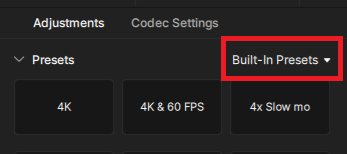
After upgrading from Topaz Video 1.0.2 to 1.0.3, the dropdown to switch between Built-In Presets and Your Presets no longer works. When I click it, it does nothing. This means I cannot view or use my custom presets in 1.0.3.

Steps to Reproduce

  • Open any video
  • Click the dropdown that says Built-In Presets near the top-right of the screen

Expected Behavior

The dropdown opens and I can switch to viewing my custom presets.

Actual Behavior

The dropdown does not open.

Workaround

Downgrade to 1.0.2.

3 Likes

Same here, exactly as stated above.

This has been shared with the devs and is being looked into at this time. Thank you for the reports.

2 Likes

Another case here. Did a clean install with no difference.

The issue also exists on the Mac.

1 Like

so if topaz releases a version with some bug fixes, but the new version has more bugs than the previous one, then we really have a problem. i have never understood how it is possible for things that have always worked to stop working after a release

Ever since the last update, I can’t access my custom presets in Video. Clicking on the drop-down arrow does do anything.

Anyone else have this issue?

1 Like

Yes, it’s been widely reported…

Same issue

After downloading and installing the latest video ai version patch 1.0.3, it appears the Built-In-Preset option are not working. Clicking on the built-in-preset pull down does nothing. I am not even sure if my personal presets are even still present on the system after the install. :frowning:

logsForSupport.zip (10.5 MB)

I can reproduce that on MacOS.

After updating to the latest 1.0.3 version of Topaz Video i cannot select my own presets anymore. Clicking on the dropdown besides “Build-In Presets” does not do anything at all. Reverting back to 1.0.2 makes it work again.
Duplicate of V1.0.3 Regression: The dropdown to switch between Built-In Presets and Your Presets no longer works - #4 by dianac

We have a saying, “Pick out the eye when you fix the eyebrow.” That’s exactly what Topaz developers always do.

Upon updating to v1.0.3, cannot access or save any user presets.

Does Topaz do any QA before making releases? The amount of UI regressions in updates is absolutely absurd

until a fix, is there a workaround , except downgrading ?

This has been patched in version 1.0.4.

3 Likes