Thanks, will look into this!
We are doing separate release threads for Linux builds in the beta group. We are currently only releasing these sometimes.
This is the most recent Linux beta.
We will make a new thread for 4.1.0 in the beta group.
Small suggestion: “NYX fast” is not so fast  You should name it for example “NYX soft or smooth” which is the main thing people use it when NYX2 is to strong.
1 Like
Hello, could you send us your app logs? help@topazlabs.com
To gather logs, please select Help > Logging and make sure that there is a check mark next to File Logging. Next, recreate the issue and then return to the Help menu and select > Get Logs for Support and attach the “logsForSupport” file to your reply.
Thanks, we will look at this. Addressing batch processing issues is a major concern we will be working on in in the next few updates.
3 Likes
@Johnnycyan If you send us the preset file here we can take a look at why this is happening.
Hi @DannyEl could you please send us your logs? We can take a look into it
Actually I restarted the program and now none of my presets are showing at all
It appears there was some sort of corruption with one of my presets. After removing them all and only adding back 1 they are working normally now
1 Like
It also appears that the scale setting is not being loaded properly from the preset
1 Like
Hello,
Could you send us your app logs at help@topazlabs.com?
To gather logs, please select Help > Logging and make sure that there is a check mark next to File Logging. Next, recreate the issue and then return to the Help menu and select > Get Logs for Support and attach the “logsForSupport” file to your reply.
There you go. The issue is consistent on 3 almost identical machines running the same OS. Weird but before I did the full re-install (both through .dmg and .pkg) I was able to process a preview and export if it was a single pass. As soon as I added the second enhancement, I would have the error. Just for reference, I usually do a first pass with Artemis (Low Quality or Medium Quality) and the second pass is with Proteus on a preset that works best for me. Now, after a clean install, I can’t even process even in a single pass with Proteus v4. The previous version is still working, even on a 2-pass enhancement.
logsForSupport.zip (346.9 KB)
Have an update from the team - Unfortunately Catalina is too old and Proteus v4 will not be able to run on GPU on that version of macOS.
If you want to use Proteus v4, you will need to run it on CPU or update to Big Sur (macOS 11).
We will release an update in 4.1.1 or 4.1.2 that will run v4 on CPU automatically on Catalina.
1 Like
Here’s some additional information on options for running Proteus v4 on macOS Catalina:
To run Proteus v4 on the CPU instead of GPU:
- Replace “prob-4.json” in “/Applications/Topaz Video AI.app/Contents/Resources/models” with the attached file, which will revert to CPU processing for macOS 10.15 systems.
prob-4.json (25.6 KB)
To run v3 instead of v4:
- Delete the file “prob-4.json” from “/Applications/Topaz Video AI.app/Contents/Resources/models”
- Enable “Previous Model Versions” in Advanced Preferences and use Proteus v3.
Batch processing for frame interpolation is still not working and it is still broken. If you add multiple files to the processing, they do not have the new frame rate applied, you have to click them 1 by 1 for it to work…
1 Like
Like others, I confirmed the batch processing issue on v4.0.9 and v4.1.0. Batch processing still works on v4.0.8 or earlier if you reinstall.
I wish I had noticed this before wasting a few days rendering 
-
Download for 4.0.8 is available here at the top: Topaz Video AI v4.0.8 - Topaz Video AI / Releases - Topaz Community (topazlabs.com)
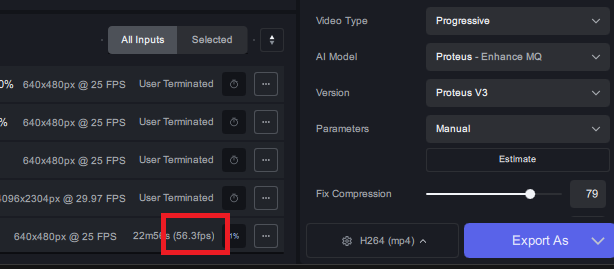
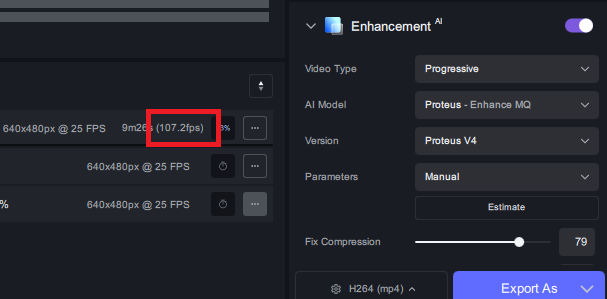
You guys were not joking on “faster”… its about twice as fast in my test sample. this might be the greatest release yet.
Proteus v3:
Proteus v4:
1 Like
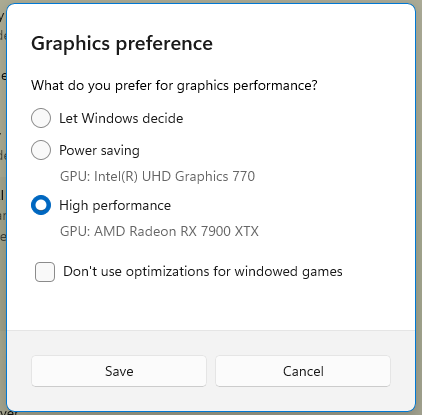
This also happened to me and the setting alone in Topaz didn’t fix it… I had to also go to the “Graphic Settings” in windows and change it there as well. Just wanted to share incase someone else ran into this issue with switching it:
2 Likes
Does Video AI support two GPU’s? I was thinking of getting another 4080 to speed up the rendering times.
