Tried that and won’t work. I’ve had this issue with downloading models since April, I always have to download them manually from the log files which is just annoying. Same issue happens on my laptop.
I checked the Model Manager and saw that the missing files were Enhancement models, there are a lot of them! Had to get them in batches of 2 to 4 to avoid the download errors.
Now, I have 39.4GB and 781 files so I can happily work entirely offline if I need to (and not be bothered by intermittent connection dropouts). Thanks to Topaz for restoring the Model Manager!
1 Like
Nah, he duplicates them not just at the beginning, but periodically 
Thanks for exploring. As you said earlier, it would be great if someone could advise what the optimum download is. I don’t recall seeing an option to delete old models when downloading.
That option appears when you install a new TVAI update.
1 Like
Has Topaz forgotten about Intel Arc already because it’s been months since Arc GPUs have gotten support or any updates on these recent versions of Topaz video AI they don’t even mention Arc in the ‘Known issues’ anymore so should we give up on Intel arc cards working on 4.0 versions of Topaz. There was an Alpha version of topaz for intel but nothing came of it so what is the team planning to do about it for 4.0
2 Likes
Then why have Topaz NEVER given Apple Silicon users the CHOICE of using the GPU instead of the Neural Engine? Instead, we have to use a roundabout method of deliberately selecting a low memory limit, when upscaling SD, which can force the GPU into use as a side effect rather than by choice. Surely it would be better to be able to leave the memory limit at 90% AND still use the faster GPU cores when upscaling SD?
If Topaz don’t have control between GPU and Neural engine, then please just tell us! We can then moan at Apple instead of Topaz.
Thanks.
Andy
4 Likes
We don’t have specific control over the distribution of tasks between the GPU and Neural Engine, so we decided to remove the option for M-series Mac systems.
1 Like
Not only the live preview… what is the problem with fixing the sync issues between preview and source file? Seen this since version 3 and never been fixed. This is a core issue!
While switching previews (one of them still processing) in ‘single’ mode (‘Comparison’ disabled), I’ve got a crash of this version of TVAI. I’ll include the log here.
2023-12-15-03-28-13-Main.zip (71.4 KB)
I’d like to make a small suggestion on seeking the bar - could the cursor ‘snap’ (as an option) on the beginning or the end of the previewed part? It would be TREMENDOUSLY helpful.
During processing, the names of languages disappear on audio tracks and subtitles. This is a fundamental function. I don’t want to further process files after TVAI…
If you cut out a piece of video, the video is delayed for a few seconds at the beginning of the processed piece. Fix.
And where are the models loaded? I’ve downloaded more than 1600 models, but the Topaz Video AI folder in the Application Files folder is still 1.13 GB.
And when the processing is turned on, the models are still loaded!
GREAT QUESTION… I am wondering the same…
You can check it in your Perference setting.
By default, it is in ProgramData → Topaz → models folder
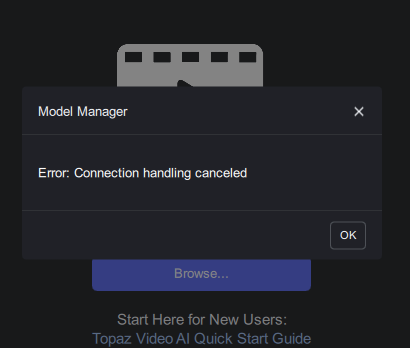
I keep getting this error when trying to download the from the MODEL MANAGER
Thanks! Saw. This folder is hidden in the system.
Sorry that’s how FFMPEG cuts. It’s been like that for years. It would be overly impressive if Topaz fixes it.
That’s when cutting with -ss and -t. There are other filters available for cutting, maybe they are more precise. Or maybe it because the audio is not being transcoded. I’ve spent days looking for the best way to cut in FFMPEG and not found anything better than -ss and -t.
2 Likes
“Loading” or “Downloading”?
But, all other programs cut correctly. Maybe it’s better to cut by keyframes?
