I think whoever needs it will read this.
? I don’t recall 3.5.4 uploading any models once it had done them initially, although maybe v4.x.x don’t have newer models that it could use ?
There is of course the option to use older models…
TVAI install comes with a small file size and only loads those models when you first use them.
So, besides the Iris1/2.json there are quite some MB of model files loaded once you first used them:
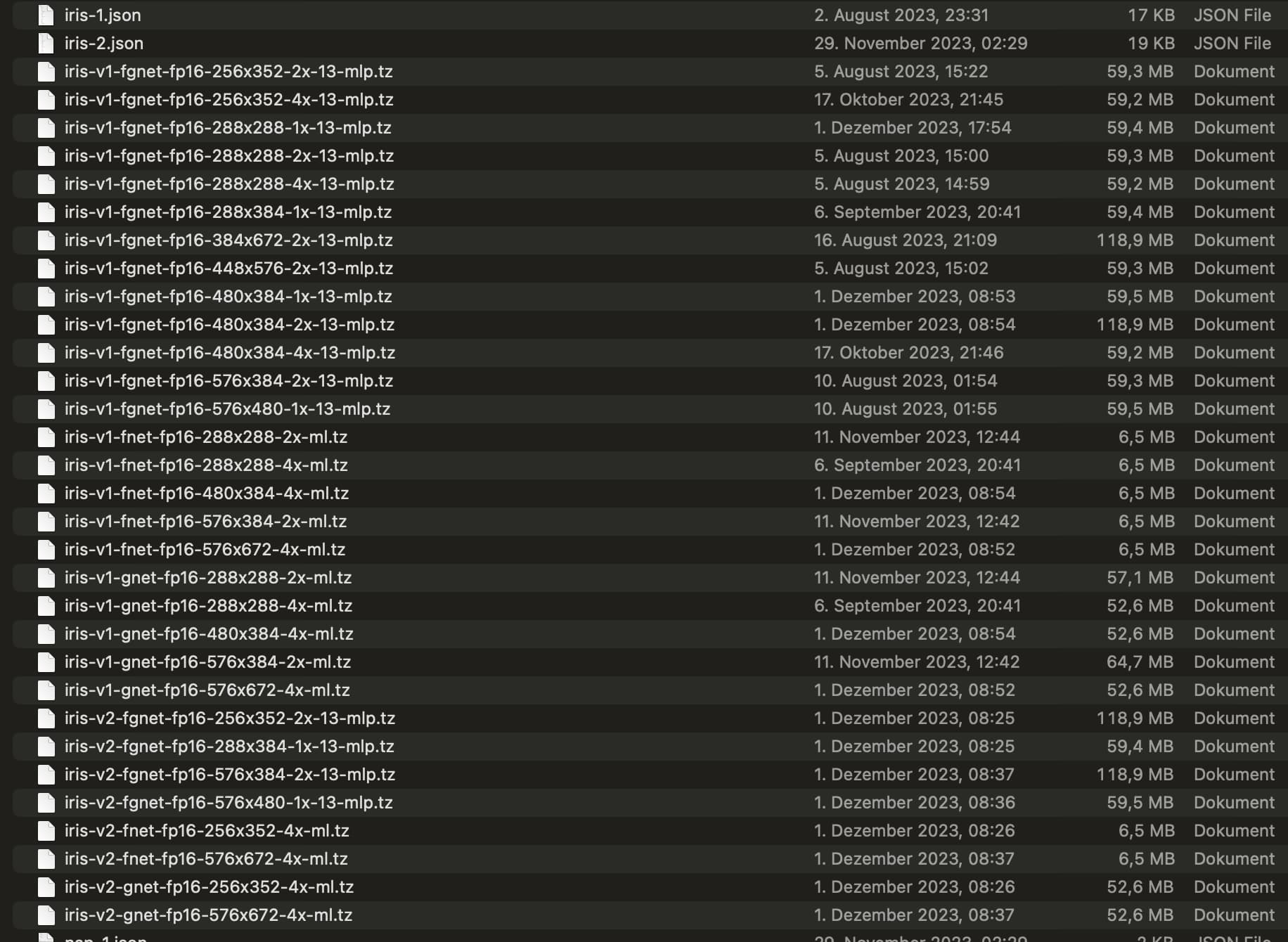
And this can have a considerable effect on the speed of the encode on MacOS if you have older models there that you can just copy over and the TVAI will not dl them again as they’re already there and - fortunately - not check if there are newer ones.
There’s also the CoreMLCache folder which I’m not really sure if the files in there also affect speed.
Maybe that is due to you doing 4k encodes? I’m nearly only doing SD → HD upscales with Iris 2x.
But still, good finding. Anything that helps with performance on Apple silicon is more than welcome.
1 Like
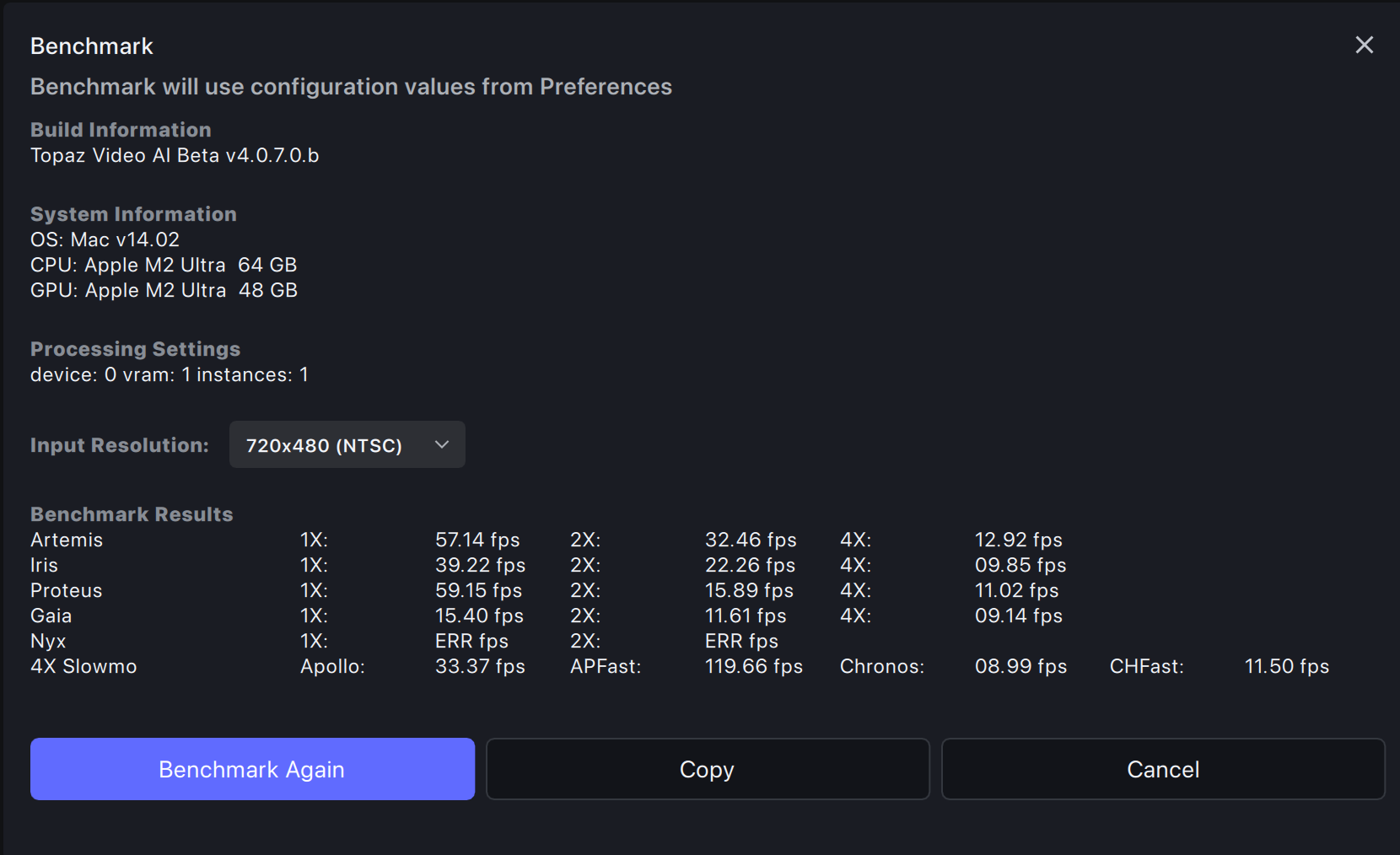
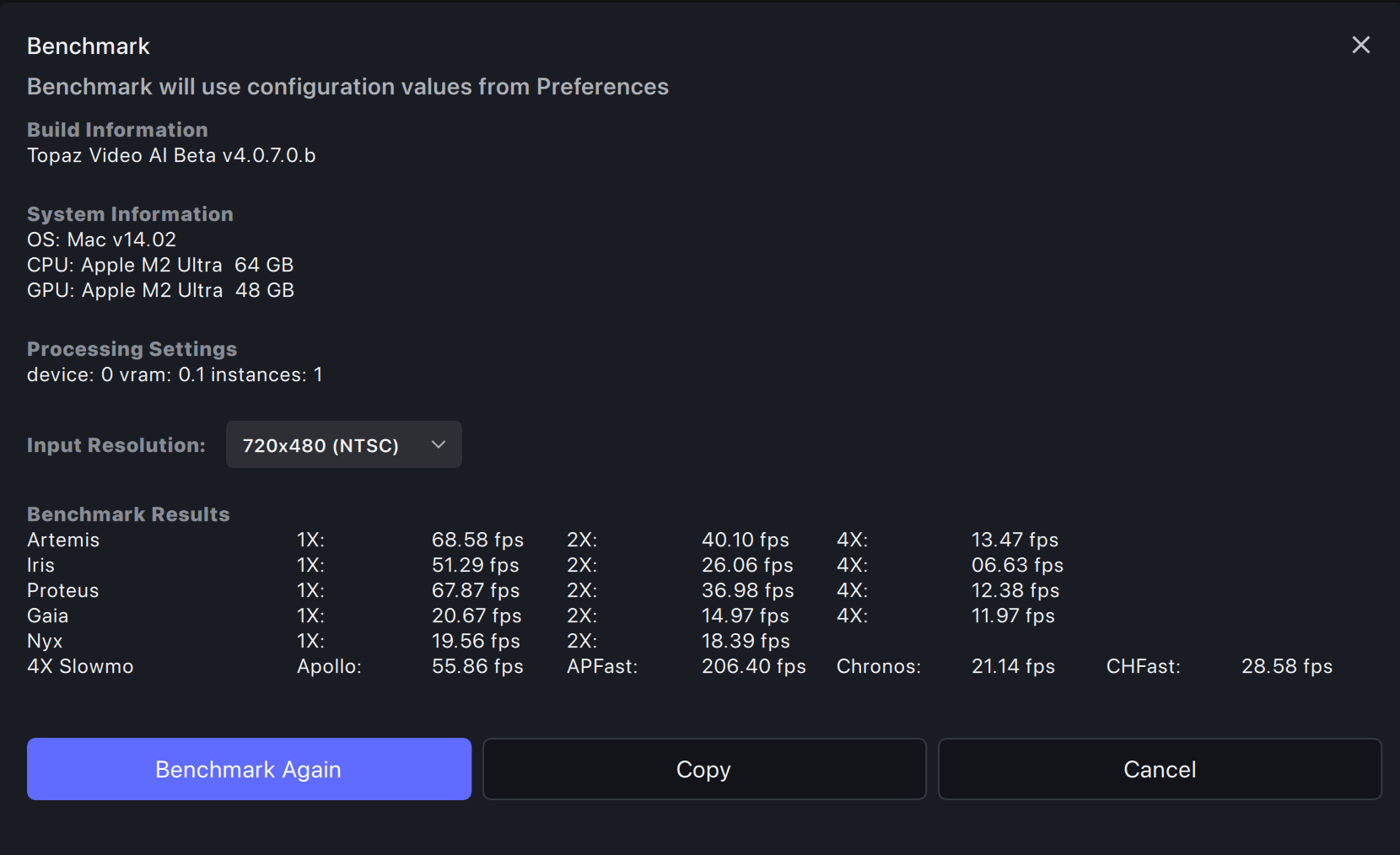
Somehow it seems they got IrisV1 SD 2x upscales partly up to speed again but now you need to set RAM to 100% (formerly it was faster on High GPU count machines with RAM set to 10%). But 4x still is slow.
All in all the results with those old models are not fully conclusive :-/
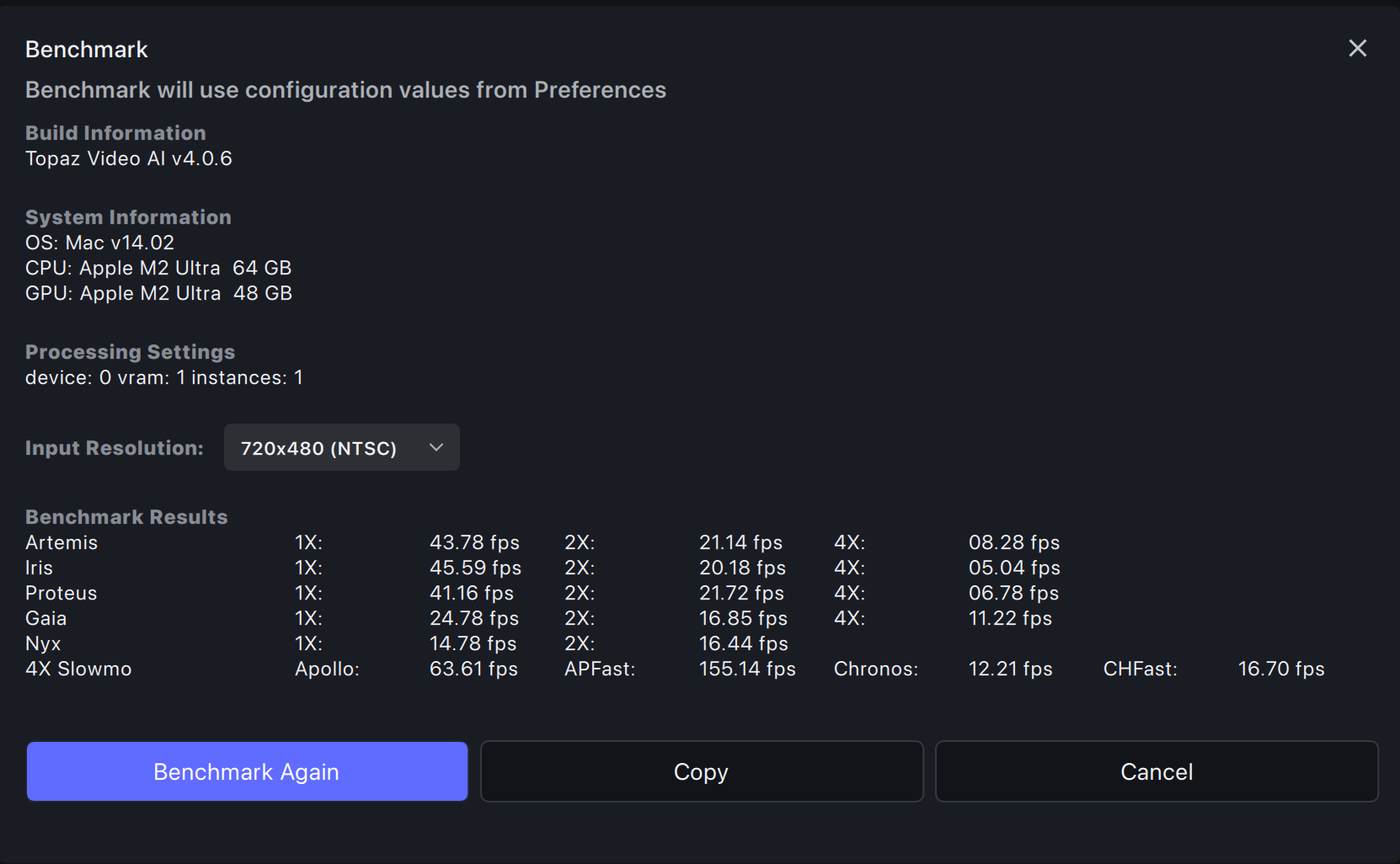
Here’s a direct comparison V4.0.6 with the newly downloaded actual model files, just the benchmark.json edited to use IrisV1 instead of V2:
compared to the 4.0.7.0.b “patched” with the old model files at RAM 100%:
and last, not least 4.0.7.0.b patched with the older model files and RAM set to 10% - about everything faster except for Iris 4x (??):
1 Like
Yes, but I don’t see any models that have been updated after their original download…
Normally it´s only needed to download what is needed right now to save downloadtime.
Yes, it downloads the model for the actual encode on the fly only when it’s needed and (currently) does this only once without checking every time if there are new models.
So after install the model folder is basically emtpy and succesively fills one after another when you start different encodes (or running the benchmark).
Otherwise this “patching” (copying old model files) in the app folder could not work - or only when you cut the internet connection.
I’m using Hybrid with following QTGMC settings:
Preset: Custom
Final temporal smoothing: 0
Denioser: KNLMeansCL, Loseless: before resharpening
EZKeepgrain: 0.5 and slightly above.
It keeps noise so TVAI could handle it, and tries to keep loseless as possible.
I yield about 75 fps at SD footage which is great, then process progressive video in TVAI.
3 Likes
Why you don’t use just the “PLACEBO” preset with QTGMC???
1 Like
I think it also depends on your source material, settings, etc. I am running VEAI 3.5.4 on an M2 Max and an upscale from 1080 to 4K on a randomly selected video was clocking in at around 1.3 FPS.
Placebo uses temporal smoothing, which is unacceptable because of very bad noise reduction in QTGMC.
Ugh. I hate Topaz forum engine that doesn’t have discussion tree view.
2 Likes
Ok, for what it is worth. I see this release is about fixing up the player, however, my player on this version is the worst it has ever been.
Here are a few things I see on mine:
- No loop options.
- Takes 16 seconds to start playing after I hit play (give take 2-3 both ways).
- It stops at the end, sits there for about 30 seconds or so, then goes to beginning of the preview, sits for another 20-30 seconds, then the pause turns to play and nothing else.
- After my third manual playthrough, NOW suddenly looping is showing up in the preview text pane.
- After the first preview is done, the ones after start and re-start playing a little faster, maybe 8-12 seconds to start, had one go in 4s.
- Previews do not delete in your temp dir after you remove them from TVAI. (is this expected or can I have an option to delete upon removal?)
- Oddly my speeds for Iris med quality is around 1.6fps when I have my settings lower, but if I crank up the noise reduction and and deblur to past half (just testing), the speeds nearly double for me, getting about 2.9fps.
That’s about all I have time for this AM, but those are what I saw so far.

So the settings are all correct?
Can you also tell me all the settings of the x264 encoder that you use with the program? Thank you
That’s correct. A minor tweaking may be applied to EZKeepgrain, if your source is really grainy, you can increase this value.
H264 encoder is set to constant rate factor = 10. I don’t care about intermediate file size.
If you did everything right, you’d get progressive file with double framerate.
Perfect!!!
The last thing I ask you now:
for a “standard” source (so Live Concerts/FILMS) encoded with this method via the Hybrid program, what settings do you use inside TVAI to enhance and upscale the video?
Thanks for your question.
My next step is Proteus with Manual settings, slightly increased Recover original detail, but not more than 40.
Or Iris MQ with Manual settings, slightly increased Sharpness and Improve detail. And again, Recover original detail set to 40 or more, up to 60.
Iris tends to create too much clay-looking faces, so I prefer to keep original skin pores and wrinkles.
Remember, estimating works at the first 5 or 8 frames of the clip (correct me if I’m wrong about numbers), so I trim clip firsthand to the middle of clip, Estimate, then trim back to beginning.
Proteus is good for architecture, nature.
Iris is good for close-up faces.
None of them is good for distant faces though. There’s no cure for upscaling a wide shot of an orchestra for example.
I’m still trying to find a recipe for that.
3 Likes
and me
Exactly in par with what I was thinking. I only bothered upgrading to v4.x for Nyx 2 AI. but as soon as I got to conclusion that Nyx 2 is currently unusable (for my content at least), I got no other reason to stick with v4. i don’t use the preview system at all as part of my workflow, so I got no need for all that fancy stuff they introduced in v4.
As of a week ago I reverted back to v3.5.4 as for me it works nice and simple for my needs.
If there will be a new AI and it will be relevant for me, I will upgrade again.
When I see apps development concentrating on UI rather than fixing functions, it tends to make me wonder if it’s because they’ve hit a wall on function. I hope that’s not the case here.
3 Likes
Sometimes I am quit surprised as well
My son married with a Egyptian Beauty anyway I used my Samsung S10 to make HD movies
the source was Full 1920 X 1080 HD 30 frames
I scaled it up to 3840 X 2160 with 60 frames using apollo
I used iris MQ 2.0
I put the detailed recover to 93 percent and anti aliasing 83 and square pixel
left
Exported it H265 Main 10 Main 10 created for HDR effect
It seems that compared to my videos from my marriage videos the HD upscaling with Iris and H265 main 10 really is phantastic
on my LG TV the H265 main 10 and the upscaling of proper source material it is able to create spectacular videos
One of my satreceivers could not rea the files the mutant hd51 but the newer one sf8008 with 4 cpus had no problem
Luckily USB sticcks are hugh so I played it from the LG internal player and the audience loved it crisp clear effects the HDR effects of the dresses and their glitters look spectucular
moral of the story the topaz software seems to be geared towards your mobile recorded videos in HD but has a hard time to make your old mp4 VHS on our 4K to look good and seems to create with that content and iris the artificial crap.
3 Likes
What model is for flash animations? (400p)