What don’t you like? The new UI is awesome and much better. Being able to compare two models is ESSENTIAL to the process.
1 Like

The way it is implemented here seems gimmicky.
I can’t reproduce this here, either.
I can see those bars. Selecting them does nothing.
Awesome idea! Hi and thank you for writing in,
You can add any feature requests and vote for any you would here. This allows our development team to really see what the majority of our users want to see so that they can prioritize the next release based on user feedback.
Okay, now I see that the Export button has a dropdown menu that gives me an “Export As…” checkbox that when checked gives me the option to name my files. Thanks.
1 Like
All GPUs is broken in 4.0 at this time.
For now, manually select one of the GPUs.
1 Like
Oh, and I don’t just mean the progress in the form of the colour-stripe. I mean an actual rendered image in the preview window.
We do not have live previews in v4.0 for export. Will be added in a coming update 
2 Likes
This is kinda bad, I have to say.
Can you make a patch to Disable it ?
Tried it for about 10min, then re-installed 3.5.4 again until the 4.x.x gets more love from the devs.
I didn’t like it, at all.
Now, in general: stay away from re-working your UI too often. This is the second or third major change since I began using this software. This is a sure-fire way to piss off your users.
Now, into the details.
First, I don’t need the comparison view. Never needed or wanted it. But it’s now mandatory. Not an option you can use IF you need it. The workflow is now changed, even if I don’t need it.
I think several people here mentioned that if you delete the preview, it deletes the configuration. This is BAD. 
I have a 2560x1440 144Hz display. I get the feeling that the new interface gives me slightly less screen real estate for the actual video.
There are problems with the UI since version 2.x which were never fixed. My display uses G-Sync and if this is enabled (which it always is, because why not), the Video AI screen flickers when I mouse over certain elements. I addressed this to your support team months ago.
There is also this strange problem that I also have with other applications, where if you move the mouse inside the application window, it is moving with a lower framerate. That’s what it feels like. I am using 120Hz in Windows, but some applications (Handbrake is also one of them) like Video AI have a problem with that.
Not a big deal, but it makes working with it less fun.
Also, please fix the video player. This problem has persisted at least since 3.x, probably earlier. Comparing the preview with the original doesn’t work because often the original is 1 frame ahead of the preview.
Using the cursor keys to forward/play or rewind the video is totally buggy.
While we are at it: in 3.x the previews looped, but in 4.0.0 the video keeps playing. Why? What is the purpose of this? I have to manually rewind the video to see it again, look for other details, etc.
It’s horrible!
Why isn’t there a project save/load feature?
Things happen. Software crashes, users make mistakes. But when the application closes, the settings are gone.
I’m really disappointed. You keep making major changes and adding features but the software is unpolished when it comes to the details.
Also, please introduce new features without breaking how the software is used in general. It’s annoying.
9 Likes
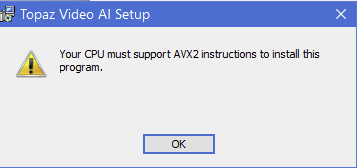
Why are we forcing PC hardware upgrade? Now those customers with older generation processors cannot use the product at all? how inconciderate.
1 Like
Attempting scroll back and forth to do a trim is not usable. It jumps all over. The new UI/Previews interface is confusing. Sorry to be so direct, but this whole release seems very much like a Alpha/Beta version, (and your user base didn’t sign up to be a Beta testers). I’m going back to 3.5.4! Let me know when this one is really ready.
5 Likes
Hello! Just Providing some feedback. Non-professional use. Thanks for the continued updates and improvements. I think I’ve encountered some UI bugs, when I click on the timeline to scrub the video, sometimes the entire window moves. That’s a bit hard to reproduce, but it has happened to me at least twice so far. Also, if you try clicking and dragging any where to the right of the words “Inputs”, “Previews” and “Exports” the entire window moves. It might take a couple of tries, but its easy to reproduce.
This came as a shock to me as well.
Whelp, it was fixed, except when using the stabiliser and its accompanying settings, and also when using deblur, it would add dupes, then they fixed it completely, I can confirm that the dupe bug is BACK, how is it back!?
For those reading this post:
Seriously, Topaz developed a magnificent program whose other major, defining characteristic is to interpolate videos, and the reason for this is for previously choppy videos to play smoothly; one of the reasons is due to not enough frames…
The other reason is that the footage has duplicate frames, that’s why we use progs/plugins to remove them, (I use Anton’s “Remove duplicate frames” plugin for virtuadub!) as this bug literally adds dupe frames to the footage even when it was de-duped!
Thankfully I found a workaround, for when the bug first was introduced, simply multiply the footage’s frame rate by 2, or 3, nothing above, then input the total sum for your new frame rate…
So if you want your 15 fps video to have, say, 120 frames because you want enhanced slow motion, then:
- 15 × 2 = 30, export, add back into prog.
- 30 × 3 = 90, export, add back into prog.
- 90 + 30= 120, You’re done, now you can go ahead and apply enhancements, and export again…
NOW add several more files with varying frame rates because you need a batch job converting them all to 120! 
I really hope this is an unintended bug, and that the final fixes for the general release borked the interpolation algorithm, or a different team inadvertently reintroduced it, so hopefully it can be easily fixed as they did fix it before…
And before anyone reading this suggests using “replace duplicate frames,” option not only is it a moot point as the interpolation process itself is introducing the dupes, but, it simply does not work as intended…
EDITED, I suck at maths… 
2 Likes
This update has bit of learning curve. It’s hard to tell the difference between previews. The auto feature no longer suggests the level of detail that can be recovered from the video. You’re left to guess and check details recovered=
2 Likes
How do I add two consecutive enhancement models , has this function been removed? thanks
