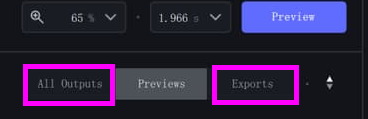
Click on the “All Outputs” to show both Previews and Exports.
Click on the “All Outputs” to show both Previews and Exports.
That’s odd because when I used the Reduce Jittery motion, my video had waves going through it. That was the first time I’ve seen that anomaly. When I run Reduce Jittery motion or Rolling Shutter Correction, I usually run Enhancement filters at the same time to remove noise or sharpen the video, and usually with good results, even upscaling 1080 to 4K. Typically, I use Rolling Shutter Correction, Full Frame, with Proteus enhancement and scaled to 4K and my results are excellent.
H264 Dynamic Quality Adjustment. Medium quality values are wrong.
Medium quality gives a video with 3500 kbps and with High quality there is a jump to 30000 kbps (at 1920x1080).
High quality is still OK with 30000, but now something is missing in the middle with about 14000 to 18000. H265 is ok at 18000 kbps with medium quality.
Please change the H264 settings, best freely adjustable, a slider or input with which we can set CRF to the needs (0 to 30).
Recover Original Detail does not work as it did in the first versions.
In the first versions 70% also brought more details, now the video is blurred, and with 0% it is sharpest (more detailed).
Or has the value been twisted? 0% is now 100%?
Topaz Preview (for the users):
If you have Avisynth installed on your system and use AvsPmod you can download a macro for the not working Topaz Preview.
There are bookmarks, same zoom and same frame number for a clip, and it doesn’t take a second to switch between tabs (with black image).
GetLastTopazPreview.py or click on Help > ‘Video tutorials & more’
from my point of view, for “original recovery details”, the more you increase the value, the more the video resembles the source so the less effects are applied, so I think it’s normal if it seems less clear at 100%
What ssbroly said.
When exporting images from a certain frame, Topaz Video AI always starts exporting from the beginning of the video.
I had some issues with this version with mem set to max on a mac studio with 32gb ram, decreased the memory 15% and the crashes stopped.
