I just did a batch export of 5 files for upscaling and after the 10 hours of rendering and exporting I could not find any of the files, going into the app and pressing show in finder only took me to an empty folder. The app did not export anything and all of the previews for the upscaled videos in the app are completely blank. Previews for the short previews work but not the actual finished upscaled files as they do not exist. This has only occurred after upgrading from 3.4.2 to 3.4.3. Also having the option to process for than one video at a time was freezing up my entire system and causing system settings to be unresponsive, despite the app not using up almost any of the CPU, GPU and memory. So I had to switch it to 1 process. Also processing the same video at the same quality by 2x on the Iris option has decreased to around 7fps from the 14-15fps I was getting in the previous version of the app.
yep - blurry when any swift motion occurs
That’s a feature we’re planning to release very soon!
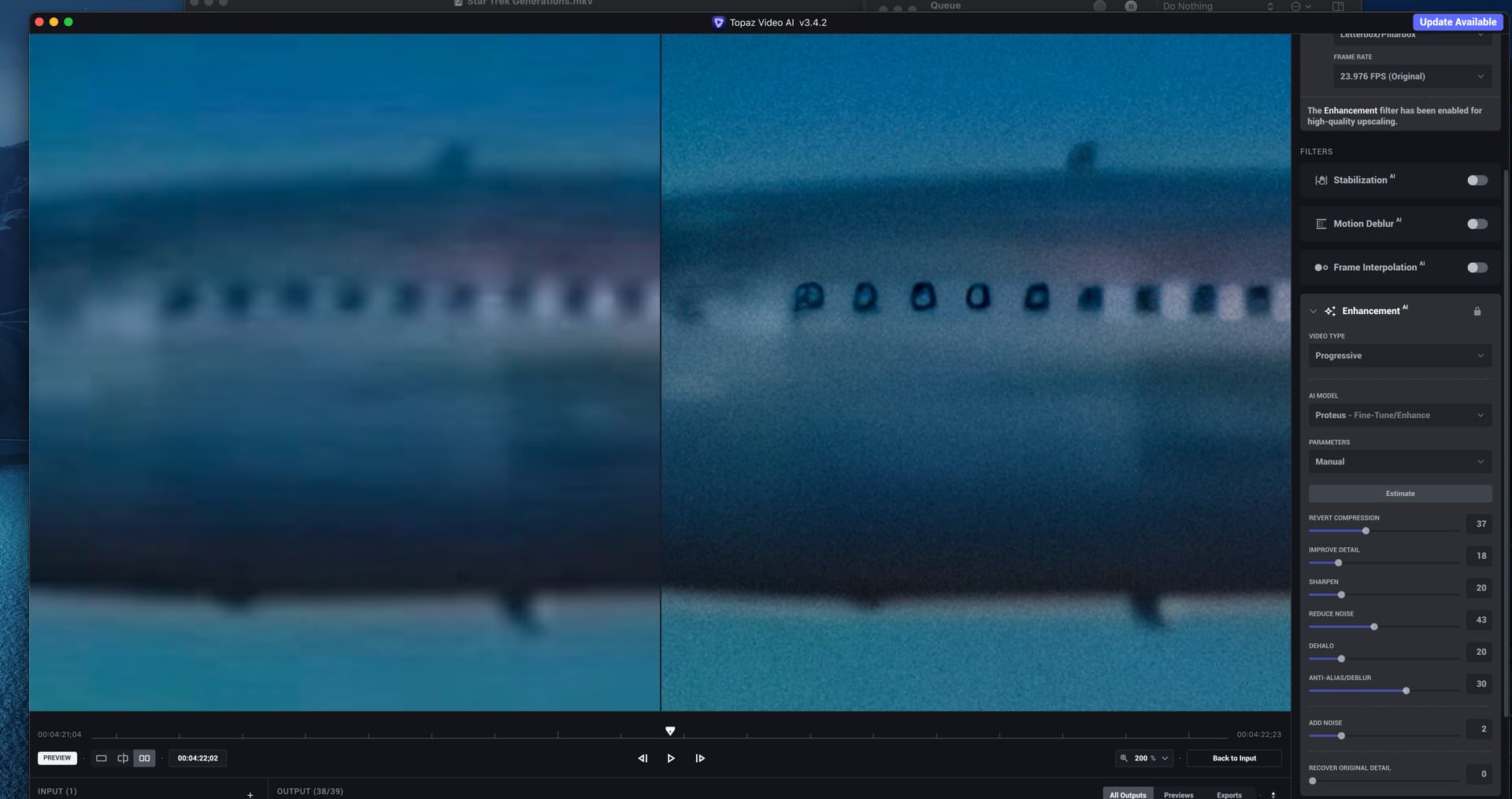
Is the Blue Man Group riding in first class? What is with all the spotty blue bits in the airplane windows? Can you teach the AI what an airplane looks like? No matter what I do I can’t get rid of the mess in the windows that appears to be generated out of nowhere. There is nothing in the original image that suggests these spots. BTW there was no reply option in 3.4.2 and nothing was mentioned about updates to the model in 3.4.3 so I am assuming the model is the same.
Precise trimming is not possible
you can use the slider to adjust trim but you cannot type in the digits and confirm with enter
I’m really enjoying v3.4.3. However, there are two picky things I’d like to mention.
First when doing many previews, rather than scroll down to the last preview entry is counter intuitive. As a computer user I’m very accustomed to having the latest item at the top of the list where it’s easily visible. As such, a good easy solution would be to change the control into a toggle or checkbox that would retain its upward or downward setting between sessions.
The second one is probably more important to some of us. That is the problem reading print that becomes almost unrecognizable when displayed on a very hi-res screen. - It practically disappears. It would be very nice to have the option to make them a bit larger.
Otherwise, I really like the tool and its potential for greatly enhanced output.
Topaz Video AI doesn’t support vertical screen. I am using dual monitors one in landscape mode and another in portrait mode. The application window doesn’t fit to portrait screen when maximized
In all honesty who would want to run TVAI like that ?
If Iris v2 is giving better results, why on earth would they not put it into the release version?
That’s an extremely important feature to many people, it used to be possible but was removed. I see this all the time nowadays, in websites, software, etc. Useful features removed for no reason. It happens so often nowadays it’s starting to make me sick to my stomach when I seem to be constantly encountering this! 
People who work with vertical videos. I can’t stand them… they used to try to tell people to simply turn their phones to the side to film, but people just don’t want to do it, and now you have massively popular things like Tik Tok and YouTube Shorts where it’s actually heavily encouraged to use a vertical format. It is what it is I guess. I mean, look at this (you can’t make this stuff up): https://en.wikipedia.org/wiki/Vertical_Film_Festival
Maybe the final version was released before the beta or they integrated iris v2.  I can’t stand vertical videos either…
In fact, it’s people who don’t understand that when you watch a video on a screen tv or pc, this screen is necessarily horizontal 
But there are many videos and photos that don’t match a 16:9 screen shape full screen. DSLR photos never did (black side bars). Old videos of the kind many of us are trying to improve never did (bigger black side bars) and of course 9:16 phone videos don’t (even bigger side bars!). At a guess, less than half the stuff I run through TVAI fits a 16:9 screen.
With vertical 9:16 video I can either sit several of them side by side on the same screen to compare, or if I feel the urge, rotate my screens vertical roughly double their size on my moniitor. Can’t do that with my 50 inch TV though lol.
So I just think all video and screen aspect ratios should be catered for in any video or photo software - even Vegas Pro eventually caught up with that (after many annoying years when they hadn’t). Vertical video is here to stay, TVAI should be able to handle it as well as every other aspect ratio. Clicking full screen should go to full screen whatever the monitor orientation - and still give access to the task bar. Basic stuff.
Are we just giving up, then? This is upsetting. I guess I’m going to stop watching these updates.
When it’s down to Intel and their driver what do you expect Topaz to do ?
Long time user here but have never noticed these strange behaviors before:
A. Import clips, change the settings to your liking, select all and export. And voila they have all the same settings, gone is all the meticulous work you have done on each of them. Must be wrong, not??
B. Often I go backwards an exports because I do not like the end result and end up with several versions of the same clip. Then when I look in the export folder they now all have the same creation date. In fact they are the same date as the original clip was. Very unusual, not??
C. I often use stabilization, either in Topaz or in Premiere. Topaz usually gives a better result, but not with the latest version, especially on jittery footage.
D. In the past it was quite easy to push too far and get that cartoon-y look. At the moment with some footage (film) I can push everything to 100 and nothing seems to happen. Feels like it has gone completely the other way.
After updating to this new version, my Topaz Video AI do not show export progress bar anymore. But the preview progress shows correctly…

as shown in the screenshot attached, the software is rightnow exporting but nothing shows on the output panel…
you have to go to the export tab
This would be a good reintroduction. I have to use Handbrake to trim things pinpoint accurate so hopefully this feature will return.
