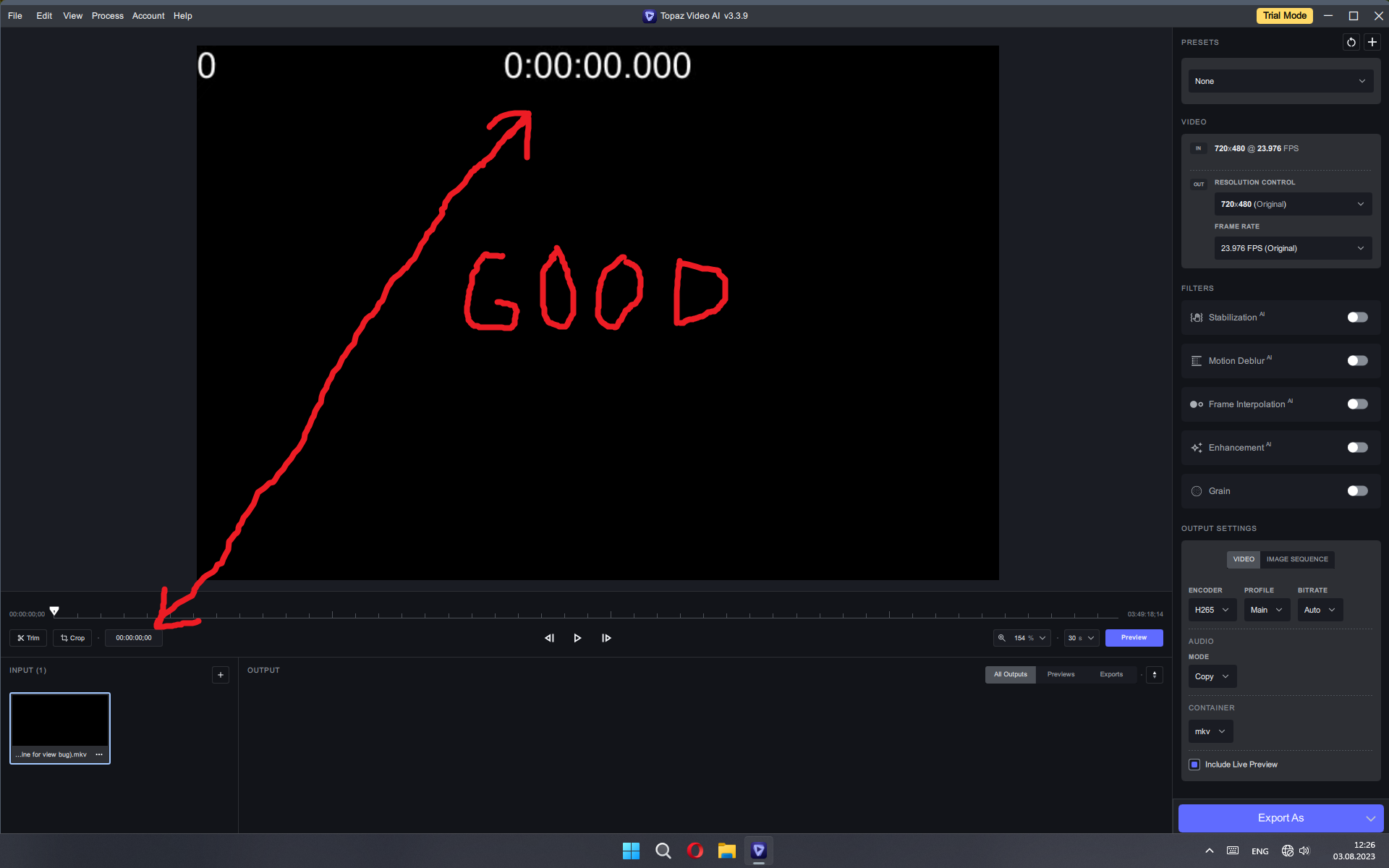
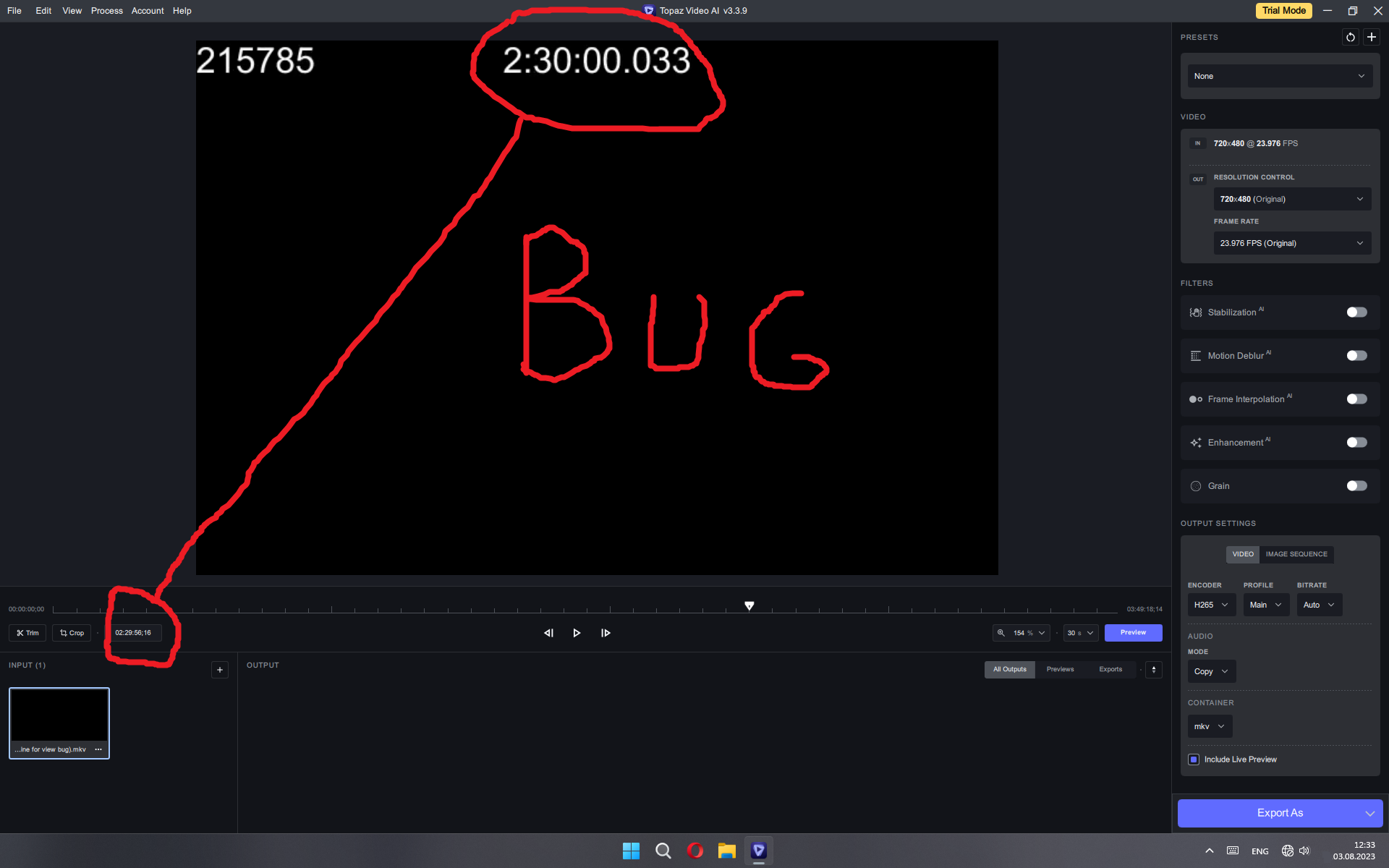
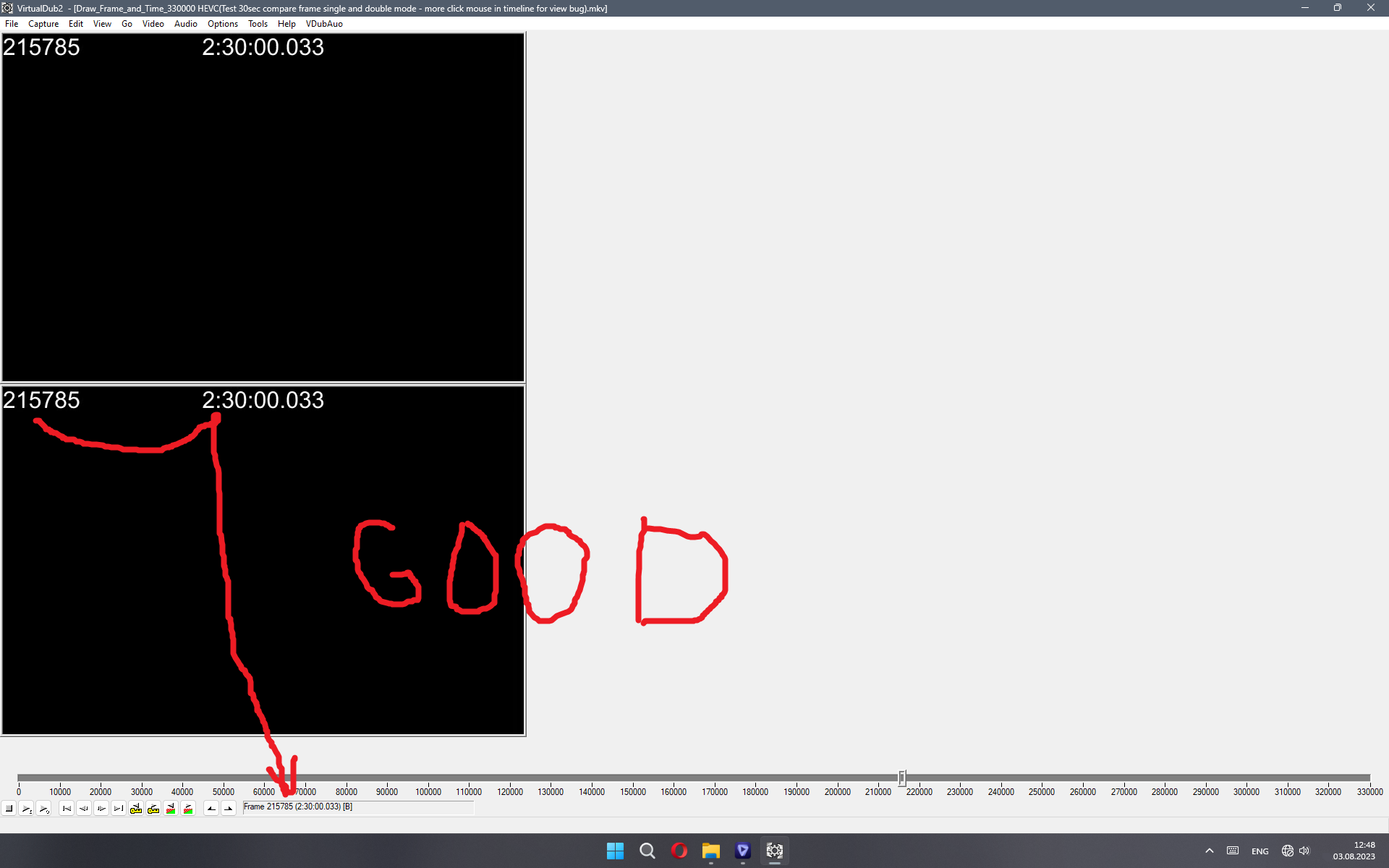
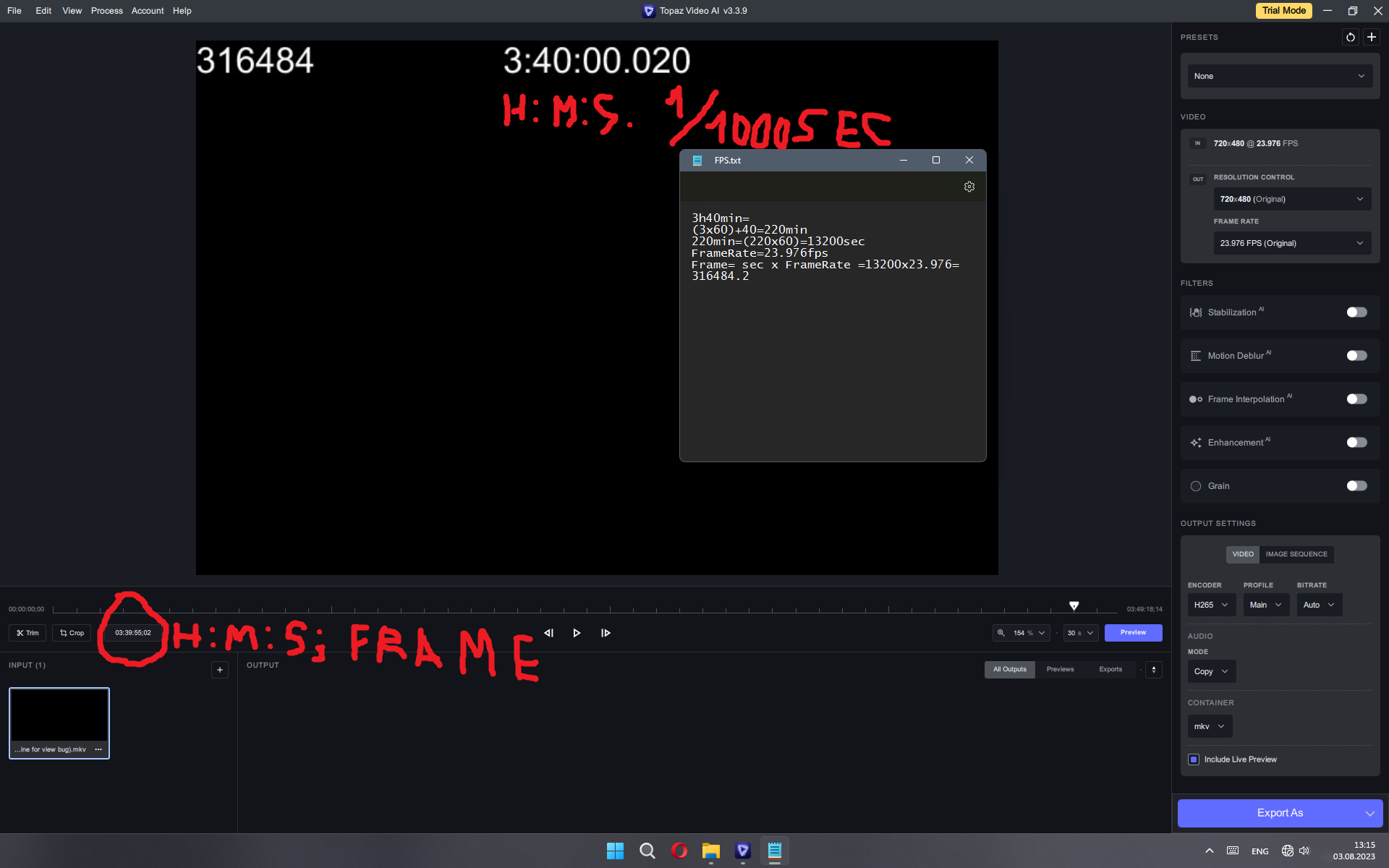
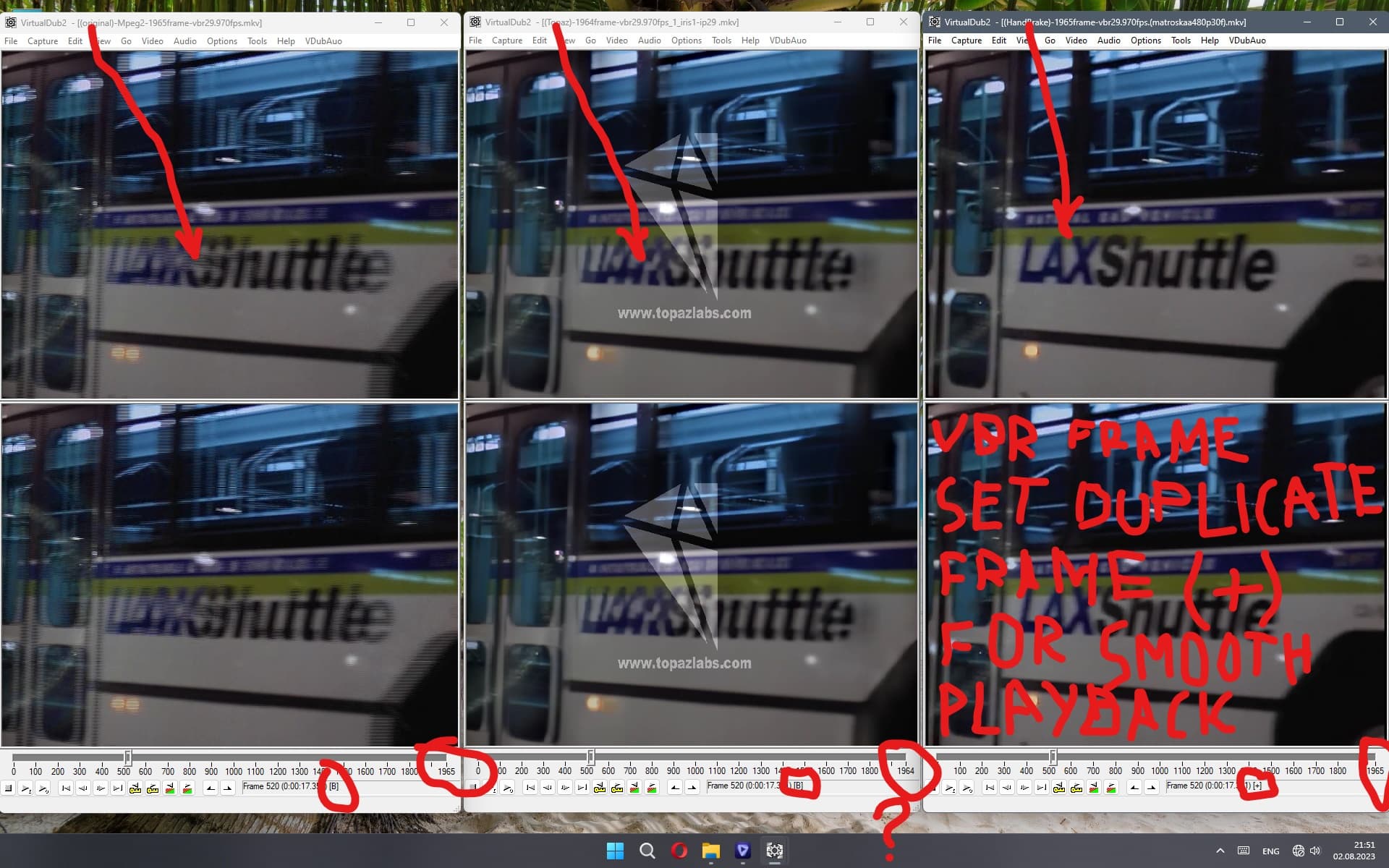
The program has not yet fixed the preview in both single and double windows. The frames do not match in identity and may differ by 1-3 next frames. Now this happens if you select timecode in the display settings. Time display and therefore frame display calculations get messed up with increasing time because there is an error in the calculations and if a variable frame rate (VFR) is used, this is even more pronounced. For the test, I made a file with frame and time counters that is large in time, by which you can correctly see real frames, also if you write out 1 frame in pictures. For example, I checked this in the free program VirtualDub2, where each frame corresponds to its estimated time. To correct the picture, you can see my time calculations. Also in the VirtualDub2 program, in the frame and time scale (which would also be desirable to do here for a correct understanding), the types of compressed frames (I; B; P; +) are displayed and the duplicate frames are displayed as (+). as a result, the variable frame rate marks them as repeated and the player simply skips them without wasting time on repeating them, as a result, playback is smooth and without jerks and fading. Here you also need to take into account the process of converting (restoring) the original frames during deinterlacing and interpolation. That is, you must first restore the original frames, and then mark the duplicates, and only then calculate the time of movement from the original frames. Since they convert from the body of the standard 29.970 to digital 23.976, although the film could have a variable frame rate of 22-25 frames per second, which is a big problem when digitizing from the interlaced format.
Hmm, this pulsating blurring “halo” around the space station is there already in the original with it’s heavy compression artifacts, so will be hard to really fully eliminate.
it only appears in IRIS, it doesn’t exist in ARTEMIS, there is a clear video - this is an artifact of IRIS.
You compressed the video in the HandBrake program with a resolution of 1612x846, but I say that in Topaz 2x (1440x960 2x Upscale) the result is completely different and if you make 4x Upscale, then bubbles do not appear in this video (there is a subtle movement of this effect), although at 4x they may still appear in various scenes maybe it depends on the incoming formats and codecs, I have not figured it out yet
Is the attached file the result of Video AI?
Can’t believe from my experience working with it.
Beside the flashing color artifact…the picture seems not enhanced/improved with Video AI.
I rendered your video example again with Artemis medium. This improved the details and noise.
Also it reduced the flickering.
I guess, that the original footage has too much flickering (like e.g. old TV record), that it can’t be eliminated.
yes, this is possible with the help of other AI models or other programs, but this example is just a test video fragment and refers specifically to the artifact, which refers specifically to the IRIS model. It outperforms others in the quality of face processing, but in everything else it loses to other models, this concerns poor detail, jitter of the general background and this terrible diagonal wave artifact.
I haven’t gone into anywhere as much detail as yourself and one or two others, but I do agree, there are some issues with IRIS. After noting the improvements in some cases on faces, in other cases IRIS for me makes things look worse, and yes there are other issues too.
So I have abandoned its use completely and will continue to use more established models or combinations of them, until the main issues are resolved. But as this is still IRIS v1 and was implicitly acknowledged by Topaz to need further development, I’m happy to wait and see what develops.
I have also found that none of the slomo models work well on all videos so in those cases too, I often have to choose which one best fits each use case but that isn’t a problem for me as i do have the choice. Chronos is the most useful for me but not in all cases.
Where I do think Topaz have perhaps followed the wrong path is in continuing to develop new models (e.g. IRIS) and adding more bells and whistles that often, can be done better in any NL video editor or audio editor, before ironing out the existing irritations or bugs already acknowledged by Topaz, some of which are long standing. If this is policy, I hope they will think again.
quite a good result, but the manifestation of artifacts should not be set to automatic by default. Therefore, it is very difficult to predict when they will appear and at what settings. What settings did you apply to IRIS, because you are converting HandBracke video a second time and you can’t see what Upscale mode was in, the type of progressive or interlacing, the parameters on automatic or manual and the amount of noise (I already said that when it is added 2-3 or more IRIS artifact may not appear). Recover original detail - 20 or more, Yes, all these settings greatly affect the quality, but automatic settings should determine at least without artifacts, otherwise there is no longer artificial intelligence (or a programmer :), but the user’s intelligence to the fullest.
By the way, regarding the use of the Motion Debure model, I would prefer the manual version of the deblur with a regulator for the entire picture as a whole, because the artifacts that motion blur gives do not always favorably affect the video, and you can see how the focus jumps from one video fragment to another . Especially when you understand that the perspective in focus can only be in one place, and not in places of different distances and still swim. Focus cannot appear in front of a person a meter from the camera and at the same time 30 meters behind him, although objects in between can be blurry - this is not correct. It was much easier to apply a general blur filter, manually set it to maximum focus and apply it to the entire video, since the source video usually has stable clarity or blur, depending on the quality of compression and the resolution of the source. In order for AI to operate on this, this is still very far away! AI needs to build a three-dimensional model and identify all objects in space, recognize them, understand at least where the arms, fingers and legs are in motion, so as not to blur them like with normal denoise. Now IRIS understands only the face at a close distance, With small sizes of people and faces, or when the AI does not understand that this is a head in profile or turned to the side, when instead of a nose it turns out a stump and eyes instead of ears … In this case, it would be necessary to to soften the sharpness and simply remove the dynamic noise, which would give much better results. Ideally, it would be nice for the user to be able to train the AI program himself, for example, there are not so many defects throughout the video, and in the training settings mode, just circle the defective section of the video with a marker and select the type and level of a specific or selected filter. But these are still dreams … We are still very far from a computer with a HALO CAMERA to set the parameters like from a starry path …
I’m very excited for the next WORKABLE update.
I rollback (again) from 3.3.9 to 3.3.5.
3.3.5 is the last workable version for me with only a few number of bugs. In comparison to the versions of 3.3.6 and higher these bugs a nearly acceptable, were I can arrange it
Meanwhile I know how to rollback to older versions. Uninstall the app/applikation is not enough.
After deinstall in my case I have to manually delete presets, models and registry entries. This takes a while.
It would be great, if Topaz adjust Video AI with a clean/proper deinstall routine.
I completely agree on this subject, many times I also had to manually remove/delete files/registry entries after the Topaz Uninstaller.
Is this so hard to figure out Topaz to make a solid uninstaller?