no actually in my test i wanted to double the images with appolo and use proteus at the same time. but when I just use proteus, without appolo with the original frequency, I don’t have any artifacts, so it’s using appolo with proteus that causes artifacts.
Totally agree there should be an option to download all models at once. It’s ridiculous that there isn’t. I don’t care how big a file it would be. These days many people have fast enough internet.
I’m not saying that the program is bad, but I ask you in the next update, in a week, to adjust the image so that it is more contrasty, and less noisy (gain), as it was in previous versions, when converting to 4K60(120)fps, using Apollo + ArtemisHQ.
By the way, why is it not possible to select 100fps in the settings? 25fpsx4=100
Yeah same here! Although now I undervolt nowdays. So this 3080 Ti runs at 1920-1950 Mhz year on end. But haven’t tried actual overclocking on this yet, mainly because steep energy prices.
Yeah this card chews about 460w on renders so she’s hungry. (I have a 1250w PSU so she’s got the headroom)
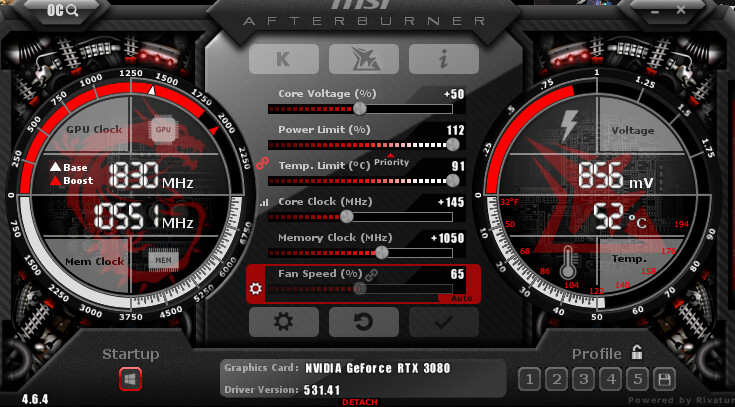
My advice with overclocking really is just to try small increments with a benchmark/stresstest burn-in software that can analyse artifacts. I use MSI Kombustor with MSI Afterburner.
(I’d say never just Up the clocks to something crazy someone else had cause your card may not be ‘stretched’ enough yet.)
So I’ll go up about 10mhz at a time and roughly sit the stress test for about 5-10mins each adjustment. slow process but eventually you’ll reach a peak. In some cases I get up to +175mhz on core clock on most Gpu’s. Some a bit lower, though Memory clocks can be pushed fairly high these days with GDDR6+ Vram cards. But you’ll know when you reach a limit cause after a few seconds or so the test will accumulate a few artifacts here and there and that’s the unstable point. then run underclock just a bit before that point and that’s a good spot to be in. then I like to leave it there for a few weeks and then come back and see if she can go up more. and most of the time the chip has ‘stretched’ enough (either by Driver optimization or the card getting used to that speed) I’ll proceed to go again and I can squeeze a bit more etc.
I won’t say more about it cause this is a forum about Topaz Video AI software, not an overclocking room haha so I’ll leave it there.
I mainly do it for games and as a hobby. but I do get great results when paired with custom optimizations. But yes the performance increase is to be taken with a grain of salt, can be great or worse. I’m honestly just an OC addicted guy who can’t help it
Petro I can see that deep hair noise. Not good, but are you sure you have had the exact same settings back in the days? Prores /Tif, Artemis Subfolder etc.
Thanks!
With my RTX 3070 Ventus card, I was at 0.13-0.14 seconds per frame with TVAI until 3.1.11. With this new version 3.2.0, I’m down to 0.11 seconds per frame. Which is quite interesting.
PS, I have my MSI after burner power limit at 55%. If I raise it to 100% I would surely be at 0.9 or 0.10 seconds per frame but at the cost of an increased heat of the card. Like well over 50° with the fans running at full speed. Here, I set it to stay between 47 and 48°. And in TVAI, I set the power consumption to 75%.
Conclusion, I’m happy with the speed results. I did not test with the other models. For now, I use Artemis medium quality to improve the rather compressed image quality of the original Star Trek series in 1440x1080 quality to 1440x1080 enhanced.
Hello! I only convert high quality video. I did a lot of tests, and stopped at the best option for me. All settings are always the same: 4K, 120fps-ArtemisHQ+Apollo, H265(Nvidia)Main10, 180Mbs, mkv
Instead of selecting it from the list it lets you cut the existing text and type it in. Though they should add it in the list of selectable frame rates.
Also in some of the posts above people have mentioned the picture quality not being as good.
With the updates to the app/models couldn’t we be given stats about the quality of the ouput. ie. currently we can test how well the speed has been improved by using the benchmark option but there’s no stats that show how accurate the app/models are in a standard set of tests so we can easily get an idea of how much of an improvement it is (if it is an improvement - or how much quality might have reduced for some things).
eg. couldn’t Topaz create a standard set of test video files (with some for testing upscaling models and some for testing interpolation models) and use them to give us numerical stats for each new app/model release?
They could have a few different types of content, and they could have a real 4K version of a number of different test videos and a 1080p version created from them and then the app could use the different models to upscale the 1080p version to 4K and then it would check the differences (signal to noise ratio/PSNR) of the upscaled to 4K versions against the real 4K versions. And all these test videos would be ones that weren’t part of the training set used to create the models.
Those should be useful stats about the different releases (especially if the PSNR values - or one of them - closely matched the human visual system - so that where we would see a big difference between images/videos that that number would also give a big difference).
ie. they could release something like (or we could maybe run a test option within the app ourselves to create these):
Topaz Video AI v3.2.0, Artemis [version no.] 4x scale, Test Clip(s) 1, PSNR :[numeric value showing quality compared to actual 4K version of the test video] …
Topaz Video AI v3.2.1, Artemis [version no.] 4x scale, Test Clip(s) 1, PSNR : [numeric value…]

 so I’ll leave it there.
