What do you mean? Ideas - Topaz Community
EDIT: That whole sorting via tags is kinda confusing, though. A more organized, well-kept list would be better, for sure.
What do you mean? Ideas - Topaz Community
EDIT: That whole sorting via tags is kinda confusing, though. A more organized, well-kept list would be better, for sure.
Some problem.
Yeah that list is a total mess and I’d be surprised if anyone from Topaz has looked at all that in months.
Maybe someone here could start some polls so we can create a customer list of top 10 fixes wanted?
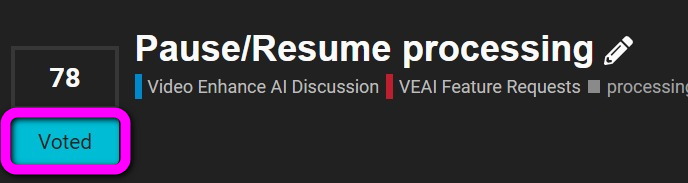
In the Feature Requests posts, you can click on the “VOTE” button next to the title, if you want the same feature.
You can sort the requests using the “Vote Number”,
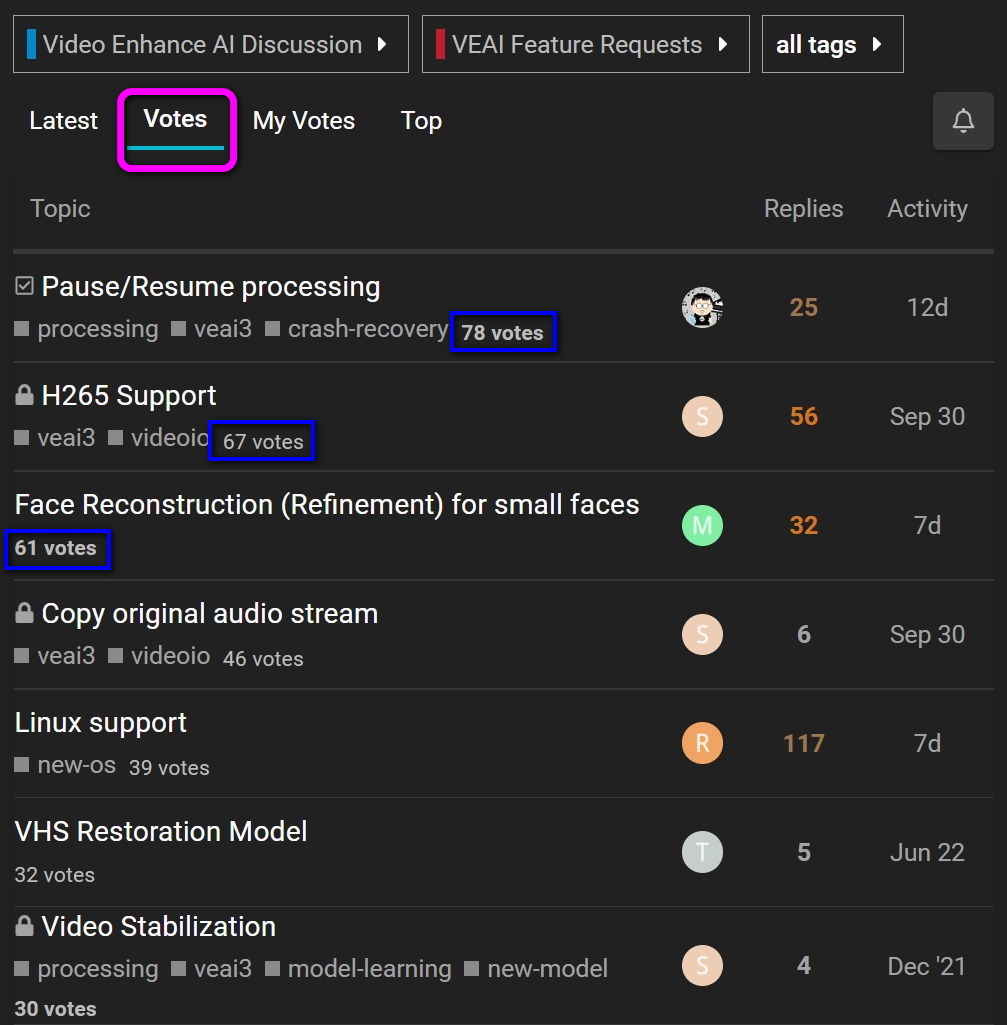
Here is the TOP 7 most requested feature.
If you see a🔒 in front of the Title, which means the vote is closed , because developers already listened to our requests and implemented it into the software.
The problem, as I had it explained to me recently, is that the follow-up apparently takes place in the beta-testers section of the forum – thus leaving the regular users (and the original requestor) in the dark as to what is happening with that issue.
Implemented it…or broke it beyond repair? There is a fine line with Topaz it seems.
@Orion
I am curious - 2.6.4 measures the processing speed in seconds per frame and in almost all circumstances, except for terrible PC’s, something wrong, or else large processing increases (say 400% using Gaia), the seconds per frame in 2.6.4 range between 0.11 and 0.8 seconds per frame.
The ballpark given was - in 2.6.4 - 0.57-0.64 which looks exactly like it should, but is not frames per second.
However 3.0.6 uses frames per second as the default time, and again, 2.6-6.4 looks normal. But if I convert 0.64 spf to fps to match 3.0.6, 3.0.6 comes out 3x times faster than 2.6.4 based on those numbers. Meaning on the surface, it looks like you are saying its significantly faster in 3.0.6.
If I make the assumption that you really did mean 0.67 “fps” in 2.6.4, the first issue I have is that works out to 1.49 spf in 2.6.4 terms - which is very slow, like I have never seen it that slow before except upscaling 1080p to 4K (my test 1080p to 4k in Artemis was running at 1.02 spf) - but thats also worse, because if it really is 0.67fps than that means 3.0.6 is up to 1000% faster than 2.6.4 in that comparison, not 300%.
So was the question meant to be asking why 2.6.4 was so much slower o_O? Otherwise, you have done something strange with the numbers, as both translations state that 3.0.6 is faster in your example. Something is very much missing or wrong in the example numbers if your intention is to say that 3.0.6 is slower…
This software really needs a second computer that you run 24/7 in a room you do not sleep in. I think it will be that way for a few years. They really are a small team of people.
And that is why I started using a stopwatch instead.
I did switch TVAI to show spf so that it would match VEAI, but then I forgot that 0.16 spf is much slower than 0.09.
It really does, and probably will for quite a few years. Maybe all the M1 and M2 Mac users can pipe-in about how quiet it is for them, but for Windows hardware, it’s noisy.
Not really an issue for me, I have a computer my neighbor threw out, setup in the basement as a Plex server. My main computer is in a giant closet. Only issue with that is how hot it gets in summer. Right now though, I can open the window and freeze it.
Then all the more reason to get existing stuff working, instead of introducing fancy-schmancy things that don’t work at all and break existing features in the process (see Preview).
Yes, all the more reason to get a linux version working. I want to send the work off to my server.
In any case, I keep asking for the remote desktop to be fixed for this very reason. I dont process the video at my desktop, it is done in a computer in a much cooler location. But they broke the RDP with this version.
Or Gigabit Ethernet, shared drives and VNC. I like TightVNC for it’s very low overhead. Setup for local access only. I can move to any of my computers, Windows, Linux Mint or my cell phone then monitor or make changes to machines running TVAI.
You are correct 2.6.4 was measuring in seconds. I was tired and had to re do some tests yesterday. I finally figured it out on why my process was a lot slower with 3.x.x than of that with 2.6.4. There is an option where you select square pixel or original.
Apparently I had original selected which stretched my content from 16:9 to 23.x.x so it was taking a lot of time to process some of those black bars as well. I selected the square pixel option and now I’m getting 11.3fps so in short upscaling a 24 min episode from 480p to 1080p and converting fps to 60 at the same time is taking me about 1 hour 40 minutes so I’m happy about that. One thing that odd happened though which I processed 2 episodes at the same time but the results shows the “topaz” watermark on both of them mind you I own the product and was signed-in. I hope this is just a glitch because I lost 3 hours+ worth of process.
I got it sorted out thank you for your answer though 
You can apply to be a beta tester, and if you don’t want to, then helpful people in this forum, like Ihkjacky will bring you up to speed. 
dang, that sucks. oh well, I will just have to keep using handbrake then…
I haven’t had chance to test since 3.0.4 but then, when signed in, it was watermarked (without telling you that it WOULD be) when offline when starting any process (even one of a series), whether by accident or design.
This makes me angry because no other video software I use does this - low or high-end, and I have plenty. If not fixed since 3.0.4, for those whose support year ran out after 3.0.0, it needs to be because the licence ‘extension’ is in effect partial. I won’t be renewing until this is done, in case it ends up as Topaz policy going forward.
That is why I just keep using ProRes 422 HQ, and then use a secondary x265 pass.
N.B. There’s another reason for that, btw: I want the VEAI process to take as short as possible (as it’s the most unstable of the two). So I just output a (near) lossless output format, then just let x265 stew a bit on it, afterwards. Dividing time between VEAI and x265, in 1 process that takes twice as long, enlarges the chance of a VEAI crash, ruining both.
Qute honestly, that really IS ridiculous. Even if your license won’t allow for further updates, you should never get a watermark when logged in.
What’s your remote setup like?
I have a Windows 10 machine that I remote into all the time. I only run the CLI on it, and I can’t start it running while remoting in, but I use a Python script that does some per-processing anyway, so I’m long logged out before it starts TVAI. Works fine. I think the issue is remoting in changes the GPU device to some other number. In my scripts I have it set to 0, but I think that gets changed to a fake GPU.