Is there an ETA on Iris v2? Same issues as before:
and yes I know it’s a v1 thing, but figured I might as well ask.
If anything, I’m noticing the output from Iris v1 in 3.3.6.0.b is softer and less detailed than in 3.3.4.0.b, which seems to be the wrong direction for things to be going in.
Also the bug where the program takes over the entire screen when you maximize it is back.
First the good news, Previewing now displays frames as you go. It’s some wacky frames at times (unlike prior to 3.3.4) but for the most part OK.
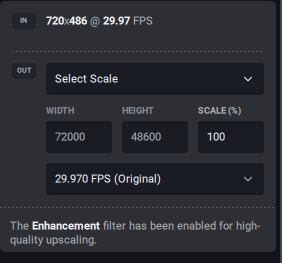
Second thing is - the SELECT SCALE option is out of order. It creates some very bad math! See the image here:
I can still use the Select Width and Height option to get by. I had been using 268% to get the frame size bigger than HD.
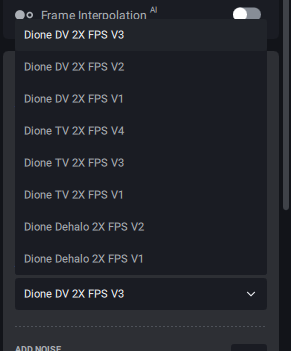
I never saw 3.3.5 so I didn’t see any info on Iris, except for @UHD4KUser comment above. I don’t see IRIS in the list when selecting Interlaced. Although the list is sorted quite badly (imo)
I hope this is a bug and not a removed feature, as it’s super important without the 4-up display, (Sadly missed). When switching from preview to preview using the grid the settings don’t change on the settings tab. That’s a must to help figure out which settings are the best.
When getting to the 2nd to last frame in the preview, the cursor stays there and there is a > 30second wait for that last frame and the preview to start playing.
I do have a pokeyish video card gtx1070, but I’m running on an i9 12th gen and it has been working OK for most things still. Also, running on 2 seperate m.2 drives (980pros) one for the program and one for the Previews/Export/Models.
To not leave you haning on the ‘wacky’ preview, it does mostly work now, but when doing a run, side-to-side comparison, the convert side lags the actual side by many frames, which it didn’t prior to 3.3.4. I can jump ahead and it seems to frames are there. But there is a long pause when the main timeline bar reaches the 2nd to last frame before they start playing synced well.
I was ready to type up a storm regarding how unintuitive the preset management still is overall, and you guys fixed most of the issues with it in this update! The buttons at the top of the preview to save/update are much more user friendly. Small things to improve:
there is no “tooltip” on the left “reset settings to previously saved preset settings” button, and it looks a bit like the “shutdown” icon. At the very least, please provide a tooltip so that users know what the button does
there is actually not tooltip on the other two icons either! Please add if possible
the reset settings to saved preset values button is the only one of the 3 which does not bring up a dialogue box asking if you really want to reset the settings to the saved preset settings
Apart from that, please include an option to save trim and crop parameters to the presets as well, thank you!
Something has broken the “Export As” (nothing happens if I press the button, but “Export” starts the processing in the same directory as the input file).
The cropping also does not work as intended. I can apply a crop, that part still works. Viewing a cropped preview though, the crop does not line up with the original in any of the preview modes I tried.
Also, no matter which cropping options I apply, the program is still processing the full input image, ignoring any cropping which was set.
And one other thing: even if I set the “include Live Preview” preference to “off”, it still defaults to “on” in the bottom right above the export button.
After the completed installation, checking the “Launch Topaz Video Ai” box does not launch the program when clicking on “finish”. On first manual start, the program then was “initialising” (if I remember correctly?) and existing shortcuts would not work until this manual start procedure was completed.
OK, thanks to Ida’s info, the resize bug is a recognised bug, good, I’m glad I was wrong about this one.
We still have the interpolation feature, one of the backbones of the program, adding duplicate frames, which defeats the entire purpose of frame interpolation, not to mention that you cannot use the “reduce jittery motions” dialogue as it literally blurs out half the stabilised results!
EDIT: I’m glad the dev team fixed the issues raised here, I still hope that the interpolation duplicating bug, the extreme blur artefacts with the stabilisation will be fixed as there are no mention of these issues by the dev team so far!
EDIT 2: Thanks Ida, for pointing out that the scaling bug was a recognised issue, I was admittedly too irritated, so I missed it!
EDIT 3: Updated my post due to new info, thanks to the dev team, for the quick fix!
Please allow copy and paste from the timecode field (such as the starting frame from an earlier preview render) into the current timecode field on the timeline. When jumping around the source and creating different previews, it would be great to have that available to not require typing it manually until we have some kind of “marker” system
The ProRes preview output is not true to the final file output. It shows banding which is not present in the actual render, and it’s also not present in other 8 or 10 bit preview formats.
Iris v2 is currently being trained, so we don’t have an exact timeline for release but we expect that beta releases including Iris v2 will be out soon.
Thank you, I saw the discussion but didn’t see this was already reported in a comment in the thread. Keeping it here for visibility if there are others stumped by this who weren’t following the other topic.
I’m not usually one to complain about bugs in beta releases, but I can’t imagine why this was even released for testing in this state. With basic functionality broken, it just wastes beta testers time. I’ve already uninstalled it.


 See the image here: