All of those are very exciting to hear.
If I were to not set TVAI_TRIAL_ALLOWED, would the default behavior be to stop the processing if logged out?
I agree that this approach might not be the best solution, but it’s better then nothing.
All of those are very exciting to hear.
If I were to not set TVAI_TRIAL_ALLOWED, would the default behavior be to stop the processing if logged out?
I agree that this approach might not be the best solution, but it’s better then nothing.
No the default behavior would be similar to TVAI_TRIAL_ALLOWED=1
There are a lot of development/deployment situations where watermarked processing is very useful, so it will be the default behavior.
Hopefully, with GUI fixes the project related issues are fixed. This is the primary reason for the /temp directory getting deleted.
Just when I’m about to call it quits with TVAI, you guys are giving me a glimmer of hope that maybe things will get fixed. 
Can’t for the life of me imagine any situation, in any walk of life, where I would possibly want a watermark on my movies.  But it’s handy to have TVAI_TRIAL_ALLOWED available for when you do batch processing with command lines.
And this is fine by me, tbh. It’s just a failsafe, so I won’t accidentally start an ffmpeg process that would reproduce a watermark-borked render. And it looks like setting TVAI_TRIAL_ALLOWED=0 in the environment variables will accomplish this.
There are a few people who like to try out and automate with command line before purchasing a license. Just want to avoid processing failures in those cases.
When installing OFX using the DaVinci Resolve plugin installation in TVAI 5.4 to 6.0.0.2.b, the Frame Interpolation OFX is not installed.
Has the Frame Interpolation OFX been removed?
How about a fix for us that have been literally locked out of the program due to the mpv-UI being incompatible for some systems?
A suggestion is to resurrect/release an old build with the current model support for those affected by the mpv-UI, while you guys continue working on the accursed mpv-UI incompatibility fix; that way we can continue to use/test the program that we spent hundreds of dollars on after the initial purchase of the program…
If VFR is a replacement for that accursed mpv-based UI, then please disregard my post…
VFR = Variable Frame Rate; so not really ‘accursed mpv-based UI’ related.
Holy crap I’m an idiot, I should have known, I guess I was wanting it to be an actual fix/replacement for the mpv-UI…
Thanks for the clarification!
When the heart floweth over… 
I do think they consider the mpv-UI already fixed, although Preview in general is still rather flaky, and need massive functional improvements too.
Unfortunately, it is not ⇒
It’s completely unacceptable, however, it is not lost on me that the UI takes precedence which is why I suggest that they at least give those who are having issues with the program a separate working UI sans that bloody mpv player, including updated models within an old beta UI, it should be no issue whatsoever on their part.
Is this also what v6 beta builds look like on your system?
There’s a line in your log files that suggests this could be a DirectX issue: “Failed setup for format d3d11: hwaccel initialisation returned error.”
Would also be good to know your current driver version number
Thanks, Tony, I was hoping for someone to point a specific error, so that I may have a starting point to work off of with hunting down the culprit on my idiot system!
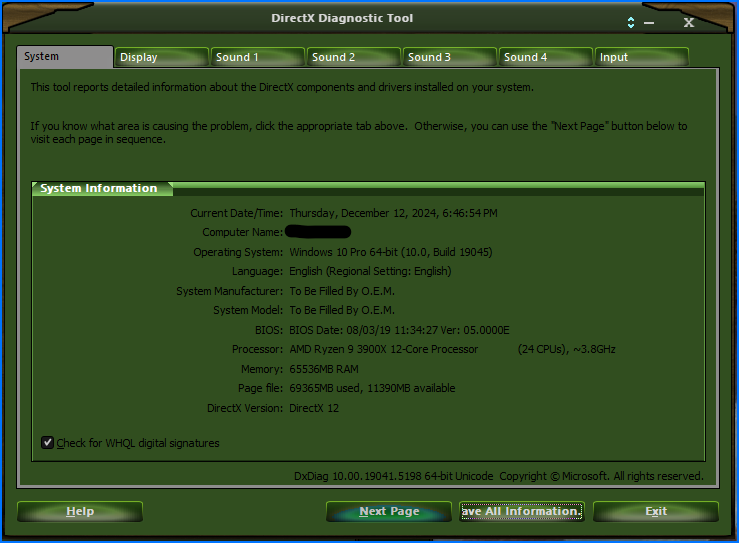
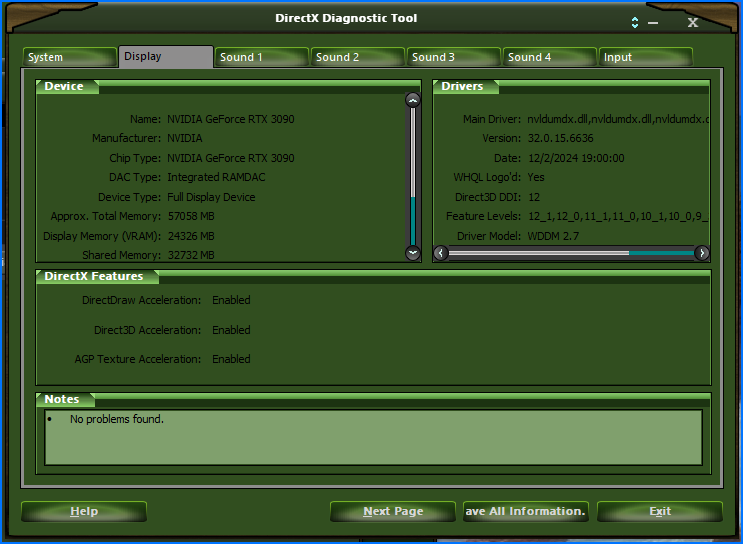
Here are the results of DxDiag
Yes, that is pretty much what it looks like as well, as I’m stuck on version 5.3.5.0.b
I’m using version 566.36 game ready driver, I switched to the game driver as I wanted to see if there was a difference, by the way I DDU’d my studio and did a clean installation…
EDIT: I did a bit of digging, and it looks like I may need to add hwdec=auto to mpv’s config file, so I’m going to reinstall vers 6, and see if it helps, thanks a LOT Tony, as I now know what to test for, I’ll update this post when I’m done reinstalling vers 6!
@tony.topazlabs can we check if the GUI opens currently on Windows 10 and if there are other users who can use it on windows 10?
I am going to try to add hwdec=auto to mpv’s config files in the meantime, again, my irritation is not focused on the Devs/researchers, but more so with my idiot system it’s been frustrating and disheartening to see progress with the program that I cannot partake in!
EDIT: There isn’t a mpv.conf file in TVAI’s directory, so there’s nothing to add, so it’s a dead end, as I’m no coder, so I have no direction to solve this issue…
I have a Windows 10 I can fire up, but it’s got my trusty GTX 1060 in it. I don’t really expect it to work.
Reminds me of my own treasured 1080 gtx that I retired with honours, and yes, it still works! :^)
I would have loved to upgrade my rig for win 11, but in order to be able to run it, I would have to buy a new mobo/DDR5-64gb/and an AMD 7950x
I can at least still hold onto my 3090… But yeah, that’s the upgrade path I have to take, but thanks for stepping up to test this, I was actually afraid it was an OS issue, but did not want to believe it… :^P
My 1 year license expires today. In the past year I haven’t had a non-buggy TVAI release and I’ve been paying since v2. I think I’ll take a break and renew next black friday.
Topaz: maybe work on your process a bit – I don’t want to keep paying for something that is constantly breaking, particularly when it seem like it’s due to UI changes that no one is super asking for.