Thank You. This works for now. Looking forward to the tensorrt.
1 Like
This one is working. Thanks.
I re-installed the previous build until a fix can be made, I just hope my previous Proteus model wasn’t overwritten by the swapped install!
The models have not been modified in anyway to improve performance so the quality of results should be the same. The resource utilization of the software has been improved.
This version will user more CPU threads, VRAM usage should be similar or less, RAM usage will be little higher than the release versions and depends largely on input/output resolution of the video.
7 Likes
Thanks for the confirmation and details with the current build, even though I can’t use this version, it’s excellent to know the details of this beta as it will most definitely be in the next!
That’s the great thing about this program, it allows for the viability for smaller resolutions in my case: 2160/1920 ⇒ 1280, as HDD space is becoming more and more a premium for me, so I plan to re-do a lot of oversized edits!
This is working on my RTX2070.
I updated to 5-Jan-2023 GeForce RTX drivers. Same problem Proteus and Artemis not processing after loading model.
Installed replacement dll in Beta directory. Non-processing has now changed to instant red “AI error ” for Proteus and Artemis (after loading model). Gaia and Theia still work as before.
Have RTX 3060/12Gb. Windows 10 Pro all latest updates.
[Later note: I don’t know why my browser is showing a boxed CROSS as a boxed TICK above. Ah, technology…]
OK, so I installed the updated DLL that appears in the conversation timeline and got (after model loading) instant red “AI error ”.
Later, I found a new reference to the same DLL in the release notes themselves at the top of the thread. This appears to have been compiled about an hour later than the version further down the thread (file time stamp) but is not documented as a different version (bad procedure). I installed that and Proteus and Artemis are now processing successfully on RTX3060/12Gb.
Please delete the reference to the DLL down the conversation thread so that others don’t waste their time with this one.
Speed is improved by about a third. DVD (405 lines) to 1080p/8Mbps on V307 Proteus with 6 processes and Fine Tune/relative processed at 3.2fps. GPU-Z reports 20-42% GPU load (jumps around a lot), and CPU load is about 45% feeding it.
On B310 with 4 processes (current program limit), the same thing processes at 4.4fps. CPU running around 45-55% capacity feeding the GPU, and GPU-Z reports 52-64% load with plenty of heat and fan ceiling, so could wind the number of available processes up for better speed. It looks like my system might max out at 6 or 7 processes on B3.1. (I have lots of big smart fans throughout the cabinet, so cooling is not a problem even for long jobs.)
From the stats, I estimate that V307, if it supported 8 processes (at least on my system), would be as fast (and use much the same % GPU grunt) as B310 does now at four processes, which would notionally equate to speed doubling.
B310 Proteus currently gives slightly oversharpened output (a bit artifact-y in out-of-focus areas) compared with the same settings on V307.
In my case, this beta is only about 10% faster than VEAI 2.x.x.
System: iMac i7-7700k, 48GB RAM, eGPU AMD RX6800XT
Hi Suraj and other Devs. Thanks for the quick turnaround on this DLL fix. I just want to sensitise you to the life of a beta tester. You have busy lives centred around VEAI. We have busy lives centered around other things. The way the patches are handled in this threaded conversation is less than ideal for people other than those deeply immersed in the detail of your dev process.
May I suggest that when you release a patch, that the patch is:
- Given a version number (even if it’s only a file date/time/size), so people know they have the RIGHT or LATEST patch.
- The patch download appears in only ONE place: the release header, next to the main beta download furniture, so those getting the new beta will trip over the latest patch as a matter of intention when they install the beta (as I did this morning having just returned from overseas).
- Where patches are mentioned in the thread, they are referred to by version number and the advice is to get the patch from the link at the TOP of the thread.
That way, those of us throwing limited testing time at betas don’t have to (a) read tomes of everyone’s technical detail to figure out who did what and when, and (b) reliably get and use the latest patch rather than some superseded one.
Cheers
2 Likes
Yeah, didn’t work, sadly. Proteus still gives the folllowing:
- Error message from AI engine: model failed.
1 Like
Yeah, saw that link. But if it isn’t using my Tensor cores, then how good can it be? (Let alone be faster). I;ll give it a try, though, for good measure.
I’ve been at this since v1.1 and I can’t remember when a dll or any other file was released as a patch. It’s been wait for the next full update so this is a very different thing.
It’s not faster but you don’t have to reinstall and older version also.
I should say that I just tried comparing processing with V264 versus the tests in my previous post. As close as I could match parameters with V307 and B310, V264 processed at 3.7fps. So V307 is a bit slower (3.2fps) than V264, and now B310 (4.4fps) is a bit faster. Not big gains so far. But more supported processes (current limit 4) in B31 should help.
And I find the final result (Proteus) in V264 much more pleasing and natural looking yet sharp where it needs to be, than either V307 and especially B310.
Hmm, that one actually works, and started in at 3.4 FPS (which is, indeed, about 1/3rd faster than previous version). Not sure how suray can bypass the Tensor cores, and still make it faster, LOL, but it works so far. 
It’s not just GPU that makes a difference in optimizations. The more data you can push through the CPU the better.
That part I got.  Just don’t get how you can not use Tensor cores, and still get such results. It’s over 4.2 fps now! Woot! Means the entire movie will be done in nearly 10 hours (vs. the usual 18-20).
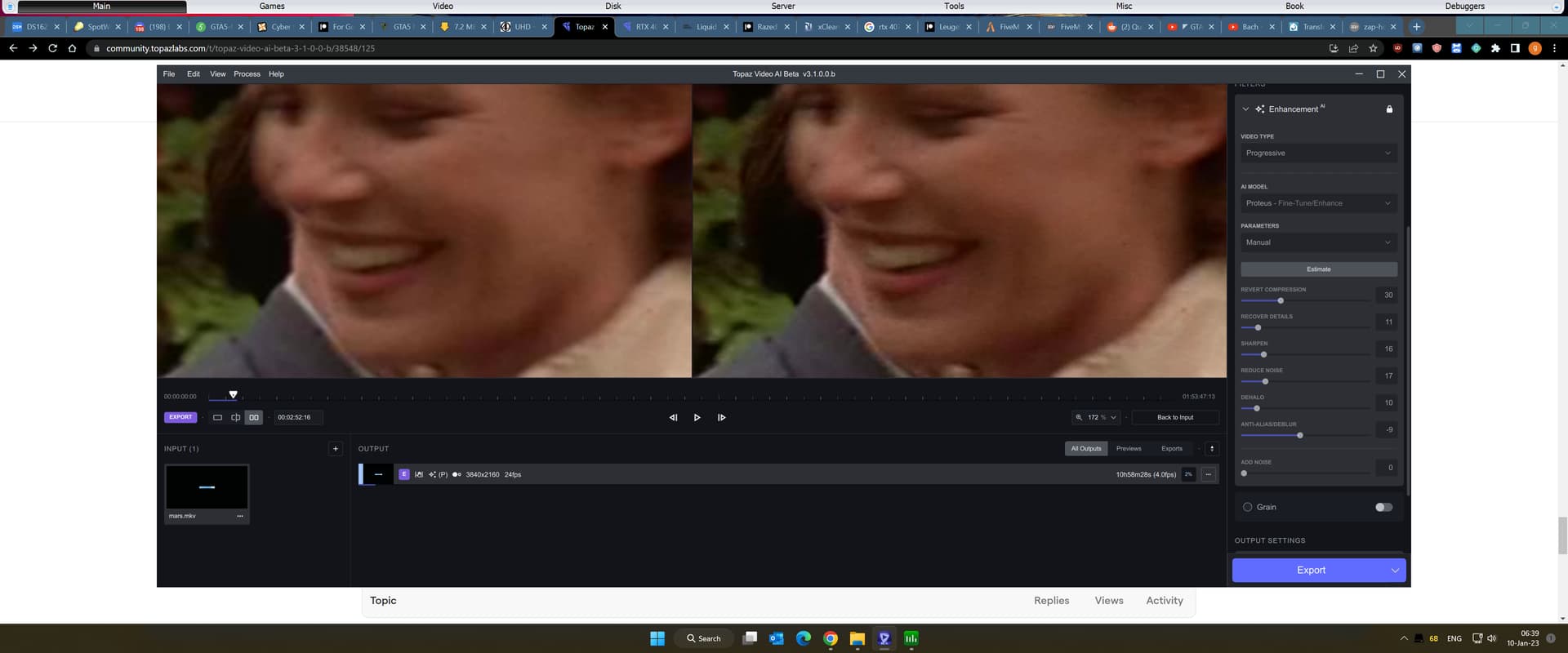
 It’s doing something, but, erm, almost making it worse (see below). It’s sharpening, but adds MORE noise even, and even accentuates the compression artifacts: