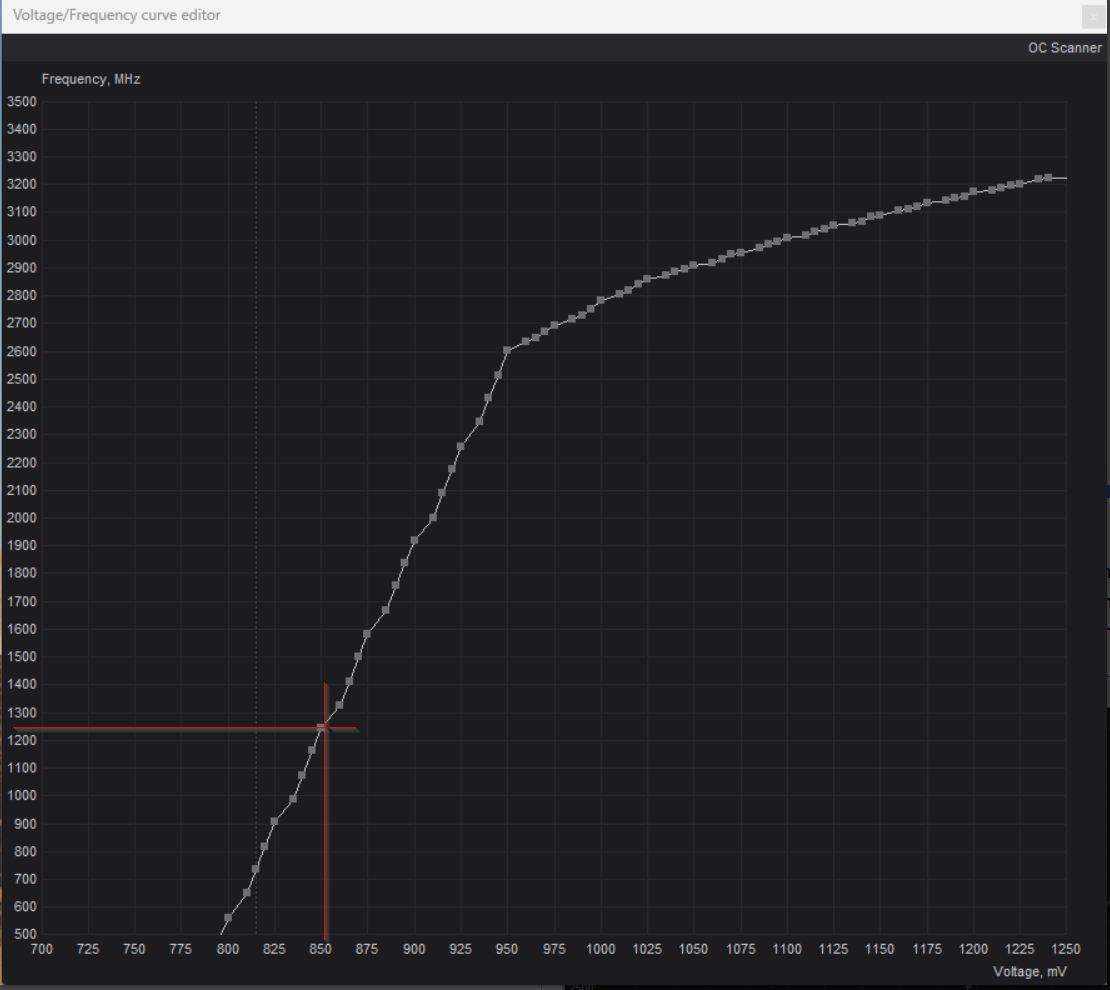
I have installed newest Beta5 because Final did not work on my PC, the program did not start. You must unlock voltage into the program settings section first + set load program at startup, then open voltage editor adjust the curve, then set power limiter and Ram frequency to max and save. Do exactly as described here, video
I have just watched three separate videos on under volting 5000 series products.
In each, they show pretty conclusive results that slight under volts not only decrease heat, noise and power usage, but can also increase frame rate performance on video games.
I’m not sure how that would relate to rendering performance in SLM.
But just lowering heat, noise, and power usage….
Well, …..even if it got the same rendered FPS in SLM…
Yeah, it’s not the usual SD resolution of videos I upscale, seems to be an odd one out. I’ve noticed too there seems to be “bands” for when clips go over certain resolution sizes, that seem to make jobs slower, and with this one I have in particular technically crossing the threshold of 1080p res, it’s going to be slower. I’ll try the next job for one that’ll be either spot on 1080p, or a little below to see how the speed is then.
For now though still holding at 0.2FPS speed, and VRAM usage seems to have settled at 12.3GB.
in your previous post ‘normal’ was 1.12 spf and undervolted was 1.15spf.
Now you have 1.18spf. So it’s getting slower, not faster.
Are you confusing spf with fps?
I just changed the number to the 7.0.2 link, hardly a “back door”. Why have that version on the server if the company doesn’t want people accessing it?
Anyway, I was just curious if anything was pending release given there’s been no new betas etc.
Topaz staff and developers have repeatedly emphasized that a placeholder file was included solely for testing purposes. They strongly advise against downloading the unreleased version, as it is not finalized and may contain numerous bugs or unexpected issues. This file might be an outdated version renamed to test update notifications, making it unsuitable for general use.
Previously, some users reported unique bugs that other users did not experience. Developers spent days analyzing log files to identify the cause, only to find that the issue was supposedly resolved in the official release. When using the official version, developers could not replicate the reported errors. It was later discovered that the affected users had inadvertently downloaded an unauthorized pre-release version, mistakenly assuming it was the latest release. To resolve the issue, these users had to completely uninstall the software and reinstall the official version, after which everything functioned correctly. This process unnecessarily consumed valuable developer time to troubleshoot issues that could have been avoided. For this reason, developers consistently urge users to avoid unofficial pre-release versions to prevent such complications.
good point, I notice with afterburner beta, programs starts but my profile gets not auto loaded after windows login, I have to set manually my saved profile..which is good to prevent what you say, when you have the case the setting leads to crash.
yes my fault, your right, as it is, difference is very small, but power consumption drops massive, so for me it’s clear, if it is stable, what I would like to use.
I tried to increase the speed and consumption of the graphics card - the SLm speed either did not change or was slower. I’ll try to reduce consumption like yours.
So yes good choice, because 5090 is already running out of the box near limits. Power limit is 575W, and connector can handle max of 600W, so there is only 25W left you can increase with tuning tools. 600W is hardware limited on the card itself. Although that’s not recommended anyway, since the connector runs hot and can melt!
I can’t say yet which voltage curve is perfect one for SLm, but first tests are very promising…not to increase TVAI fps, but reduce power consumption by lowering voltage and lower gpu clock seems to be has lower effects than I tought on SLm, ammount of tensor cores is much more important…so reduce power as much as it gets, without loosing significant fps is the route I’ll take.
Tip: you can use TechPowerUp GPU-Z as I did to check power consumption (before/after)
I followed your link to the video and made the same curve settings for my RTX 5090.
The advantage of these settings in my case is a lower power consumption of in average 845w and reduced heat now to in average 65-70 degrees (always hot enough ).
Starlight Mini runs now since 4 hours. I “lost” around 0,1 fps render speed with the new settings. Before I had mostly 1,0 fps now constant 0,9 fps.
@PeteVideoEdit what means 845w? You did it at 850mV? What Mhz you have now shows in the curve? Better is switching to spf into TVAI, 0.9 / 1,0 can be rounded up or down
ah ok! yes then you have same settings! For my understanding 850mV at 2300Mhz is highest possible frenquenzy at 850mV Afterburner allows (to prevent get into instability) When this is stable, then it is impressive because by factory at 850mV the card runs with only 1250Mhz, but we have 2300 now. This can explain the big power consumption drop. Here my original voltage curve before undervolting
yes I did maxed out memory slider, but was not sure this takes effect on the Mhz because old value was shown into Afterburner Beta, have to check again, at the moment I’m in the office and can’t test
 ).
).