I have the issue that I cannot see any preview that I do (you know, with the slider and all that). Reading through the posts here, I guess not everyone has that issue, right? Because this would be the worst and first thing to complain. So is there a trick to get to see the previews?
2 Likes
Did you change some Settings in between under “Crash Recovery ?”
As far as i know, disabling something (dont know precisely what, because the Help Text is Cut Up/Truncated, because Topaz Gui Guy expect, that anyone in the World got a Display with >=1440 Width) under Crash Recovery, takes away the Pause Function.
I can feel your pain  (i hope it was for the complette File, and not just for a part)
it reminds me of some 640x480 Garbage Clip (not because of the res. Bad Lightning + Analog Cam Recording from 1996 + To Less Bitrate + ReEncoding from Adult Site) that i got a few weeks ago.
Unsharp (NTSC VHS Composite Niveau), low contrast, many blocking (but good distributed, not to many connected blocks), big analog noise blobs (to my luck mostly luma), but some detail was still there in low motion (too bad some parts are very fast motion because the “Dame” was realy, lets say motivated^^, got joy and moved very fast. Yes she moved ! not the Guy ! not like today with those *iagra Cyborgs that ram like Bunnys) so there was hope.
- VirtualDub2 Color/Contrast
6 Axis Color Filter

Intensity=0   0.642   0.86
Red-Gren=0.016
YellowBlue=0.068
Saturation=1.366
Red=0.587   1
REST = untouched- 2 Sets out Output with Video AI 5
-------Settings for Output File 1:
Iris Low Quality V1 @ Original Scale, Add Noise 0, Recover Detail 0, Grain 1/1
Param Relative: 20,0,0,0,-100,0
Enable Second enchancement
Intermediate: Scale 2x
Artemis Low Quality V13
Add Noise 0, Recover Detail 30
------Settings for Output File 2:
Artemis Low Quality V13 @ 2 x Scale, Add Noise 0, Recover Detail 100
Enable Second enchancement
Intermediate: Scale 2x
Iris Low Quality V1
Param Relative: 18,10,15,0,-100,0
Add Noise 0, Recover Detail 30
-
Open Output File 2 with AviSynth to downscale
 back.
back.
Spline36Resize(640,480) -
Opening in VDub2 with AviSynth
V1 = LWLibavVideoSource("K:\Output File 1.avi",Cache = true)
V2 = LWLibavVideoSource("K:\Output File 2.avi",Cache = true)
Overlay(V1,V2,mode="blend",opacity=0.35)

LimitedSharpenFaster(strength=45,wide=false,overshoot=2,undershoot=5,edgemode=2,ss_x=1.5,ss_y=1.5)\

AiUpscale(Factor=2,Luma="HQ",Chroma="HQ",CResample="")\
Final Color,Gamma/Contrast Correction in VDub2 with VDub2 Filters
Brightness/constrast: bright -3%,cont 106%
levels: 0   0.939   230 (Operate in luma = YES)
        0   255
6 Axis Color Correction:
    Saturation: 1.01
    Red 0.505   1
    REST = untouched.
Now its watchable (looks like a 0815 ntsc adult dvd) there is just one problem.
This was Frame 28145 to 28265 from 40773 
I hate badly deinterlaced stuff.
Blending is horrible (Strong Deblocking and Detail ki**ing was allready done^^)
there is just one thing that is more horrible (when it comes to badly deinterlaced)
Resizing before Deinterlacing 
Got some 1080p Clip from a Adult Site here
(that always used very good, very high quality Cameras. Even 20 years ago ddf with very good lightning and relative good encoding settings and codecs. They used high bitrate XVid & WMV8/9 way back in 2004 when other still used crappy Mpeg1&2)
and that *diot Guy who encoded the File, scaled it first down to 1080p (still the Version with highest Res for public, and any other Res for Public got the same problem) and deinterlaced it afterwards facepalm
So Deinterlacing doesnt work anymore.
Got to discard one field, and to get away with 920x540 (-.-) but luckily the Camera was so High Quality that 920x540 still got very good detail 
4 Likes
No, but you realy should consider to use comma’s 
2 Likes
didn’t do anything like that
So one bug more (-.-)
Or it has something todo with the Codec that you selected.
It’s just a guess.
Maybe the Pause Function works only if Topaz create first a Ton of PNG Files, to join them (the “Finalize” Part) afterwards to a Video File.
I got Crash Recovery stuff disabled (because it doesnt work right ! Got more as one Crash, where the Previe List in V5 was not restored + double the Space usage !)
and when i used Video AI the last time, i got no Pause Function, but at least Video AI doesnt kept a Ton of PNG Files.
Maybe Video AI doesnt create PNG Files with some Codecs, and that’s why Pause is not aviable.
I hate the new UI! Also, can we get + and - hotkeys so we can scale the timeline? That’s all…
6 Likes
I’ve purchased Topaz Video AI for every version since it was Topaz Video Enhance AI. I’d like to go back to 5.3.6 but I didn’t download it as a separate installer, I just used the “update” functionality from within the app itself.
Do you know how I can download the 5.3.6 installer?
7 Likes
Go to the Release Thread from that Version
3 Likes
There is always a Pause button, but when you save to MP4, one file of normal quality is made upon completion. And when you save in MKV, then when processing is complete, there are three files that are not played.
1 Like
Normal interface. You get used to it in 5 minutes. There is no difference between the interfaces. Processes in the same way.
I care more about focusing attention on improving the quality of upscalling over processing speed and UI.
4 Likes
I usually Pause ffmpeg by pressing ‘Suspend’ in Process Lasso. One time, I tried it the official TVAI way, and immediately saw the ffmpeg process crash. And I remember thinking, ‘Why, O, why, am I not surprised?’
4 Likes
I know that ffmpeg can be a *itch (used it for a Video Compare Tool from me. But it ignored Color Space, so i used VirtualDub2 and it’ Script Files. Way more work, but at least it worked) but i will never understand bugs like that
It’s so easy, to get ProgramExitCodes and to Check if ffmpeg still runs, and if the System Handle from the Process is known, then it’s no Problem to Hard Terminate or to Pause it.
The biggest Crash in Video AI 5 (dont tried it with 6) happens, when all the stuff
in Crash Recovery is activated and
Artemis X with Second Enhancement - Intermediate X1
After that: No Change ! Same Frame Range+same start Frame, same settings, just Intermediate changed to another Value. Start Preview !
Bam ! Crash without any Message. Restart: All Preview Entrys gone xD
Good Crash Recover 
1 Like
Neither do I have a pause button and even worse there is no progess bar 
2 Likes
Where do you guys get a ton of temporary PNG files?
A Topaz on mine (5.3.4) creates a temporary MP4 file and renames it to a final filename afterwards.
1 Like
d:\TopazXWorkDir<InsertProjectNameHere>\temp\
“Preferences → Workspaces Folder”
If not set, Topaz will throw the PNG Files somewere on C: inside the User Folder.
If crash Recovery is used, Topaz will keep those Files, until something…
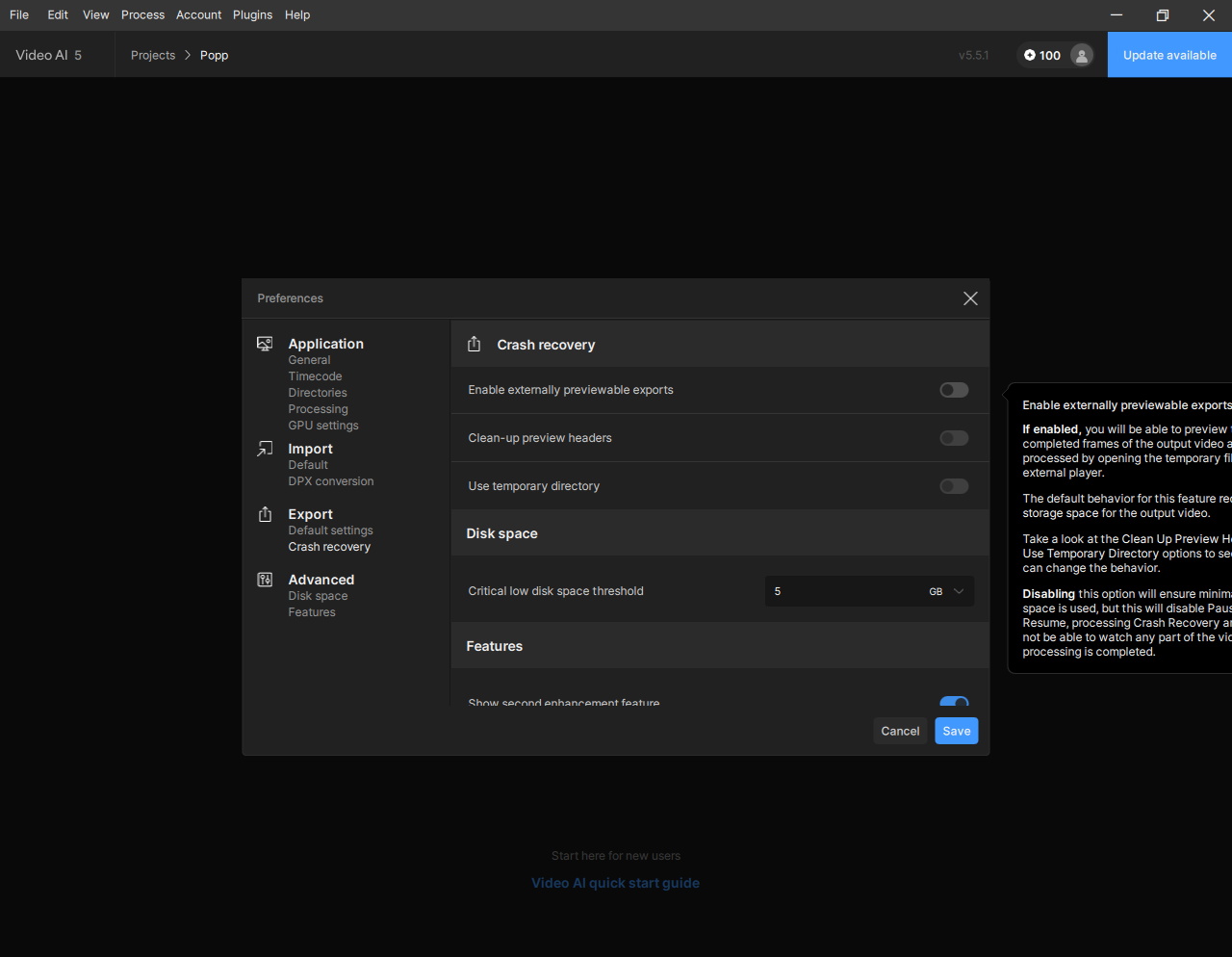
Very smart from Topaz, to assume that anyone on earth has a Disiplay Res >= 1440 !
Preference Window can not be moved + no real PopUp Info Box.
It’s a borderless Window, were the distance is bound to the Position from the Preference Window !
EDIT: Tried avi out (ffv), mkv out (ffv), mov out (ffv) , mp4 out (h264)
Always “Finalizing” so with other words. Joining PNG Files together.
4 Likes
I came to the same conclusion nearly a year ago and am still running 4.2.2 from March. I visit occasionally to check the latest updates but to be honest, it usually ends up as me having a laugh at seeing the same old same old bugs, comments and complaints. And still no improvement at all in what I originally bought TVAI for - one or two click upscaling, noise reduction, frame interpolation - of old pre-HD videos. Artemis is almost always good enough to deal with it, occasionally Iris.
They seem to be so badly organised or mis-directed that I wonder periodically if they’ll even continue to give permanent access to all models so I’ve downloaded them all. But even then, they (or any successor) could pull the plug on me at any time simply by not responding to that annoying monthly(?) requirement to visit the site and sign in to re-authenticate the software I purchased. No other software that I own does that with old software versions!
6 Likes
I think we’re in the gimmicky phase of video upscaling using AI and it’s more of a way for small software companies to make a quick buck. I got sucked in by the hype back in 2020, but quickly became disillusioned when I saw the mediocre results of the different projects I was working. I stopped paying for upgrades after version 2 and decided to sit back and read the forums, hoping for positive signs to jump back in, but so far, it’s been a big disappointment. I think it’s going to be many years, if not decades before consumer level hardware will be able to produce the results we were all sucked into believing could be achieved way back in 2020. A good example of where we’re at technologically, is the incredible amount of work and computing resources it took to upscale The Abyss to 4K. What they were able to accomplish is way beyond anything even remotely close to consumer level computing.
5 Likes
I agree that TVAI cannot do what the advertising claims it can do. What I have found though, is that with Proteus 4 Manual settings, I can get every DVD I own to look better. That’s worth it to me for the price I paid.
I was in the same situation. Since TVAI 4, they had not released any AI models that did anything I needed. There was no need to update.
That all changed with the beta they released today. They fixed the ability to not process with the CLI if you are not logged in. No more coming back to the computer after two days of processing to find that there are watermarks in all six episodes I had loaded up to process. Now I can come into the room with the computer, wonder why the fans aren’t running at full blast, check and find that the processing stopped because I was not logged in. That is worth another round of payment. Nyx is a good model too. I’ll use that on a lot of the Blu-rays I own. I never liked noise and removing it makes the files smaller. Two birds with one stone.
