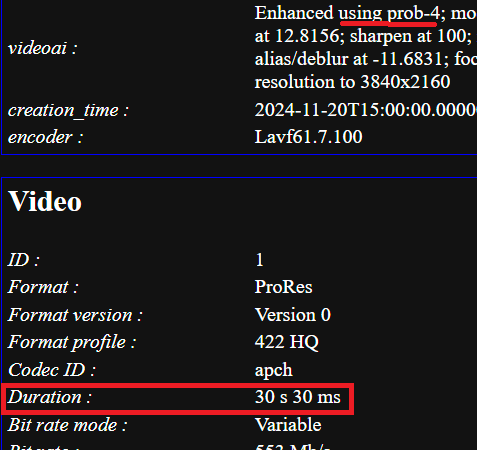
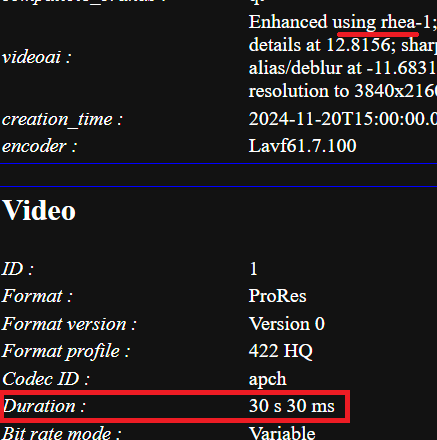
Topaz Video AI 6.0.1

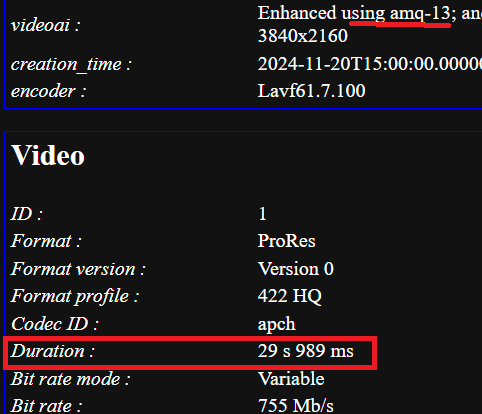
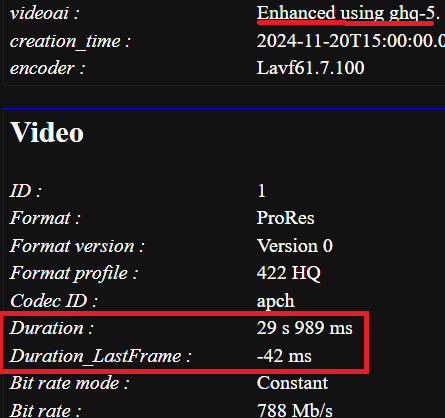
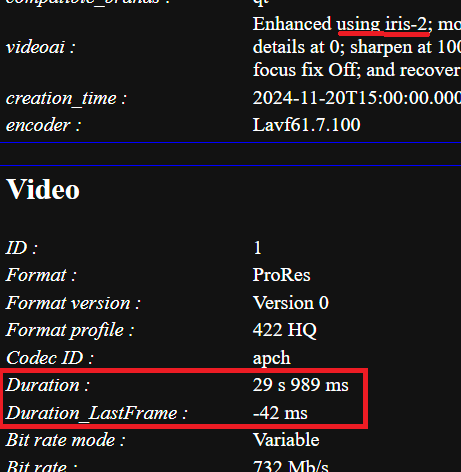
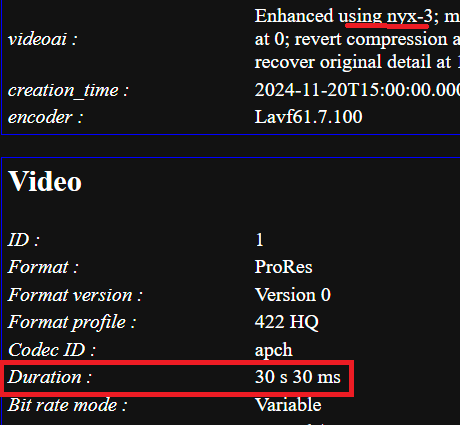
I had fun with version 5.3.6 and found problems with the duration (I think lost frames) in the various models
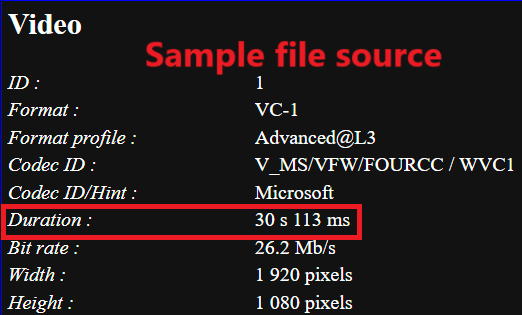
Again using a sample source file of 30 seconds duration
(1 fps@23,976= 41,7 mS)

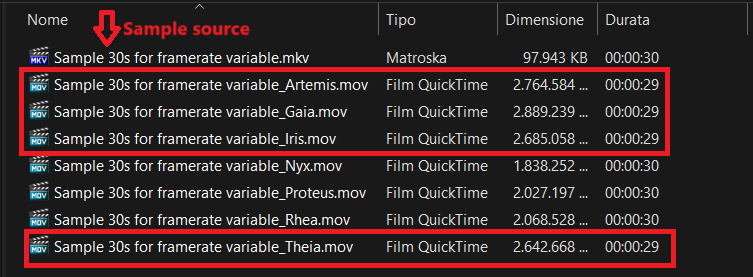
Artemis= -124 mS (-3fps)
Gaia = -124 mS (-3fps)
Iris = -124 mS (-3fps)
Nyx = -83 mS (-2fps)
Proteus= -83 mS (-2fps)
Rhea = -83 mS (-2fps)
Theia = -124 mS (-3fps)

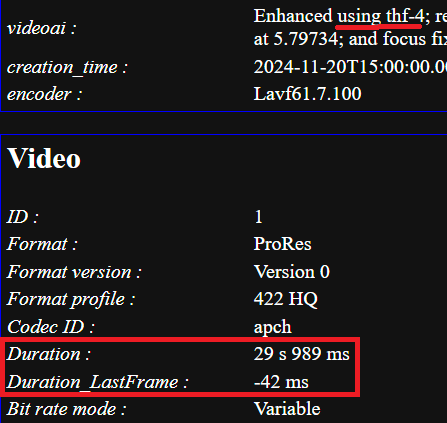
What I don’t understand is “Duration last frame” on some models (Gaia, Iris and Theia -42 mS), this does not appear on release 4.2.2

Immagine 2025-01-15 155057

Source

Artemis

Gaia

Iris

Nyx

Proteus

Rhea

Theia

Testing on release 4.2.2
Artemis= +84 mS (+2fps)
Gaia = +43 mS (+1fps)
Iris = +84 mS (+2fps)
Nyx = +84 mS (+2fps)
Proteus= +84 mS (+2fps)
Theia = +43 mS (+1fps)

2 Likes

Interesting, what I can say is with 5.3.6 Iris and Rhea generates frame accurate outputs. If that weren’t the case, I would have noticed it long ago, as I often put iris tracks over rhea in my video editing software and then every frame has to match exactly.

What I notice is that at the beginning and end the encodes are sometimes not exactly the same length, one or two frames are missing, so I just cut this flush away.

So it’s no VFR problem here (V5.3.6), but TVAI has problems with first and last frames

3 Likes

x265 is the best. You are just not using the right command. There is a grain flag to preserve that if you want. But usually I enable no-sao, which preserves skin texture details. Try this command for yourself. I spent a lot of time testing. This should encode to x265 with no discernable difference from the source, even when pausing and pixel peeping.

ffmpeg.exe -hide_banner -i “SOURCE” -c:v libx265 -preset medium -crf 20 -c:a copy -x265-params “me=star:rskip=2:no-sao=1:deblock=-1,-1” “OUTPUT.mp4”

Change SOURCE to your file and OUTPUT to the name you want.

1 Like

Ryzen 7 2600 8 Core 16 Threads. SD Content

XVid 120fps First Pass
XVid 70fps Second Pass
x264 90 Fps First Pass
x264 50 fps Second Pass
x265 5-10 fps ! Out of the Question !
h265 over GPU → Garbage !

There is a flag in x264 too, and XVid can still preserve Grain better, and is a lot faster.
So why should i use x265 which is way slower as x264 ?

Let’s see what tune grain does.

  • grain (psy tuning):
    –aq-strength 0.5 --no-dct-decimate
    –deadzone-inter 6 --deadzone-intra 6
    –deblock -2:-2 --ipratio 1.1
    –pbratio 1.1 --psy-rd :0.25
    –qcomp 0.8

–aq-strenght → So with other Words, a Function that shoves priorities around, and need more Bitrate for that. I use a custom XVid Matriz, dont need more Bitrate, and it’s faster.
–no-dct decimate → If i use the right Matriz in XVid i have the same effect, but with one difference, XVid doesnt lose Speed.
–deadzone inter and intra → Dont needed with XVid. It see’s anything.
deblock → I hate backed in Deblocking
–ip & pbratio ratio → Custom value does the same in XVid.
–psy-trellis → Dont need that in XVid. I configure with the Custom Matrix what is important and what not. XVid doesnt wash out by nature like h264 & h265. Before those both show something ugly they wash out.
–qcomp 0.8 → So a fast working Curve Compression. That’s XVid behavior !

Funny how a Codec that should be 35% more efficient on Paper (and i talk here just over x264 !) use Settings which go in direction from a older Codec, when it should preserve grain.

People look on the bright parts, i look at the dark parts from a picture, and this is were x264 fails (or you have to use AQ-Mode 3 → AQ Mode need more Bitrate and is slower. So if X264 cheats, i cheat to and raise the Bitrate in XVid, but XVid doesnt get slower if the Bitrate is raised !)
and extreme sloooooooooow x265 (which still cant compete to this day with x264 when it comes to grainy content) even more.

There is a reason why there is a big thread in doom9, were people *hit on h265.
There is a reason why there are old threads in doom9 were people *hit von x264 when it comes to grain & fine detail conservation.

Did AQ-Mode & that Psy Stuff help ? Yes ! But at what cost ? AQ Mode need more Bitrate, and Psy Changes the Form from things around, and i hate nothing more if a *ussy Lip in a darker Area, looks after Compression like a Cow Tongue.
That’s was always the result (2 Weeks of experimenting) with X264 5000kbits 29,97fps SD Content.

3 Likes

Some time ago I make test with grain flag to preserve in x265. To make exactly quality like in x264 I was needed to do file equal big like x264. X265 need more time and energy. It’s no eco-friendly to use HEVC to make film with preserve grain.

You got me curious, so I looked up Doom9 threads about the issues of H.265 and noise. I could only find people that were trying to set kilobytes per second having a problem with it. Would have been nice to hear what the results of a standard CRF 18 on slow does compared to whatever they were trying.
I personally don’t like noise or grain and get rid of as much as I can without completely smoothing everything out, so I’m not the right person to do my own tests on if libx265 does keep noise correctly or not.

I agree that it takes LOADS of time to convert with libx265, but the point in doing that is to get the smallest file with the greatest quality. If’s that’s not something you want, you won’t go through the effort.

If You don’t like noise or grain, Topaz is Your best friend with strong settings denoising :slight_smile:
And If you want the smallest file, why You don’t use AV1 codec? 10-20% the smallest file than HEVC with equal quality.

My TV cannot play AV1, and H.266 is better than it by all metrics—and also cannot be played by my TV.

If you want the best quality with the lowest file size, x265 is the way to go. Yes, it takes longer to encode, but you are only doing that once. You always have to trade something when encoding. Speed, Quality, Size. I prefer to sacrifice speed to maximize quality and reduce size. I just set batches to encode overnight if I need to.

There is no best Quality at the lowest Filesize

(there are more possibilites of Setting Combinations with x264/x265 as People in China xD. What is considered good today, can look like *hit in 10 years ! Example: DivX5 1CD Ripps, that looked nice back in the day on our 19" CRT Monitors and CRT TV’s over S-Video, but look horrible on a Flat Screen, even more if the Flat Screen is big)

Lossy Encoding got always sacrifices and compromises, the Question is where (Priority) and if it’s tolerable at the given Filesize.

Auto Judgement stuff like Psy-Rdo/Psy-Trellis, MB-Tree & AQ Mode just push Prioritys around (and i dont trust AQ-Mode & MB-Tree anymore)

Examples how they just push Prioritys around.

Example1: AQ Mode → The Higher the Strenght, the more Bitrate in CRF will be used. The Higher the Strenght, the more Ringing Risk.
The Higher the strenght, the more Priority for complex DCT Blocks (Fine Detail) and less for low Complex Blocks (wall, hart contures, surfaces with allready low detail).

Ok let us think again about what i wrote.

There was a x264 Coder back in the day, who selled the Idea to use more Bitrate to keep more fine Detail, as a Function ! (any Codec can do this !)

The only thing that allowed him that he got not *aped from the doom9 guys is, that
it mostly fixed the Problem that h264 washed out fine Detail.

Ok, so what is, if AQ-Mode is used with CRF ?

Way More Bitrate is used, and we got slightly more Ringing at hart contures (something that XVid does by nature ! because it sees more, and tries to keep more, even if it looks bad afterwards) and better fine Detail preservation (something that XVid does by nature ! no deadzone cheating)

What is if AQ-Mode is used in 2 Pass ? The Filesize doesnt change, but because x264 need way more Bitrate to keep Fine Detail, we lose cleary detail at any place, that was not complex, and the only reason why there is not a ton of Ringing & Blocking is because h264 got the luck of having a Deblocking Function (and loves to >dont see what is there< ! That’s what the deadzone-inter & deadzone-intra parameters do. What can’t be seen, cant be processed. Result = Washed Out High Frequency Detail, i call it Cheating to create less Blocking & Ringing at the same Bitrate as XVid)

It’s no wonder, that most people dont use 2 Pass anymore, and that those x264 guys recommend CRF, it hides better the fact, that they did sell “using more Bitrate to keep more Detail” as some kind of brand new special function.

I can use a Custom Matrix in XVid, and can configure the Priority from 64 DCT Blocks from I, and P&B Frames like i want, and XVid will do it exactly like that, no flawed Auto Judgement, no Deblocking Cheating.

Example2: Psy-Rdo, Psy-Trellis.
Good: Does not make the File bigger ! like AQ Mode.
Bad: Doesnt try to ReCreate Complex Blocks, if it would cost to much Bitrate.

It ReCreates something that looks similar complex, but cost less Bitrate.

The Problem: It’s a Auto Judgement Function (like AQ Mode) so things that are important can be distorted (*ussy Lip in a shadow, shadow on a *ick → Both are a important Combination in Pron ^^) especialy if grain is in the Source.

Example3: MB-Tree
Tracks Detail over Time ! So it sacrfices the Detail of static parts, for moving parts.

Good: Helps to keep Motion Sharpness (because it sacrificed on other places) and need less Bitrate at the same CRF. Very good for normal Movies !

Bad: Static Parts (lets say a Chick on a bed that doesnt move much) lose more Detail, or moving but unimportant parts (like a ton of tree leaves that move, because a Person walks in front of it, and the Cam follows) got to much priority.

Another Problem: If there is grain and the Grain Intervall & Size matches the “Tracks Detail over Time” range, then MB-Tree will have Problems to judge what has to be prioritized.

All those functions push problems around, and in the end, there are way to much possibilites to find “the best quality” for given filesize ! (especialy if some codecs do better at some resolutions and lightning as other)

So i take the least pain in the *ss Codec, with a behavior that is more predictable (no psy, and a Matrix that i know) and honest !

No Deblocking Cheating ! No 0 Effect @ value Change (because Deblocking negated the effect of the Value Change)

8 from 10 times XVid does a better job (and is way faster) at the content that i process (mostly Euro Pron DVD’s until 2007, most times i dont upscale. I get the best out of the SD Res.) and the Bitrate that i use, even on 59.97 fps.

Yeah i cheat too xD with a Custom Matrix (that i select by use case) and Special BFrame Values ^^ that work good with the Bitrates that i use.
Version 6.01 of Topaz Video Ai is the WORST UPDATE of all. All of the things that we have learned to use are now altered, and for most practical purposes hidden on another page, or under some unexpected small button.

I think I started a render, but cannot see the damn export window to see if it is working or not. This is inexcusable.

Why do I and others have to RELEARN how to use this version? Haven’t you heard all of our complaints? DO NOT CHANGE THE DAMN INTERFACE. Change the underlying engine, make it better (which you have) but don’t make it confusing, frustrating, and so hard to use without spending tons of time to learn where the hell things are.

I have cancelled all of my Preset Updates and I’m asking for a REFUND for my last payments because I find all of the most recent updates UNUSABLE. I don’t have time to waste on searching out how to use this damn version.

If you are also pissed off about these same things, put your voice here and also do what I have done to make sure Topaz pays attention.

14 Likes

Because they pay no attention to complaints, and keep screwing with the interface. They just don not get it at all. No respect for our feedback.

5 Likes

They are deaf to our complaints and do not understand or respect our complaints.

2 Likes

One of many examples is the variable frame rate problem that was never solved, a command was introduced that rather than solving the problem hides it, creating others.
It has also been pointed out to refer to the latest versions where the problem was not present such as 5.3.6. or the old 4.2.2. But they seem to disregard what we write on this forum.

5 Likes

I bet if they reverted to an older FFMpeg build from before the problem started, it will fix it. I am 99% sure it’s an issue with something that got changed in FFMpeg, and then it got incorporated into the Topaz FFMpeg build.

@tony.topazlabs , thoughts on this?

Why not get the team to build FFMpeg with a build that was older than the 5.3.6 release and see if it fixes the VFR issue?

5 Likes

That means before they implemented mplayer, since that the VFR thing startet. They can revert, but I am sure they don’t do that. So then the problem must get solved, otherwise they can stop publishing any new releases, we don’t use it!

MAC users are not affected and Rhea model is ok, so it’s definitely possible to fix it, get in the code and find it! I’m going to keep bugging Topaz until they fix it.

1 Like

Why not get the team to build FFMpeg with the exact 5.3.6 release and see if it fixes the VFR issue?

3 Likes

It only limited them in what they could do (like using lib265) using this public domain ffmpeg tool.

They will absolutely never get ahead of the bugs using the latest version of ffmpeg because it’s in constant development. The most successful applications that use ffmpeg are ones that keep it simple.

read about the new TVAI Abilities.

v.5.4 installed and tested new Rhea
It took longer to encode and I didn’t see any differences from Iris… The interface is still ugly… I’ll stay in v.5.4 for now