Great! Thanks for that! Now the preview in external player works with one click

New roadmap coming?
2 Likes
Can we please have some more flavours for VBR Main 10 compression.
“Low” compresses to much for my liking and “Medium” is way of the scale for me.
With CBR I can more or less control the output size, but then I don’t have the advantage of VBR which is supposed to give me the higher bit rates when they are needed the most.
With handbrake I can more or less predict the file size of the target.
When the file is too big to my liking I can compress it further with handbrake, but the result can’t be as good as doing it at once with Topaz.
Rhea is more effective at upscaling text than Iris and Proteus as it does not create ‘scribble’ i.e. meaningless markings instead of words. But, although all text is recognisable as such, if it is not in the foreground, it tends to be made thinner than it should be. Small text is also not readable.
Example still shot attached.
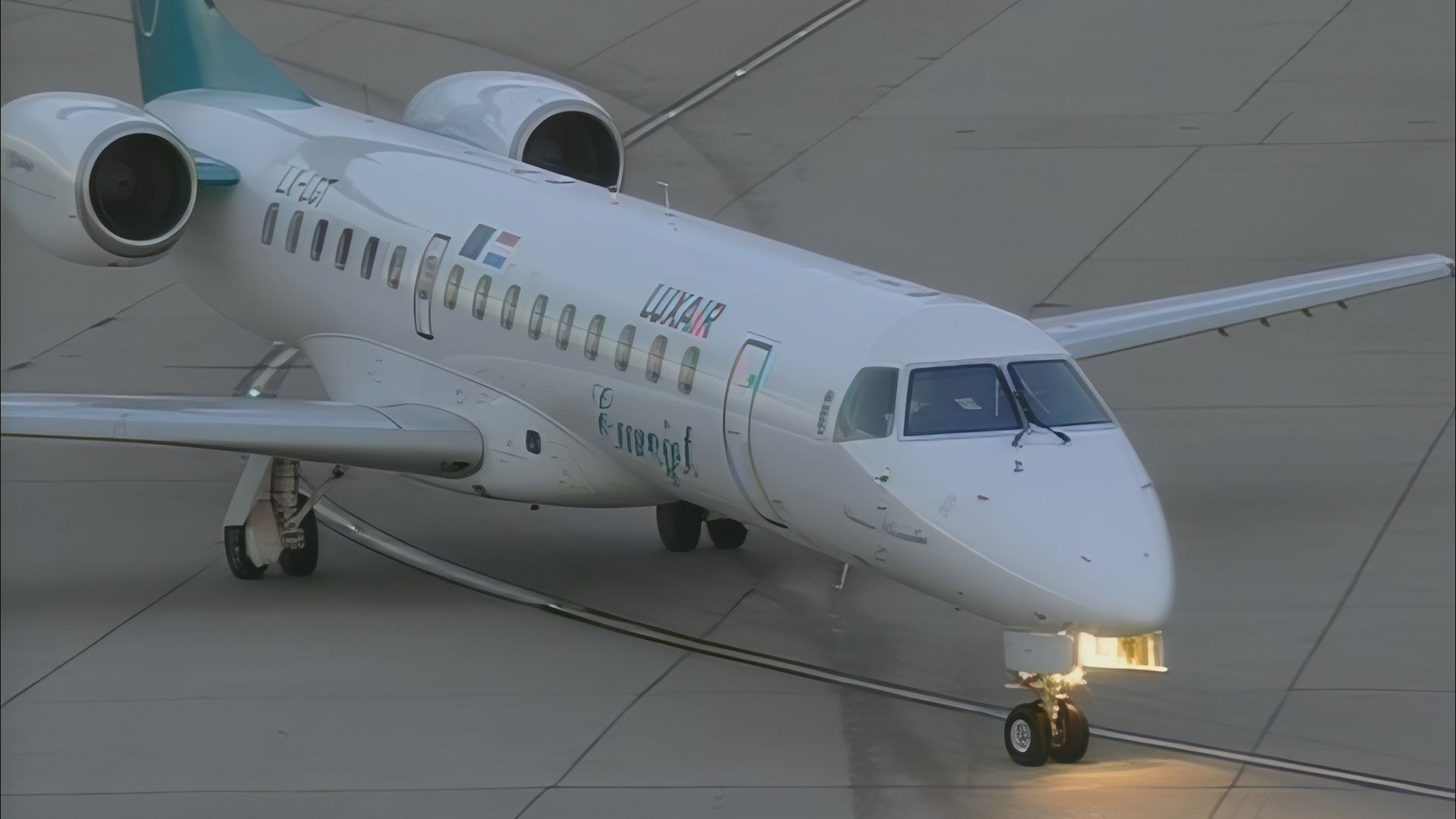
If you look at the registration, the text is thinner at the end and slighlty distorted and the word Eurojet is unclear.
Hopefully this will improve in later versions as, overall, Rhea is doing a good job in upscaling SD 4:3 DVCAM to HD 16:9.
2 Likes
This seems to have some connection to “Instant render.” If you turn this feature on, you can “instant render” previews all over the timeline without any apparent problem, but with it turned off the old method of specifying preview length and rendering looping previews will, without any consistent pattern, join all your previews together into one giant one.
1 Like
I flew in that plane  it is so noisy
1 Like
I have x2 standalone PCs which are not identical builds but both have (different brand) 4090 cards and since this latest version, as soon as I import any video file, the software locks up instantly on both machines. Getting quite tired of these hit and miss updates now.
That’s really close to what is happening on mine as well, though nowhere near as powerful as yours systems. However, it seems to vary slightly between versions of 5 I have tried.
-
One of them did finish loading the input, but I had to wait up to 5x minutes after selecting import. However, when it did load, processing previews didn’t work at all in app, the frame numbers were correct but the live display of what frame number I was on while scrubbing was wrong and the last 3000 frames or so were black, but exporting still exported those frames correctly despite showing black in the app.
-
This one won’t open the input at all. I left it after import, went to kitchen, toilet, came back - nada. However, if I try to DO anything with the application, it either hangs or crashes immediately - other than very basic things like opening settings or playing with the scrub bar (that just shows 63000 black frames).
Additionally, because the program tries to save the input from crashing, each time I re-open the input is there again, but I can’t close the input because trying to close the input crashes the application and then I go into a loop of open/crash. IE, literally unusable for anything currently.
I am sure that there is a way to manually remove the input settings from the app so it opens without the input loaded - though not sure the point, If I add the input the same thing happens again.
Every time the version number increases, so do the number of issues. This is the first time, however, where the program has literally become impossible to use with an update. I like the working on the models and trying to bring in news ones - was looking forward to at least testing this Rhea model - but a per-requisite for using a release version of an application is, well, that it runs properly first…
Had I bought the application now, not coming into this with background and had this kind of issue, I would be more than a little unhappy at the price point for an application that is unusable. Note I also get that not everyone has the same issues, as I see people using this app in the meantime, but my posts in Alpha, Beta and Release have been ignored, as has my direct message to Topaz - so hence I am at that position that I may as well uninstall V5 and go back to at least V4 indefinitely.
I just don’t like my chances of these issues getting fixed anytime soon if I can’t even get assistance directly trying to message topaz and getting no response either. So if anyone else is reading this and not having issues, I am glad for you and hope you never experience any cause god help the length of time you will have to wait for assistance.
Mine never opens either despite how long I wait and yes, having the program always auto open the last used file is a pain.
Are you importing a your files from a network/NAS at all?
I’ve always pulled files from my network and exported them back to the same location on the network (as it defaults to) so i tried changing the export location to a local drive and that seems to fix on one computer.
It didn’t work on the second computer but if I copied the video file from my NAS to the local computer, things worked ok with no lockups.
So, it seems it could be a issue with Topaz getting files from a network and I vaguely remember an older update had this network/lockup issue too.
For reference, I’ve used 100’s of videos with Video AI all from the same network/NAS and I run a 10GB network with 10GB switch so speed should not be an issue.
TVAI isn´t choosing the right AI Processor on Auto here.
Processings time reduces from 3 days to 6 hours choosing the GFX-Card as AI Processor !!!
logsForSupport.zip (47.3 MB)
3 Likes
Another bug detected in this version: if in “preference/processing” you set the GPU, and then close the software and reopen it, the processing parameter resets to “Auto”. If you’re not careful, the 2nd batch file will use the CPU instead of the GPU.
This is a very problematic bug.
4 Likes
@tony.topazlabs
The latest driver has improved slightly but has not solved TVAI’s issue. The constant bitrate still failed to reach the setting (when using H265 Main 10).
The team should really dig into this issue!
1 Like
We better get @ForSerious on this one!


2 Likes
This bug is so irritating! Oh well.
I did read a few people having issues with network drives, but in my case, I have always found using Topaz on my SSD’s was the fastest and when I tried to involve my NAS - my one storage location on a network - ages ago, it doubled processing times.
So now I have a spare 2TB SSD direct plugged into the SATA 6Gb connection on the board and use that for all upscales. Technically i actually use two normally, one for the input and one for the output, just to avoid any potential bottlenecks reading from and exporting to the same drive.
I will mention that I actually left Topaz alone (with the frozen import) went to work, came home forgot about it till now and just realised I had left it open.
I can see the import now, so the import did - at some point in the last 24x hours actually open - don’t ask me how long it took - though it still has the same issues with the import, IE, the below screenshots that show the import “ending” several thousand frames before the actual end of the import with all black frames after this. (The Out bracket at the end is how the video imports, I don’t select it that way)


If I ran a test again, it is likely that the export will still actually be exporting ok, but the preview is completely broken For example:

This shows my selecting an extract from the blank space at the end, the output folder showing actual images, but the preview window still stuck on the “last frame” which isn’t the last frame.
In essence, I “might” be able to use the application somewhat. I just need to pre-prepare by importing the import the day before and pretend the preview pane doesn’t exist and use it as a glorified CLI…
How tricky is it to merge audio and to get correct frame rates when you combine the image sequences back into a video file? Concerns about that have always stopped me from going the image sequence route.
@tony.topazlabs The Pro Licence May be a blt use full on Intel iMacs and Windows Desktops .Windows PCs can have multi GPUs .Intel iMacs can have an External GPU only. .Apple M1 and above thunderbolt as far as I know can not have an external GPU.1099 for pro Om M3 Multi GPU
not allowed.For Enterprise consider Cloud Like Blackmagic Cloud.Enterprise could be Client /Server.Clients Make Adjustments Till they submit to Server.
By the way Plugin for Resolve is Crashing.
2 Likes
It is very frustrating to see that a feature which seems to be so easy to implement being ignored for a long time.
I’m talking about the little control we have over the output size.
Personally I either use “H265 Main 10 VBR low quality” or “H265 Main 10 VBR medium quality” .
The first is often giving me too low quality and the 2nd one gives me one that’s too big in size.
The last render in medium of a movie gave me a file that’s 26 GB. Even though it’s 50 fps, it is huge. No idea what a “high” would have given me.
I’m currently rendering it in Handbrake which will probably give me an 8 GB file.
It will not only cost me much more time (an extra 40 minutes), but the result is probably of less quality than if Topaz would have done it.
Please rename “low” to “very low” and give us an extra one between that one and “medium” .
I can’t imagine that’s a hard thing to do.
Later this could be changed to a slider with an “expected average VBR”, (just like handbrake has). Because that could take a bit more work I don’t mind if that’s done later.
The part that’s actually doing the work is pure magic to me, for which I have a lot of respect. I therefore don’t understand some of the quirks in the interface.
There are many other things that I hope to see improve, but this one is giving me headaches each render.
1 Like
You can edit the video-encoders.json file and create your own custom presets.
