@tony.topazlabs Can we please get a benchmark thread started for the 5.x series? Thanks.
2 Likes
created
2 Likes
it is a hidden microsoft folder programdata enable hidden items in explorer
n modern versions of Windows, you’ll see a “ProgramData” folder on your system drive—usually the C: drive. This folder is hidden, so you’ll only see it if you show hidden files in File Explorer1. It contains data for both Windows classic and UWP applications. However, it’s generally not recommended to alter system files, including the ProgramData folder2. If you need to access it, follow these steps:
- Open File Explorer options from Control Panel.
- Go to the View tab.
- Uncheck “Hide protected operating system files” and click on “Show hidden files and folders”.
- You’ll find the ProgramData folder on your C:/ drive itself3.
“ProgramData is not Appdata
1 Like
For those who are unhappy with the new GUI look, please vote for the idea I just posted:
12 Likes
The pause function does not seem to work with clips that are stabilized. Could this still be implemented?
2 Likes
Bug: The temp file “filename_258257891.mp4” is not being deleted when the final file is finished.
No. The only thing open that could be reading it, besides Topaz itself, is an Explorer window.
That new logo icon is horrendous, glad I saw this as I’m not updating until it’s fixed.
8 Likes
I think the removing of icons from each section on the right-hand side “Stabilisation, Enhancement, etc” was a bad choice too. Especially since those icons used to show you in the bottom centre what you’ve selected, now there’s no visual communication of this.
5 Likes
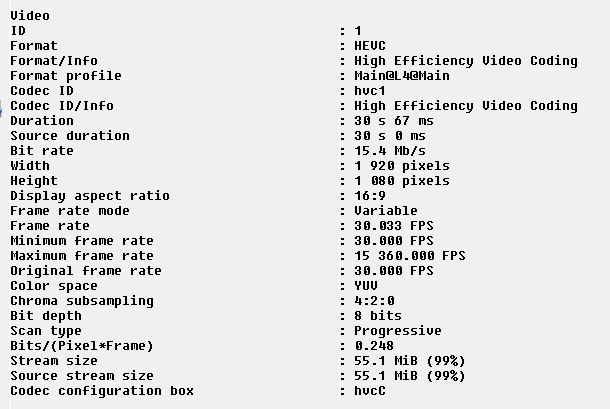
Also, a technical issue I’m facing in v5 that wasn’t in 4.2.2. My inputed file has a constant framerate of 25FPS for example but when I export, I now have a variable framerate where the minimum is 25 but the maximum can be some nonsense value like 12000FPS. This means I can’t relink the clip later in Resolve due to this framerate mess up.
This wasn’t an issue in 4.2.2 and I just confirmed there by downgrading and running the same footage through it. Output is constant framerate in 4.2.2. The issue is identical on macOS and Windows.
1 Like
I did not expect a new major update! If everything here is true, this is huge!
1 Like
What are your export settings ?
I’m getting the same using h265 to .mp4 anf FFV1 to .mov
Defo a bug. Tested on 5.0.0 and 5.0.1
3 Likes
Can you send the logs to the support team or post here?
Wow, that program has a nice retro look to it. I use MediaInfo Lite. What’s that?
Mediainfo - Text view
I had a PC issue of some kind whilst doing exports late last night, unsure what happened but the PC had restarted. So this is the first time I have seen how this resume function after crash works.
The exports are there - they even had started again by themselves - however, they both started from the beginning and ignoring the 80% of one already done and 60% of the other.
Is it intended to restart the entire export from a crash?
3 Likes
New features are great but I’d personally prefer updates more focused on hardware optimization, I’ve been looking at the benchmarks and noticed the 4080 and 4090 are almost identical yet the specs are huge.
Currently on Task Manager my GPU is only been used 10%, while CPU is at 90%, even with putting GPU in preferences.
Features are great ideas that most will love the effort of them being implemented but I always feel they should be added once the software is ready for them.
1 Like
Dont use task manager use gpu-z to get a correct reading.
1 Like
My export settings were H265, Main, Constant 2.5 Mb/s, Audio Mode Copy and Container mp4.
