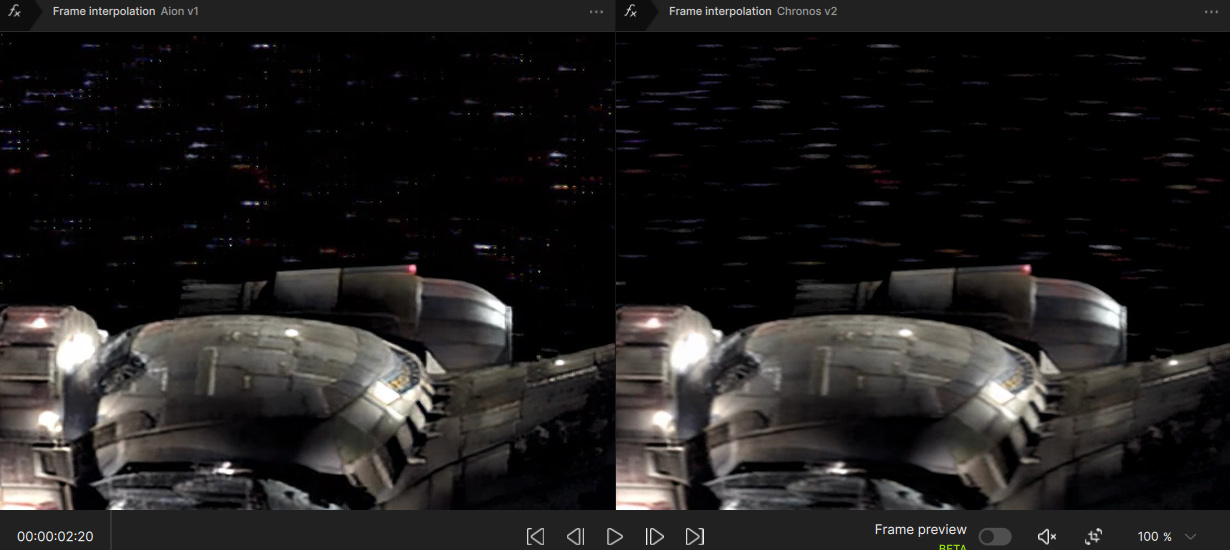
When looking at models that increase FPS, I liked Aion the most – it was the best at creating additional frames. Unfortunately, I didn’t pay attention to one thing during the tests: Aion also increases sharpness. He shouldn’t do that, because there are other models for that. Among other things, he shouldn’t do it because it deforms the image. As I saw what he did with the moving stars in the background of Serenity flying, I shook my head. Then I looked at other parts of the film and regretfully abandoned this model for Chronos. Chronos maintains the sharpness faithfully, thus not destroying the image.
But can you see that it is sharpened at normal speed? The model tries to undo the motion blur that is a byproduct of 24FPS. It does this for if you’re creating a slow motion version, but it should not be visible at normal playback speed when using it to increase the FPS.
I noticed that too - the starry sky and all those little dots - … I tried Chronos as well, but the in-between frames are sometimes too blurry. Right now I’m using RIFE 4.17… I haven’t had a chance to try the newer versions of RIFE yet.
I would never use Chronos to double the frame rate. I’d only use it as a secondary model to compensate for the remaining difference and reach the target FPS. You won’t be happy with Apollo or Aion when you’re trying to go from, say, 48 FPS to 50 FPS. Only Chronos still produces good intermediate frames here between the two original frames, because it was designed for uneven fps interpolation. On the other hand generated Chronos frames can be blurry, so which matters more to you—if the improvement in motion smoothness outweighs or not
In general, I’m a bit cautious about using frame interpolation. Not every video actually benefits from interpolation, especially if the motion between frames is already very consistent. Once you get to around 48 FPS or higher, people often refer to it as the “soap opera effect.” The term usually has a negative connotation, but I don’t think that’s entirely fair, it pends on content and some people simply prefer the smoothest possible motion, while others feel it looks “cheap” or less cinematic because traditional films are typically presented at 24 FPS (or, at most, 48 FPS).
Moving to 48 fps is essentially a compromise worth considering when upscaling, instead 50 or 60, because TVs also handle 48 fps well. That has the advantage that you don’t need the Chronos model
I would like to be able to use the model with the precision of building additional frames like in Aion, but without unnecessary sharpening like in Chronos. I hope Topaz does it someday.
And now I double the almost 24 FPS to almost 48 FPS, and the European 25 to 50.
What do you mean? When I tried it a year ago you could put in a 23.976fps movie and choose output fps at 47.952fps or 48fps or whatever you wanted. Are you saying they removed that that?
You can manually set any fps, but you can’t set it to 48000/1001 like I do in VirtualDub2. I don’t risk that at some point the sound will diverge from the image, so that’s what I do.
OK thanks for clarifying. Isn’t 47.952fps, which you can put, the same as 48000/1001 except for the extra decimals? Is Topaz limited to 3 decimals max and you’re saying that will cause a drop at some point?
How are even getting that level of accuracy when you output anyway though with 48000/1001? Nvidia cards cannot even do 24000/1001 without rounding errors. AMD can but don’t they have other issues with PC playback? Curious what system you use successfully for outputting 48000/1001 content because I need to figure that out also, not just a good way to make the 48000/10001 films but how to output them without drops/repeats etc. Would be great if there was a disc player that could play it off a disc also, or other options besides HTPC?
Im very sensitive to audio sync myself. I have a sync-one2 device and flash-beep test patterns, and want to get exact audio sync. I have improved it a lot but both the TV’s built in audio, as well as doing audio by AVR and speakers, will shift slightly each time you load the test patterns from scratch, or shift a lot if you pause and play the test patterns. I dont remember what I tested on the TV, except that it was jumping from scratch up to 20ms different, but with the speakers and Denon AVR, DTS was only drifting 5-6ms no matter what you did, but Dolby would drift up to 10ms just from redoing the test, and certain types of Dolby (like trueHD) would jump over 40ms from one pause and play, and then stabilize within 10ms jumps around that new number with more pauses and plays.
Apparently Sony AVRs may be much worse for this than Denon, and can’t speak to others brands. But yes definitely on top of that you don’t want to add more from bad timing in the movie. If it helps at all to configure your setup, I think in this application, frame drops will not affect audio sync, but frame repeats will. That’s because if a frame gets dropped the preceding frame is held twice as long and the remaining frames still play in their correct timeslots, while if a frame gets repeated then the rest of the movie still plays 1 frame slot late, causing 41.7ms audio desync.
47.952 fps i don’t know could be a problem…but 48fps works on my LG G4 (120-Hz-Panel, 48 is factor 2.5), I have a Zidoo Player direct HDMI attached to my G4
ChatGPT
Yes. The LG G4 OLED accepts a 48 Hz signal over HDMI.
Specifically:
3840×2160 @ 48 Hz is supported.
1920×1080 @ 48 Hz is also supported.
The TV will display the signal correctly without forcing it to 60 Hz.
This makes it suitable for a PC or media player outputting native 48 fps content.
Since the LG G4 uses a 120 Hz panel, 48 Hz is within its supported refresh rate range. Unlike some older TVs that only accept 50/60 Hz and convert everything else, the G4 can process a native 48 Hz HDMI input.
If you’re using a PC with HDMI 2.1, you can create or select a 3840×2160 @ 48 Hz output mode, and the LG G4 should recognize and display it properly.
Before turning the monitor back on, run the following script from another mac or iPad using screen sharing or ssh
#!/bin/sh
sudo killall coreaudiod
Video AI will not be notified of a new audio device while this daemon is not running ! It will restart automatically after a little while, so you have to remember to do this every time.
Hope this helps!
Edit: Using screen sharing will not crash Video AI because no new audio device is created. I never had any issue on a “headless” mac. This could be a safe way with macOS 27.
Thanks. I spent so many hours with Chatgpt and it is completely wrong about 75% of what it says about this subject, just FYI. But it sounds right when it says things.
Which Zidoo model?
Can you explain more what is the problem with 47.952fps compared to “2x”?
Is there something wrong with Topaz Video Activate ? I Activate it and it logs in and all is good until I close it and then reopen it and I have to log in yet again and again. I have uninstalled and reinstalled and tried a few things and nothing seems to work. Per my account I am good until Aug 30, 2027
maybe gives floating Points but I don’t know 47.952fps works fine or not, theoretically modern TVs supports variabel frame rates up to 120Hz/144Hz but I’m unsure now the Zidoo does VFR too or not maybe it gives out 50Hz.
Zidoo “Z2000 Pro”. I haven’t tested 48 fps on my TV for very long, so it’s possible that 50 Hz works better. For now, though, I’m making my films at 48fps when I do Interpolation ( I rarely do), so I don’t have to rely on Chronos. Later, I can always convert them to 50 fps, either by speeding them up, using Chronos, or whatever better solution might become available in the future.
 3840×2160 @ 48 Hz is supported.