Ah, the ‘ghosting’ from adjacent frames - it happens, indeed.
2 Likes
Thanks for the answer, i can definitely do this manual editing, just i can’t find where does it located. Now i got the answer.
Oh, I see!
1 Like
i7 13700K
RTX 5080 16GB
64GB DDR5
Windows 11 Pro 25H2
Hello, I don’t know if this is normal, but my setup doesn’t seem powerful enough to run Starlight Precise 2.5 with a 1080p source video. Is that expected? Because if that’s the case, there’s no point in me trying to find solutions for nothing xD
My process crashes after about 20 minutes (always during the stage where it’s still estimating the required time) because of RAM issues. My 64GB gets fully used, and then it tells me there’s no RAM left available.
I’m using a 1080p source video, and the final output will also be 1080p, because if it already doesn’t work like this, I can’t even imagine trying in 4K.
I tried with a much lower resolution video, and SP 2.5 converted it perfectly — everything worked great and the result was impressive.
So the issue really seems to be that my 1080p source video is too high-resolution!
Is that normal with my setup?
Another issue: C:\TEMP is one of my working folders, and I had several upscales stored in it. When closing V1.6, it froze again — something we already know about. I then force-killed the task, and something unbelievable happened: V1.6 deleted my TEMP folder, including all its contents. Everything was gone, and I lost several days of work because of it.
I don’t know whether it happened because the folder was named “TEMP,” but something like this must never happen. Now that I think about it, the exact same thing happened once before, although that time the folder was empty.
So be careful, keep an eye on this, and maybe make backups or copy your data elsewhere just to be safe!
Just an update after fiddling with it for whole day, so i uninstall Topaz video, manually delete all the left over folder, everything, then reinstall 1.6, somehow SLP start to work again.
Some weird behaviour i noticed:
- If i render the video from 0 frame, the neuroserver will not took all the system RAM before start rendering.
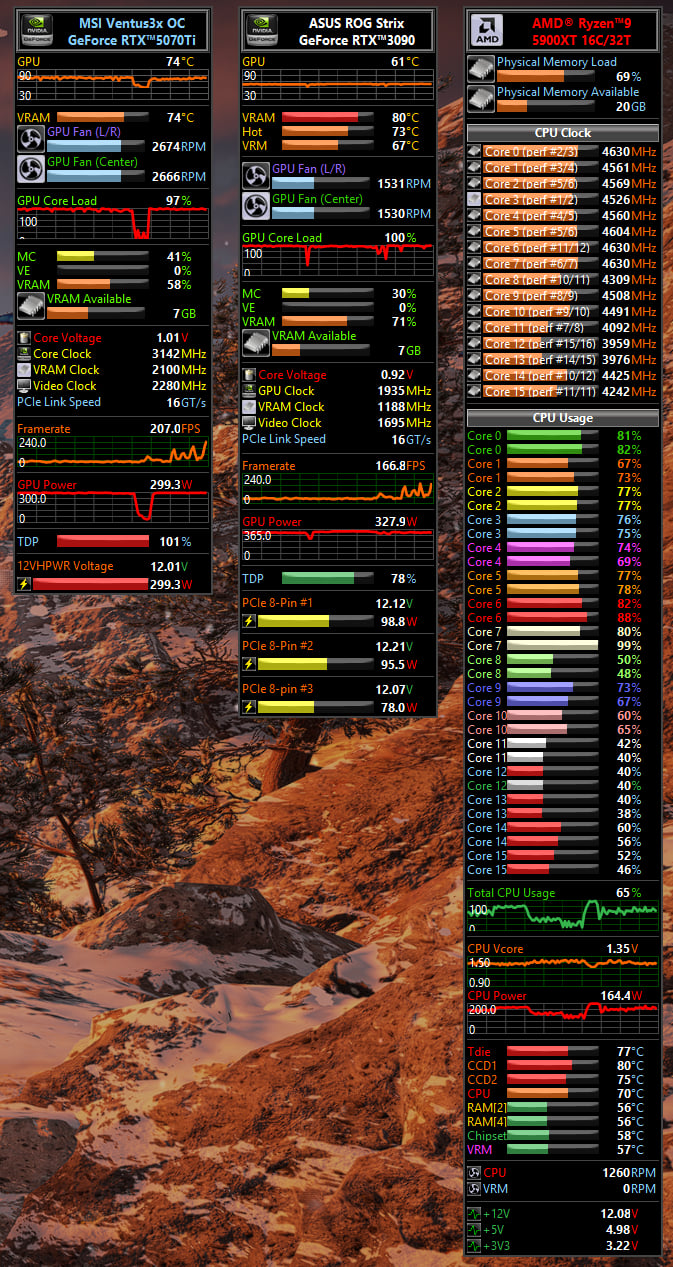
- If i cut in and not start from 0 frame, example in my dual GPU setup, i assign 0 - 15000th frames to RTX5070Ti, whereas 15001 - 27000th frame to RTX3090, when i hit run on the RTX3090 rendering, the neuroserver will start to occupy the RAM GB by GB until it drop to 0GB (my system got 64GB RAM), but then it release all before it start rendering. So it works, unlike the same behaviour on 1.5 but it never release the RAM again causing the whole system to hang up.
In terms of workflow, i’m doing 480p x3 → 1440p by SLP, then SLM 1x, i found the result is much natural compare to SLM 3x 1st then followed by 1x SLP.
The file is being rendered by both cards now, let see how it ends up later.
This is the HW resourced used by SLP.
As several Topaz Video AI users have reported in the past, I also experienced a high probability of a final frame drop in my videos, especially with low-to-medium quality source files.
However, after testing, I reached the conclusion that this frame drop phenomenon does not necessarily apply when a video is split into segments; it only occurs at the very end of the final segment (the absolute end of the entire video).
In other words, there is no need to worry about frame drops at the intermediate cut points. In fact, creating a “buffer” (adding extra frames) at the blackout point is exactly what triggers the “ghosting from adjacent frames” mentioned by mikmod1.
1 Like
Thanks, when i start from 0 frame, indeed, when I don’t cut the videos, it works. That was the problem!
I’ve showed an example of such ghosting, visible even in ‘normal’ video (cartoon). It’s apparent and unfortunate, for now. 
1 Like
I also observed the ghosting issue on 2D animation, especially on a 10 FPS clip, it seems to me low FPS with fast movement will create more ghosting issue between each frame. I did not see obvious ghosting on normal FPS like over 23.976, but definitely saw around 1-5 frames of ghosting leftover from the previous scene on the new scene.
1 Like
Would the ‘repair’ install (and then Windows reboot) help? I hope so, cause, for example, for me the 1.6.0 update failed to even install, and I had to fully reboot my OS (Win10) prior to trying again.
I have a weaker CPU (i9 7940X), also 64GB of RAM and RTX 3090, but all the Starlight models did initialize on me at least with Video 1.5.0.
For 1.6.0 I’ve tried Hyperion 2 only, as it initializes its processing unusually long, which I ranted a bit about here (and for v1.5.0), showing screens of rising memory allocation for neuroserver.exe.
Anyone to confirm if the process dies on starlight precision 2.5 after reaching max ram capacity? also i ve issue with the bar that video appears and you can see the different scenes. after a certain version its blank, if i revert to 1.3 if im sure it comes up. any ways to fix it?
That is interesting, I wanted to try this as well, but I haven’t tested it yet. Yes, it’s true that SLM does not produce a 100% natural-looking result, however but I’ve noticed that SLP at 3x compared to 2x doesn’t really provide much additional benefit.
I think there is no single workflow that fits every situation. I often do first, SLM at 3x or 4x because of the advantage it removes blocking artifacts and delivers very fine results, which creates a really good base for SLP, since SLP works less finely but sure performs stronger reconstruction. Using SLM first forces SLP to be a bit less creative. Sometimes SLP tends to invent too much fantasy.
So I use often ewa_Lanczos for the SLM downscale with “deringing 0.6” to FHD, afterwards SLP 2x up to 4K. However, this workflow needs some post-processing because the result becomes oversharpened.
Wow, that looks terrible. It’s so severe that anyone can notice it at a glance.
In my case, however, it manifested as a “subtle ghosting/relic with a tiny bit of motion” leaking right into the blackout frame, making it hard to recognize at first. It felt almost like an issue with motion interpolation.
But as you said, the root cause of the error seems to be exactly the same.
1 Like
Amazingly fantastic! From a Mac owner. Well done and thank you!
3 Likes
This animation had frames drawn every other one, excluding background movement, and it’s 29.97 fps, that’s why it catches this ‘sickness’ (effective fps is close to 15 for the animated parts).
Luckily, only one of Starlight models suffers such severe ghosting on low fps cartoon animation (effectively 15 fps) - Starlight Fast 2.
But the ‘bleeding’ frames into the black ones is also very nasty issue, forcing you to edit out them and replace with pure black ones once again later.
1 Like
Have you tried running the source through interpolation with no enhancement and jacking it up to 60 fps before Starlighting it?
The ghosting issue I experienced was caused by Starlight Precise 2.5. I initially hoped to just edit it out afterward, but LosslessCut refused to cooperate with me on that.
Because of this, I went back and re-did the cutting from the original ProRes 422 HQ / CFR intermediate file, making the cut right at the frame immediately before entering the blackout.
Moving forward, I plan to proceed with my workflow by selecting cut points based on the premise that no frame drops will occur at the end of the segments.
1 Like
We confirm there is an issue relating to trimming a video for SLP25/HYP2 processing (setting a starting frame index to process, instead of processing the whole video). It will indicate long model loading/init status, and out or CPU RAM possibly. We will fix it in the next patch. Note this is not a regression issue from previous releases - it has been there since v1.4.
The current solution is to crop video outside the app, or just processing the whole video without cropping.
@coolkwc1985 @mikmod1 @yoplafraise2 Your report issues are likely related.
@k3nsh1nta SLP25/HYP2 can run with systems with >=32GB CPU RAM and there is reasonable system disk space.
5 Likes
