Amen!
Yeah. I’ve always had “replace duplicate frames” off and still get VFR/fake CFR. The playback is still “smooth” compared to source, but the video is a pain to work as the mediainfo data is wrong. At default most software treats the video as CFR (since its labelled as such) and drops the embedded timecodes (which are correct in TVAI output), resulting in A/V of output going in and out of sync during playback, which is very noticeable. Re-adding the timecodes from TVAI output to the final edited video track at least fixes that, but really that shouldn’t be necessary.. even then though, still left with a video track which is technically VFR with an irregular avg framerate.
Is it too much to ask for a bug-free version like 5.3.6? I think I’ll cancel my subscription and stick with 7.0.2 or 5.3.6, which I can keep forever. I’m really not happy with the way this company is going… I wait months and months for a bug-fix update that only creates more bugs; the same goes for major updates
12 Likes
I feel the frustration. It appears that the focus is being spread between local and cloud. I wish they would just focus on local or have a dedicated team that specifically works on local and fixes all the bugs.
There is a new version of starlight that is in cloud right now, that supposedly will come to local. Someone from the Topaz team posted that on X. Might want to wait a week or two, to see how that goes. I’m hoping the next version that comes out has the bugs fixed + a new starlight model that is better than Starlight mini or better than Starlight sharp. Mini seems better about retaining the correct details, it’s just a little bit blurry. I love the sharpness and the speed of Starlight Sharp, but it sometimes can mess up eyes.
4 Likes
Yes, odd numbers always. But for example 2x from 30 to 60, I noticed that when “replace duplicate frames” is set to ON, the result is VFR, but when it is set to OFF, you get CFR
1 Like
I was hoping that with the introduction of “Topaz Video,” these well-known bugs (there are over a dozen older posting around VFR) would be fixed, but unfortunately, they continue as before. It would be really important to have a solid base where everyone can switch to it, but now I’ve installed three different versions.
Unfortunately, I also noticed that V1.2 is not particularly stable. When I add grain and select a second model, the program occasionally closes after hours of rendering, and I have to kill ffmpeg.exe in the Task Manager.
…but after this happend it was even worser: I couldn’t start V1.2 anymore, it always freezed at startup and I had to reinstall. A lot of things can be worked around, but that’s where my patience runs out. Also annoying; when I close the program with “X” it still can hang…but Topaz said it’s fixed.
Of course, there are also positive aspects. For example, I think it’s great that we’ve got a new add grain, and I really hope that something happens at Local Starlight.
I hope so.
Right now I’m very happy with Proteus Natural.
With a good input from SeedVR2 it can slightly upscale and clean artefacts while keeping the natural look of the picture.
A bit of sharpening, adding noise afterwards, and Rhea output overlay at 60% opacity - and we’ve got a perfect picture.
1 Like
may i know which model you used in SeedVR2? I used 3b and 7b, both result to me is like junk, the compression artifacts still remained. Whereas Starlight Mini output is a clean but softer image, just need a proteus to sharpen the details will do. The only problem with SLM is the font distortion, otherwise face details is very good.
2 Likes
The difference in quality is impressive. I’m less certain about the necklace, which appears to be pearls in the original. But perhaps I’m mistaken. On the other hand, the facial expression (especially the mouth) isn’t quite the same as in the original. But it must be said that the source image was of very poor quality. The AI did its best.
And let’s not forget the rather bizarre tendency to remove mission critical features, such as the CLI.
4 Likes
With SEEDVR2, you need to upscale at least 2x, preferably 3x, and 4x being the best. If you do a 1x enhance, quality is junk and very instable with tons of artifacts. However, at 2x, SEEDVR2 is already miles ahead of Starlight Mini. At 3x enhance, SEEDVR2 is in a whole nother league compared to Starlight Mini especially for small garbled up faces. 3BQ8 model produces the best results and runs at about 2x the speed of Starlight mini if processing using the same final resolution. 7b models are not that great and slower than 3b models but still faster than Starlight and better results than Starlight. Topaz should incorporate SEEDVR2.
5 Likes
3BQ8 - the best model so far. I split my files to 1000-frame segments, make batch size 69 frames, set 10 frames temporal overlap and it creates almost seamless output. If you need more consistent output, increase temporal overlap between batches.
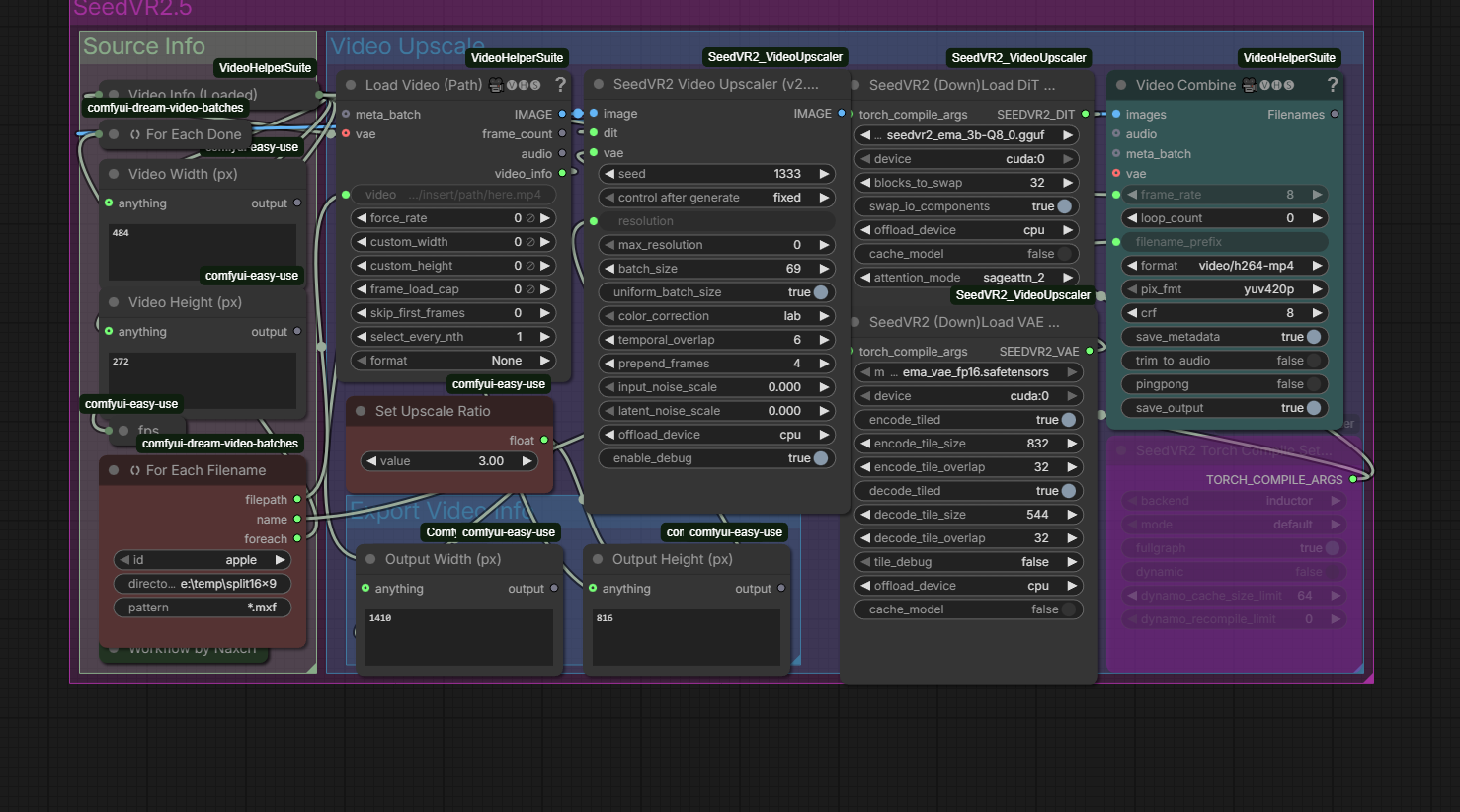
As it was already mentioned, SeedVR2 works better with 3x upscale than 2x (I know it’s counter-intuitive). Therefore I have to downsize my videos to 484x272 (16:9 input) or 422x308 (4:3 input). I upscale it to 3x - 1452x816 and 1266x924 respectively.
That’s the max input my 16Gb cards can calculate without overflowing to system RAM.
3 Likes
This sounds amazing, but I really don’t want to mess with complicated workflows and have to slice my video into multiple sections. This is why I like Topaz Video. I hope they can improve starlight so that the quality exceeds or beats seedvr2 and that they can also match or beat the processing speed.
I’m looking at some screenshots and the quality doesn’t look great to me. Definitely not better than starlight mini, but it may be because the resolution of the screenshots is lower.
2 Likes
Trust me. I’ve been using SEEDVR2 daily for the last few months and it is miles ahead of Starlight Mini. You can google up some comparisons. There are even some comparisons in the SEEDVR2 github discussions. But from what I see from my own videos, the results are even better than the comparisons I see online. The only drawback is the manual work required to break up the videos, downsizing and tweaking ComfyUI to work. Reducing resolution to 1/3 and upscaling by 3x also will cause some lost of original details. SEEDVR2 will generate its own details to make up for it but it is not original so there are tradeoffs. At 1/2 resolution, the video might not be stable enough to your liking. You can apply Proteus or Iris after SEEDVR2 and then do a Apollo at 2x frame rate to stabilize the video and it helps quite a bit. Don’t do anything other than 2x with Apollo as I notice Jitters if the multiple is not a whole number. At 2x, Apollo works better and smoother than Chronos because it has temporal consistency and analyzes multiple frames so you get sharper detail in motion scenes.
4 Likes
SeedVR2 is really good, but the downside at the current state is the bad ghosting artefacts, what Starlight Mini does not have. SeedVR2 has a strange 4-frame pattern, where on moving objects and moving faces only every 4th frame is sharp and the rest has dark blury spots in it. That effect has nothing to do with motion-blur, because if you skip the first frame on the input, the sharp frames in the output also shifts one frame. It’s very strange and I can see the artefacts very clear, when I play the video.
1 Like
did you enable tiled? I wonder whether the junk quality i got is due to tiled setting
Font / gfx / logos distortion is MUCH better when you do Starlight 3x.
BTW., In my tests here Starlight mini at 3x is better than SeedVR2 in most cases.
But it takes eternally
Yes, maybe…because i always did Starlight mini at minimum. Shall try 2x or 3x later
same here. I have try SeedVR2 to upscale my long video, the experience is so frustrated. You have to slice the video into multiple chunk, need to try and error for the batch size and tiled to avoid Out of memory error, definitely counter intuitive. Worst still each setting will varies when your input resoluation is changed. I would definitely trade off the quality abit (if it really exist) for far better user experince.
1 Like
Of course. Without tiling I get the OOM error.
Here’s my workflow, optimised for 3x upscale with 5070Ti and 32Gb of system RAM:
16:9
4:3
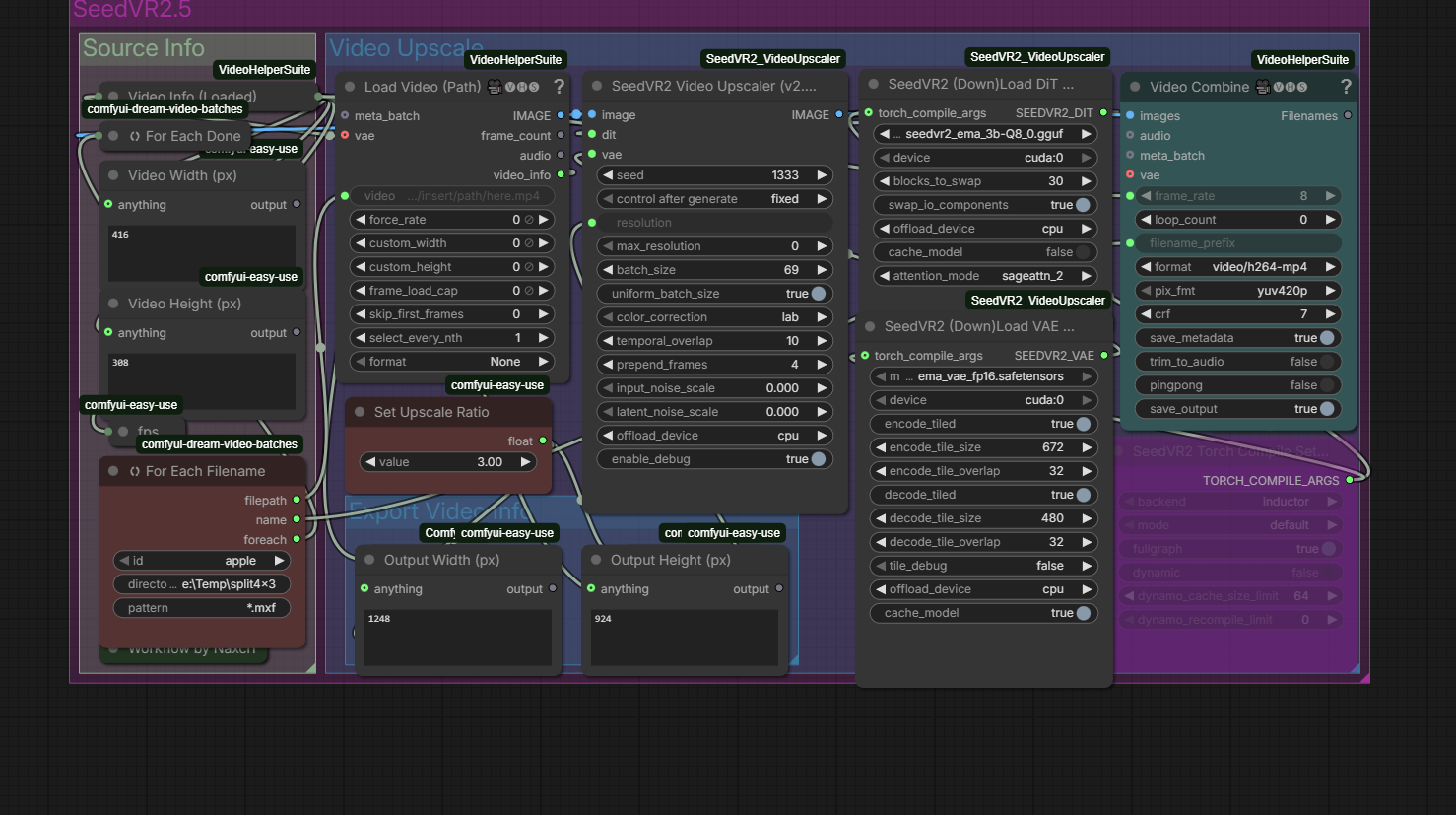
PNG consists the workflow. You can drop it to the ComfyUI window and import the workflow.
After multiple clips upscale, I concatenate them with FFMPEG.
A little Powershell 7 script:
param ($path)
if (Test-Path -Path $path\files.txt) {
	Write-Host "Deleting files.txt"
	del $path\files.txt
	}
$outDir = Read-Host -Prompt "Set the output folder"
$outDir=$outDir.Trim('\')
if ($outDir -eq '') {
	Write-Host "Processing to the input folder"
	$outDir=$path
	}
if (Test-Path -Path $outDir\output.mp4) {
	Write-Host "Deleting output.mp4"
	del $outDir\output.mp4
	}
foreach ($i in Get-ChildItem $path\*.mp4)
	{
#UTF-8 file names work in PowerShell 7 only
		echo "file '$i'" >> $path\files.txt
	}
ffmpeg -hide_banner -f concat -safe 0 -i $path\files.txt -c copy $outDir\output.mp4
Invoke it with the input folder parameter.
And I process the final concatenated file in Topaz Proteus Natural - the best option so far for cleaning good input.
2 Likes
