Topaz Video 1.2.0

Hi Everyone,

Today we have a new release with a good collection of updates!
See more details below:


1.2.0 Downloads


Improvements and Fixes

  • New Model: Proteus Natural
  • Nyx XL Fix
  • Aion Mac Fix
  • UI refinements
  • Processing update
  • Batch Exporting improvements
  • Cloud Export Fixes

Proteus Natural

Proteus Natural, is the next installment to our popular Proteus ai model. Like Proteus, this is intended as a general up-scaler for most types of content and can render locally and on the cloud.

  • Great for most video conditions and types
  • Addresses compression and general digital artifacts
  • Reduces halos common with older content or dark sharpening halos from digital zooming
  • Respects the original source material -doesn’t overly enhance/modify source inputs
  • Clean upscale that does not distort or warp original source details
  • Addresses aliased edges
  • Great model to mix and match with a second enhancement
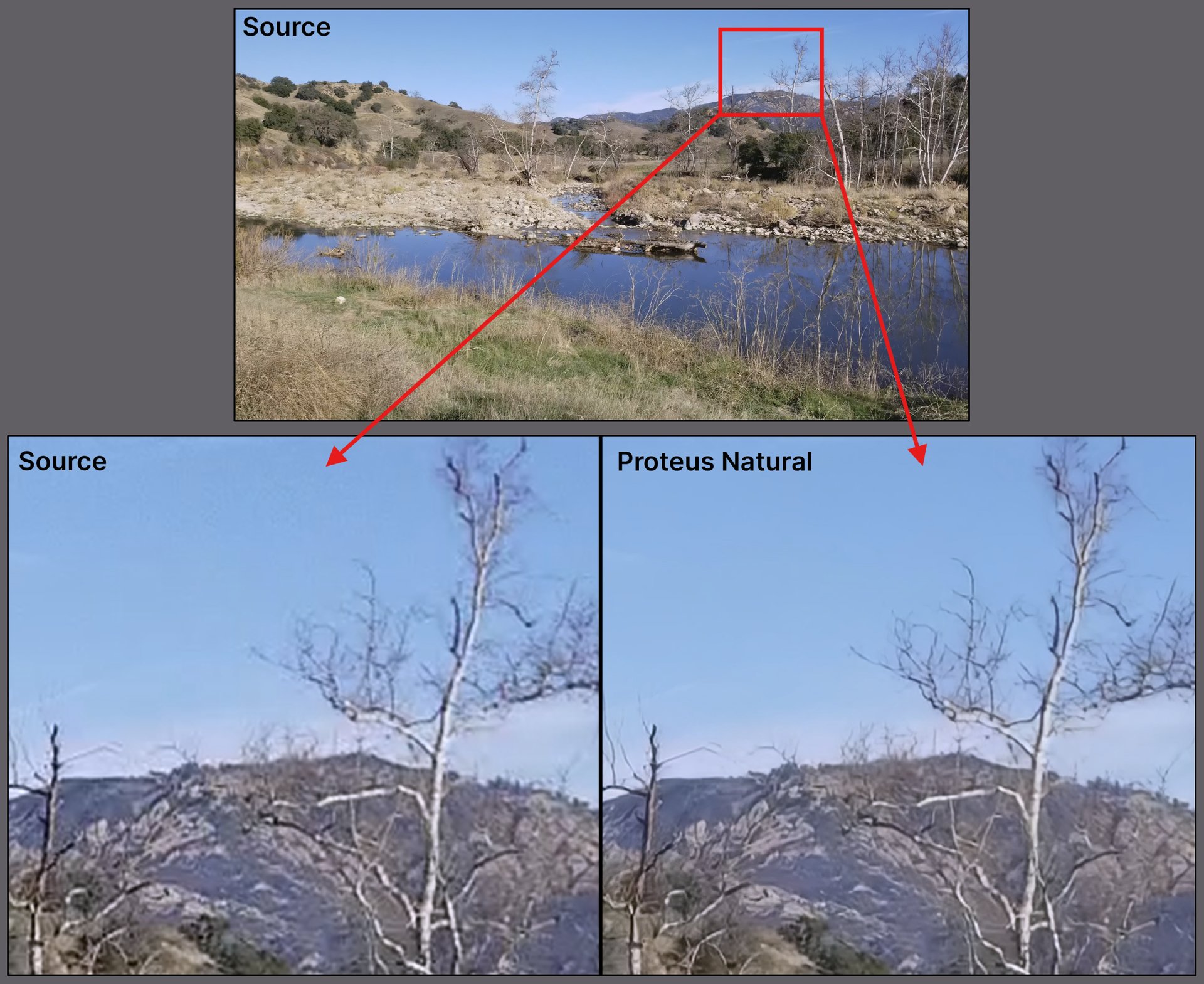
What’s the Difference between Proteus and Proteus Natural?
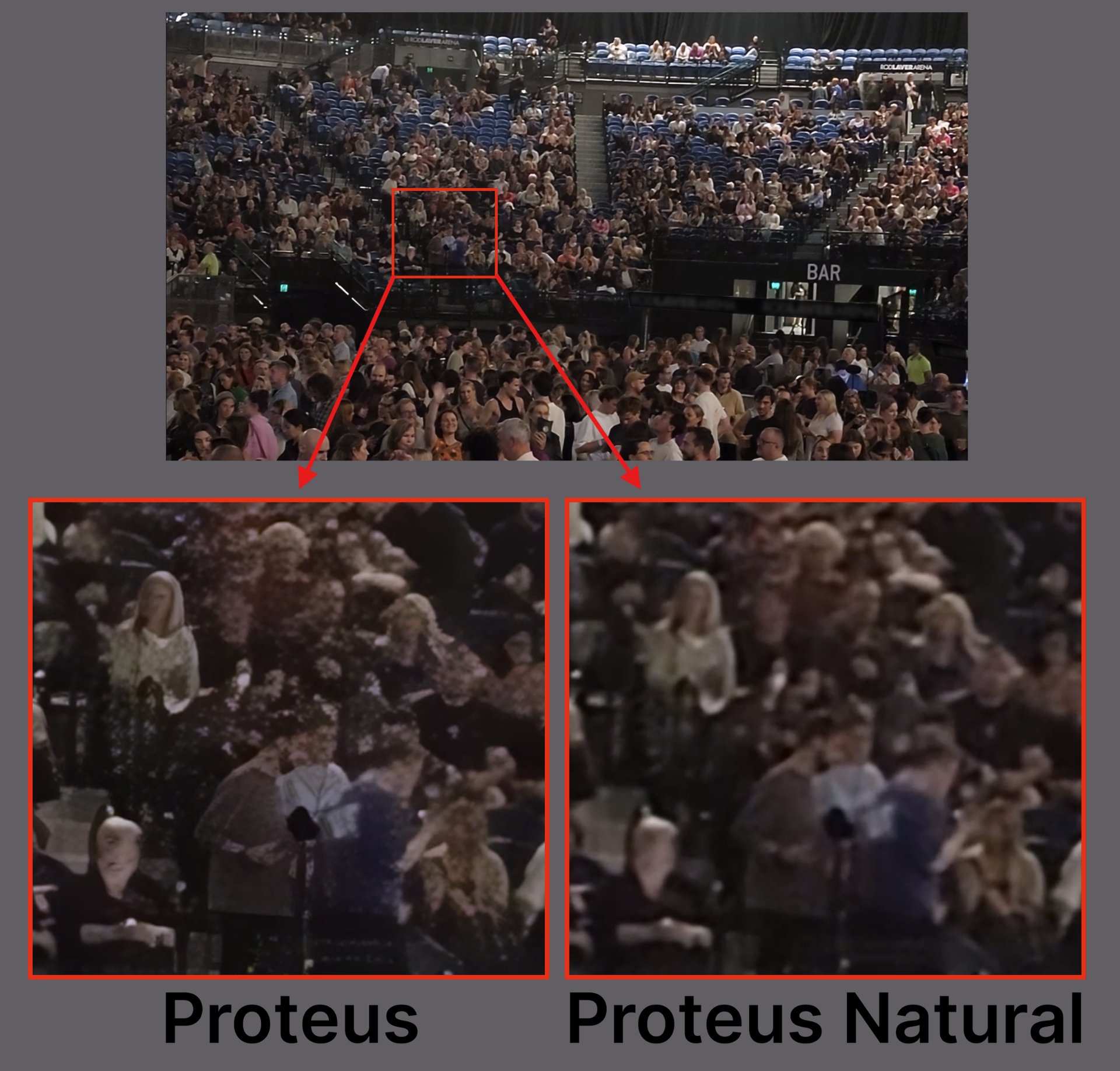
  • This model takes the best out of Proteus and improves it with a more natural output that doesn’t over sharpen or “over enhance” everything.
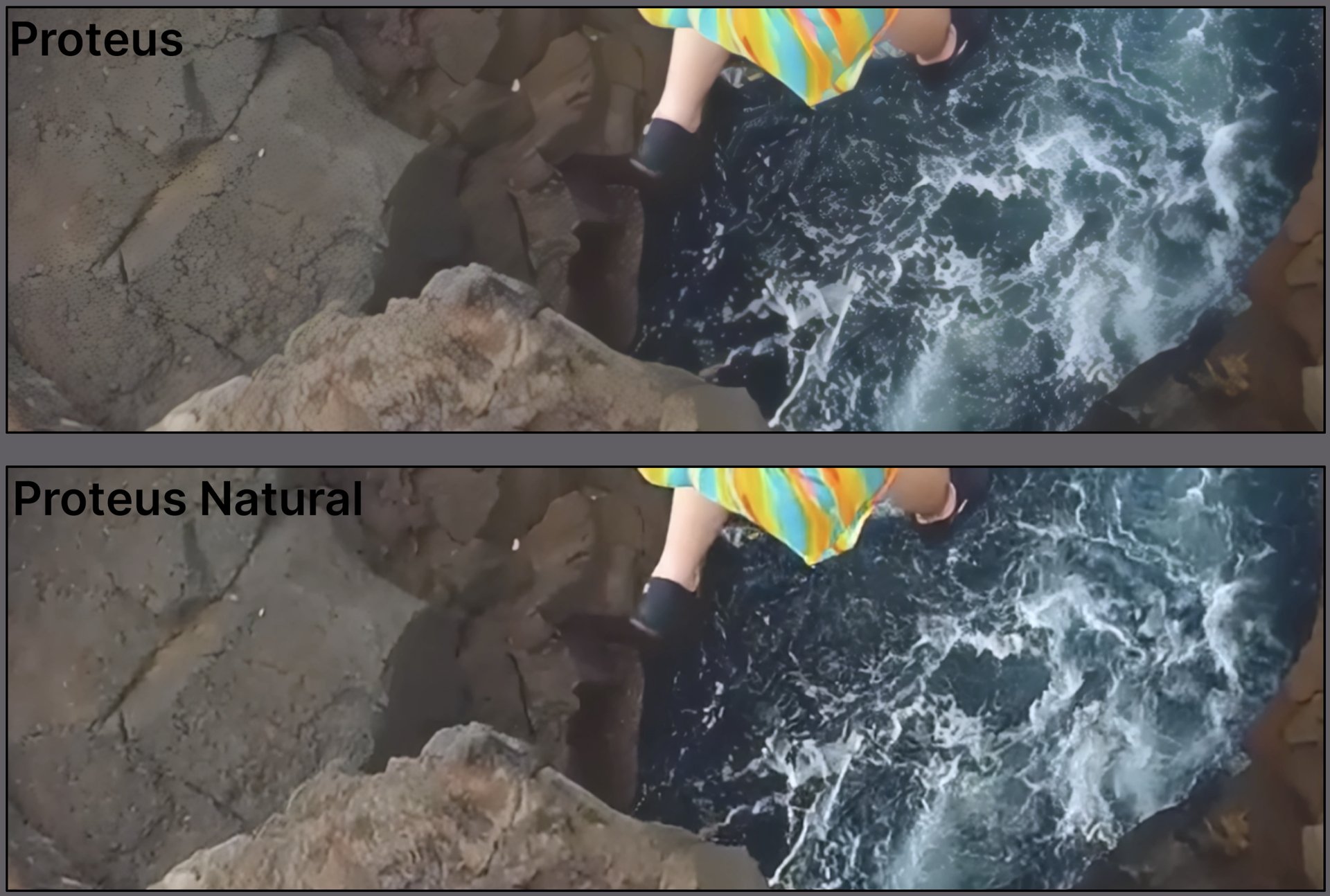
  • Though the original Proteus is quite robust, at times the background texture can appear extra sharp, crunchy or flattened with some details. Natural takes this into account and minimizes these types of issues. The example above clearly shows the issue within the water and the texture of the rocks.
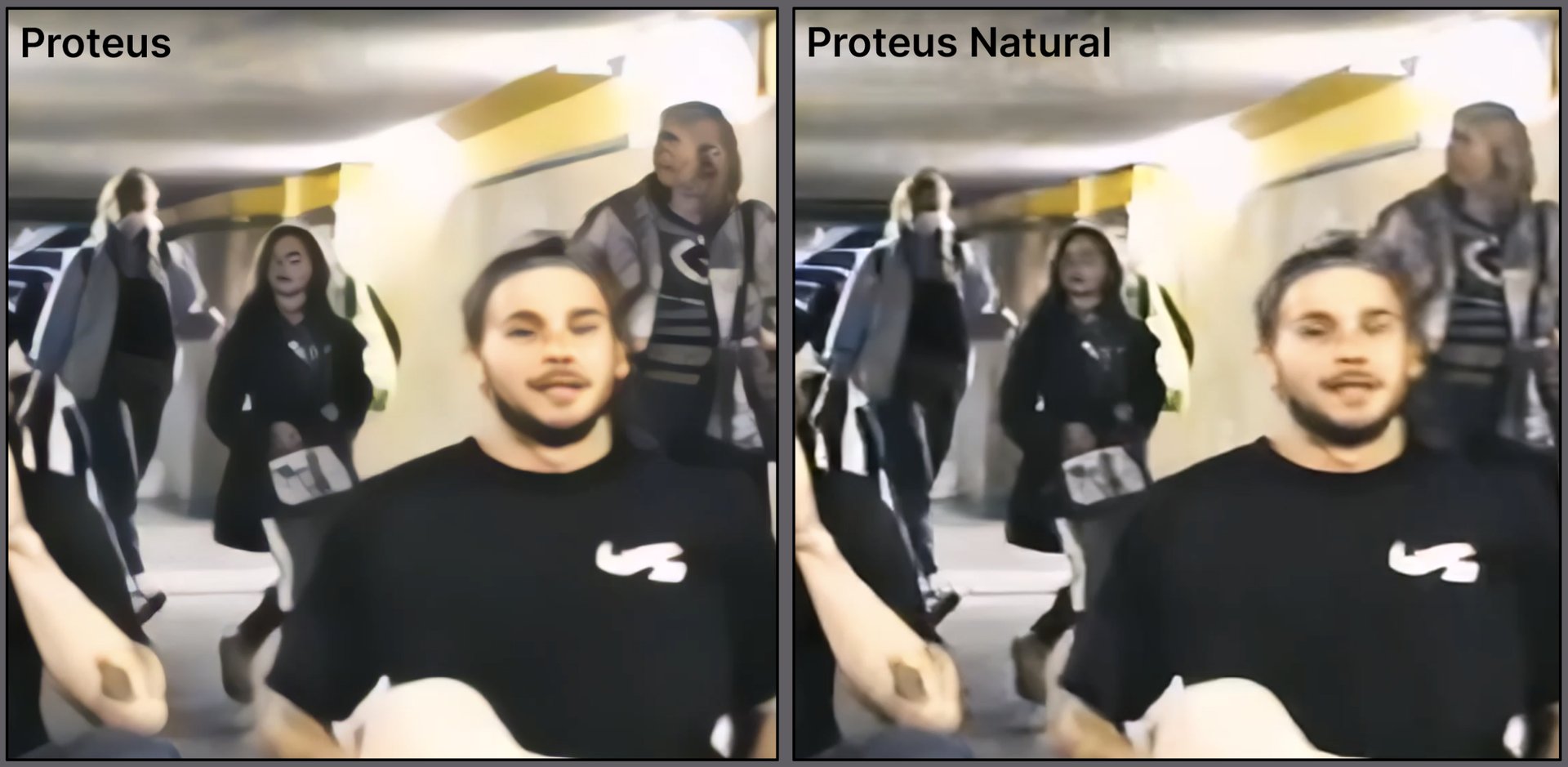
  • Additionally, smaller faces (background people -small in scale) can also have distorted faces as a result of Proteus trying to understand a face from pixels of low quality video data. Proteus Natural, reduces this issue and allows for a more subtle touch up rather than an over estimation of the face.
Model Access
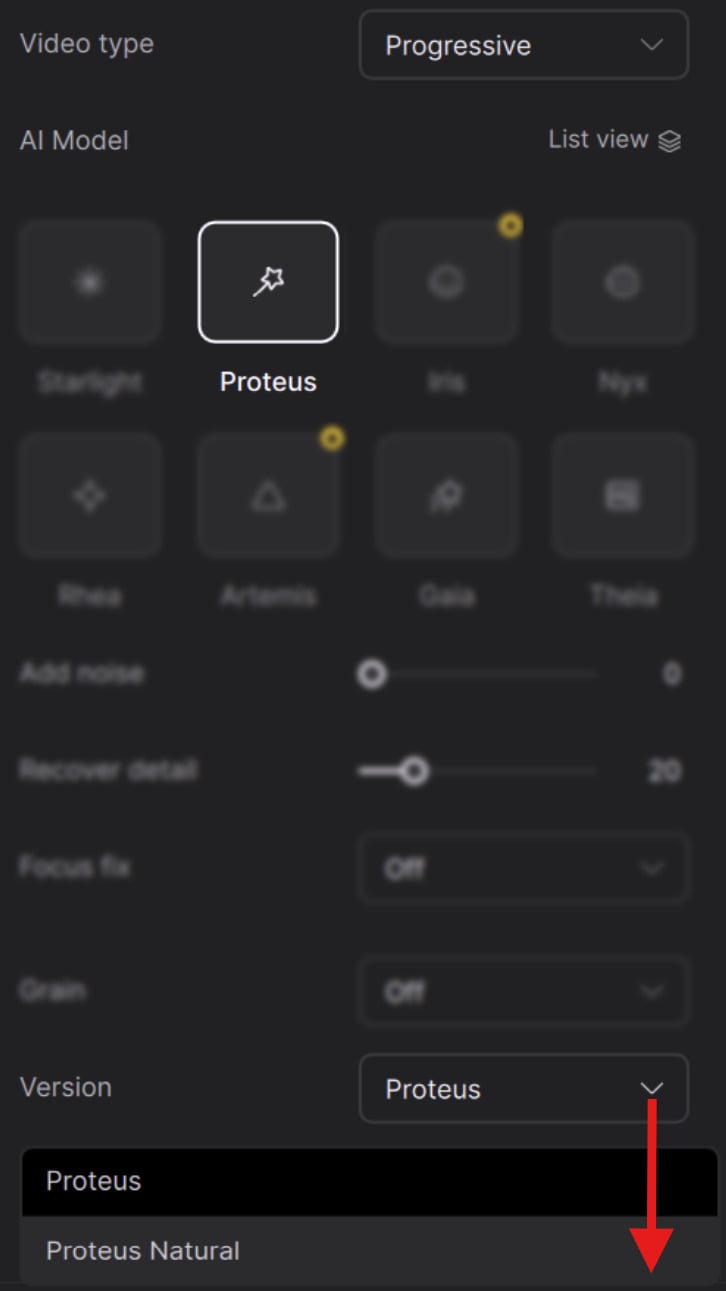
  • Select the AI Model Proteus
  • From the Version options, click on the drop down menu
  • Select the second option for Proteus Natural

Things to Note

  • Unlike Proteus, this does not have modifiable settings. It’s a “click and play” type of model.
  • Due to the more natural intention with this model, it is worth noting that it is not the sharpest model available and this is by design. If additional sharpening is desired, it is recommended to couple this model with a second enhancement for the desired look.
  • Though speed can be similar to Proteus, it can take a little longer.
  • Designed as a 2x model similar to Nyx. Like Nyx and Rhea (4x), these are not limited to the upscale multiplier. You can still output the model for any resolution that your codec can support.
  • Also available as a second enhancement.
  • Available for Windows (Nvidia & AMD) and Mac
  • Requires macOS 15 or newer to run on Mac

Additional Updates to Note!

Nyx XL Fix

  • We have resolved the issue that some have experienced with dropped frames associated with this model.

Aion Mac Fix

  • Those on Mac, may have had issues with the interpolation Aion model causing a color shift and burn on the video. This has been addressed.

UI Refinements
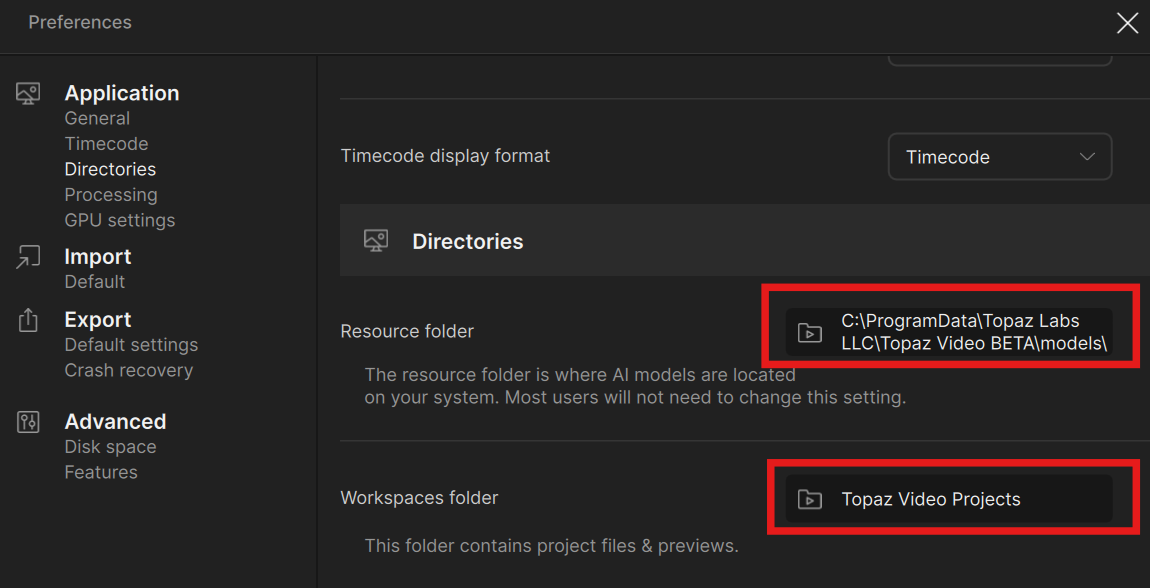
  • Drive-root paths (e.g., F:) are displayed in workspace/export/model directories settings.
  • Export queue scrolling won’t snap to the bottom when selecting “Newest First.”
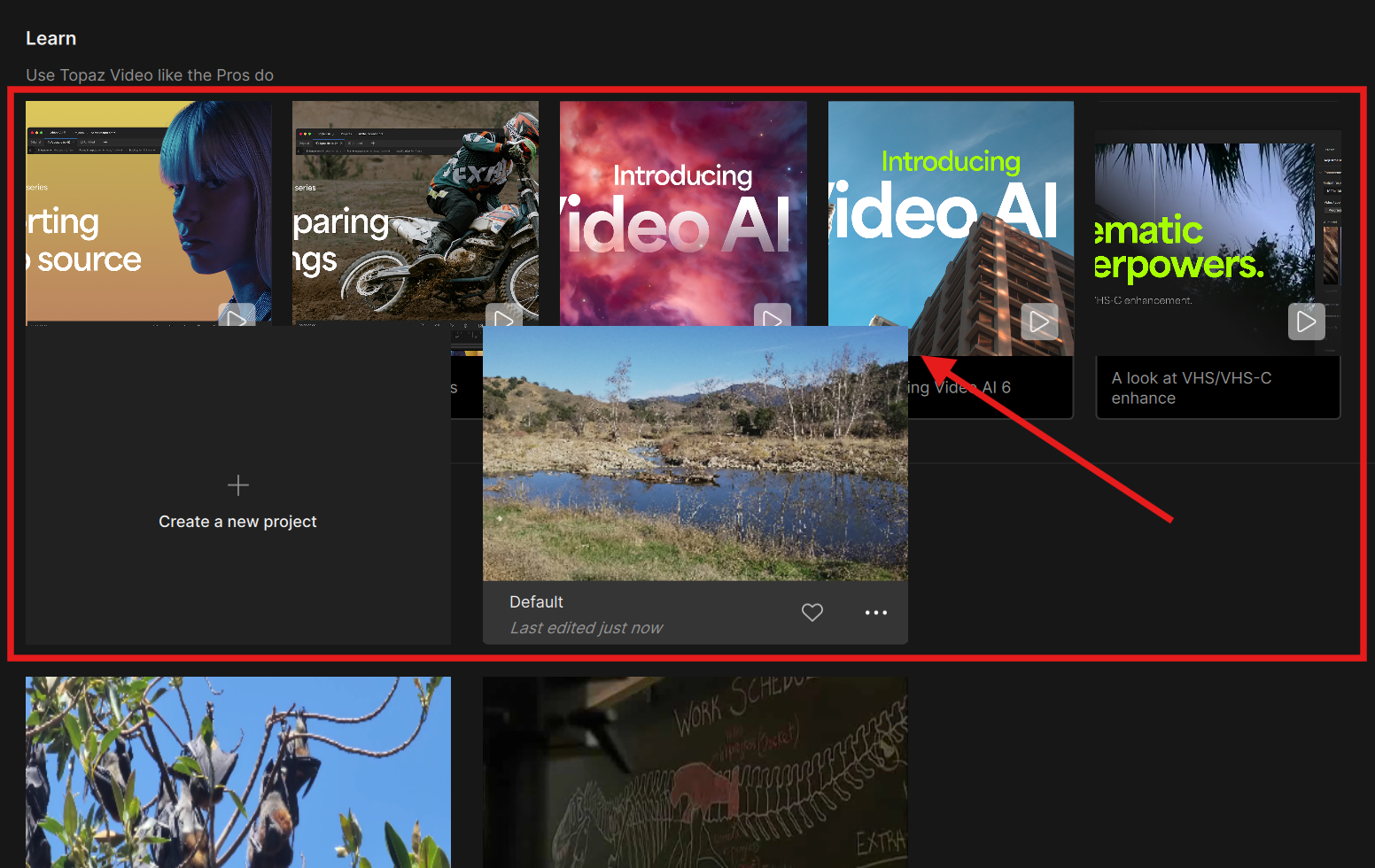
  • Welcome/Project page clips the projects grid and no longer overlaps the reference videos if you have multiple projects and need to scroll down.

Processing Update

  • Videos with non square pixels can be cropped and exported without error or change to the aspect ratio.
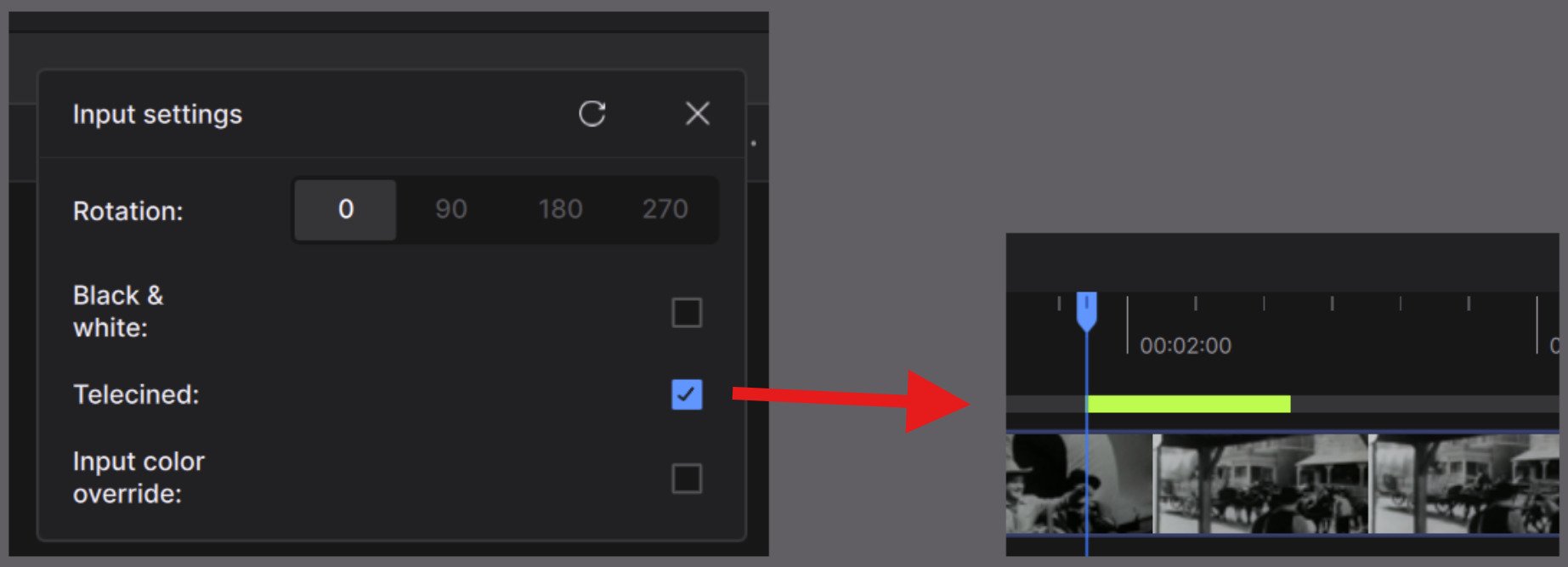
  • Previews with telecine turned on will display in the timeline. Previously doing a preview while Telecine enabled did not display the green visual notification of the processed preview on the timeline.

Batch Exporting Improvements

  • When batch exporting with Quick export, this now targets the default directory instead of the last used path.
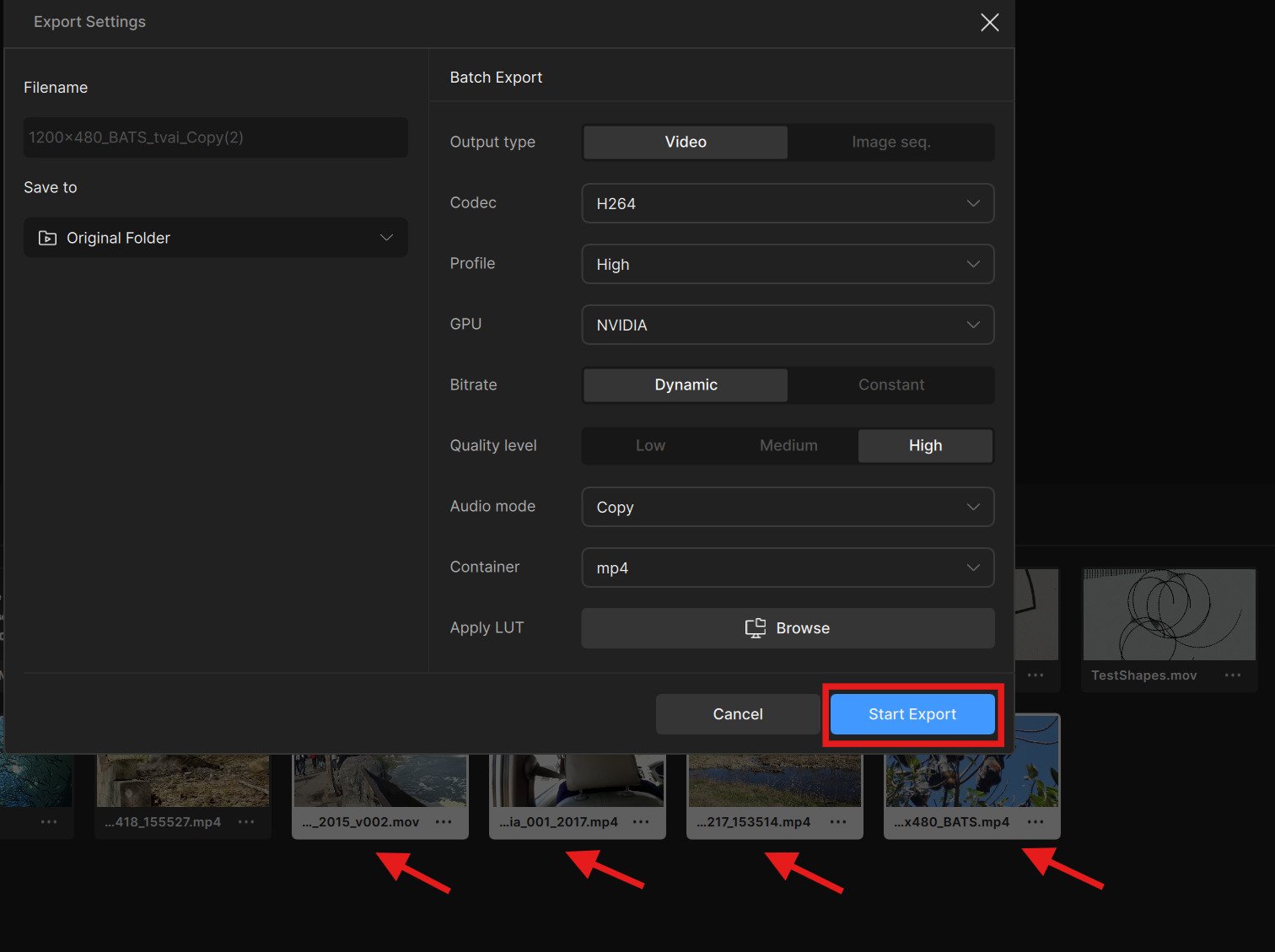
  • Clicking “Start Export” button (while batch exporting) now closes the Export Settings pop up menu. Previously this would stay open and require the “X” button on the upper screen right corner to be pressed.

Cloud Export Fix

  • Cloud downloads keep their progress regardless if you change the sort order.
  • Cloud output resolutions are honored. Few have received a 4K output rather than the expected minimum resolution for Starlight.

Additional Known Issues

Starlight Mini: Mac
For those with Mac that have updated to MacOS 26, there is an issue with blank or overly smeared color outputs. We are currently working with our friends at Apple to find a solution with this recent OS update. They have assured us that we will have a resolution to this soon.


Announcements

CLI Update
We want to share an update regarding Topaz Video: we’ll be gradually phasing out the Command-Line Interface (CLI) and its support.
This was a thoughtful and deliberate decision, driven by our goal of delivering a more reliable, flexible, and powerful experience over the long term. Moving away from the CLI allows us to:

  • Enable more customizable and modern workflows
  • Remove technical constraints that limit advanced features
  • Improve error detection, validation, and recovery
  • Reduce turnaround time when addressing processing issues
  • Provide greater flexibility for performance optimization

We recognize that this change may require some adjustment, and we truly appreciate your patience as we make this transition. Our intention is to focus on an application experience that is more consistent, dependable, and capable as the product continues to evolve.
To clarify, this change applies only to the CLI and support for CLI. It does not affect API access or custom solutions for enterprise customers. Note, that existing perpetual licenses will retain CLI.
Thank you for your understanding and continued support.

Verification Checks Update
In the coming weeks there will be a patch or official update that will reduce the amount of verification checks for subscribers of the Topaz Video App. This will align with our Photo and Gigapixel apps. For Topaz Video, the more frequent checks are no longer necessary and should allow for a more enjoyable experience with less interruptions while rendering. In addition, this should better support those dealing with areas having less than ideal internet service. Further details to come with the update.


Don’t Forget!

Is your system compatible?
Click Here

Documentation
Click Here

Encountered an Issue?
If you experience any issues, please ensure that your drivers are up to date. Next to a proper restart or an app reinstall, this is usually the first step to ensure you have the correct drivers running for this application.

Otherwise, you can easily reach out to our fantastic Support Team: Click Here


Hope you enjoy the new updates!

10 Likes

Yeah I’ll be cancelling my subscription then and potentially issuing a chargeback then in this case. This company continues to go from bad to worse and makes no apologies or real efforts and has been consumed by the greed of datacenter large scale AI. CLI and automatic batch processing is WHY I originally purchased Topaz. I see now that was a mistake.

Shame on you for bait and switching customers with the promises of automation and local workflows.

Also shame on you for waiting until the end of the week to be honest about discontinuing CLI support - and dragging it out for over 2 months.

This is on the same level - if not worse than NVIDIA level behavior.

You’ll own nothing. You’ll be happy you own nothing. And if you do own something, you won’t be able to use it.

37 Likes

I don’t see proteus natural in enhancements. I see it in the second enhancement Is that the way it is supposed to be?

“improving Project Starlight” hello, where are you? :wink:

14 Likes

Phasing out CLI support is a bad decision, especially given how buggy the UI continues to be. I’ve had videos where I had to use the CLI to make previews, because the in-app preview didn’t work. But I suppose you have already lost all of the Linux users, who are going to be the majority who care about customized batch processing via CLI scripts. I’m very curious who is making these decisions. Please tell them to stop.

22 Likes

The most terrible intention since the introduction of cli in version 3. :-1::firecracker:
IT IS THE CLI THAT ENSURES “more reliable, flexible, and powerful.”
With your “flexible” approach, it is impossible to make such basic things as fine-tune the final video encoding or make simple brightness/contrast adjustments.

23 Likes

I’m glad Topaz hasn’t completely given up on offline models like Proteus, although ‘Proteus Natural’ does sound more like a new variant rather than straight up next version, i.e Proteus v5 (which I would have preferred).

Maybe my expectations were high, but still not having any major updates on Starlight since September is CRAZY (don’t care about astra).

5 Likes

Nyx XL in particular and a few of the other models are significantly slower after this “update”. Proteus Natural runs at 44% of the Proteus speed.

5 Likes

is NYX-XL still 1x only? (the text other scales does not use AI is still there?)

sound slike exisitng Proteus without sharpening
programmed in one day. But I may be biased and need to try it first.

4 Likes

Unlike the earlier Proteus models, it seems Natural also has higher system requirements. Topaz haven’t said what the requirements are, but it appears you need 8GB+ of vram to run it (6GB vram gpu here).

No, it isn’t just this.

The model is (sometimes VERY) subtle, more a cleaner than an „enhancer“. Which sometimes can be quite welcome if you see what artificial things other models tend to introduce.

In other cases it just isn’t worth the time as it does little to nothing - so this depends quite much on the source.

It also is quite a bit slower than original Proteus.

1 Like

This was a thoughtful and deliberate decision, driven by our goal of delivering a more reliable, flexible, and powerful experience over the long term. Moving away from the CLI allows us to:

  • Make automated bulk processing impossible

  • Demonstrate how little we care about user needs

  • Screw longtime users who depend on the command line

  • Drive away loyal paying customers

There, fixed that for you, Topaz.

17 Likes

Regarding the CLI, here is a comparison of the EULA for the various versions:

v1.0.0 - v1.2.0:

Access to or use of the Command Line Interface (“CLI”) is strictly prohibited under a Personal License.

v1.0.0 - v1.1.1:

3.1.3.2.Command Line Interface (CLI). Access to the CLI is available as a premium, paid add-on to a Professional License or
Enterprise License holder. The specific licensing model for the CLI, which may be usage-based, a flat-fee subscription, or another
arrangement, along with the associated Fees, will be set forth in the applicable Order Form, at the time of purchase, or other
documentation provided by Topaz. CLI access may be restricted, modified, suspended, or terminated at any time, and may be offered
solely in an online environment, at Topaz’s discretion.

v1.2.0:

3.1.3.2.Command Line Interface (CLI). CLI access is available only as a premium, paid add-on to a Professional License, and only for
Services, products, versions, or deployments for which Topaz makes CLI functionality available. The licensing model (usage-based, flat-
fee subscription, or other arrangement) and associated Fees will be set forth in the applicable Order Form or at the time of purchase.
CLI is not available for Topaz Video subscription offerings (including Pro or Standard), and may be discontinued for other subscription
offerings at Topaz’s discretion. Notwithstanding the foregoing, End Users of certain perpetual legacy versions may continue to use CLI
with those versions, and Enterprise customers or customers using custom-built versions may be granted CLI access under a separate
written agreement or Order Form. Topaz may also restrict CLI access to online environments only, at its discretion.

So, Pro licence users - contrary to what you might have thought, you’re not allowed to use the CLI either starting from v1.2 according to the EULA!

Notice how Topaz CAN be bothered to update the EULA for version 1.2 but can’t be bothered to update the EULA to clarify that personal licence users ARE apparently allowed to use the CLI in version 1.0.0 (and maybe some other 1.0.x versions?) according to @dakota.wixom.

What a complete shambles. But sadly, that’s to be expected from Topaz these days.

Andy

13 Likes

Proteus Natural Comparison

Speed:

Proteus Natural - 19 fps
Proteus V4 - 65 fps
Irıs MG - 66 fps

https://imgsli.com/NDQ0NzAz/


model file: pnat-v1-fp16-384x672-2x-ox-1200-1_1_1

The reason it’s slow is because it doesn’t use TensorRT; it still uses ONNX. I think this will be fixed in the future.

1 Like

Again regarding the CLI:

IF it’s any consolation, we are still ABLE to use the CLI with v1.2 even if prohibited from doing so - according to the EULA, which Topaz knows that hardly anyone ever reads.

So existing scripts / commands that worked with previous versions of Topaz Video do still work, as I’ve just checked. That’s assuming you’re in the right folder and have set the two required environment variables.

If you want to use the the new “natural” Proteus model via the CLI, the new variant’s name is pnat-1. I’ve just tried it in the the CLI on my Macbook Air but it’s much slower than the standard Proteus.

Andy

6 Likes

Still no way to download models on 5G/mobile connections, so must tediously trawl through error logs to find download URLs directly. I see you have now removed absolute URLs from the logs, however, so now I can’t even do that (unless I know the server address in advance). How is this a paid product?

@eric Wrong move with the CLI. You, of all people, should know that 90% of users don’t use the GUI.

The one and only way that I will use the GUI is if the ability to define sections is added. For example, I have a three minute video, I define section one as the first minute, set the model to Iris with custom parameters. Then I define section two as the next minute and thirty seconds, and set the model to Proteus auto parameters. Then I define the last section of thirty seconds with something like Proteus Manual settings.
When I hit export, it will use all those things I have defined and export them into a single video.

So far, the GUI has not moved closer to being able to do that kind of workflow. TVAI 4 was a step in the right direction. TVAI 5 and on have moved away from that.

The corporate anthem of our times.

12 Likes

The grabbing hands grab all they can - all for themselves, after all :musical_notes:

Yeah, that’s right!

3 Likes

And on the Mac it’s much slower too. Unlike the standard Proteus, it doesn’t use the GPU cores, only the Neural Engine, regardless of the memory settings.

Andy