Howdy! I’m an Engineer @ Topaz.
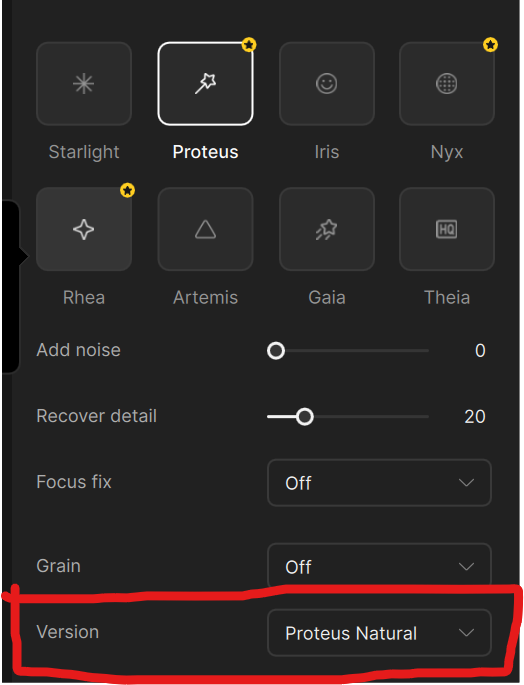
You should be able to see it by selecting Proteus and then changing the Version to select Proteus Natural in the right panel.
Howdy! I’m an Engineer @ Topaz.
You should be able to see it by selecting Proteus and then changing the Version to select Proteus Natural in the right panel.
Can you pull the logs and send to the support team so we can review what is going on here? help@topazlabs.com.
So it’s apparently the exact same/unchanged model from the beta.
Apart from being slow rendering only on the ANE has one advantage: it’s extremely energy efficient. Of course it would be nice to have the choice: full speed or energy efficient.
Hello,
We have given an earlier statement about the phase out of CLI back in September of 2025 Click Here. The most recent post outlines the reason we have made this decision. We understand that this may be disruptive for some during this transition, however, the ultimate goal is to provide a more secure, reliable and optimized application.
Rest assured, as mentioned in the post, CLI is fully available if you already have the perpetual license. This will not be phased out from those versions of Topaz Video AI.
Thank you for your understanding.
Hello,
Please refer to the official statement in the post for the accuracy of intentions, which clearly and properly outlines the reason we have made this decision.
Thank you
Agreed. But it should absolutely use all available resources by default, leaving the user to use the lower power mode switch if they want (which would in turn prioritize the ANE).
It would be interesting to see the speed of Proteus Natural on the M5, which has definitely been a major benefit for Iris (at last) from what I’ve seen of the benchmarks.
Andy
Seriously sweet. 
Thank you for your note. I have updated the post to include how to access the model.
None of the reasons you cite can justify the removal of mission critical functionality.
If they want to move off of ffmpeg, sure, they can do that and still make a CLI part of the new system.
100% this. There is no justification for removing CLI. It’s not like it’s going to not be a thing because how else would the cloud datacenter product be able to function? Are they seriously going to pay someone to go into their UI over RDP and put settings in by hand from submitted ‘cloud exports’?
If no CLI then make the API available to us locally.
NVIDIA systems continue to experience significant delays, with video processing times extending from the usual 45 minutes to 1 hour to over 3 hours. This issue affects all versions released after 1.0.4.
| Feature | Proteus (Original) | Proteus Natural |
|---|---|---|
| Enhancement style | Robust, can sharpen strongly | Milder, more natural look |
| Artifact control | Good, sometimes with sharper halos | Better control, fewer digital halos |
| Face handling | May over-enhance small/low-quality faces | Softer, subtle touch on faces |
| Settings | Adjustable parameters | “Click & play” (no settings) |
| Speed | Fast | Slightly slower |
Use Proteus Natural if you want:
A more organic, filmic look with fewer AI artifacts
Better control of background faces and textures
Cleaner results out of the box (no manual tweaking)
Gentle enhancement on old or compressed footage
If you want stronger sharpening or aggressive upscaling detail, you might still choose:
Proteus (original) for flexible tuning
Gaia / Artemis for more detailed upscaling
Iris if faces need special attention
Proteus Natural is excellent for:
• Soft skin preservation
• Reducing compression blocks (common in adult videos)
• Avoiding plastic / wax skin
• Preventing AI “oversharpened pores”
• Keeping body textures smooth and realistic
This model is very conservative — it enhances without pushing detail too hard.
 Result:
Natural-looking skin, fewer AI artifacts, cleaner image
I was so visionary (and lucky) to stop my professional license at version 7.0.2.
It’s really getting worse and worse, and the meager progress takes forever.
I can’t wait for the competition, which is rapidly approaching, to clean up these unscrupulous practices.
I got Perfect Result Using Proteus Natural 720p to 1080p mix and match with a Nyx XL as second enhancement Then a final improvement using Gaia 1080p to 4k . If not skip Nyx XL.
Is this true? If so, why hasn’t this been fixed?
Quite disappointing about the direction you’re taking with the CLI, and the reasons you listed are contradictory 
How does removing CLI..
Enable more customizable and modern workflows - (limiting parameters to what is available in the GUI rather than custom commands is by definition less customization and more restrictive to workflows)
Remove technical constraints that limit advanced features - (what technical constraints exactly? The option to use CLI has worked perfectly in addition to the GUI for years. The GUI is merely a “layer” on top and the option to instead use CLI is entirely independent of the GUI and its associated parameters, workflows and “advanced” features. The only limitation is the hard coded parameters associated with the GUI, many of which are not customizable in the GUI)
Improve error detection, validation, and recovery - (I can’t really comment on this one as this set of features hasn’t worked properly for me (recovery aspect), and my workflows rarely have crashing issues outside of something breaking with an update, which, funnily enough can sometimes be worked around using the CLI if the issue is related to an incorrect parameter used by Topaz)
Reduce turnaround time when addressing processing issues - (This one is somewhat feasible if Topaz do not have the knowledge to analyze more complex workflows, though anyone using CLI should be doing so at their own risk and not going to Topaz for support)
Provide greater flexibility for performance optimization - (again, limiting the parameters & workflows that can be used to what is available in the GUI is by definition LESS flexibility. As far as performance optimization isn’t that mostly down to the actual model?)
Test any footage that was noisy/grainy? Did it preserve grain or tend to clean in that case?
This model is very conservative it enhances without pushing detail I got Perfect Result Using Proteus Natural 720p to 1080p mix and match with a Nyx XL for noisy and grainy footage as second enhancement Then a final improvement using Gaia 1080p to 4k . If not skip Nyx XL.