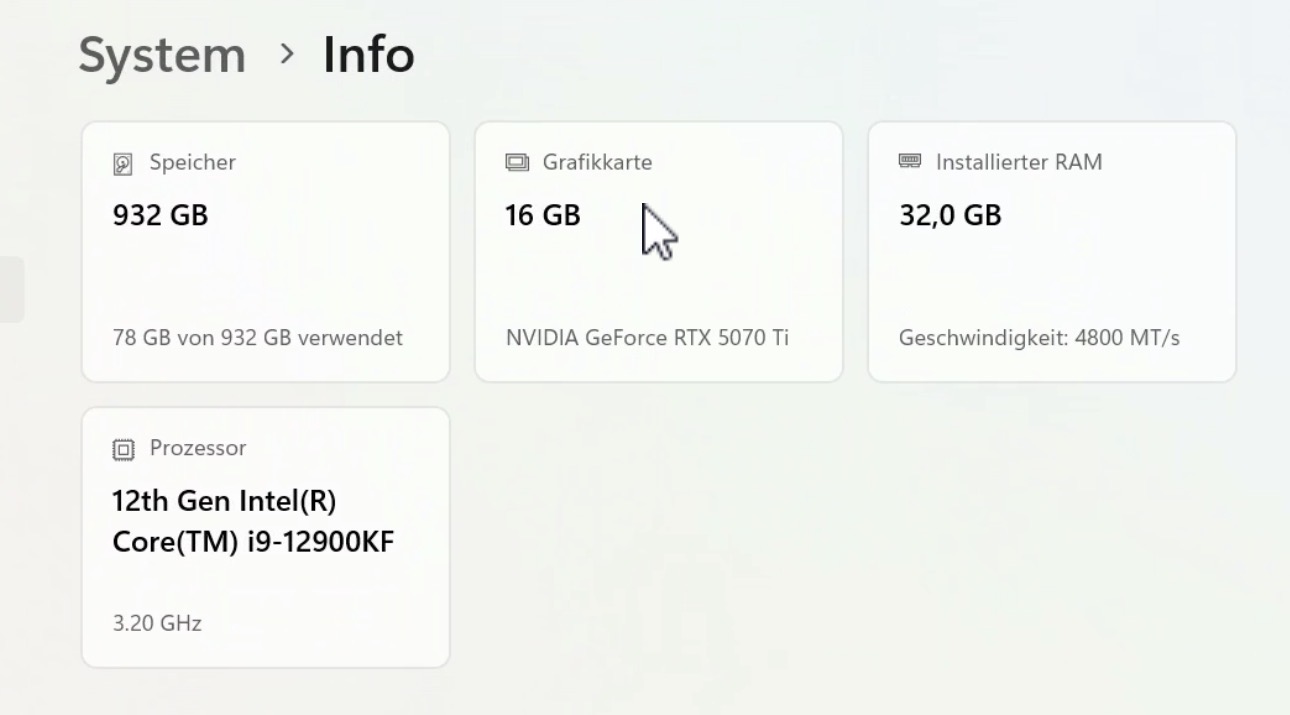
Thank you! Which motherboard/mainboard do you use with the DDR4 ram? I’m on an Asus X99 a usb 3.1 with 5730k and 5070ti. Both MB and CPU are very old.
I have XMP on otherwise it wouldn’t run on 3200. Benchmarks are higher than real performance. About double. Starlight at 480p 2X = more normal at 0.5 fps
The bottleneck i think is the cpu because it’s much more utilized than the 5070ti on proteus. Google Ai tells me the 5730k is the bottleneck because of the encoding and decoding but i suspect the slow pcie 3.0 bus too. I maybe can do encoding and decoding on m4 base mac mini which is more energy efficient than a 5090 per frame in proteus 2x 1080p.
I asked you because the 6850K is also rather old and 1 generation newer than mine if i’m correct. I’m looking around what to upgrade. I have bought 4 sticks of 16 gb ddr4 3200 ram in july this year coming from slower and 2 times 8GB ddr4 ram but it didn’t make any real difference.
I can overclock this system but really don’t want that yet. I’m figuring out if i can upgrade this ddr4 system with other cpu and MB but also have been looking at new ddr5 systems.
1080p proteus 2x is around 5 fps i think. But will run some benchmarks later and post them here.
edit: forgot to mention i run the memory on quad channel. Read you thought it made a big difference
The 6850K is on an Asus X99 too. Overclocked to 4.1 Ghz. Manually tuning RAM can make a decent difference but is more complicated than overclocking CPU or GPU. Your CPU is certainly holding back your gpu since it’s much older.
To check whether there are some easy gains to be had, the userbenchmark.com test would be helpful.
TVAI configuration can also make a big difference. For best performance do this:
turn off ‘restore details’ (taxes cpu and ram)
use manual parameters if source material allows (auto setting taxes cpu and ram)
use GPU based encoding which frees up cpu. unfortunately nvidia gpu encoding causes some loss of detail. some lossless codec could be used if u have the storage space and use Mac for encoding afterwards
Btw, Starlight performance is not much impacted by cpu or ram because it is more than 10 times more GPU heavy than the other tvai models, minimizing their performance impact.
This has been shared to the devs and they are looking into this error in the benchmark. If you run a pass with the model applied to a video source, are you getting an error back? If so, please grab the logs and send to the support team at help@topazlabs.com so we can get those looked into.
The normal benchmark doesn’t include Starlight, hence his question. Add to that that he has a quite unusual scenario for Starlight (having a FHD source instead of SD and only doing a 1x SL pass).
And, for Starlight there’s really not much influence of the CPU and/or RAM since this model is that extremely GPU dependent.
I think we both have pretty good results, with pretty old processors.
Interesting, right?
But what’s even more amazing to me are the values of your RTX 5070 Ti.
You probably have the best price/performance ratio here!
And that’s probably because your RTX 5070 Ti has just as much memory as my RTX 5080.
… New RTX 5070 and 5080 Super cards are supposed to be coming out soon, with more memory … Maybe I’ll build myself a small second computer with one of those cards, so I can run Topaz on it all day without blocking my main computer …
Except for Starlight, TVAI models don’t seem to use more than about 8 GB VRAM. I am currently running a 4K Proteus job and it doesn’t even use 5 GB VRAM. So except for Starlight, amount of VRAM shouldn’t make a difference in speed.
That old CPU (i9 12900) is still extremely competitive if you look at a price/performance ratio (and don’t care that much for energy efficiency) - and it is paired with 4800 MT/s RAM.