Are the numbers for Nyx XL Real?
Makes no sense.
OK, last benchmark here:
RTX5070Ti 16GB with i9 12900:
3.41 sec/frame.
All in all the RTX 5070 Ti seems to deliver quite good value for the money - and is at least a bit future proof with the 16GB VRAM.
1 Like
I have nearly 45 fps on Nyx XL on my „small“ (with only 60 GPU cores instead of the max 72) M2 Ultra - so for a fully specced M3 Ultra this value seems possible, especially with that much (V)RAM.
Nyx XL seems to profit from large amounts of VRAM.
And, Topaz performance on AppleSilicon is quite erratic anyways, see the unexplainably low Iris scores or the astonishingly high scores for Hyperion.
1 Like
Do you get the same speed at export or only in the benchmark?
The only thing i can image is that the bandwidth between CPU and GPU could play a role.
On PC everything stops at 64gb/s atm.
Dunno. I don’t use Nyx normally.
I’ll have to do a test when I have time.
1 Like
GPU RAM and utilization rate:
It seems to be roughly as you say.
I currently have an 8K file running with only Apollo (20 to 60 fps), nothing else, and it’s using just 10.1 to 10.7 of the 16 GB available on the graphics card.
The speed is 1.9 - 2.0 fps and the utilization of the RTX 5080 is between 97 and 100%!
Very good!
(the PerfCap Reason in ‘TechPowerUp GPU’ App is almost complete green)
Thank you! I think i have c16 ram but i need a good guide how to tune this kind of ram in this kind of system. Do you happen to know some good guides that can help?
Also when you overclock the cpu does your ram speeds go up too? Before you start working on the timings?
And your processor is 1 generation newer and close to the fastest from that generation. I think that makes a difference too.
Anyway DDR5 system with high ram prices is not a real option right now so this could be great.
Have been watching Broadwell cpu proces and hoped they would drop from 100 euro to lower on ali but they went up but i’m going to search for a compleet system locally and swap the cpu’s i think and then resell that.
You need to
1. check how fast your RAM module can go (data sheet)
(I have DDR4, which is certified for 4600 MT/s)
2. then you need to check what your processor can do; my i9 11900 is only certified for 3200 MT/s
3. and now you have to see how fast you can crank up the RAM in the BIOS while keeping the system stable – it’s a bit of a DIY job!
→ I managed to boot up to a maximum of 5000 MT/s (with modules certified for 5300 MT/s) → completely unstable
→ Slowly scaling down to (unfortunately only) 4000 MT/s is absolutely stable in the long term for me (2x 16 GB 4600 modules)
PS: If I worked on the timings, which I don’t know much about, I might be able to stabilize the 4266 MT/s.
As I tested further (see above), that would help somewhat…
Best regards
For anyone interested I have recently upgraded from RTX 4070 super to a RX 9070xt and will post benchmarks and other performance apsects of this card early next year.
I’m hoping its an upgrade due to the more vram available for 1080p to 4k upscales. Especially using starlight. I am scared if starlight will run worse but so far the rdna 4 cards have been running very well on all the other upscale models from previous benchmark posts.
I will chuck in a upscaled video along with benchmark.
I also have a RX 9070 XT and I have never got Starlight to run on it. I think it will run on the RX 7900 XT.
Is it even worth to use Starlight to upscale from 1080p to 4K ? The performance must be atrocious. Also, if u already have a 1080p source, the other models usually do a decent job, no?
I recently used Nano Banana Pro to restore images from WW2 videos and it does a much much better job than Starlight. I think I can wait another 2 or 3 years for Nano Banana quality on desktop computer before starting to restore very old or very low quality docus and movies.
From my expereience I would say its only worth using starlight if the video bitrate is really poor even viewing from a 1080p source.
You are right starlight is very good at upscaling from 540p or around that area. I find 720p videos to be limit for me when using the rtx 4070 super, it freezes up when i do a 1080p source.
The other models are really good upscaling from high quality 1080p source to 4k with my previous results but you need to tinker around to get the most out of the upscalers from my experience. Its not about speed its about quality/improvements.
I thought topaz supports rdna 4 cards for starlight now in the version 1.0 program?
It sees that it does not have 20GB of VRAM and skips the rest of the checks. They have said they are working on getting it working on AMD, but it’s not there yet.
A post was merged into an existing topic: Topaz Video 1.1.x - user benchmarking results
Starlight mini speed update:
As it turns out as soon as there is at least 12GB of video ram, render speed only depends on video ram bandwidth.
In this table I collected all GPUs I was able to test with.
These are all measured with starlight mini 1080p 1x.
The correlation is close to 100%.
Based on this you can easily calculate what’s your speed will be with a new hardware.
Just check your current hardware specs vram bandwidth, check your current speed with starlight mini, your new hardware specs vram bandwidth and do the math.
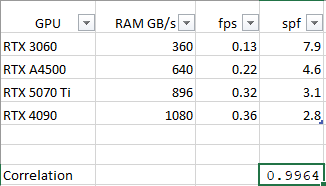
Also note, 3060 and 5070ti are the same config except GPU, the A4500 and 4090 are very different machines, yet nothing else seem to matter. Not CPU, not chipset, not RAM.
1 Like
Great, I just upgraded my 3950x with gpu from 3060 12Gb to 5070 TI and get similiar results. SLM runs 2.5 times faster (now at 0.5fps). A 15min sd video (old footage with kids) took 1d7h now “just” 12h30min!  How to you create the benchmark report with fancy blue and green font? Thanks!
Use the benchmark’s Copy button and Paste it here using the preformatted text option (looks like </>)
1 Like
