Hi,
Thanks for the tip. Could you perhaps post two pictures showing this?
Hi,
Thanks for the tip. Could you perhaps post two pictures showing this?
More general problems with computer and graphics card utilization
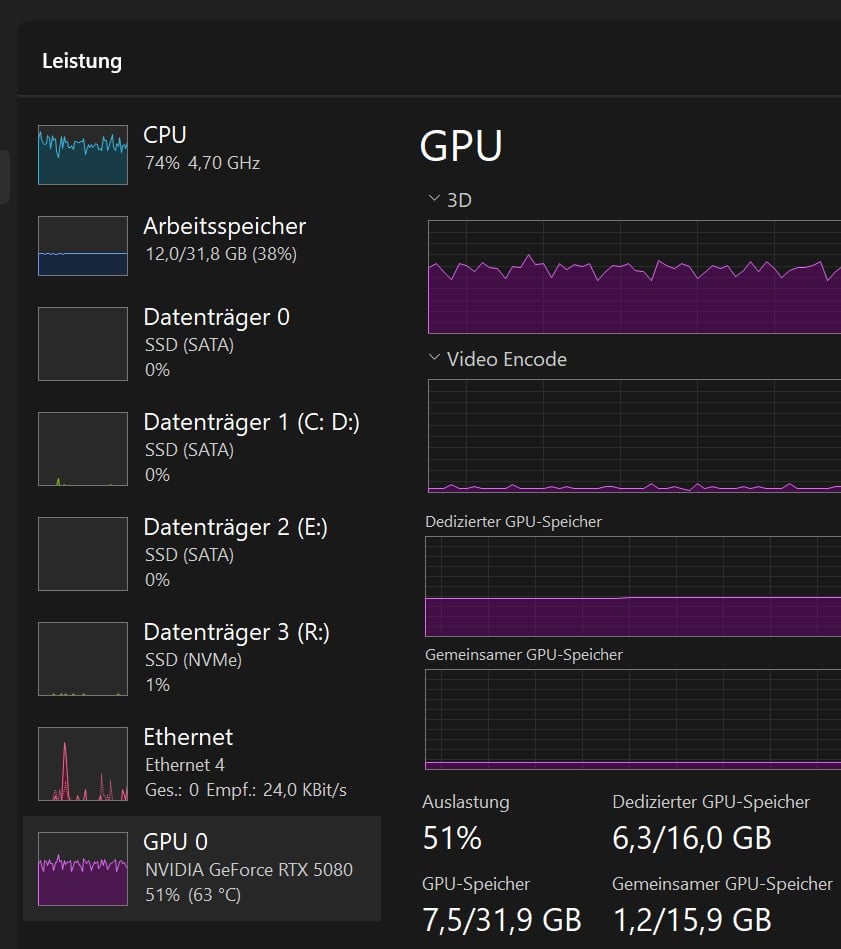
Whether I use the IRIS model (which I use frequently) or a pre-made preset, like the current “4K & 60fps” preset, the utilization of my computer with TOPAZ is unsatisfactory.
The job is now estimated to take about 8 hours, and looking at the Task Manager, it’s clear that the GPU is only working for half a day.
The memory is at 40% utilization (4000 MT/s, PCIe 4), the CPU i9 11900 at about 70%, and the ASUS-NVIDIA RTX 5080 fluctuates between 50 and 60%.
Can someone explain what’s causing this?
Is it something wrong with my computer? What values are other users experiencing?
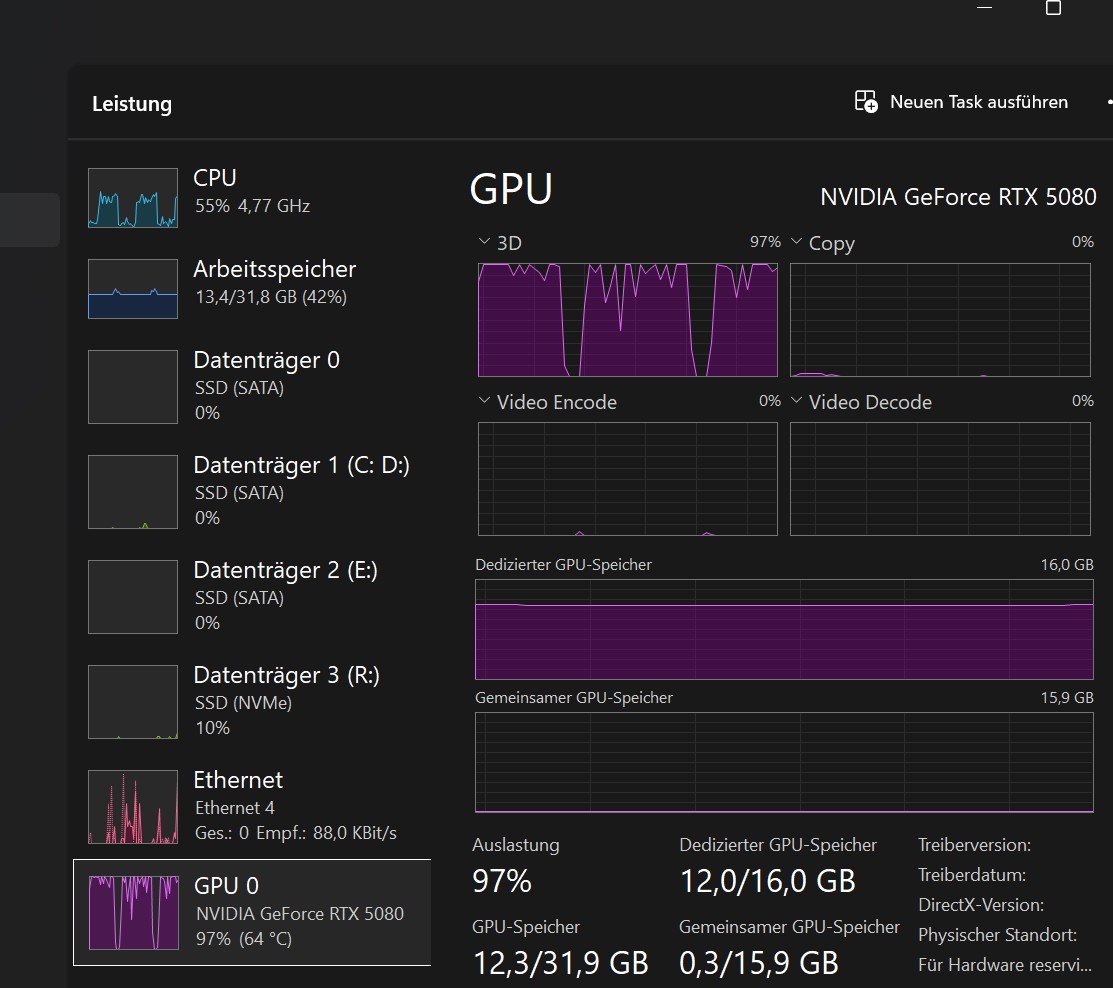
→ With Starlight Mini, I have close to 100% utilization; it should be the same for all models.
(Starlight Sharp doesnt work, crash while starting it, without to give info whats the problem …Benchmark brings also ERR on Aion 16x …)
If the RTX 5080’s utilization were between 97 and 100%, as is ALWAYS the case with DaVinci Studio (where AI calculations are almost always part of the timeline), I would only have to wait 5 hours instead of 8 or 10.
It’s certainly a problem that graphics card architectures change completely at least every two years.
(…soon it will be every 3 months or weeks…life is an irrational, self-accelerating drive of energy…  )
)
A software provider today simply has to live with this and adapt their models promptly nonetheless—or perhaps precisely because of it. It can’t be that the adaptation only happens when the graphics card manufacturer has already discontinued the model.
Why can’t the AI adapt to the new computing architecture itself?
…almost simultaneously with the release of the new graphics cards on the market…
Best regards, Renato
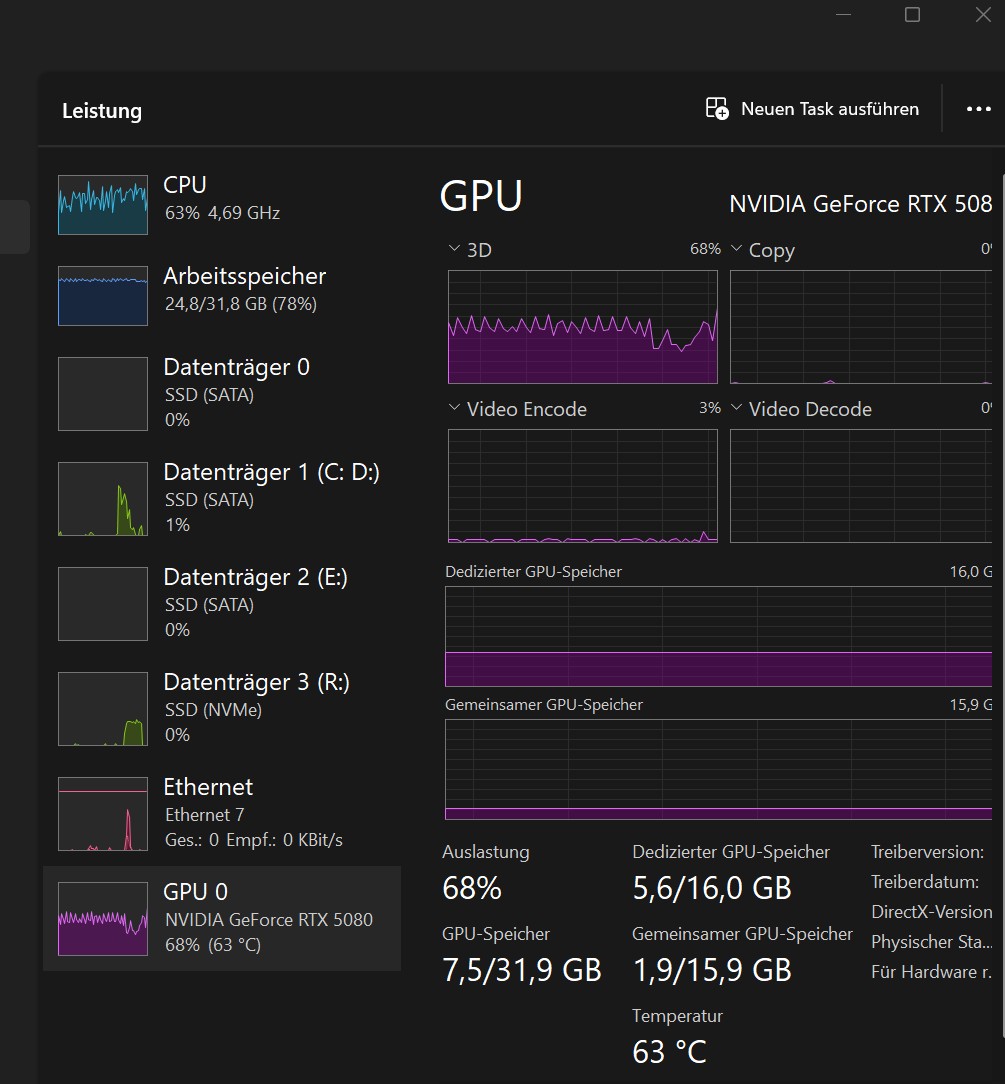
→ P.S.: last picture with IRIS 2,7 fps: 4K input with 5K output
Starlight is very different from all the other TVAI models. It uses about 100 times more GPU power for the same fps than any of the other models and therefore the CPU + RAM performance is dwarfed by the GPU. That’s the reason u have about 100% GPU utilization with this model.
For the other models, performance of CPU + RAM plays a much bigger role in overall performance, which is why powerful GPUs are often not fully utilized. Especially if there is any image scaling involved since that is performed by CPU in RAM. That’s why I get close to 100% utilization of my 5090 without scaling but maybe only 60% with 2x or 4x scaling involved. Other CPU/RAM intensive operations are ‘detail preservation’, ‘auto parameter detection’, ‘some of the CPU based video encoders like pro res’, … .
Also, TVAI can’t really utilize much more than 8 CPU cores (+ hyperthreading) effectively, which is the reason I assign only 8 cores of my 16 core 9950X3D CPU to TVAI. It’s simply faster for most TVAI tasks.
Regarding the h265 AMD iGPU vs NVIDA GPU encoding quality, I will make a screenshot of the side by side comparison in TVAI next time I use it. But I would also be interested in other peoples experiences when comparing AMD iGPU/GPU vs NVIDIA GPU h264/h265 image quality in TVAI. For me it seems AMDs iGPU encoder preserves visible more details in side by side comparison.
Hi Michael,
Thanks for your detailed reply.
So, with a better-optimized computer, I could achieve near 100% utilization of my RTX 5080, for example, with the IRIS model?
Your reasoning doesn’t sound illogical, but I saw something funny in the benchmark thread:
Let’s look at the benchmark from user avid-1676:
Topaz Video v1.0.4 ; System Information; OS: Windows v11.25
CPU: Intel(R) Core™ Ultra 9 285 31,706 GB
GPU: NVIDIA GeForce RTX 5080 15,517 GB
→ This user and I have the same graphics card - RTX 5080, but he has a computer that’s four generations newer - CPU: a modern Core Ultra 285, while I have a five-year-old i9 11900:
Core Ultra 9 285: Iris 1X: 39.12 fps 2X: 14.04 fps 4X: 3.64 fps
Ancient i9 11900: Iris 1X: 36.81 fps 2X: 15.20 fps 4X: 4.36 fps
This means that without scaling, the four-generation newer 285 is only 6% faster. In the lead, and at 4x scaling, even my ancient CPU is almost 20% faster…?
(It’s also funny that user avid-1676, just like me, is getting ERR fps at 16x slow motion in Aion )
Okay, all very interesting, we need to keep at it, and it would be great if Topaz could give us some tips on how to tune the computer, which components they recommend, or how to determine which components of your system need improvement, as the Task Manager in Windows 10/11 doesn’t seem to be sufficient.
Have a nice Sunday!
I guess u have better RAM performance because the higher the image scaling mode the better your performance becomes relative to the other PC. The more scaling, the more important RAM performance becomes because scaling is performed by the CPU in RAM and the amount of data for each movie image in RAM quadruples with each scaling step (2X, 4X). For example a 3840x2160 image has 4X as many pixels as a 1920x1080 image (the TVAI scaling factor from 1080p to 2160p is 2X).
Here is the Iris result from my 6850K + 3080 combo. This illustrates RAM importance for scaling tasks even more. The CPU is from 2016 but is has quad channel RAM and beats the 285K + 5080 in 4X Iris:
6850K + 3080 + quad 3000Mhz RAM: Iris 1X: 18.64 fps 2X: 10.97 fps 4X: 03.69 fps
The limit is current hardware. For some combinations of TVAI model, settings, … there is simply not a fast enough CPU and/or RAM in order to fully utililze a powerful GPU. Eg. I don’t think there is a CPU/RAM combination which would fully utilize my 5090 for any of the Artemis, Proteus or Iris models in 4X mode.
Can i ask you which motherboard you are using and how fast your ram is? I run a 5930k in a x99 board with quad channel ddr4 3200 memory in XMP with a 5070ti but it’s heavy bottleneck by the CPU and even 480p proteus 2 X gets max 22 fps while it should be a lot more. Thinking about removing the spectre and meltdown fix but not sure if that helps. Old owner OC-ed it from 3,5 tot 4.4 ghz with a 980ti but not sure i want to risk it. Looking into a new system because everything this old getting way to expensive and new is lot better.
I have DDR5 6200@CL30 in my 9950X3D + 5090 PC and DDR4 3000@CL32
Both RAM kits are manually tuned which can make a 10-20% difference in RAM heavy tasks.
As minimum, u need to turn on the EXPO (AMD) or XMP (Intel) memory profile in BIOS to get decent results from your RAM.
If u post your TVAI benchmarks @ 1080p, we might be able to identify some bottleneck of your system.
Also, for a quick performance check and relative performance to similar systems, u can use https://www.userbenchmark.com/.
PS: I know that userbenchmark is really bad to compare AMD vs Intel systems but it’s still great for a quick system info and especially for the comparison to systems with the same hardware. If anyone has a good alternative for this, I am eager to hear it
Here is my RAM userbenchmark from the 6850K system:
```
Topaz Video v1.0.4
System Information
OS: Windows v11.25
CPU: Intel(R) Core™ Ultra 7 265KF 63.696 GB
GPU: NVIDIA GeForce RTX 5060 Ti 15.588 GB
Processing Settings
device: 0 vram: 1 instances: 1
Input Resolution: 1920x1080
Benchmark Results
Artemis 1X: 17.39 fps 2X: 12.66 fps 4X: 04.07 fps
Iris 1X: 19.88 fps 2X: 11.92 fps 4X: 03.99 fps
Proteus 1X: 17.80 fps 2X: 13.75 fps 4X: 04.32 fps
Gaia 1X: 06.15 fps 2X: 04.16 fps 4X: 02.99 fps
Nyx 1X: 07.57 fps 2X: 06.75 fps
Nyx Fast 1X: 17.81 fps
Nyx XL 1X: 28.12 fps
Rhea 4X: 03.11 fps
RXL 4X: 02.87 fps
Hyperion HDR 1X: 16.29 fps
4X Slowmo Apollo: 23.56 fps APFast: 64.69 fps Chronos: 13.46 fps CHFast: 20.81 fps
16X Slowmo Aion: ERR fps
```
Hi,
I have forced my ancient-machine with i9 11900k from 4000 to 4266 MT/s:
Topaz Video  v1.0.4
System Information
OS: Windows v11.25
CPU: 11th Gen Intel(R) Core(TM) i9-11900K @ 3.50GHz  31.828 GB
GPU: NVIDIA GeForce RTX 5080  15.517 GB
Processing Settings
device: 0 vram: 1 instances: 1
Input Resolution: 1920x1080
Benchmark Results
Artemis		1X: 	32.13 fps 	2X: 	15.19 fps 	4X: 	03.92 fps
Iris		1X: 	41.51 fps 	2X: 	16.39 fps 	4X: 	04.45 fps
Proteus		1X: 	36.51 fps 	2X: 	17.84 fps 	4X: 	  ...    fps
Gaia		1X: 	12.60 fps 	2X: 	08.27 fps 	4X: 	03.95 fps
Nyx		1X: 	16.83 fps 	2X: 	13.58 fps
Nyx Fast		1X: 	34.54 fps
Nyx XL		1X: 	28.37 fps
Rhea		4X: 	04.21 fps
RXL		4X: 	03.95 fps
Hyperion HDR		1X: 	26.85 fps
4X Slowmo		Apollo: 	29.94 fps 	APFast: 	68.71 fps 	Chronos: 	24.97 fps 	CHFast: 	31.65 fps
16X Slowmo Aion: ERR fpsCompare RTX 5080 in 2K:
Avid-1676 Core Ultra 9 285: Iris 1X: 39.12 fps 2X: 14.04 fps 4X: 3.64 fps
i9 11900 with 4000 MT/s : Iris 1X: 36.81 fps 2X: 15.20 fps 4X: 4.36 fps
i9 11900 with 4266 MT/s : Iris 1X: 41.51 fps 2X: 16.39 fps 4X: 4.45 fps
That means increasing the RAM speed by 6.6% resulted in a speed improvement of 2.1 % for 4X scale; 7,8% for 2X scale and 12% without scale ! ! Note: IRIS (my main model).
From this, we can conclude that we need 20.000 MT/s or more …
→ So I’ll buy an RTX 5090 or 6090 if there’s a CPU/motherboard that can handle at least 10,000 MT/s.
→ PS:
I need to check if this setting is stable. The i9 11900 couldn’t stable handle 4600 MT/s (RAM specification),
4000 MT/s has been running super stable for about a week in DaVinci Resolve and Topaz.
PPS: 4266 not stable → back to 4000 MT/s
Hi kyle.topazlabs
Its interessting that all/ or the most ? Owner of a Nvidia RTX 50xx get for
16X Slowmo Aion: ERR fps
kind regards seifenchef
```
Topaz Video v1.0.4
System Information
OS: Windows v11.25
CPU: Intel(R) Xeon(R) w5-2465X 127.25 GB
GPU: NVIDIA GeForce RTX 4070 11.73 GB
Processing Settings
device: 0 vram: 0.9 instances: 1
Input Resolution: 1920x1080
Benchmark Results
Artemis 1X: 18.32 fps 2X: 12.03 fps 4X: 03.35 fps
Iris 1X: 23.00 fps 2X: 13.20 fps 4X: 03.51 fps
Proteus 1X: 19.03 fps 2X: 13.73 fps 4X: 03.69 fps
Gaia 1X: 06.40 fps 2X: 04.34 fps 4X: 03.16 fps
Nyx 1X: 09.42 fps 2X: 08.03 fps
Nyx Fast 1X: 19.33 fps
Nyx XL 1X: 26.07 fps
Rhea 4X: 03.19 fps
RXL 4X: 03.16 fps
Hyperion HDR 1X: 17.45 fps
4X Slowmo Apollo: 21.85 fps APFast: 54.99 fps Chronos: 13.41 fps CHFast: 20.60 fps
16X Slowmo Aion: 23.49 fps
```
Hi Michael,
Okay, okay, it’s truly chaotic in the world, not just in the PC world
… even Schopenhauer said he didn’t believe the world was rational… or something like that…
I read somewhere online that the 285K has a ‘hidden’ quad-channel RAM controller?
What does that mean, and why isn’t it being used?
Is there an affordable, modern motherboard/CPU combination with quad-channel RAM?
You also mentioned that TOPAZ only supports 8 cores (which is probably why my ancient i9 performs relatively well) – when will this be increased to modern 16-core processors?
kind regards seifenchef
```
Topaz Video  v1.0.4
System Information
OS: Windows v11.25
CPU: AMD Ryzen 7 5700X 8-Core Processor               31.91 GB
GPU: NVIDIA GeForce RTX 5060 Ti  15.587 GB
Processing Settings
device: 0 vram: 1 instances: 1
Input Resolution: 1920x1080
Benchmark Results
Artemis		1X: 	14.33 fps 	2X: 	07.63 fps 	4X: 	01.97 fps
Iris		1X: 	17.94 fps 	2X: 	09.40 fps 	4X: 	02.48 fps
Proteus		1X: 	16.52 fps 	2X: 	09.30 fps 	4X: 	02.58 fps
Gaia		1X: 	05.87 fps 	2X: 	03.94 fps 	4X: 	02.35 fps
Nyx		1X: 	07.39 fps 	2X: 	06.25 fps
Nyx Fast		1X: 	16.21 fps
Nyx XL		1X: 	17.47 fps
Rhea		4X: 	02.21 fps
RXL		4X: 	02.22 fps
Hyperion HDR		1X: 	17.10 fps
4X Slowmo		Apollo: 	20.29 fps 	APFast: 	50.71 fps 	Chronos: 	12.76 fps 	CHFast: 	17.16 fps
16X Slowmo		Aion: 	27.15 fps

```
```
Topaz Video v1.0.4
System Information
OS: Windows v11.25
CPU: AMD Ryzen 7 7800X3D 8-Core Processor 63.66 GB
GPU: NVIDIA GeForce RTX 5080 15.517 GB
Processing Settings
device: 0 vram: 1 instances: 1
Input Resolution: 1920x1080
Benchmark Results
Artemis 1X: 35.28 fps 2X: 16.72 fps 4X: 04.85 fps
Iris 1X: 39.00 fps 2X: 18.65 fps 4X: 05.11 fps
Proteus 1X: 36.72 fps 2X: 18.87 fps 4X: 04.95 fps
Gaia 1X: 12.73 fps 2X: 08.58 fps 4X: 05.05 fps
Nyx 1X: 16.63 fps 2X: 13.77 fps
Nyx Fast 1X: 38.92 fps
Nyx XL 1X: 36.26 fps
Rhea 4X: 04.71 fps
RXL 4X: 04.66 fps
Hyperion HDR 1X: 33.08 fps
4X Slowmo Apollo: 39.02 fps APFast: 105.47 fps Chronos: 24.99 fps CHFast: 36.03 fps
16X Slowmo Aion: 47.59 fps
```
Hi JakSpoon
You have the same RTX card as me, also an 8-core processor, but slightly better results than mine.
What’s your RAM speed? (MT/s)
kind regards
I’m about to buy a better GPU for 1080p Starlight (former mini) processing.
Unfortunately the factory benchmark tool won’t test it. Can you please help me out guys?
I have an RTX 3060 which gets me 0.1 fps.
I tested with RTX 4090 which worked at about 0.4-0.5 fps.
What should I expect from a 5070 Ti?
Is a 0.2 - 0.3 fps realistic for starlight 1080p?
I don’t want to spend all my money on GPU, I’m trying to find a sweet spot.
Is for example a 5080 that much better?
```
Topaz Video  v1.0.4
System Information
OS: Windows v10.22
CPU: AMD Ryzen 9 5900X 12-Core Processor              31.925 GB
GPU: NVIDIA GeForce RTX 3060  11.831 GB
Processing Settings
device: 0 vram: 0.9 instances: 1
Input Resolution: 1920x1080
Benchmark Results
Artemis		1X: 	06.35 fps 	2X: 	04.11 fps 	4X: 	01.46 fps
Iris		1X: 	08.74 fps 	2X: 	04.93 fps 	4X: 	01.51 fps
Proteus		1X: 	07.92 fps 	2X: 	05.41 fps 	4X: 	02.00 fps
Gaia		1X: 	02.95 fps 	2X: 	02.07 fps 	4X: 	01.40 fps
Nyx		1X: 	04.28 fps 	2X: 	03.41 fps
Nyx Fast		1X: 	08.45 fps
Nyx XL		1X: 	16.16 fps
Rhea		4X: 	01.35 fps
RXL		4X: 	01.33 fps
Hyperion HDR		1X: 	09.33 fps
4X Slowmo		Apollo: 	10.97 fps 	APFast: 	30.06 fps 	Chronos: 	06.33 fps 	CHFast: 	08.36 fps
16X Slowmo		Aion: 	16.91 fps

```
What do you mean by 1080p processing?
A 1080p source with SL mini at 1x or a SD source that is then (2x) upscaled to 1080p?
Oh sorry, 1080p source SL mini 1x
Also I found in another topic that we can get more precise numbers if we change the metric from frames/second to seconds/frame in Preferences / Timecode.
So my current speed with starlight (mini) 1080p 1x is
~12.7 sec/frame with RTX 3060 (+ Ryzen 5900x + 32GB RAM)
~2.7 sec/frame with RTX 4090 (+ i5-12400F + 128 GB RAM)