And that on this very vanilla chip with only 10 GPU cores.
We will have to wait for the “big” M5 Pro/Max/Ultra versions with high GPU count to make a real assessment of it’s performance, though.
And that on this very vanilla chip with only 10 GPU cores.
We will have to wait for the “big” M5 Pro/Max/Ultra versions with high GPU count to make a real assessment of it’s performance, though.
And I am pretty sure the M5 is not used at its full potential. I was running on battery and heard the fan ramping up only once during the entire benchmark…
Mac Studio M4 Max 16 CPU 40 GPU. 64 GB RAM Tahoe
```
Topaz Video v1.0.3
System Information
OS: Mac v26.0001
CPU: Apple M4 Max 64 GB
GPU: Apple M4 Max 51.84 GB
Processing Settings
device: 0 vram: 1 instances: 1
Input Resolution: 1920x1080
Benchmark Results
Artemis 1X: 14.37 fps 2X: 08.92 fps 4X: 03.29 fps
Iris 1X: 13.03 fps 2X: 05.34 fps 4X: 01.98 fps
Proteus 1X: 14.04 fps 2X: 09.95 fps 4X: 03.43 fps
Gaia 1X: 04.23 fps 2X: 02.96 fps 4X: 02.32 fps
Nyx 1X: 04.94 fps 2X: 05.91 fps
Nyx Fast 1X: 11.60 fps
Nyx XL 1X: 60.36 fps
Rhea 4X: 01.21 fps
RXL 4X: 01.28 fps
Hyperion HDR 1X: 82.64 fps
4X Slowmo Apollo: 16.49 fps APFast: 41.29 fps Chronos: 05.58 fps CHFast: 09.28 fps
16X Slowmo Aion: 17.68 fps
```
Could someone also fill in Starlight/Starlight Sharp results? By exporting a sample(note res. as input resolution) and counting average FPS based on video export time by dividing sample video’s all frames with export time(seconds).
SL mini with SD source, 2x upscale
RTX 4070 12GB: 0.3fps
M2Ultra 64/48GB: 0.3fps
SL mini with SD source, 3x upscale
RTX 4070: 0.1fps
SL mini SD source, 4x upscale
RTX 4070: 0.0fps
M2Ultra 64/48GB: 0.0fps
Considering the M2 Ultra is an ARM chip, 2 years old by now and is in the same ballpark as the RTX 4070 when it comes to a heavy AI model it is very impressive.
Going forward when I purchase a new GPU it is clear to me I should not go below RTX 5080 if I want to use the Starlight model.
Yes - otherwise you need LOTS of patience.
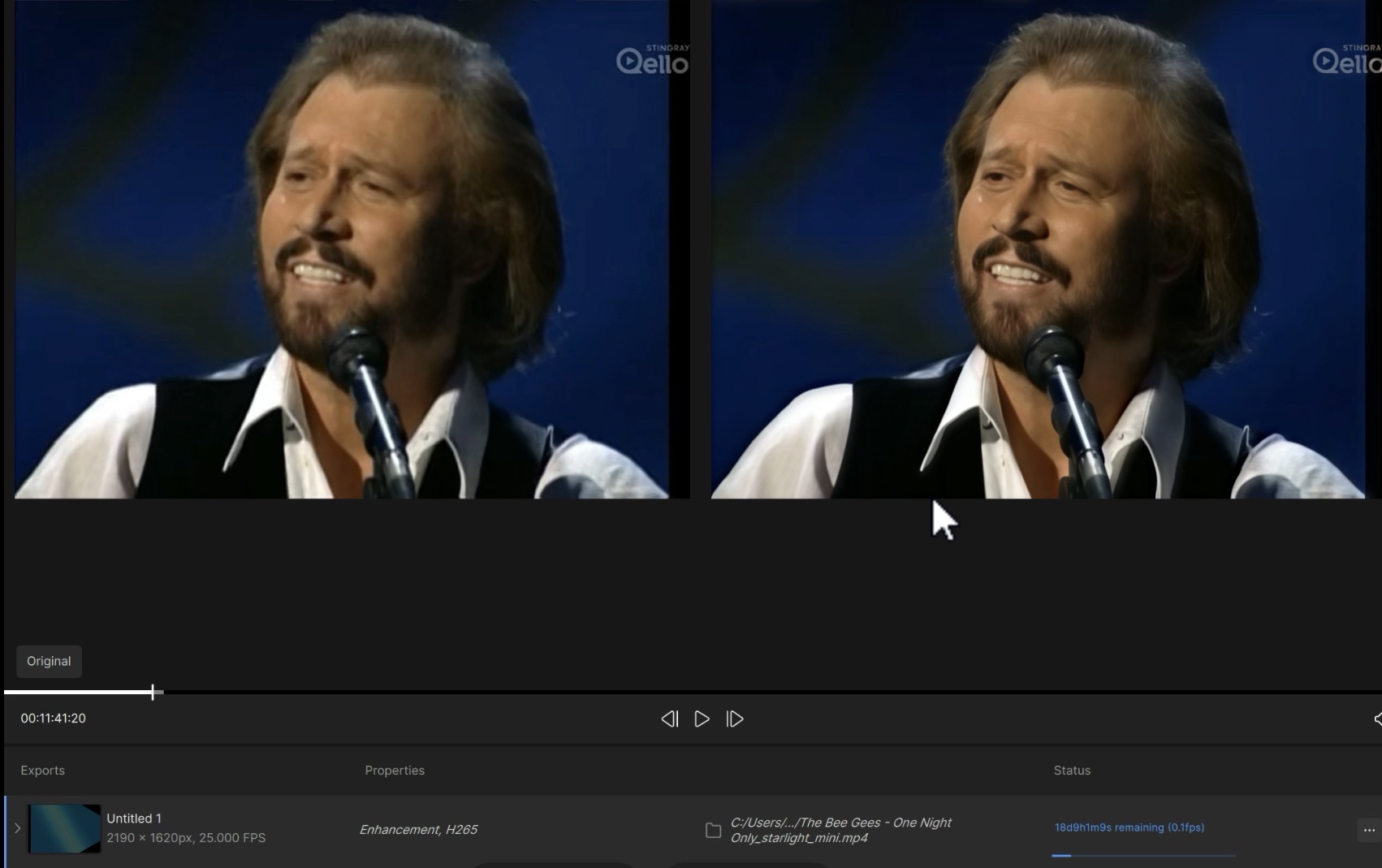
See the estimated running time in the above screenshot.
And if your source video does have any smaller but still prominently visible logos or text in it you unfortunately need to go 3x since 1xand 2x of SL mini are sh*t at those 
With GSP Enabled

```
Topaz Video  v1.0.2
System Information
OS: Windows v11.25
CPU: AMD Ryzen 7 9800X3D 8-Core Processor             63.556 GB
GPU: NVIDIA GeForce RTX 5070 Ti  15.307 GB
Processing Settings
device: 0 vram: 1 instances: 1
Input Resolution: 1920x1080
Benchmark Results
Artemis		1X: 	22.15 fps 	2X: 	14.38 fps 	4X: 	03.96 fps
Iris		1X: 	23.91 fps 	2X: 	13.81 fps 	4X: 	04.51 fps
Proteus		1X: 	23.80 fps 	2X: 	17.23 fps 	4X: 	04.53 fps
Gaia		1X: 	10.79 fps 	2X: 	07.17 fps 	4X: 	04.37 fps
Nyx		1X: 	09.05 fps 	2X: 	07.49 fps
Nyx Fast		1X: 	17.50 fps
Nyx XL		1X: 	31.97 fps
Rhea		4X: 	03.11 fps
RXL		4X: 	03.20 fps
Hyperion HDR		1X: 	32.92 fps
4X Slowmo		Apollo: 	28.43 fps 	APFast: 	70.12 fps 	Chronos: 	14.94 fps 	CHFast: 	27.11 fps
16X Slowmo		Aion: 	41.99 fps

```
After the Update
```
Topaz Video  v1.0.3
System Information
OS: Windows v11.25
CPU: AMD Ryzen 7 9800X3D 8-Core Processor             63.556 GB
GPU: NVIDIA GeForce RTX 5070 Ti  15.307 GB
Processing Settings
device: 0 vram: 1 instances: 1
Input Resolution: 1920x1080
Benchmark Results
Artemis		1X: 	22.12 fps 	2X: 	14.17 fps 	4X: 	03.86 fps
Iris		1X: 	23.63 fps 	2X: 	14.02 fps 	4X: 	04.34 fps
Proteus		1X: 	23.85 fps 	2X: 	16.00 fps 	4X: 	04.50 fps
Gaia		1X: 	10.79 fps 	2X: 	07.24 fps 	4X: 	04.38 fps
Nyx		1X: 	09.05 fps 	2X: 	07.47 fps
Nyx Fast		1X: 	17.49 fps
Nyx XL		1X: 	41.28 fps
Rhea		4X: 	03.20 fps
RXL		4X: 	03.21 fps
Hyperion HDR		1X: 	32.42 fps
4X Slowmo		Apollo: 	25.61 fps 	APFast: 	68.68 fps 	Chronos: 	14.91 fps 	CHFast: 	27.03 fps
16X Slowmo		Aion: 	41.49 fps

```
Topaz Video  v1.0.4
System Information
OS: Windows v11.24
CPU: AMD Ryzen 9 9900X 12-Core Processor              31.602 GB
GPU: AMD Radeon RX 9070 XT  15.922 GB
Processing Settings
device: 0 vram: 1 instances: 1
Input Resolution: 1920x1080
Benchmark Results
Artemis		1X: 	29.42 fps 	2X: 	14.30 fps 	4X: 	03.73 fps
Iris		1X: 	35.77 fps 	2X: 	16.96 fps 	4X: 	04.45 fps
Proteus		1X: 	31.34 fps 	2X: 	17.70 fps 	4X: 	04.82 fps
Gaia		1X: 	15.47 fps 	2X: 	11.06 fps 	4X: 	04.60 fps
Nyx		1X: 	14.24 fps 	2X: 	11.25 fps
Nyx Fast		1X: 	27.52 fps
Nyx XL		1X: 	36.74 fps
Rhea		4X: 	04.08 fps
RXL		4X: 	03.80 fps
Hyperion HDR		1X: 	29.77 fps
4X Slowmo		Apollo: 	33.35 fps 	APFast: 	81.65 fps 	Chronos: 	20.72 fps 	CHFast: 	32.85 fps
16X Slowmo		Aion: 	54.98 fps
Quite a few speed improvements with this update.
```
Topaz Video  v1.0.4
System Information
OS: Windows v11.25
CPU: AMD Ryzen 7 9800X3D 8-Core Processor             63.556 GB
GPU: NVIDIA GeForce RTX 5070 Ti  15.307 GB
Processing Settings
device: 0 vram: 1 instances: 1
Input Resolution: 1920x1080
Benchmark Results
Artemis		1X: 	30.66 fps 	2X: 	14.95 fps 	4X: 	04.11 fps
Iris		1X: 	33.05 fps 	2X: 	19.25 fps 	4X: 	04.71 fps
Proteus		1X: 	31.58 fps 	2X: 	17.43 fps 	4X: 	04.84 fps
Gaia		1X: 	09.83 fps 	2X: 	06.80 fps 	4X: 	04.54 fps
Nyx		1X: 	13.37 fps 	2X: 	11.49 fps
Nyx Fast		1X: 	34.46 fps
Nyx XL		1X: 	30.90 fps
Rhea		4X: 	04.36 fps
RXL		4X: 	04.21 fps
Hyperion HDR		1X: 	32.67 fps
4X Slowmo		Apollo: 	34.78 fps 	APFast: 	88.06 fps 	Chronos: 	21.51 fps 	CHFast: 	30.44 fps
16X Slowmo		Aion: 	41.96 fps

```
Hello, can you also do an FPS test Starlight Sharp? I am thinking about getting the RTX 5070 Ti now at Black Friday and if the performance is acceptable under Starlight Sharp I may pull the trigger.
It says I don’t have enough video memory for Starlight Sharp.
That may be because I have GSP enabled. (Confirmed, that was it.)
Starlight Sharp export is only cloud based on my system even after I disabled GSP.
Starlight Mini took 22 minutes to process 24 seconds of SD video on my system. The result encoded the audio in an IPCM format that couldn’t be played.
I don’t think the benchmark is working like they intended it to. The real speed stays the same between versions. For example, yesterday I processed a video with Proteus Manual settings with TVAI 7.1.3 and it took about an hour and a half. Then right after that I did the same movie with all the same settings in Topaz Video 1.0.4, and it took 8 seconds longer. 8 seconds in an hour and a half is a difference I would expect in normal run to run variance—meaning: the speed is the same.
Unexpected results:
Topaz Video  v1.0.4
System Information
OS: Windows v10.22
CPU: AMD EPYC 9454 48-Core Processor                  31.999 GB
GPU: NVIDIA L40S  47.316 GB
Processing Settings
device: 0 vram: 0.85 instances: 1
Input Resolution: 1920x1080
Benchmark Results
Artemis		1X: 	23.78 fps 	2X: 	07.33 fps 	4X: 	02.30 fps
Iris		1X: 	23.66 fps 	2X: 	08.45 fps 	4X: 	02.53 fps
Proteus		1X: 	23.90 fps 	2X: 	08.53 fps 	4X: 	02.33 fps
Gaia		1X: 	15.18 fps 	2X: 	05.78 fps 	4X: 	01.84 fps
Nyx		1X: 	22.52 fps 	2X: 	14.97 fps
Nyx Fast		1X: 	25.93 fps
Nyx XL		1X: 	12.08 fps
Rhea		4X: 	02.29 fps
RXL		4X: 	01.95 fps
Hyperion HDR		1X: 	07.89 fps
4X Slowmo		Apollo: 	22.09 fps 	APFast: 	39.09 fps 	Chronos: 	15.02 fps 	CHFast: 	22.89 fps
16X Slowmo		Aion: 	20.77 fps
Starlight Sharp: 2.9 FPS with 1280x1280 minimum render time 10 min 19 sec . Calculated based on a video with 1800 frames(1 min 30FPS). For reference the RTX 5090 rendered the same video on Topaz 1.0.2 at around 1.2 FPS for 23 min. 56 sec.
UPDATE:
Well that’s bizarre. Testing a 1080p video with 2x render on Iris.
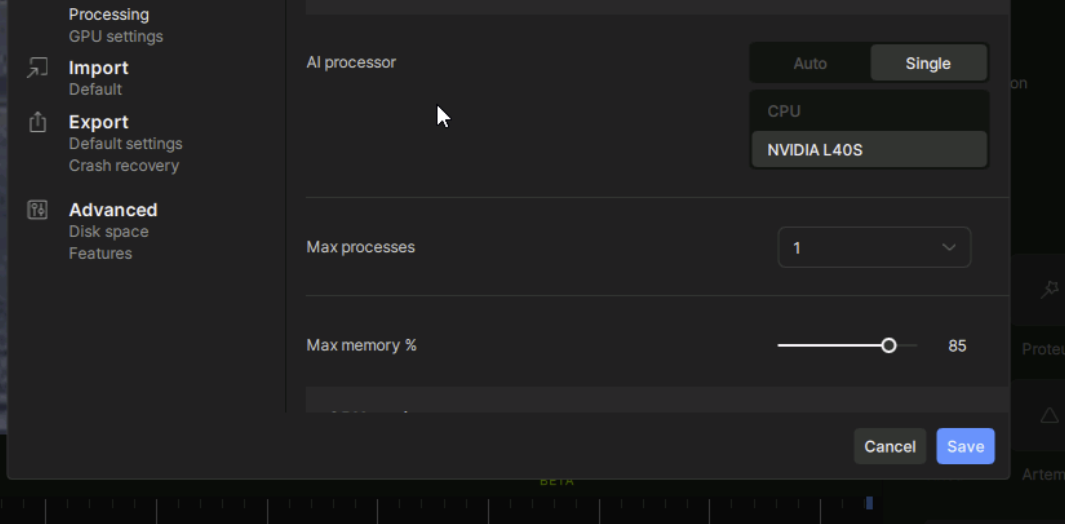
Yes, the GPU is selected in the preferences, memory limited to 85% and Nvidia GPU set to prefer no system fallback on Nvidia Control Panel
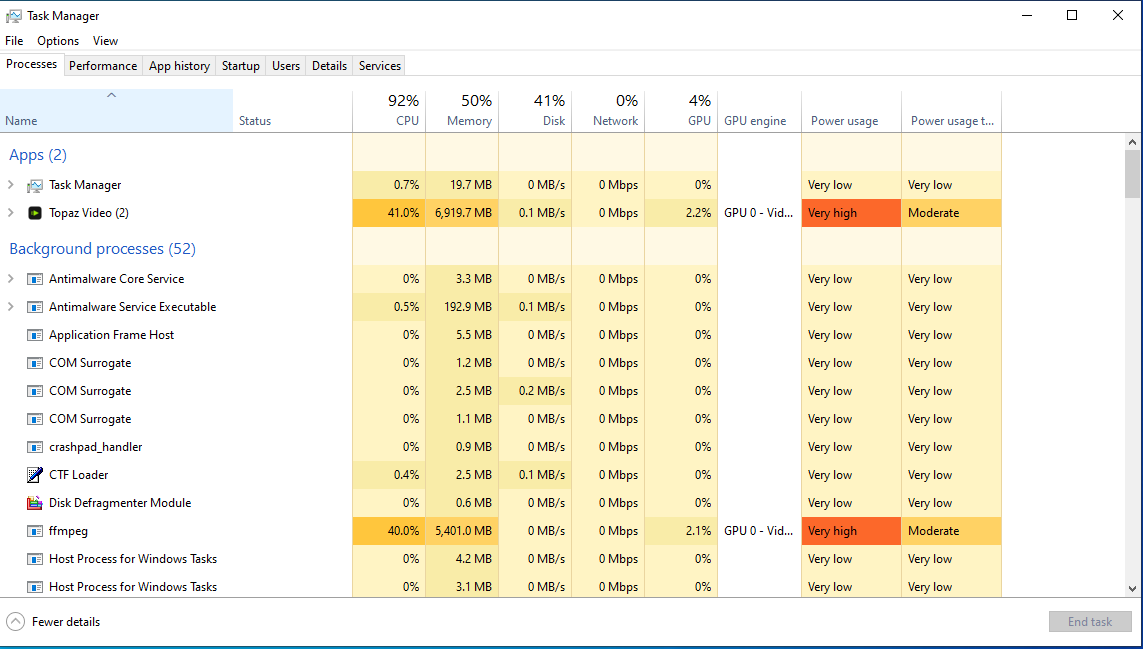
Although the CPU is reported by Topaz is 48 core it features 8 cores actually
UPDATE 2: after I reconfigured the machine with 22 core CPU the CPU usage is now around 52% and I am getting 3.7 FPS on Iris from 1920x1080 with 2x upscale on Topaz Video 1.0.4.
In comparison my RTX 3070 with Ryzen 7 5800x is rendering the exact same video with the same parameters and export settings at around 5.2 FPS on Topaz Video AI 7.1.4 on Win 10.
You may say my comparison is not 1:1 but it does not explain such a big difference in performance why the AMD Epic 22 core setup with the Nvidia L40S is giving such a low performance with the normal models.
It is very strange because in theory the Nvidia L40S is much more powerful with 3 times as many CUDA and Tensor cores as my RTX 3070.
```
Topaz Video v1.0.4
System Information
OS: Windows v11.25
CPU: Intel(R) Core™ Ultra 9 285 31.706 GB
GPU: NVIDIA GeForce RTX 5080 15.517 GB
Processing Settings
device: 0 vram: 1 instances: 1
Input Resolution: 1920x1080
Benchmark Results
Artemis 1X: 34.86 fps 2X: 12.07 fps 4X: 03.23 fps
Iris 1X: 39.12 fps 2X: 14.04 fps 4X: 03.64 fps
Proteus 1X: 36.11 fps 2X: 14.26 fps 4X: 03.81 fps
Gaia 1X: 12.71 fps 2X: 08.57 fps 4X: 03.76 fps
Nyx 1X: 16.80 fps 2X: 13.66 fps
Nyx Fast 1X: 33.09 fps
Nyx XL 1X: 23.71 fps
Rhea 4X: 03.30 fps
RXL 4X: 03.43 fps
Hyperion HDR 1X: 20.50 fps
4X Slowmo Apollo: 28.64 fps APFast: 79.28 fps Chronos: 25.20 fps CHFast: 27.74 fps
16X Slowmo Aion: ERR fps
I agree, it doesn’t make sense. Why do you have the Max Memory limited to 85%? As far as I remember, it only slows TVAI down on Windows machines.
Topaz Video  v1.0.4
System Information
OS: Windows v10.22
CPU: AMD EPYC 9454 48-Core Processor                  29.999 GB
GPU: NVIDIA L40S  47.316 GB
Processing Settings
device: 0 vram: 1 instances: 1
Input Resolution: 1920x1080
Benchmark Results
Artemis		1X: 	20.95 fps 	2X: 	08.41 fps 	4X: 	02.70 fps
Iris		1X: 	21.57 fps 	2X: 	08.05 fps 	4X: 	02.41 fps
Proteus		1X: 	20.50 fps 	2X: 	08.35 fps 	4X: 	02.43 fps
Gaia		1X: 	15.33 fps 	2X: 	06.79 fps 	4X: 	01.91 fps
Nyx		1X: 	20.56 fps 	2X: 	10.82 fps
Nyx Fast		1X: 	24.31 fps
Nyx XL		1X: 	11.94 fps
Rhea		4X: 	01.85 fps
RXL		4X: 	01.92 fps
Hyperion HDR		1X: 	14.18 fps
4X Slowmo		Apollo: 	19.00 fps 	APFast: 	37.76 fps 	Chronos: 	13.50 fps 	CHFast: 	18.30 fps
16X Slowmo		Aion: 	  ...    fps
I rerun the test with 100% but I don’t see any difference out of margin of error or in some cases even lower.
My conclusion is that in the case of the Nvidia L40S theoretical performance does not translate to Topaz real world standard model performance.
Why? It seems that the Datacenter driver the L40S is using was not optimized for Topaz Video AI.
In case of Starlight I tried with a longer 40 min video now and now it seems that the speed is roughly about the same as on RTX 5080 . So actually there the raw theoretical performance advantage does not seem to translate to real world performance either.
Topaz Video  v1.0.4
System Information
OS: Windows v10.22
CPU: AMD Ryzen 9 9950X3D 16-Core Processor            31.084 GB
GPU: NVIDIA GeForce RTX 5090  31.349 GB
GPU: AMD Radeon(TM) Graphics  0.44899 GB
Processing Settings
device: 0 vram: 0.95 instances: 0
Input Resolution: 1920x1080
Benchmark Results
Artemis		1X: 	49.10 fps 	2X: 	19.56 fps 	4X: 	04.88 fps
Iris		1X: 	54.73 fps 	2X: 	20.14 fps 	4X: 	05.65 fps
Proteus		1X: 	52.33 fps 	2X: 	20.54 fps 	4X: 	05.69 fps
Gaia		1X: 	19.49 fps 	2X: 	12.38 fps 	4X: 	04.96 fps
Nyx		1X: 	26.29 fps 	2X: 	21.57 fps
Nyx Fast		1X: 	51.21 fps
Nyx XL		1X: 	35.21 fps
Rhea		4X: 	05.16 fps
RXL		4X: 	05.09 fps
Hyperion HDR		1X: 	38.84 fps
4X Slowmo		Apollo: 	45.91 fps 	APFast: 	107.67 fps 	Chronos: 	36.87 fps 	CHFast: 	42.42 fps
16X Slowmo		Aion: 	36.49 fps
```
Except for Nyx maybe, I dont see any performance improvements since v7 (or v6 for that matter). What I mostly see is that the benchmark is still very inconsistent from run to run which indicates lack of programming quality.
Also, since 2 months there hasn’t really be anything of worth added or fixed for me. I am still using v7. I only get emails from Topaz nagging me to subscribe to studio version, lol.
v7.0.1
Topaz Video AI  v7.0.1
System Information
OS: Windows v10.22
CPU: AMD Ryzen 9 9950X3D 16-Core Processor            31.084 GB
GPU: NVIDIA GeForce RTX 5090  31.349 GB
GPU: AMD Radeon(TM) Graphics  0.44899 GB
Processing Settings
device: 0 vram: 0.95 instances: 0
Input Resolution: 1920x1080
Benchmark Results
Artemis		1X: 	56.65 fps 	2X: 	23.17 fps 	4X: 	05.30 fps
Iris		1X: 	48.14 fps 	2X: 	23.61 fps 	4X: 	05.72 fps
Proteus		1X: 	58.50 fps 	2X: 	23.77 fps 	4X: 	05.74 fps
Gaia		1X: 	18.90 fps 	2X: 	13.64 fps 	4X: 	05.62 fps
Nyx		1X: 	17.26 fps 	2X: 	11.60 fps
Nyx Fast		1X: 	42.33 fps
Rhea		4X: 	05.34 fps
RXL		4X: 	05.14 fps
Hyperion HDR		1X: 	44.80 fps
4X Slowmo		Apollo: 	59.64 fps 	APFast: 	103.91 fps 	Chronos: 	47.62 fps 	CHFast: 	58.85 fps
16X Slowmo		Aion: 	43.70 fps
Pretty sure that Nyx number is meaningless. On real videos it’s the same speed between the two versions.
```
Topaz Video v1.0.4
System Information
OS: Windows v11.25
CPU: 11th Gen Intel(R) Core™ i9-11900K @ 3.50GHz (runs with 4.5GHz) 31.828 GB RAM at 4000 MT/s
ASUS 590 MBoard
GPU: NVIDIA GeForce RTX 5080 15.517 GB (ASUS)
Processing Settings
device: 0 vram: 1 instances: 1
Input Resolution: 1920x1080
Benchmark Results
Artemis 1X: 30.36 fps 2X: 14.76 fps 4X: 04.02 fps
Iris 1X: 36.81 fps 2X: 15.20 fps 4X: 04.36 fps
Proteus 1X: 36.84 fps 2X: 16.37 fps 4X: 04.39 fps
Gaia 1X: 12.76 fps 2X: 08.48 fps 4X: 03.64 fps
Nyx 1X: 16.85 fps 2X: 13.45 fps
Nyx Fast 1X: 36.61 fps
Nyx XL 1X: 24.45 fps
Rhea 4X: 03.91 fps
RXL 4X: 03.79 fps
Hyperion HDR 1X: 27.13 fps
4X Slowmo Apollo: 31.90 fps APFast: 78.85 fps Chronos: 25.36 fps CHFast: 30.99 fps
16X Slowmo Aion: ERR fps
??? how much is ERR fps