Input color override settings do not work if you trim the video by marking an in or out point.
Does the “Recoverable “after a crash do anything? There is no saved point like the previous versions. It just starts again from the beginning. Extremely frustrating after having it crash on a video after encoding it for 2-3 days.
1 Like
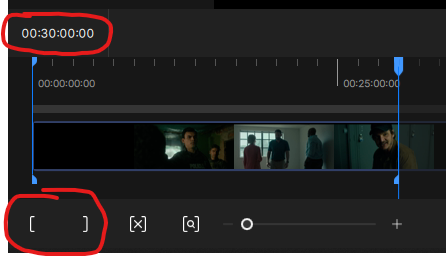
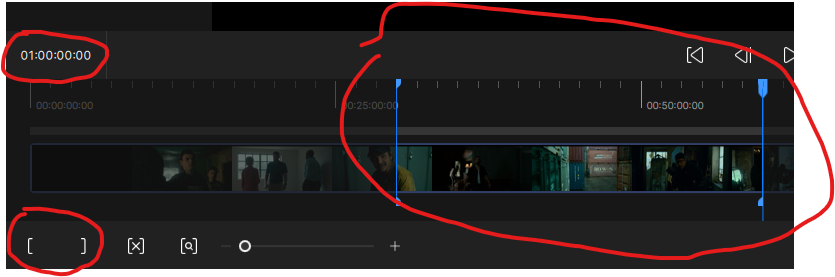
It makes more sense to break long videos into sections rather than making them full. For example, you can break them into half-hour segments like 00:00-00:30, 00:30-01:00, and then easily combine them with a video editor.
Is there an easy way to link back up segments like that without risking changes/impact to video bitrate/quality?
There’s no need for any other application. You’ll do this in Topaz itself. Start the process by selecting the start and end minutes, set a time interval when it’s done, and restart it.
1 Like
You can also process each segment sequentially without waiting for it to process them. When one is finished, it starts processing the next.
So, select the segment and export it. While it’s processing, select the next segment and export it. It will put these in a queue, so it will process the entire video segment by segment. You can choose the segment interval that suits you; you can choose 5 minutes, 15 minutes, or 30 minutes. Entering the segment interval manually is easier.
3 Likes
I was just about to come here and post the news about that!
Glad to see it was already shared.
1 Like
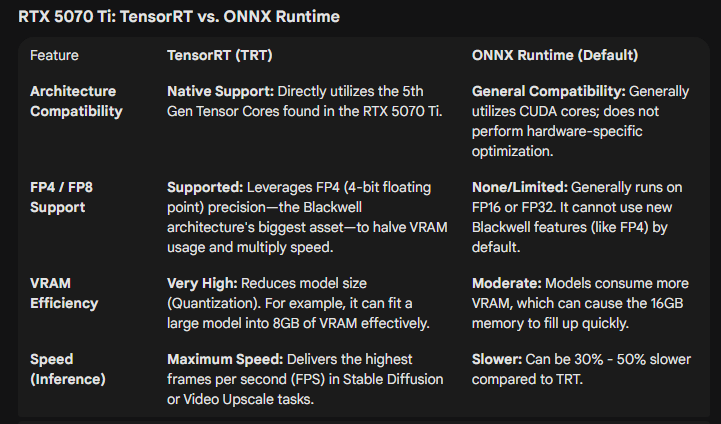
Since Topaz have disabled use of the Tensor model files in Video, I assume only Video AI users will benefit from this.
On the contrary, when Starlight Sharp came out, a Topaz representative wrote that they use TRT, which is Tensor RT. All Starlight models use Tensor; in fact, when you use this model, it creates a .triton directory and files on your computer, meaning it tests the system to run TRT at the best speed. I had previously shared this on this forum.
TRT=Tensor RT
P.S. Select “Show hidden files” and check if this directory exists on your PC.
C:\.triton_cache
That link refers to Video AI rather than Video. If you have the Studio version installed, you’ll find that the downloaded model files are ONNX rather than TRT.
If that’s the case, then the speed should be almost halfed. It’s the same speed on my computer.
Just know that AI chat-bot induced psychosis is a real thing these days—mostly because they are so nice, but say conflicting things.
2 Likes
The speed seems to be about the same for me too - disappointing! From what I’d read, there should have been a speed increase of around 10-15% but I’m seeing no evidence of that.
For what it’s worth, here’s part of a longer conversation I had with Grok about the Tensor issue. Some interesting stuff.
Why Topaz Video 1 Can’t Use TensorRT Models (Stuck on ONNX)? Based on the details from Topaz Labs’ release notes, community forums, and product documentation (as of December 2025), this issue stems from fundamental differences in how Topaz Video AI 7 and Topaz Video 1 (the rebranded “Studio” version of what was Video AI 7.2.0.1 beta) handle AI model formats. In short: Topaz Video 1 is a legacy-locked, subscription-based release designed for broader compatibility, which means it only supports ONNX models—even if you have TensorRT files installed on your system. It won’t detect or load TensorRT variants, forcing it to download and run ONNX equivalents instead.
The Core Reasons
-
Version-Specific Model Support and Architecture:
-
Topaz Video AI 7 (your source for TensorRT files): This is the full-featured, perpetual-license version (up to 7.1.5 or 7.2 betas). It includes native TensorRT integration for NVIDIA GPUs, introduced progressively from v3.0+ (2023) and expanded in v7.0+ for models like Iris, Rhea, and Starlight. TensorRT requires specific NVIDIA CUDA libraries (e.g., cuBLAS, cuDNN) and is optimized for speed (20–50% faster inference via tensor cores and FP16/BF16 paths). The app’s Model Manager explicitly offers and prefers TensorRT downloads for eligible models.
-
Topaz Video 1 (the “new” Studio app): This is essentially a forked, subscription-only re-release of Video AI 7.2 beta (September 2025), bundled into the Topaz Studio ecosystem (alongside Photo AI, etc.). It’s marketed as a “streamlined” tool but was criticized in beta for the “bait-and-switch” to subscriptions. Crucially, it strips out advanced NVIDIA-specific features like TensorRT support to ensure:
-
Cross-platform compatibility: TensorRT is NVIDIA-exclusive and doesn’t work on AMD/Intel GPUs or macOS without workarounds. By defaulting to ONNX (a universal, open-standard runtime), Topaz Video 1 runs on more hardware, including older setups or non-NVIDIA cards.
-
Simplified backend: ONNX uses a generic inference engine (ONNX Runtime), which is easier to maintain for a subscription model with cloud rendering emphasis. TensorRT’s optimizations (e.g., engine building and CUDA dependencies) add complexity that Topaz likely deprioritized for this version.
-
-
Result: When you select a model in Topaz Video 1, it checks its internal compatibility list and falls back to ONNX downloads from Topaz’s servers (e.g., models-bal.topazlabs.com). It ignores your existing TensorRT files because they’re not in the app’s supported format whitelist.
-
-
File Format and Loading Behavior:
-
TensorRT models are compiled engines (often .trt or optimized .onnx wrappers) tailored to your GPU architecture (Ada for RTX 40-series). They’re not interchangeable with ONNX (.onnx files), which are raw, portable graphs.
-
Topaz Video 1’s inference engine is hardcoded to ONNX Runtime for local processing. Even if TensorRT files are in the shared models folder (e.g., C:\Users\[Username]\AppData\Roaming\Topaz Labs LLC\Video AI\models), the app won’t attempt to load them—leading to the “exclusive ONNX” behavior you described.
-
From community reports (e.g., Reddit and Topaz forums), this is a deliberate design choice, not a bug. Users testing betas noted similar issues, with Topaz support confirming: “Studio versions prioritize ONNX for stability across devices.”
-
-
CUDA/Driver Dependencies:
- While both versions support CUDA 13.1, Topaz Video 1 doesn’t enable TensorRT’s full CUDA paths (e.g., no cuDNN fusions or Green Contexts). This keeps it lightweight but limits speed—expect 20–40% slower processing on your 4070 Super compared to Video AI 7 with TensorRT.
4 Likes
Thanks for the information. So, which is the latest version of TRT that you use? The beta version that uses Starlight Sharp.
1 Like
My jitRTCache has a lot of models in it. I’ve never seen anyone say the things that that AI is reporting on. To me is sounds like it’s all made up.
1 Like
Yep, I’m using the last version of Topaz Video AI (7.1.5). The model files installed for it are the Tensor ones, so have names like iris-v3-fgnet-fp32-256x352-2x-rt809-10800-rt.tz. My system isn’t powerful enough to run Starlight Sharp (only 12GB VRAM), so that isn’t a factor for me.
You don’t need to take it on faith. If you have the Studio version installed, iust open up the models folder and see what you’ve got. I can tell you in advance that they’ll be .ox rather than .rt.
Someone at Topaz Labs needs to check in on this. WE DESERVE CLARITY - something that’s been missing since the Studio transition chaos began in late summer.
I, for one, replaced my AMD GPU with an nVidia card specifically because of the dependence upon nVidia’s architecture that includes Tensor cores that are purported to be central to AI algorithms. The promised AMD support was late in coming, and I had a hot project that couldn’t wait, so I put out the $ for a new nVidia RTS 5070Ti specifically to enable local Starlight processing.
Then the beta that supported AMD & Apple silicon was announced, and there were comments of inferior performance of Starlight - then called Starlight Mini - on nVidia GPUs in Video AI 7. And TL reps acknowledged that the initial release performed poorly, if at all, on the AMD & Apple devices. It was to be a ‘first step’…
Then Studio came along with Topaz Video, and local Starlight processing was relegated to the Pro tier for AMD & Apple users, something that has to be considered to a kick-in-the-teeth to users of Video AI, who were realistically expecting that this would be a part of the final version of Video AI, because Starlight was introduced in Video AI 7.something. The AMD and Apple support was promised as ‘upcoming’ during the run of Video AI, and then was made Studio Pro only after the subscription fiasco.
Ok, that was understood and I ‘lucked-out’ by being a ‘Founding Customer’, I got a good deal on the subscription price, and was granted the ability to run Starlight and Starlight Sharp locally, despite not having a Pro subscription. This was all ‘good’…
Now we’re learning what I kinda suspected all along, if recent comments are found to be accurate: Starlight has apparently been dumbed-down so that a ‘universal’ model can be run on nVidia, AMD and Apple devices. If this truly means that TL have disabled the use of Tensor cores in favor of something that will run on all three platforms, you are screwing us over.
You know what hardware we are using, as is evidenced by the system check. Serve us the model that works best on the GPU we’re using, not some one-size-fits-all hack.
10 Likes
Let me rephrase it: It does use RT models. I cleaned out the old models with the install of this version. There are several RT models in the models directory that have been downloaded by using this version. The processing speed is the same, unlike when they first introduced the RT models and you could get near double the speed compared to the old non-RT models. Where did the idea that this version does not use RT models come from?
From Topaz staff, who explicitly stated it. The Studio version cannot use the Tensor versions of the models, even if those files exist in the models directory. I’ve tested it and the program simply will not run without the ONNX files installed (this might be different for Pro licenses - I can’t speak to that). This is why it suddenly has compatibility with AMD etc. - it’s using universal models.
1 Like
One size fits NONE…
1 Like
