maybe more bugs
12 Likes
I wanted to know what’s coming next in addition to those 
1 Like
They say working improve Starlight, hopefully not only for the cloud 
2 Likes
One thing I REALLY want to see in a new version is a starlight preview. I understand it would take forever to render even a second of footage, so instead I would at least like a static preview of what that specific frame would look like with starlight or starlight sharp. This would be really awesome to have.
2 Likes
Well, I guess since Starlight also seems to use temporal intel it’d have to render at least some frames to show the one frame preview anyways.
thus I normally select a very small part (e.g. 5-10 seconds) to get such a preview.
Besides, Starlight doesn’t shine in single frame previews (there IrisMQ can be the most impressive) - but in real motion with it’s natural look (vs. the artificial plastic look Iris likes to create).
This year, you twice introduced new models for richies with plenty memory GPU.
You never described future path for memory demand in future models.
This fall scenario:
- I buy $1.2K RTX 5080 with 16GB
- Going pay support for topaz video
- You introduce new model demanding 20GB memory
Bad: spent $1.2K in vain.
Good: will not pay 2-3 years for topaz video.
a preview would be great but I could also live with copy running export file and check results there. For me, the top priority is to improve the models and eliminate bugs.
3 Likes
I would say if focus is SLM/SLS, SeedVR2, bite the bullet and spend a 5090 is more future-proof than 1200$ for a 16GB card, then save on the rest. An AMD X-CPU 8-cores is sufficient, 1200W power supply, standard B850 Asus (X chipsets is money waste), $8 Arctic cooling fans are good, and the case doesn’t have to cost $200+. 2x32GB DDR6000 (Expo1) - do all without “bling-bling LEDs” saves money.
4 Likes
This is the way I’m going to go. I have already Ryzen 5700X and 64GB RAM, and 5090 is on the way.
Both Topaz and SeedVR2 work best with 32GB of VRAM.
I’m not even tempted with the upcoming 5080 Super. It’s a gamers-oriented card: RTX 5080 SUPER vs 5090
3 Likes
theoretical comparison of non-substantial data
1 Like
The large batch size SeedVR2 without using VAE is so amazing
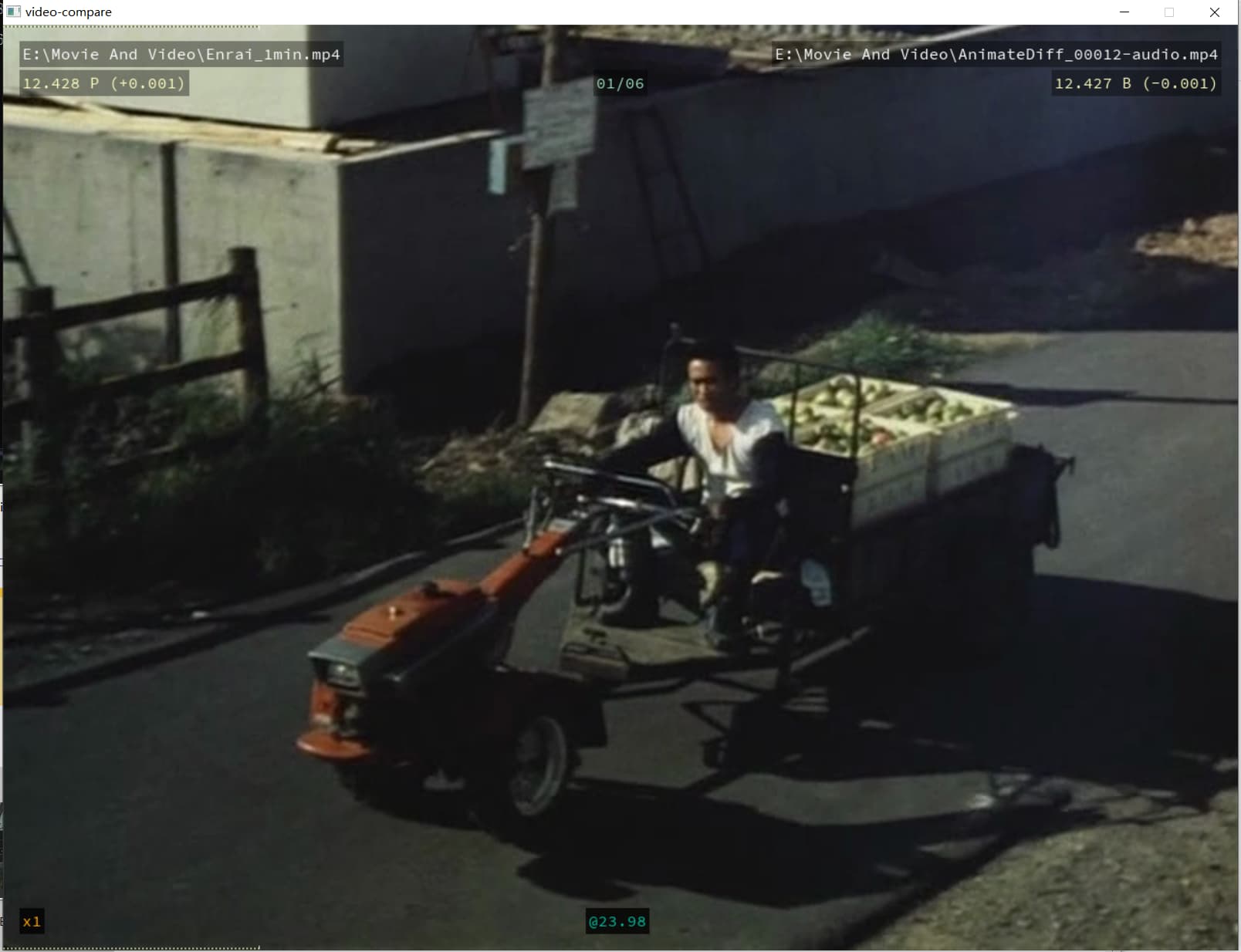
Even the number on the box after a few seconds
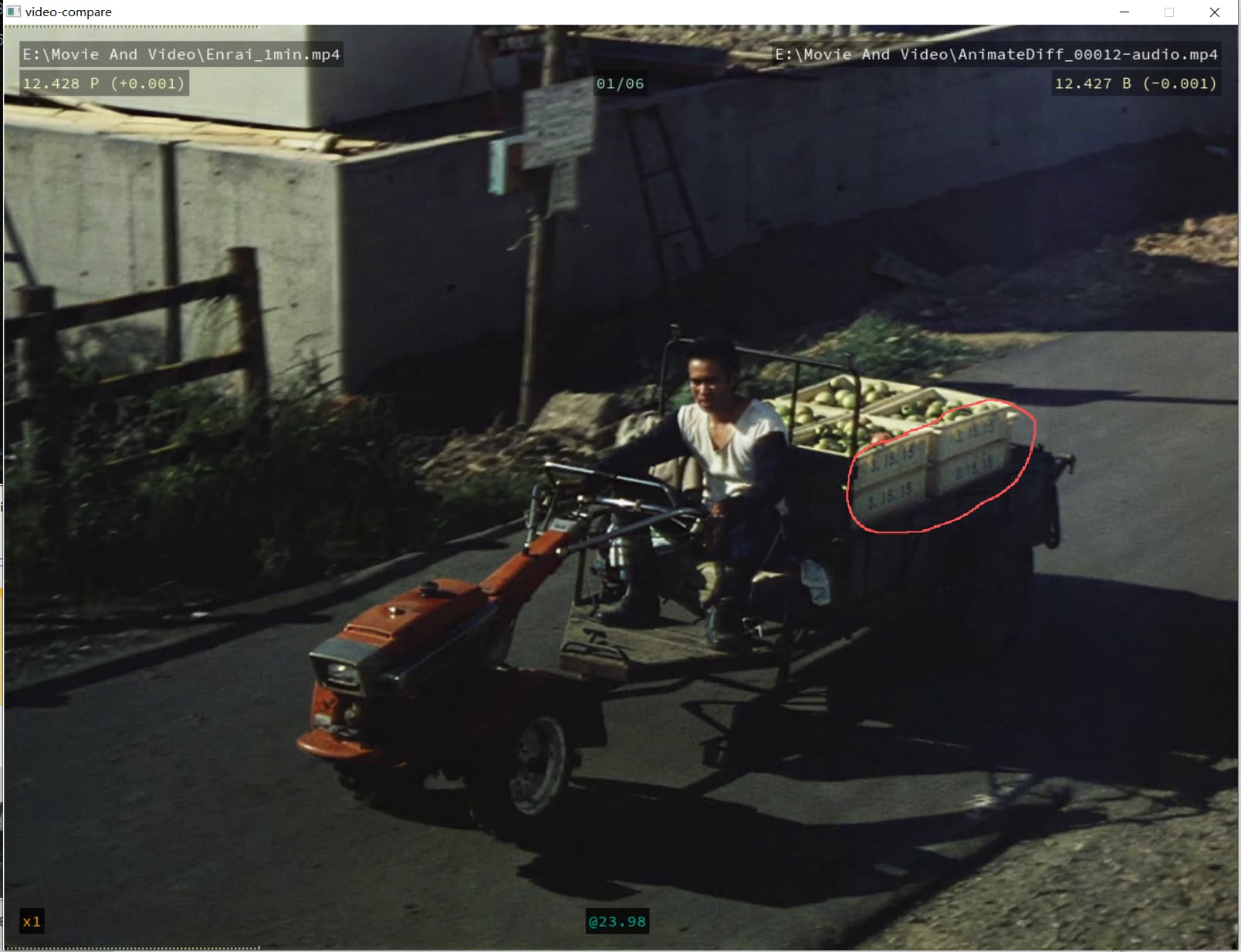
5 Likes
Starlight definitely needs the most amount of fixes. It’s been practically unusable since Studio release.
6 Likes
Would be much better if you elaborated on what actually makes it unusable for you. Personally I have not noticed any big differences/issues compared to the ones in previous Video AI releases. The visible tiles are there, but as I understand they have been there since the beginning…
The x4 setting in Starlight Mini does not work as intended, but choosing UHD instead for output resolution gives the expected size. So what are those other gradiose issues?
Has anyone experienced a problem trying to use a cropped portrait video with Starlight Sharp?
I selected an In & Out section of a video to test.
The uncropped video:
720 x 1080 H264, 25fps,AAC,MP4
Cropped to:
720 x 900
Output Resolution:
1920 x 1080 FHD, Pixel: Square, Letter/Pillarbox
Log file says:
Invalid too big or non positive size for width ‘608’ or height ‘900’
More Log Detail:
INFO {“status”: “INITIALIZING”, “frame”: 0, “progress”: 0}
Num GPUs: 1
Total GPU Memory (smallest): 31.84234619140625 GB
loading VAE: 0.4454 seconds
loading generator: 4.4327 seconds
{“status”: “RUNNING”, “frame”: 0, “progress”: 0}
Start processing…
Second stage upscaling needed: 1.3333333333333333x
Created reader and writer…
{“status”: “RUNNING”, “frame”: 0, “progress”: 0}
ERROR Invalid too big or non positive size for width ‘608’ or height ‘900’
ERROR Failed to configure input pad on crop
ERROR exception during run(): [Errno 22] Invalid argument; last error log: [crop] Failed to configure input pad on crop
{“status”: “ERROR”, “frame”: 0, “progress”: 0}
Runner: exit code: 1
platform: Windows
video_reader: (h, w)=(1080, 720), fps=25
fps: 25
num_frames_to_read: 177
Parsed filter chain: [(‘scale’, ‘w=607:h=1080’), (‘setsar’, ‘1’), (‘crop’, ‘w=608:h=900:x=0:y=180’)]
Adding filter: scale, args: w=607:h=1080
Adding filter: setsar, args: 1
Adding filter: crop, args: w=608:h=900:x=0:y=180
process exited: 100 0 0
Maybe I need to flip it 90 degrees?
Actually, SLS would be well suited for upscaling SLM content. The problem I noticed is that SLS then produces jagged contours, similar to what I’ve seen doing Rhea 1x.
SLS is combined with the new NYX and not another model I don’t know. I’m not surprised this happens I’ve never was fan of NYX, although the new NYX is probably better than the old one.
