The plugins that didn’t make it into Topaz Video 1.0.0 have been restored to their previous state. They’re fully functional again.
We’re also working on a rewrite for these plugins behind the scenes to improve both performance and quality, so stay tuned for those improvements in a future update, coming soon.
Thanks for your patience and feedback as we continue refining the software.
“Access to or use of the Command Line Interface (“CLI”) is strictly prohibited under a Personal License.“
Dakota Wixom says this in incorrect. Topaz have now had plenty of opportunity since v1.0.0 to update the EULA accordingly. Sadly, it comes as no surprise whatsoever that they haven’t bothered to do so.
If I export a video to an image sequence, can topaz then put the sequence back into a video? I’m assuming it should be able to since it would make the option useless if you can’t put it back into a video file.
I noticed that exporting files after the Studio version corrupted the file structure. When uploading the exported file to YouTube, I saw corrupted video. However, when I re-rendered the file with a video editor and then uploaded it to YouTube, this problem disappeared. This problem didn’t occur in the older 7th version, but I’ve seen it in the newer Studio versions. When you watch a video in the standard player, you don’t see these errors because it automatically fixes minor errors in the background, but when uploading to YouTube, it causes problems when it re-renders files with errors.
General
Format : MPEG-4
Format profile : Base Media
Codec ID : isom (isom/av01/iso2/mp41)
File size : 1.75 GiB
Duration : 1 h 0 min
Overall bit rate : 4 150 kb/s
Frame rate : 30.034 FPS
minor_version : 512
major_brand : isom
compatible_brands : isomiso2mp41
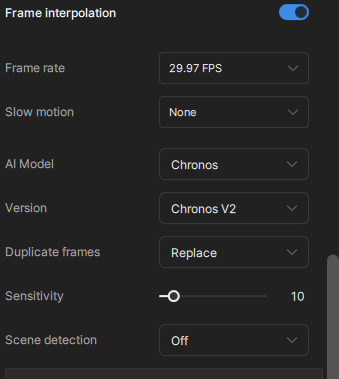
videoai : Framerate changed to 29.97 using chr-2 replacing duplicate frames. Enhanced using iris-3; mode: manual; revert compression at 50.5639; recover details at 28.578; sharpen at 25.0961; reduce noise at 8.70181; dehalo at 16.4121; anti-alias/deblur at -3.89258; focus fix Off; and recover original detail at 20
encoder : Lavf62.4.100
Video
ID : 1
Format : AV1
Format/Info : AOMedia Video 1
Format profile : Main@L3.1
Codec ID : av01
Duration : 1 h 0 min
Bit rate : 4 149 kb/s
Width : 960 pixels
Height : 720 pixels
Display aspect ratio : 4:3
Frame rate mode : Variable
Frame rate : 30.034 FPS
Minimum frame rate : 14.985 FPS
Maximum frame rate : 11 988.000 FPS
Color space : YUV
Chroma subsampling : 4:2:0
Bit depth : 8 bits
Scan type : Progressive
Bits/(Pixel*Frame) : 0.200
Stream size : 1.75 GiB (100%)
Writing library : Lavc62.12.100 av1_nvenc
Color range : Limited
Color primaries : BT.709
Transfer characteristics : BT.709
Matrix coefficients : BT.709
Codec configuration box : av1C
And while you’re at it, Topaz Labs, how about writing files that actually adhere to the output resolutions that are selected for rendering? I’ve seen some very strange results…