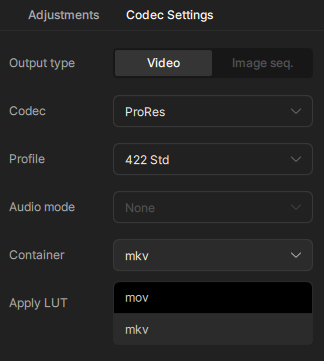
It worked for me when I upscaled 720p to 4K, encoded with one of the Prores variants and saved it to .mov.
But if it’s giving you trouble there is a workaround. If you navigate to C:\ProgramData\Topaz Labs LLC\Topaz Video\models (or equivalent path on your system) and find video-encoders.json, you can edit it to give yourself the option to save Prores to .mkv.
For example, here is a snippet from mine which I edited to include mkv:
I’m testing the Sharp model, and it doesn’t calculate FPS correctly. It starts at 2.2 fps, sometimes drops to 0.3, often displays a 1.7-1.8 GPS, and sometimes fails to calculate and displays 99999 fps. However, in all my tests, the average FPS, considering the file size and processing time for the video fps, has always been 1.37 fps. The SLM didn’t exceed 0.6 fps in the tests. It processes at least twice as fast as the SLM, but it still falls short. They still haven’t added a turbo mode. You could lower the quality and use FP16, for example, to process twice as fast. I wish there was an FP Mode setting; speed differences could be determined based on quality. Also, in my log analysis, the GPU isn’t fully utilizing its tensors. The GPU is running at 100%, but because the tensors aren’t fully optimized, they’re only using half of their capacity. I think these optimizations could increase the speed even further.
Overall, the Sharp model is better quality than the SLM. Of course, different videos may yield different results. I’ve been testing it on heavily distorted videos and have found it to produce better results than the SLM.
Well, most people here came to a contrary opinion. But I guess this is similar to that discussion Iris LQ vs. MQ or even Rhea…
Those that want it natural like it when the AI doesn’t “overdo” (Iris LQ) - even if the result of other models might look sharper at first sight (Rhea) it introduces many strange artificial things and generally overuses textures.
On still images you sometimes don’t notice it but look at it in motion and this in 300" like I do and it can get really terrible.
Why is Starlight Sharpen significantly faster compared to Mini? Is it doing less restoration by sharpening the image instead? Just curious because I would’ve assumed both versions would be at the same speed or close etc.
I’m pretty sure the answer is “no” but could Topaz Video/Studio run locally on a Framework Desktop with the AMD AI Max 300 series? 128GB of LPDDR5x for $2K seems like a lot of bargain if it could process video.
The models are brilliant but I think they employ pre-schoolers to do the UI since every new release introduces a host of stupid and obvious errors that can not have been checked, otherwise it would not have been approved for release.
It’s a shame as I always end up having to wait a month or so before the program is stable after a major update, I think WE are the beta testers here!
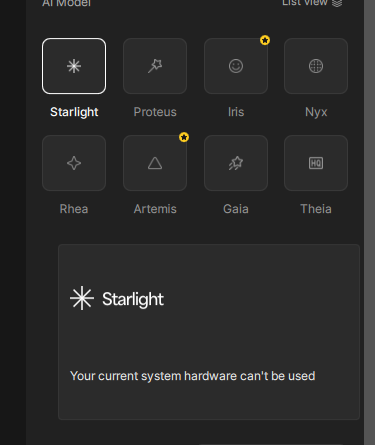
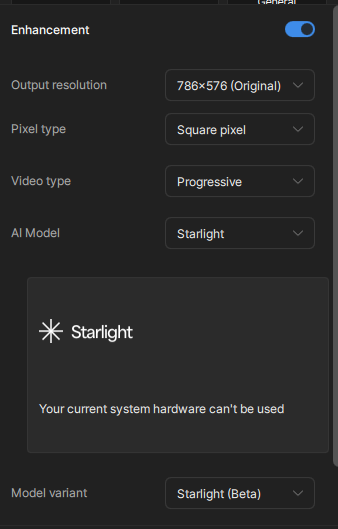
This button view is too limited and confusing–I don’t like it. You need to switch to the “list view” (top right of your image). This will reveal options to use the Starlight (beta) option which is designed to allow for non-NVIDIA GPU hardware. This button you selected will only allow you to cloud-process with your hardware.
I think you’re looking at this in a way that’s a little backwards…
There’s a relationship between the GPU temperature and progress, but you have cause and effect turned around. The GPU temperature increase indicates that it’s hard at work producing your output.
I think the unknown is “Why are there periods where the GPU utilization is minimized!”
I second jo.vo; even with the SOFTEST input, the Starlight Sharp model’s output is too rough and it is TERRIBLE with small distant faces compared regular Starlight. Lots of unnecessary texture where it shouldn’t be. Same with Rhea XL…it’s just way too much even for the worst low-res VHS or internet videos. I’ve never found a use for either of them that yields anything but garbage output. In fact, I’ve taken to keeping Rhea at “0” because anything additional is overkill on that one too.
Ah! This explains it.
The beta now runs locally on some AMD GPUs—BUT the current AMD requirement is ≥20 GB VRAM and ≥32 GB system RAM. So, with Ryzen 7 7800X3D + RX 6950 XT (16 GB) + 32 GB RAM , you meet system RAM but your GPU misses the AMD VRAM minimum for Starlight.
So I’m supposed to have access to this (I have two subscriptions for gigapixel and photo ai), but when I try to activate it it says I need to renew? How do I activate it?
Same here. I have all three, with Gigapixel and Video AI still in their free upgrade cycles.
The link posted earlier (btw I never got an email about any of this) says if I have two of the apps I will automatically transition to Studio at no cost, which includes new Photo AI.
However, when I log in to new Photo AI I am told to pay $199 to renew my seats to old Photo AI as well as another popup that wants me to subscribe to Studio. I’m guessing the bugs are still be worked out so for now I will not be renewing legacy Photo AI since it is end of life, nor subbing to Studio until I’m sure where I stand regarding the transition offer.
Find the dmgs n pkgs that are provided for every release on the release pages, run the installer or drop in the application folder (dmg) to copy and that should work. It’s been a known issue that updating through the app can be problematic.