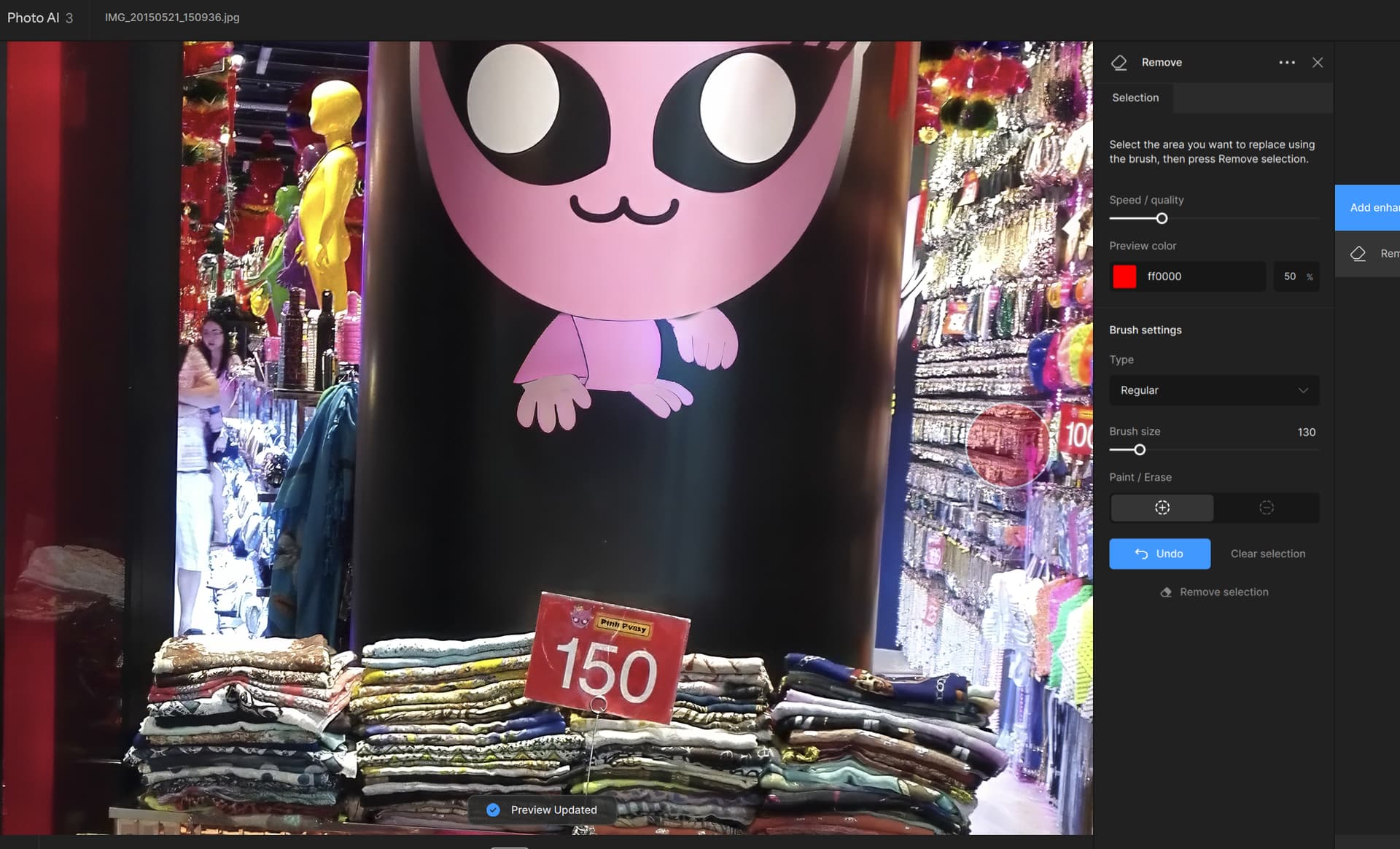
What is the point of this Remove option when it wont do the job properly and takes 48 seconds, the inpainting brush in AP takes 1-2 seconds and does the job properly, …
ORIGINAL
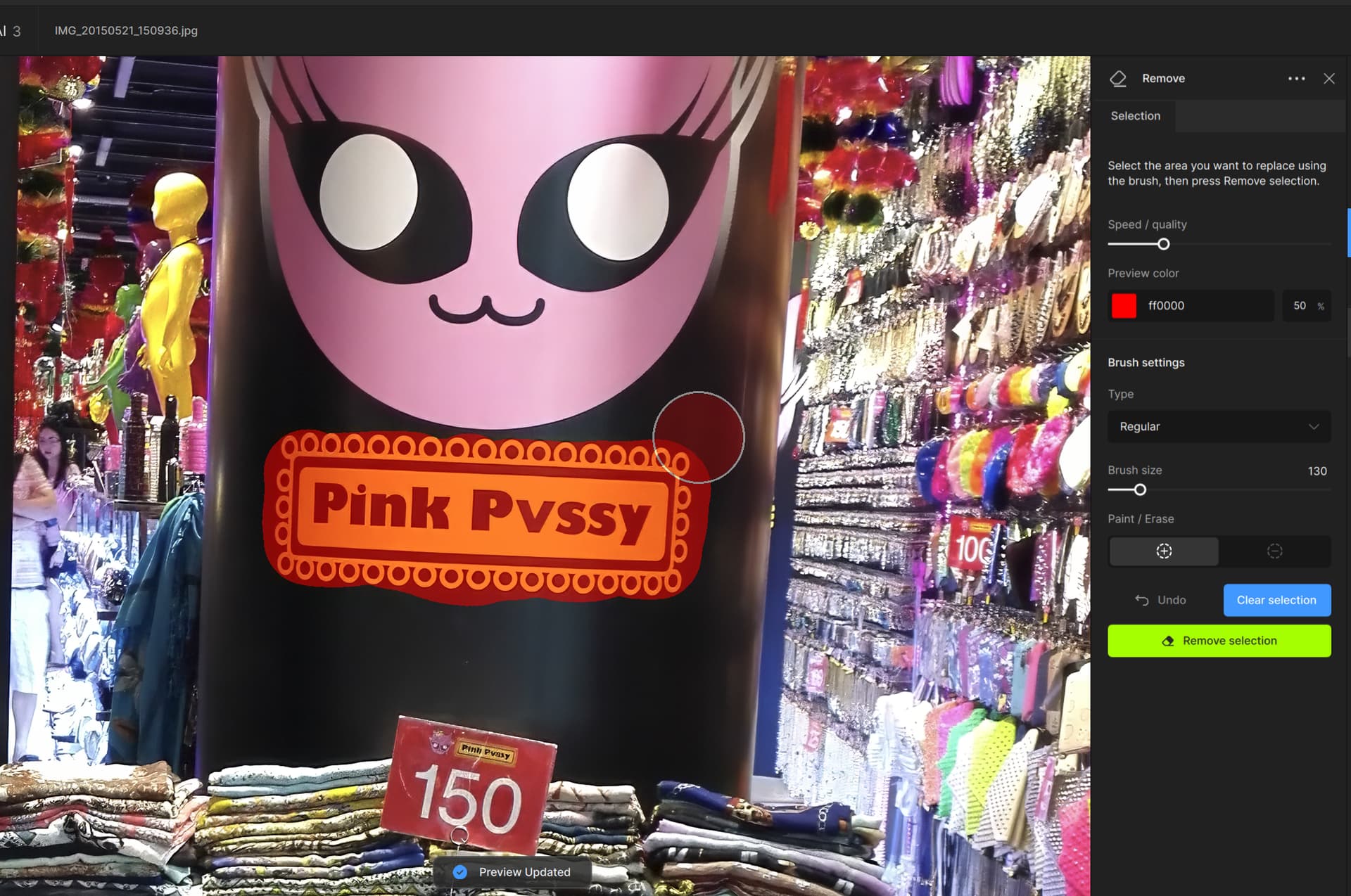
RESULT
What is the point of this Remove option when it wont do the job properly and takes 48 seconds, the inpainting brush in AP takes 1-2 seconds and does the job properly, …
ORIGINAL
RESULT
Could it have an option for “match background” vs. “auto”, or something similar. The minimally-explained “pad size” choice on the first release of Remove Tool sort of did this. Even better, a way to select what to match, if other than “auto” or “match” would be great.
Several times I’ve wanted to tell it – don’t try to match this, match that.
Just a thought…
Sam
Yes. In Photoshop we can brush a color overlay on or off areas to use as fill refence or not.
And now in Lightroom, too (they just introduced generative fill for LR)!
Wow! They’re making Lr & Ps less and less differentiated as products. Interesting. About the only thing now is that working with layers (for compositing, etc.) seems to still be superior (or only possible) in Ps. I don’t use Lr, so I can only say that based on what I read. As a former strategic planner and product planner/tech marketer, it makes me wonder where they’re meandering for Ps… because if they move it more and more towards primarily a tool for illustrators vs photogs then it starts bumping more into Ai’s (Illustrator’s) territory.
20+ years ago I was promoting Deneba (then ACD, now GFX) Canvas, a graphics app that integrated vector and bitmap objects seamlessly. You really get spoiled working that way!
See my PDF ezines about the app, most of which were made in the app itself (change the issue # below up to 17 to see them all):
I’ve long noticed Adobe moving in this direction. They should have integrated their apps long ago… Then again, Topaz is finding this challenging!
Affinity apps have done this from the start where the have fully featured vector and raster workspaces. Add raster brush texture to your illustrations, edit single pixels on icons, mask and add grain to your crisp vectors, enclose and clip pixel layers… it’s true creative freedom at your fingertips.
3 choices, image, raster and vector … it doesn’t do image tracing though.

No there isn’t. Only Beta.
Ok, usually they stick to the 2 week release cycle.
I don’t see anything about the memory leak being fixed in the beta anyway, sigh.
Interesting, though they still maintained the separate apps. New owner now too, we shall see…
Also they released 2.5 today.
Is there no longer an every other Thursday update release? I think 3.0.2 was released about 15 days ago.
They just released a beta version of 3.03 on Thursday. Some people have complained that they aren’t spending enough testing prior to releases. So let’s see what happens with the next release.
It is Memorial Day in the US on Monday. They may not want to do a release just before in case there is a serious problem
It wouldn’t make any sense to release 3.03 the same day they released the beta for 3.03.
TRULY disappointed version change.
It’s not enough that you render prior versions unusable and demand another hundred bucks to renew… but now you impose this ridiculous interface on users.
Your autopilot thinks it’s so smart that it no longer needs our input so let’s just hid all the manual functions, making the user search for them and add dozens of extra clicks to find the function buried layers deep … childishly useless unless of course you just surrender yourself to autopilot. Guess you don’t need a user… next up, let’s just let autopilot take the photos too.
So autopilot decides you need “face recovery” and then cranks it up to such a crazy high level that the face ends up looking like a plastic cartoon. … Then if you want to change that you have to take a half dozen clicks to find where they hid the slider bar to take it down to … oh, let’s say 1 or 2 instead of 80-90. … then you can see that the photo is a photo and not a looney toons cartoon.
If users had the option to keep prior versions without milking users for more money every year, … they’d certainly not “upgrade” to 3… since your upgrade is a downgrade.
The prior versions still work and can be downloaded from the releases section of the forum. I haven’t been “forced” to upgrade. I still have version 2 installed. There are users who have stayed on v2.3.2 because they haven’t liked the releases after that.
You can disable items like face recovery
This may have been spoken about previously, but I haven’t found a topic anywhere…
In Sharpening, when I go to the selection, the feathering defaults to 100%. I have to remember to bring it down to a (what I think is) reasonable level like it previously was - 20%. SHOULD I be reducing it from 100%, and if so, HOW do I change the default so it stays where I put it?
I’m TRYING REALLY HARD to use 3.0.2 since the processing is quicker, but when doing a subject selection the thing is absolutely wretched, with massive lag when drawing in the subject - FAR WORSE than 2.3.2. The system is a 12900, 64gb of member and an Nvidia 4060TI, so I’m not sure why the painting the subject is so laggy.
And while I’m whining, HOW do I get 3.0.2 to properly give me a denoise and a sharpen when I send a tif, and a denoise and a sharpen when I send it a RAW… Making my own defaults just ADDS to the junk that’s already there and before I know it I’ve got a RAW Denoise and two sharpens…
I just realized that while the stuff above is a problem, the MUCH larger problem is that 3.0.2 WON’T properly return a .dng when invoked from a Lightroom Export. This also happened way back in V2, but eventually it got fixed. Without the export the returned image doesn’t get the proper renaming.
Back to 2.3.2 'til some of this stuff gets fixed.
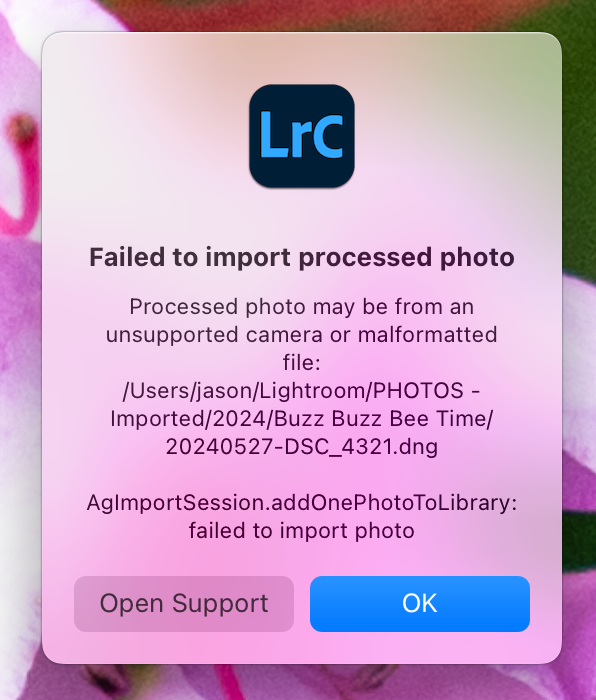
I’m seeing this error come up quite often in Lightroom Classic on macOS. It happens maybe 25% of the time, but that’s often enough that it’s quite irritating. Any idea why this is happening and if there’s a fix?