I was gonna offer up something like “You raised an important issue, and a healthy discussion is always welcome”, or “As a father of a 12 year old girl I more than understand your concerns” or “The world is full of good inventions that end up being used in a way by a few and we still don’t ban them”.
And then perhaps elaborate with examples…
But your last sentence kind of killed that.
So instead another suggestion: Why don’t we just ban cameras altogether? Or why not go for the whole she-bang straight away? Let’s ban internet!
Once again - the subject is important, but that last line…
@tim.he Couldn’t you re-integrate Sharpen V1 in 2.1.1? After all the feedback from users in that direction, that V1 had advantages over V2. Technically it should be rather easy, as versions prior to 2.1.0 already worked with V1 + V2 in the same program. It shouldn’t hurt to give users access to both versions (V2 could be standard, if you so want it - but let the users select V1 if they need it).
After all V1 is an already trained and proven model which worked well in many previous releases. There should be no actual downside providing both.
Thanks for considering.
Very true. We really see it in inter-club competitions where the same set of images are judged by a number of different judges with wildly differing marks! I may well resubmit the version without the van.
When I click on the Remove button it says compiling models and a lower button says enabling and nothing happens. It says it can take some minutes but it has gone for hours and the button saying enabling just spins.
I have a iMac 2019 with 80GB ram and 8GB of vram. Using BigSur. 11.7.10
FYSA, I had a high resolution file that I tried to create a relatively large remove mask on and then saw a warning dialog that the mask was limited to 2000 x 2000 pixels. The program subsequently crashed to desktop.
That’s useful to know, thanks for the info. I believe the Photoshop version is 1024 x 1024 pixels & Luminar Neo’s Generase tool is 1536 x 1536 pixels so it would appear that TPAI has a bit of an advantage.
Well, it really does insert nudity e.g. when selecting a bikini top it’ll often replace it with a different top (sometimes even better looking than the original) - but at least after more passes it’ll in fact replace the top with nude boobies
(No, I won’t post examples).
From a shear technical perspective this is exactly correct: remove the object and insert a fitting texture of what was behind it.
Still I can of course see the validity in those concerns people have with this.
I think this can be solved easily by adding a NSFW selection in the Perference,
or enable users to customize “negative prompts” in inpaint json file.
Generate human body can be done easily using free software such as Lama Cleaner or Stable Diffusion. There are thousands of free AI models can be download from Civitai or hugging face, which generate human body much much better than TPAI.
I honestly didn’t even imagine the possibility before it was first mentioned here but I actually did try it “just because” (now that we’re comparing notes) and I had no problem removing a bikini top at first try (in one “pass”).
Having said that I neither fee l the need of continuing that kind of experiments nor do I think there should be any crippling measures taken.
Better to educate people in using the tools well, because it ain’t the tools fault that people miss-use them.
Exactly, I said that in reply to one of @SlyFox8900 's first of several posts about this. Plus, Topaz have indicated that they are working on it.
It should not be hard to incorporate a NSFW toggle, as it’s a simple thing to do that by using negative prompts in say Stable Diffusion. That’s all they need to do really but as it’s going to take them at least a week to do, they should have thought of this before releasing a public Beta!
Yes, I tried closing the app and reopening it. I have restarted my computer. I have tried smaller in memory size photos say a 50k photo and still get the same result.
I had that warning when trying to remove a ‘light saber’ (a long thin object) from a photo and TPAI did not crash; the light saber was fairly basic and the background was camouflage material so not very complex.
PhotoAI - for when your equipment just ain’t good enough…
PhotoAI - for when your technique just ain’t good enough…
PhotoAI - for when reality just ain’t good enough…
Fakery is the future. Your future will be fake and, yes, resistance is futile.
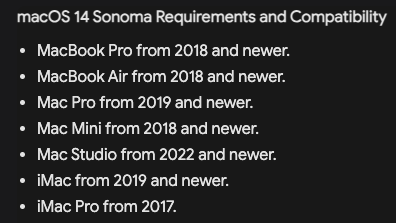
Your hardware specs were quite good for the time you purchased but your OS is way behind (assuming this has any relevance to this particular issue). Your iMac should be able to support the current Sonoma (3 OS versions newer):
In my experience going back to Gigapixel days, using Topaz apps on Intel Macs is painful slow… You didn’t mention your processor (i5? i7? i9) or hard drive type, I assume SSD? If HDD or Fusion, that too is an issue. M1 or better will rock your world. Even i9 is not so impressive any more.
First try deleting and reinstalling Photo AI, then think about updating your OS and let us know.
Not everbody, unlike you, is obsessed with removal of clothing of teenagers, so it seems you have an impulse problem and want to restrict development just to restrain your own actions. A lot of people would need the removal option for minor fixes, there are much better options like Stable Diffusion if somebody wants to do engage in NSFW work.