Maybe I’m missing something, but I’d like the option of saving just one individual photo in the “filmstrip” instead of all of them. When there is more than one image in the filmstrip the “Save” button wants you to save all of them. Saving the current photo being worked on while keeping others that I’ve already saved in the filmstrip/history allows you to go back and re-edit without having to open the image again.
3 Likes
I use Topaz to develop from Theta Z1 DNG twin lens to tiff and then stitch to 360x180. I often want to remove myself from the picture. When I hold the camera on my side, v2.1.0 does that incredibly well, removing me from even a complex background - though quite slowly as the release notes indicate. The problem is that I often hold the camera above my head, to make it easy to remove myself. This goes well with with the Equirectangular Projection setting in Affinity. But editing or removing around the singular point in nadir is useless - tilting down is necessary. Using some other program to tilt down and then tilt up is not an appealing workflow. If Topaz would include support for immersive photography, with three axes realignment possibilities, it would be great.
Would like to see similar in Video AI for watermarks and hardcoded subtitles. Whether or not it is realisable is another question (complex problems rarely have easy foolproof solutions).
Suggestion: Since the “Standard” model is the only one with a “Fix compression” value, the autopilot settings should also have (read: it NEEDS) a value that the user can set as it doesn’t always get it right (ie. one compressed images needed it at 80, but it set it to 20).

If I’m doing a batch of images, I don’t want to keep having to readjust it or apply it to one and then set it for all if I can streamline the process.
Hi, can you post that suggestion as a reply to in the following idea and vote it:
I can then rename the thread to something general as “Additional Autopilot Settings”.
Chances might be higher that they actually implement it in one row.
P.S. Anyone else also willing to support such additional settings would of course be welcome to vote, too 
I have the same issue. I have for example 10 Photos in the strip and I want to save 5 of them that I prepared (crop and enhancements) because sometimes TPAI get stuck and I lose the work of 5 photos. I don’t want to save all before all are ready but don’t want to lose my work as well.
Yup - totally agree. Don’t know why we can’t just save a photo at a time.
I usually open a bit over 100 images each time I import and find myself wanting to export one or two of them - either just to check how they look after my next processing step or because I want to see the result of different edits.
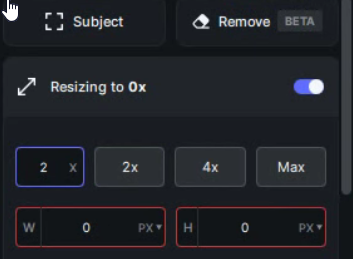
How can I downsize a picture? Putting a number lower than 1 (like 0.5) is not accepted in the Upscale factor edit box.
Like Gigapixel you can typically go down to 0.2X using text entry (to the left of 2X and 4X selection boxes) The perimeter of the entry box will turn red if you try to go too small for the starting image to be resized that much.
1 Like
I think the option to send your work to Topaz is very intrusive and not a great sign for the future of this app. U should not offer this controversial option.
Or AT LEAST pay your customers through discounts or free updates or whatever when they indirectly HELP you make revenue this way.
Maybe it’s because my work has already been used without my consent to train all major generative AI models everywhere… I find just seeing this option rather uncomfortable and will revert back to previous version.
The placement of the toggle so close to the save button looks like a “dark pattern” to me but the option itself isn’t obtrusive because it’s an option.
They really need to modify the layout to where people are not likely to toggle it by accident, but I am otherwise fine with it.
Entries including a dot are not accepted (0.2, 0.3 … 0.9). Entry box is always red. The original image size is 6505 x 4211 pixels.
Just tested this on Win10 and it accepted the decimal point fine. Are you on a non-english keyboard?
Silly thought, but couldn’t it be tied to localizations?
If the point won’t work, maybe try with a comma?
Something weird happened there… I just switched from US to Spain (from point to comma as decimal separator) and now when I try to downscale it downscales to 0x when using the comma, and it no longer accepts the point as separator.
2 Likes
Previous versions had that option in Prefs (that you can turn off) too… that said, it is obnoxious when a box pops up asking to share images after we have explicitly said, “No, do not share” in Prefs. And, that should be stopped!
4 Likes
You still opt out of it in the preferences
I see there is Autopilot preferences for Sharpen “Always Off” but not Always On. I presume it would be better to have manual settings what gets executed as default instead of relaying on autopilot.
So under Autopilot: Enabled, Disabled, “Manual selection of filters” (this one is missing). I also don’t like that if I want to crop a photo I have to wait for initial execution of autopilot like upscale and filters before I can click on crop.
I also miss the Always On option. I’ve created an idea for that, see: Additional Autopilot dropdown value: Always on
Please vote (and feel free to write an additional comment/idea there in that thread)
I have many cases where I know exactly what filter I need (because I am running a series with blurred images), and that autopilot thingy just doesn’t detect it… I want to be able to override that the hard way. Without the use of “Apply to all”, since that also copies over all of the values, which I don’t want…
1 Like
I’m in Germany with a german keyboard.
When I edit 0.5, the factor remains unchanged.
When I edit 0,5, the factor is set to 0x.
Now I found out:
When I edit 5E-1, the factor is set to 0.5x. Downscaling is working.
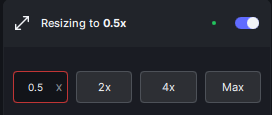
Btw: Same problem in Preferences:Autopilot:Resize Type
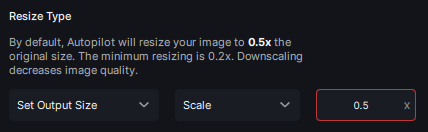
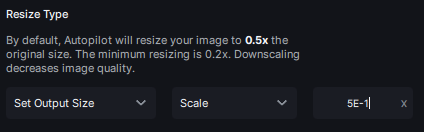
3 Likes
Haven’t checked the second part- the 5E-1 but otherwise you get the same behaviour as with Spanish locale (I’m a Swede living in Spain with an OS that got installed with US English and the corresponding regional settings  )
)
Anyway - that someone with a regional setup that uses comma as separator can’t easily downsize seems like a bug to me… Something for the devs to look at?
2 Likes
