It would be LR that has to apply the crops and masks. I’ll try and test this.
Yes!
But it doesn’t happen with Topaz. It DOES with DxO.
It’s funny. If I crop, DXO recognizes the crop. TPAI doesn’t. If I crop and process with DXO, and THEN send that result to Topaz, Topaz then recognizes the cropped DNG and further “refines” the DXO DNG
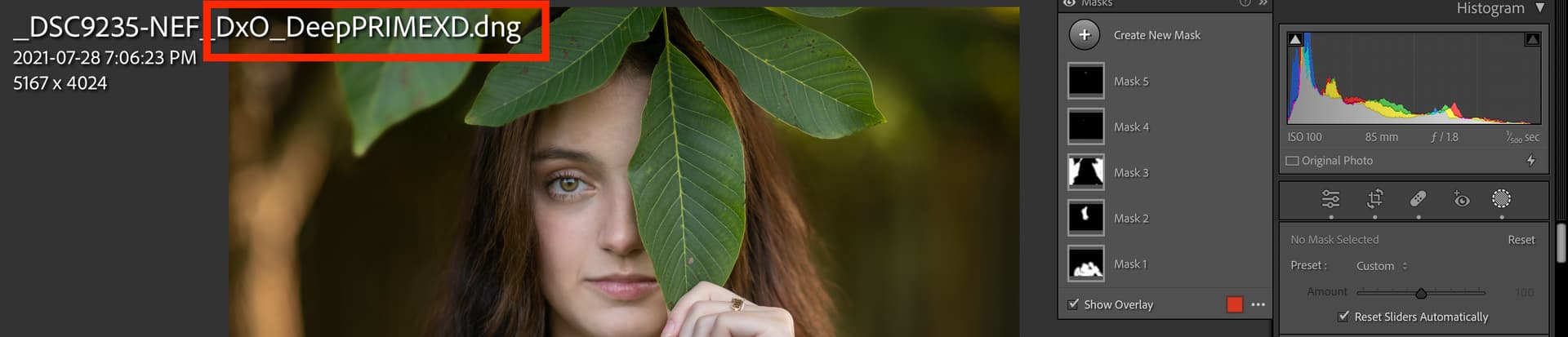
Just sent it through DxO. Worked perfectly! Crop and Masks applied. Oh, and the color profile stayed the same.
Calling Photo AI 2.0 from Affinity Photo 2 results in an error message that the plugin has crashed. This used to work prior to the latest release.
Just tested a raw sent to TPAI. The returned dng had all the LR edits applied on import, apart from the crop. I wonder if crop is set as an exclusion?
Masks too?
Yes, everything apart from crop.
What file format? .nef, .cr2, other?
This was a Nikon nef
As was mine, that doesn’t narrow the problem down. lol.
Is yours a newer nef format that uses compression?
The portrait is from a z6 and the cat image is from a d500.
The only thing holding me back from upgrading from 1.3.6 is the ability to reactivate models as anything newer always insists on using lens blur model on files that do not need it. The results are awful. When batching thousands of photos, it is not realistic to do change them manually. Has this ability been added to v2?
The only things I can think of is to try a raw file without compression, if you are using compression in your raws, and check that your dng files from TPAI have their camera metadata intact.
Thanks, I’ll try that and report back.
I love it … you are really doing an AWESOME job and I do not regret that I decided to buy Topas AI … really COOL
On my first try with the new “Adjust Lighting” feature, it turned the entire image green. Bizarre.
Adjust Lighting works well for me. I’d suggest making it default to a bit more aggressive, or providing a choice (with slider) of moderate vs. strong. In my test images, I get good results in bring up content hidden in shadows, but I have to turn it up to 90 for it to work. Nevertheless, good work!

