Why did he create a snowy scene and add so many people?
 Hoe?
Hoe?
Artsy…
!!! I must learn how to do this! Please write up a tutorial with more detail, PM or post elsewhere. Unbelievable!
2 Likes
I find that face recovery in topaz tools is primitive, it failed me when I needed to get the seemingly impossible image fixed. Kaze.ai on the other hand saved the day - it worked exceptionally well, it seemed just unbelievable how accurately it reconstructed the face which was basically absent in the source image.
It would be great if you could share some examples, so that developers can review them and further improve their model.
2 Likes
Here is the Kazeai before/after. Topaz tools just failed.
PLEASE DO NOT RESHARE THIS IMAGE OR ANY PART OF IT
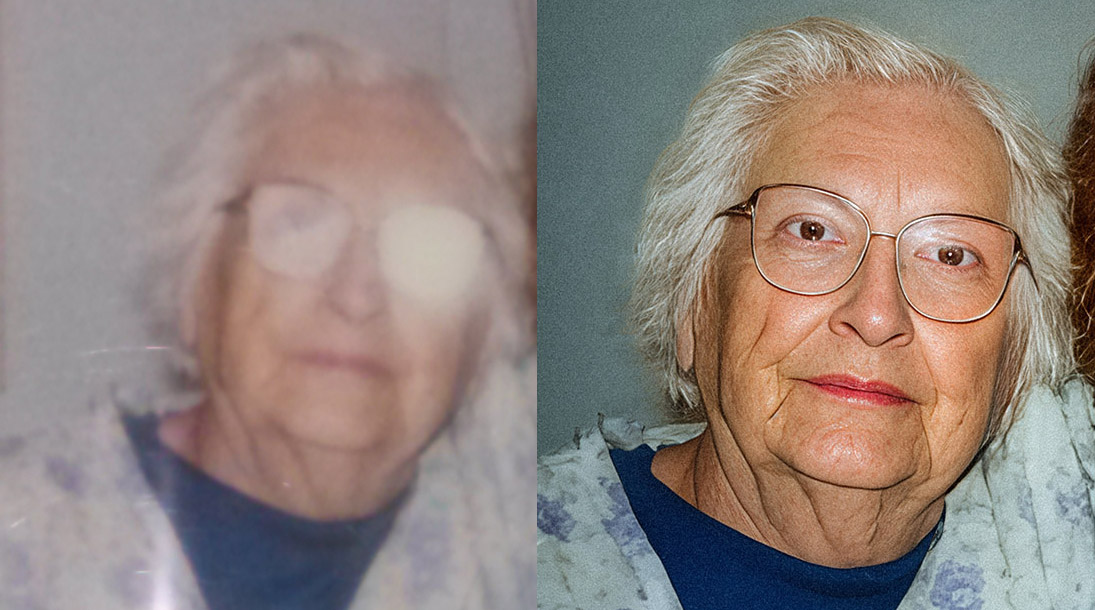
Wow. That’s pretty amazing. The hair is kind of piece-y. But considering the source it’s terrific. And it does resemble what can be seen of the woman’s features in the original; even if the After makes her look a bit more smiling. Was the After the straight output or did you tweak the output from that model? The way it handled glasses reflection is awesome too.
I enlarged the excellent Kazeai output with Topaz / Wonder, and manually changed the eye color. The result resembles the real person well.
1 Like
But what is TRULY AMAZING… is that Deevid.ai can generate a perfectly legible video of a person from just a single photograph, showing the same face from multipole angles, moving and animated in variety of facial expressions. in comparison, Topaz tools just do not stand the comparison unfortunately….
Interesting. I don’t make videos. But it sounds like something Adobe claims Nano Banana can do with stills in Ps. Do you mind if I make a snip and try that in my Ps beta? I’m a hobbyist photog. I wouldn’t be sharing it anywhere. It’s also cool to see that Wonder was effective for a lifelike portrait photo vs just an AI illustration.
Hello Michael.
I’m sorry and I don’t mean to offend but I disagree with you when you say “face recovery in topaz tools is primitive”. It’s just not true and has never been my experience of using it.
Just because it doesn’t fix your extreme example (Quote: “seemingly impossible image”) doesn’t make it bad or primitive, as you call it. It just means that at present its not designed to deal with your problem. Whether that changes in the future I don’t know. It is after all called Face Recovery not Face Reconstuction.
Regards Robert.
3 Likes
Hi
What is the difference between Topaz Gigapixel v1.0.2 and Gigapixel v8.4.4
I pressed the update button on Gigapixel v8.4.4 and it installs Topaz Gigapixel v1.0.2.
Now I have both software on my computer.
I need to know what is better
@gena.valkova - Gigapixel AI v8.4.4 is discontinued and will not receive any further new model updates. You have a active renewal for the new Topaz Gigapixel (currrently on v1.0.2) and this is subscription-only app that has new models and that will continue to get updates.
To save space you can uninstall the discontinued Gigapixel AI v8.4.4 and use the new app instead. If needed in future you can always redownload the Gigapixel AI app from your account page: https://account.topazlabs.com/
1 Like
I have both Versions, and i suggest to keep the 8.4.4., because The “redefine upscale” (non creative) is better in the old Version , the Studio-Version creates Artifakts in the lowest Setting. (I have mentioned this in the forum before, Topaz should fix this!)
3 Likes
It will be nice if you add any notification after installation of Topaz Gigapixel to tell people about this and give option to immediately uninstall old version…
I can definitely relay as a feature request to the development team! Thanks for the feedback.
1 Like
I still have GPAI 8.0.2 installed as there you could separately set values for „creativity“ and „texture“ and I still have the best results (in most cases) here with a combination of 2 and 3 for those parameters, respectively.
1 Like
