Starligt Fast Crashes every times
logsForSupport.zip (1.9 MB)
DxDiag.txt (109.9 KB)
Thanks for the logs and system profile, having the devs investigate the situation and will update once we sort this out.
Thank you both for the logs, @dianac and @ole.elverdam. I have sent them to the devs for further review into this matter.
Y’all are both running Studio Driver version 595.97 which we are seeing some issues with, can yall roll back a driver version or two and let me know if the issues continue? NVIDIA drivers update page
Hi Kyle,
Rolled back to 591.44 (from 12/4/25, two releases back) and it still errors out as soon as it should start processing.
I could go back further, but the 591 branch was a lot more stable than the 595 branch has been.
Edited to add:
I went back to 581.57 and it actually started to process but then error out within a few seconds.
Understood, thank you for testing those. The team is looking into some issues with the model at this time. I will update once we know more.
I also encountered an error with Starlight Fast 2, also with Sharp and Mini. That’s on RTX 3090, Win10 ESU and 591.74 Studio driver.
EDIT: So I decided to ‘repair’ the installation. That worked, apparently, and now Fast 2 and Mini are running. Interesting (from the programmer’s standpoint). The part of the video I’ve tried was in .webm container and the result is unusable (jumping through single frames, like Topaz Video had issues with parsing through WEBM file, once again; preview during exporting already showed that it might be the case). 
logsForSupport.zip (29.6 KB)
logsForSupport-newer.zip (73.9 KB) [after repair install and during Fast 2 processing, locally]
DxDiag.txt (146.1 KB)
I’ve tested 1.4 - Starlight Mini, Sharp and HQ run fine. Fast 2 and Precise both error out as Fast 1 did.
Based on the Releases thread, seems like the problem is more widespread now.
Correction, only HQ and Mini actually run. Sharp appear to start processing, neuroserver runs, but does not produce any output and GPU load drops to zero. Sharp 2 and Precise both crash neuroserver immeadiately after load. The application apparently doesn’t know that neuroserver has crashed and often keeps showing a processing framerate. I have rolled back to 1.3 for now on my main machine. I’ll keep 1.4 installed on my test system to continue troubleshooting.
ChatGPT says " Those QML errors strongly suggest version mismatch or corrupted install" reinstall is suggested and after the uninstall manual delete folders. I wrote here something about that
Been there, done that. I get exactly the same errors on two different computers, after doing:
A simple uninstall/reinstall keeping presets
A simple uninstall/reinstall clearing everything
An uninstall clearing everything, deleting all topaz video directories (all 3 places) and reinstall
An uninstall using Revo Uninstaller Pro and reinstall
Fresh Windows 11 25H2 and install
In every case, the exact same results were obtained.
Different source files tested—does it also happen when you use uncompressed AVI footage? Sorry I can’t help further. I recommend deleting all logs, then reproduce the error and send the logs to Topaz support.
Logs were sent on Monday
I ran a video clip through the mini DV basic preset and Artemis with no problem but when I try to run Starlight Fast 2 on the same clip, I keep getting an AI error. I thought maybe the file was corrupt so I ran it through again with the mini DV Basic and Artemis but got the same result. I tried converting it in Adobe Media Encoder and it still didn’t work. It keeps showing the same error in the log every time.
Warning qrc:/videomanager/TVideoManagerPane.qml:1224:29: QML WIconImage: Detected anchors on an item that is managed by a layout. This is undefined behavior; use Layout.alignment instead.
2026-04-30-06-36-21-Main.tzlog (443.5 KB)
That QML notice is a warning, not an error. It has been in the logs for months (if not forever). The error with the Starlight models is widespread. They changed the runtime architecture for Starlight models in this releasse and it will probably need a few updates to get things stabilized again.
Kyle,
I updated the Nvidia driver to the new 596.36 Studio driver (released 4/28) and Starlight Fast is running under 1.31 now.
Me crash too on SLP in ver 1.4.0 on WIn11 / AMD / 32 GB / 5060Ti 16 GB.
logsForSupport.zip (1,2 MB)
Thanks for the update and glad to hear that it is working for you.
Looks like the app could be running into issues pulling the file from what looks like an external drive, if you move the file to the internal C drive does that process for you?
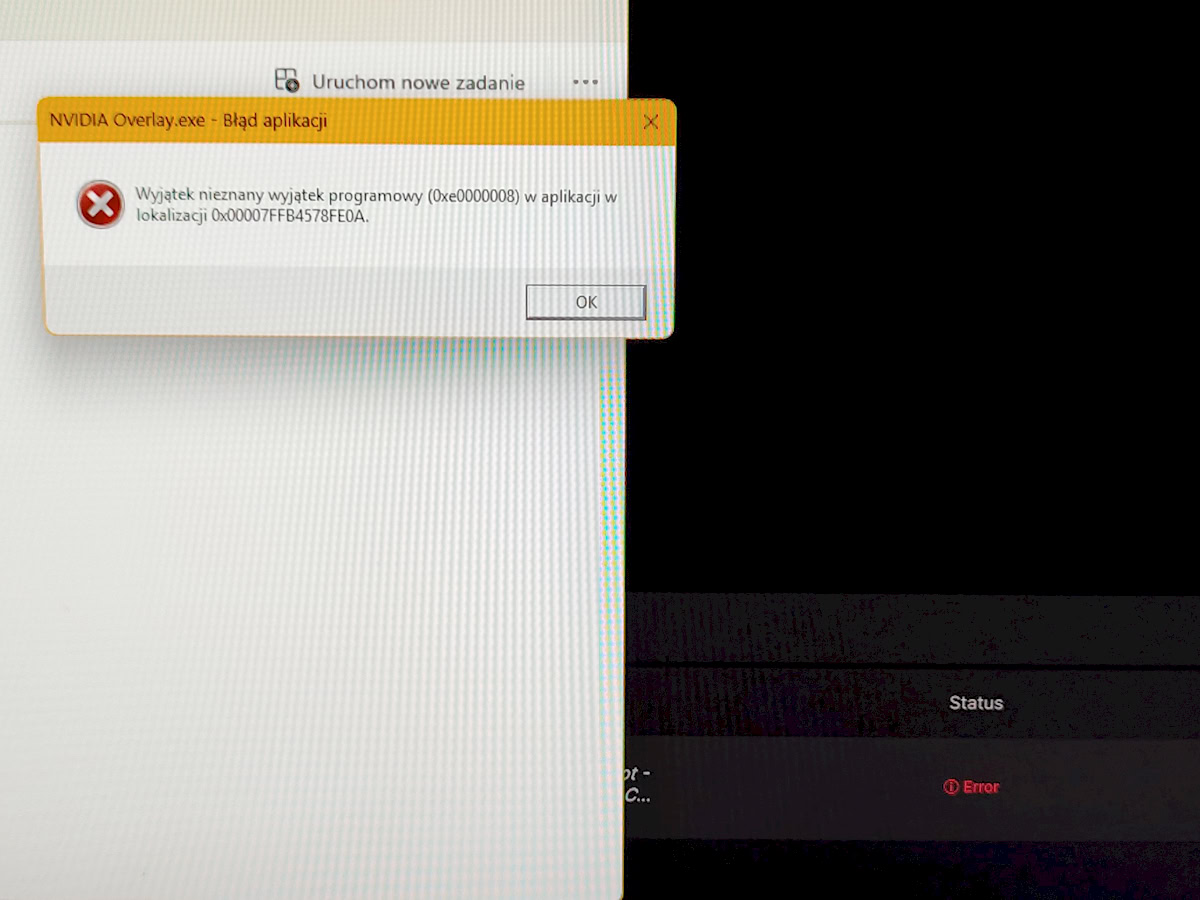
That screenshot is showing an error with the Nvidia Overlay app and could be a side issue from the GPU running hard and erroring out when processing a file.
Let’s turn that off when running Topaz Video.
Second, add Topaz Video to your anti-virus app so that it allows it to run without issues when accessing various drives and file paths.
Third, download a clean Studio Driver for your GPU card to ensure there is not an issue there.
Fourth, open the Preferences Panel and change the following settings.
File>Preferences>Processing
Ensure that your GPU is selected for the AI Processor
Set the max memory to 80%
Set max processes to 1
Save the settings and close the panel.
Re-run your clip through the process that you were trying.