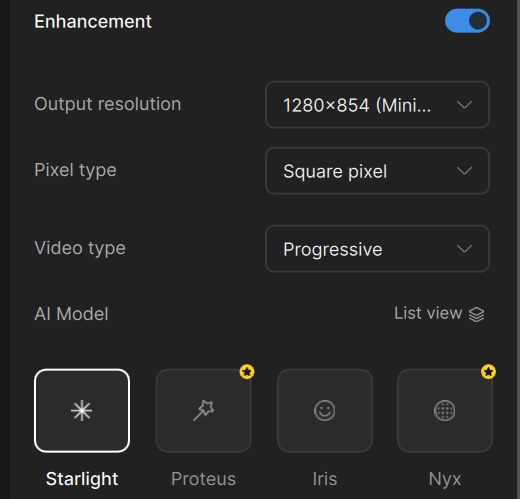
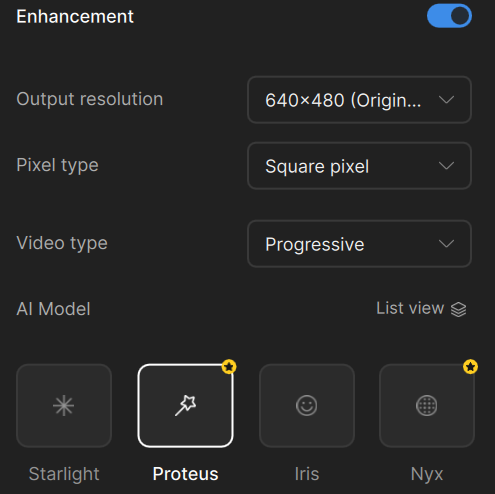
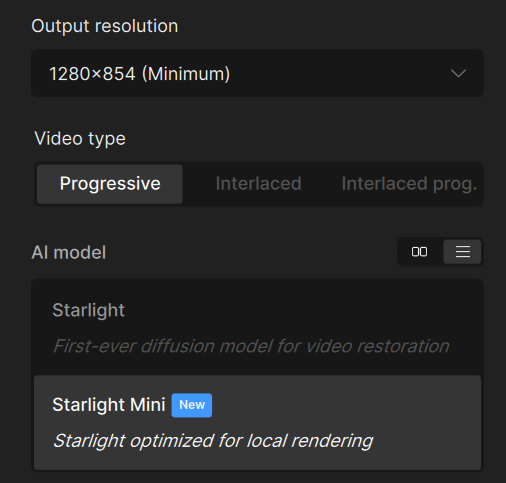
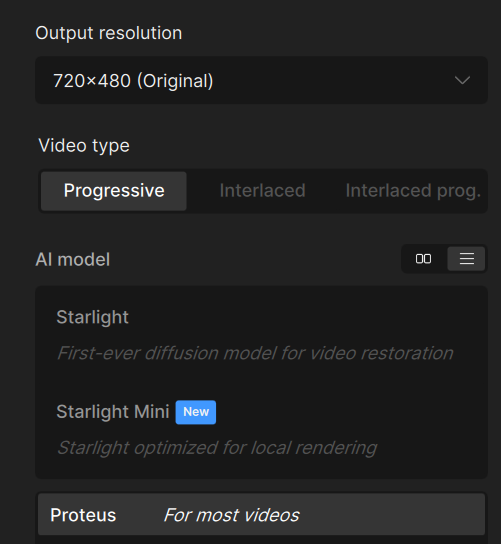
When using Starlight Mini or Starlight Sharp with a 4:3 source (e.g., VHS footage), the models do not preserve the 4:3 aspect ratio. Instead of outputting at resolutions like 1280×960 (true 4:3), the software forces resolutions such as 1280×854, which distorts the footage into a non‑4:3 ratio. This issue did not occur in earlier versions of Topaz Video AI, previous builds allowed proper 4:3 output scaling.
Expected behavior:
-
4:3 sources should retain their native aspect ratio when processed.
-
Output resolutions should include valid 4:3 options (e.g. 1280×960, 1440×1080, etc).
Actual behavior:
-
Starlight Mini and Starlight Sharp don’t provide proper resolution settings and output non‑4:3 dimensions (e.g. 1280×854, 1440×960, etc).
-
Aspect ratio is distorted, resulting in stretched or squished footage.
The devs are looking into this issue as it has been mentioned before to the support team. We have sent various samples and logs for their review.
Can you confirm which version of the app you are currently using and seeing this happen in?
Thanks for following up. I did a recent update and installed Topaz Video v1.0.4 and noticed the issue right away. To check if it was version‑specific, I rolled back and installed Video AI v7.1.5, but the problem remained (both are still installed).
With a 4:3 source, Starlight Mini/Sharp force outputs like 1280×854 instead of proper 4:3 (e.g., 1280×960). I’ve attached screenshots showing this, along with comparisons where Proteus correctly preserves 4:3 in the output resolution.
Since the behavior persists across both versions even after updating, would you recommend trying a clean uninstall/reinstall to rule out leftover files or settings?
Topaz Video v1.0.4 (Starlight Mini Resolution Output)
Topaz Video v1.0.4 (Proteus comparison)
Video AI v7.1.5 (Starlight Mini)
Video AI v7.1.5 (Proteus Comparison)