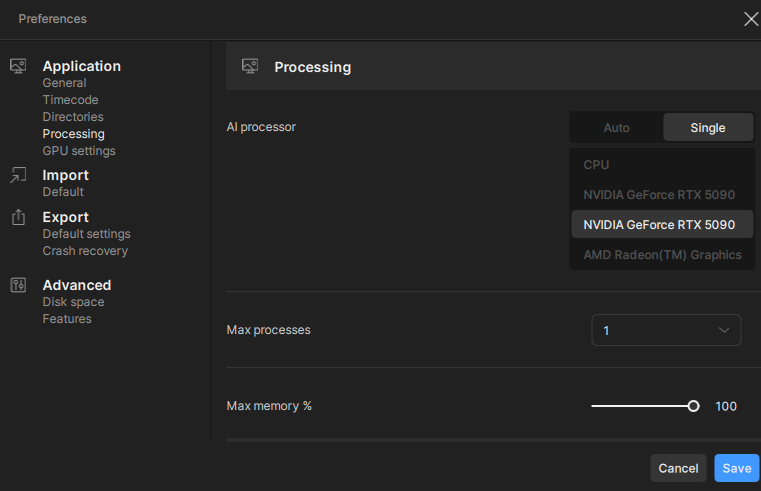
The bug / behavior you have encountered: The Starlight local model ignores specific GPU selection in the Preferences > AI Processor settings.
Important Note to Moderators/Devs:
Do not mark as Duplicate: While I reported this directly to the team via DM back in June, alongside the report on Starlight (formerly “mini”) breaking VRAM on 5090, there is no public thread tracking this specific failure. Please keep this open so the issue can be properly tracked and resolved.
Scope of Issue: To preempt unrelated troubleshooting: I have isolated this behavior strictly to the Starlight model running on CUDA. All other models respect the device selection correctly (with only occasional need for re-application). Only Starlight consistently refuses to bind to the selected secondary GPU.
Current Behavior & Failed Workaround: When I select a secondary GPU, Starlight ignores it and defaults to the Primary. The only mitigation I found is a “brute force” method that is unacceptable for a production environment:
Disable the Primary GPU in Windows Device Manager.
Launch Topaz and start the task.
Re-enable the Primary GPU.
Why this “mitigation” is intolerable:
System Disruption: Toggling the GPU triggers screen flickering, driver reloads, and crashes my external fan/power control software, requiring a manual restart of my system utilities every time.
Queue Failure: Even with this workaround, as soon as the current task finishes and the next item in the queue begins, the application logic resets and jumps back to the Primary GPU immediately.
Inconsistent Logic: The selection logic appears arbitrary. On a previous setup (dual 5060 Ti), the app would default to the second CUDA ID. Now, it defaults to the first. In neither case does it respect the user’s manual selection.
Please do not suggest running a single GPU as a “fix.” Multi-GPU configurations are still commonplace, and the software needs to respect the device selection toggle provided in the UI.
Your system profile:
OS: Windows 11 26200.7171
GPUs: two RTX 5090 on PCIE 1:0:0 and 3:0:0, AMD CPU iGPU at 122:0:0 (unaffected)
Driver Version: 581.80
App Version: Topaz Video (Studio) 1.0.4
Your log files (Help > Logging > Get Logs for Support): Logs available upon request via DM to protect project privacy
Any screenshots as necessary: