Unfortunately not for me. File status seemingly works, the other two gauges do not and remain at zero.
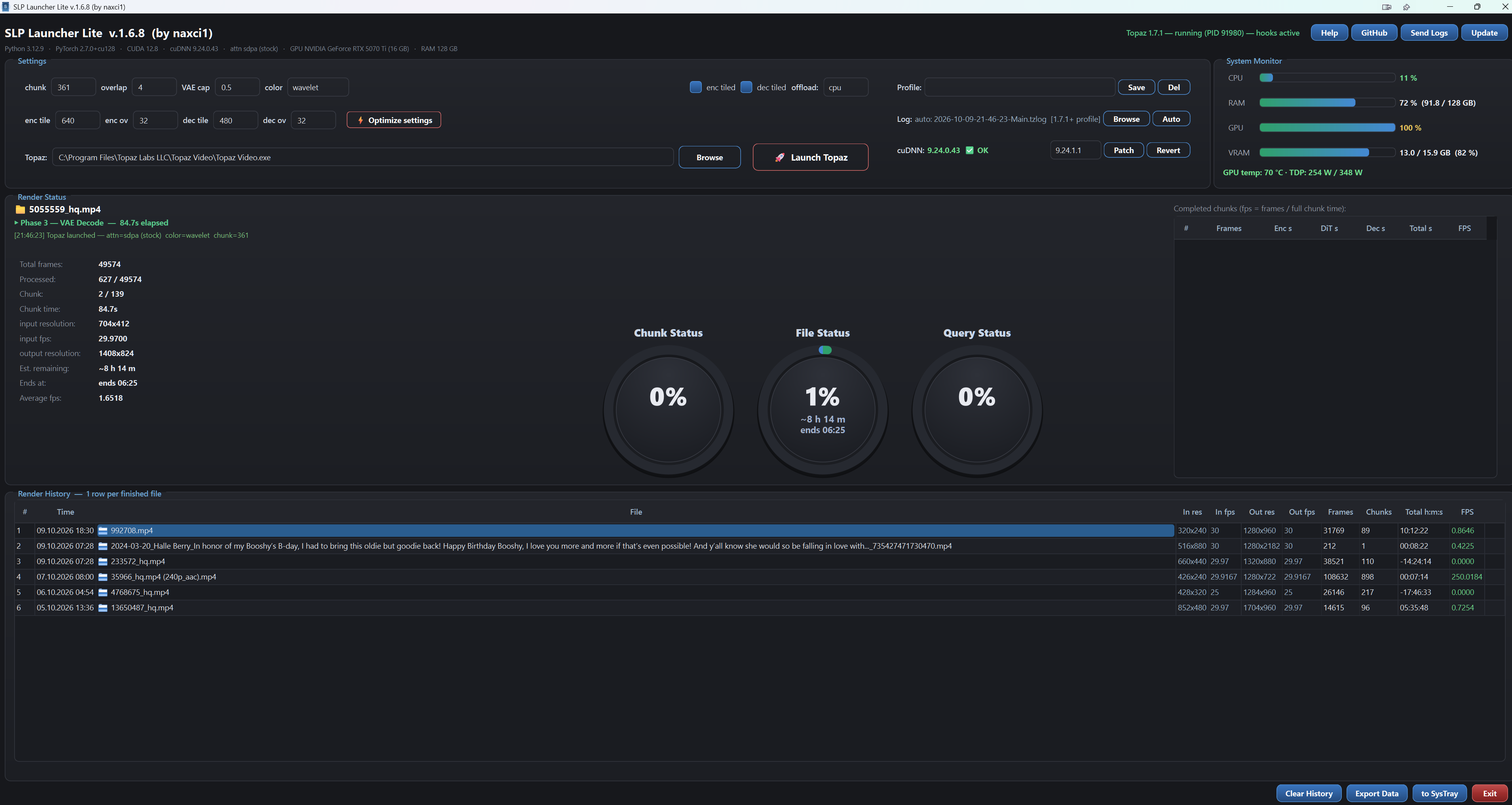
That was the faulty one; try downloading, reinstalling, and testing it yourself using this link. I am currently working on a major update that will include auto-backup functionality and allow work to resume from where it left off if Topaz shuts down for any reason.
SLP Launcher Lite v1.6.9
 Autobackup — automatic chunk-by-chunk safety copy
Topaz Video AI writes its output to a temporary file and only finalizes it
when the whole render finishes. If the program closes unexpectedly, hangs or
throws an error mid-render, that half-written file can be lost — together with
hours of GPU work.
Autobackup fixes this. Enable it once, choose a backup folder (preferably
on another physical drive), and SLP Launcher Lite automatically copies the
growing output file there after every finished chunk — so in case of a
crash or error, the half-written file is saved and recoverable.
No need to close Topaz! You can open SLP Launcher Lite at any time,
even while an export is running — it instantly finds the current render,
reads the data and updates itself, giving you correct live statistics.
 Query Status — live export queue
The Query Status ring now reads live data directly from Topaz Video AI’s own
project database (project.tvai):
- Remaining / Total video count — always identical to what Topaz itself
shows, updates the moment Topaz updates. - Finish estimate = total remaining frames of all queued videos ÷ average
fps (finished videos first, then per-chunk averages) — frame-exact, because
the per-video frame counts come from the queued render requests themselves. - Survives Topaz restarts — the queue is re-read fresh from the database every
second.
 Other improvements
-
Shared VRAM row in the System Monitor — live shared GPU memory usage
under the VRAM bar. -
 hourglass icon on progress rings instead of “0%” while waiting for
the first chunk estimate. -
Smaller fixes and polish.
Release SLP Launcher Lite v1.6.9 · naxci1/SLP-Launcher-Lite · GitHub
SLP Launcher Lite v1.7.0
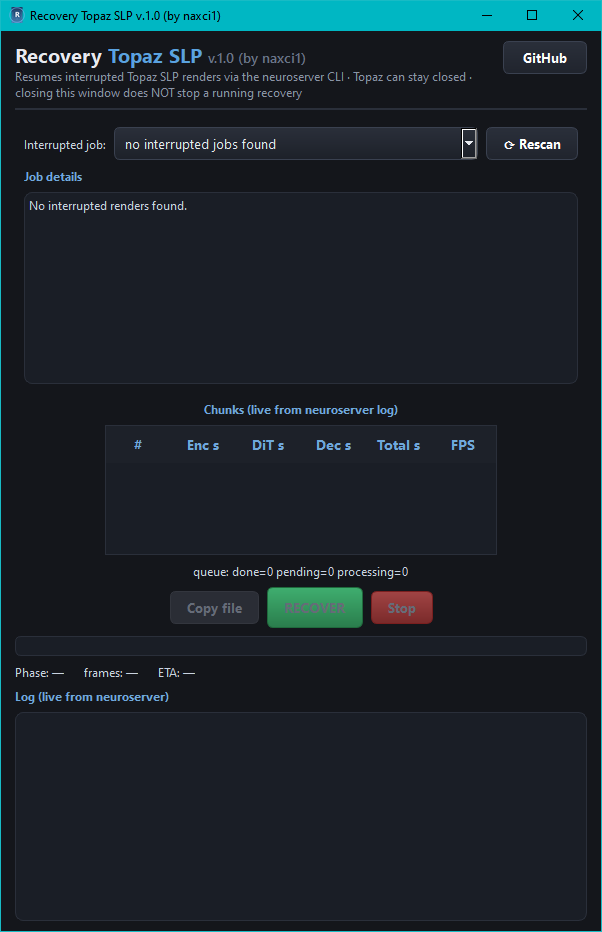
 Recovery Topaz SLP — new standalone recovery tool, now embedded in the setup
Interrupted render? Crash, freeze, closed Topaz mid-export? Recovery Topaz SLP v1.0 now ships embedded in the SLP Launcher Lite setup and finishes the job:
- Installed to
<install folder>\recovery\RecoveryTopazSLP.exe; open it from the new green Recovery button at the bottom of SLP Lite, or run it directly — it is a fully independent application. - Automatic scan of the Topaz Video logs finds exports that started but never finished — newest first, with completion %.
- Detailed job info: source video (resolution, fps, frames, codec), partial output (frames written, %), the exact crop filter Topaz used, start time and remaining frames.
- True resume: copies the partial + source into a
recovery_topaz_slp\folder (originals are never touched), cuts the remaining frames losslessly and renders them with the exact parameters Topaz used for that job — model filters, output size, upscale factor, preproc crop and encoder flags are replicated 1:1 from the log. - Smart merge: verifies the new segment matches the partial file’s resolution, then concatenates and adds the original audio — producing
<source name>_slp.mp4, exactly the name Topaz itself would create. - Live chunk statistics like SLP Lite:
# / Enc s / DiT s / Dec s / Total s / FPSper chunk, aqueue:summary line, progress bar and ETA. - Copy file button (just copy the partial), Stop button, finish dialog with a Folder button that opens the output folder.
 Startup warning: Topaz must stay closed during a recovery — if Topaz opens, it deletes the half-finished file and it cannot be brought back.
- The render runs detached: closing the Recovery window does not stop it; orphan renders are detected on the next launch.
**For the full guide see the new “Recovery Topaz SLP” section in the README.
**
I am not currently using Topaz - following the forum to see if the video hallucinations get addressed at which point I will try it again. In addition, some other topics interest me in general.
Your tools, or at least the recovery tool, will be used should Topaz be tried again. I am really impressed by how quickly you respond to problems users report.
I monitor the daily status of all the applications I’ve built and try to resolve issues immediately; I also have other repositories on GitHub. After all, if you’re going to do a job, either do it right—see it through to the very end—or don’t do it at all. It bothers me to see unfinished projects.
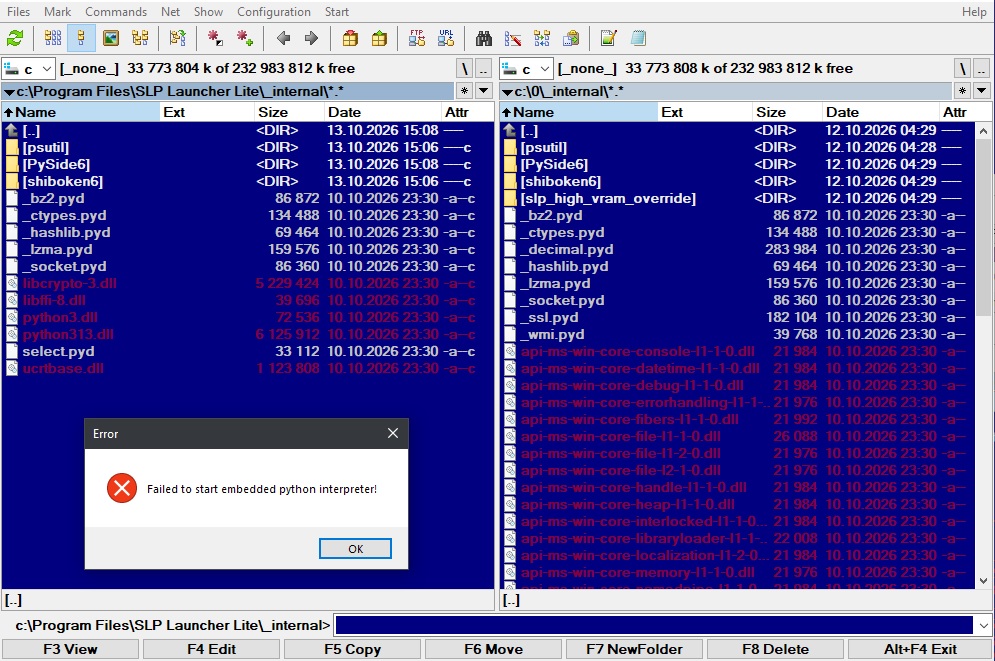
The files seem to have been deleted somehow. Uninstall the program, delete the entire directory, and then reinstall the latest version. Does the same thing happen with other applications on your PC? Is there a possibility that the SSD (or HDD) is failing? When they fail, they can corrupt certain files on their own; it would be best to run a check on your SSD.
SLP Launcher Lite v1.7.1
What IS new in this build
- Topaz Video 1.7.2 (beta or final) support — verified against a real 1.7.2 log: same log format, same runtime module, recognized automatically. When the stable 1.7.2 ships, it keeps working unchanged.
- Queue status fix — after restarting Topaz/SLP Lite mid-batch the counter showed “1/8” instead of the truth. It now recovers from the render log and counts the currently-rendering video as done (shows 8/8 while the last video renders).
- False “log format not recognized” dialog removed — when an export is queued but the render worker has not started yet, the app now shows “Export queued — render worker has not started yet” instead of a scary error. (This was the #1 reported tester issue.)
- UAC warning before cuDNN Patch — pressing Patch now first shows: “When the UAC prompt appears, you MUST click YES. Without accepting it, the patch CANNOT be applied.” (Several testers declined the UAC prompt and reported the patch as broken.)
- Send-logs tip in every error dialog — please use it: daily submissions are reviewed and fixes ship in new versions. It really helps development.
Note for RTX 30/40-series users
We tested every available lever for your cards too — the conclusion above applies: the shipped defaults are already optimal, and the launcher gives you monitoring, Autobackup, Recovery and the validated cuDNN 9.24 runtime. Speed on your card is limited by the card itself, not by the launcher.
I have had the same error message 3 times over the past 4 or 5 days when restarting the launcher. I never did investigate what was missing and just did a reinstall. I have been able to restart the latest reinstall several times without the error. I find it unlikely it is a failing NVMe drive, in part because it is RAID 1.
With SLP Launcher Lite v1.7.1 disappearing files in _internal folder remains.
I have a repeatable way for this error to occur - even with v1.7.1. Run as administrator, and either revert or patch the cuDNN. I was doing tests to determine the change in performance between the 2 and that is why I had it happen several times.
Problem with disappearing files exist only if SLP Launcher Lite installed in default Program Files folder. After install to Program Files (x86) it starts without issues.
It is installed in the C:\Program Files\SLP Launcher Lite directory on my system and runs without issues; you need to install it as an administrator and run it with administrator privileges as well, otherwise you might not have access to certain files.
Windows 10 64bit, DEP turned off.
Installed as administrator in C:\Program Files\SLP Launcher Lite, run as administrator, after exit from Launcher lot of files in C:\Program Files\SLP Launcher Lite_internal disappears and Launcher can’t start. After copy all files from backup of _internal created after install to C:\Program Files\SLP Launcher Lite_internal Launcher start and after exit files in _internal missed again.
Installed as administrator in C:\Program Files\SLP Launcher Lite (x86), run as user - files in _internal folder not disappears after exit from Launcher. Run as administrator, after exit from Launcher lot of files in C:\Program Files\SLP Launcher Lite (x86)_internal disappears and Launcher can’t start.
Is there antivirus software on the PC? It might mistake unrecognized files for viruses and delete them.
I check log of antivirus - no issues, without antivirus behavior not changed - after exit from Launcher lot of files disappears.
_decimal.pyd
_ssl.pyd
_wmi.pyd
api-ms-win-core-console-l1-1-0.dll
api-ms-win-core-datetime-l1-1-0.dll
… and lot more
In _internal remains
_bz2.pyd
_ctypes.pyd
_hashlib.pyd
_lzma.pyd
_socket.pyd
libcrypto-3.dll
libffi-8.dll
python3.dll
python313.dll
select.pyd
ucrtbase.dll
The antivirus is quarantining all of them; your best bet is to disable the antivirus and try reinstalling. Since these aren’t signed files, the antivirus mistakes them for viruses—that’s just how ridiculous it is.
Nothing quarantined by antivirus, Install goes correctly. Files disappears after exit from Launcher application, not setup.
But, for check possibility of this case, i turn off antivirus and behavior of Launcher not changed - files disappears after exit from Launcher was running “as administrator”.
These part of file aces activity of Launcher (1.7.1):
C:\Program Files (x86)\SLP Launcher Lite_internal_ctypes.pyd CANNOT DELETE Delete: True
C:\Program Files (x86)\SLP Launcher Lite_internal_decimal.pyd SUCCESS Delete: True
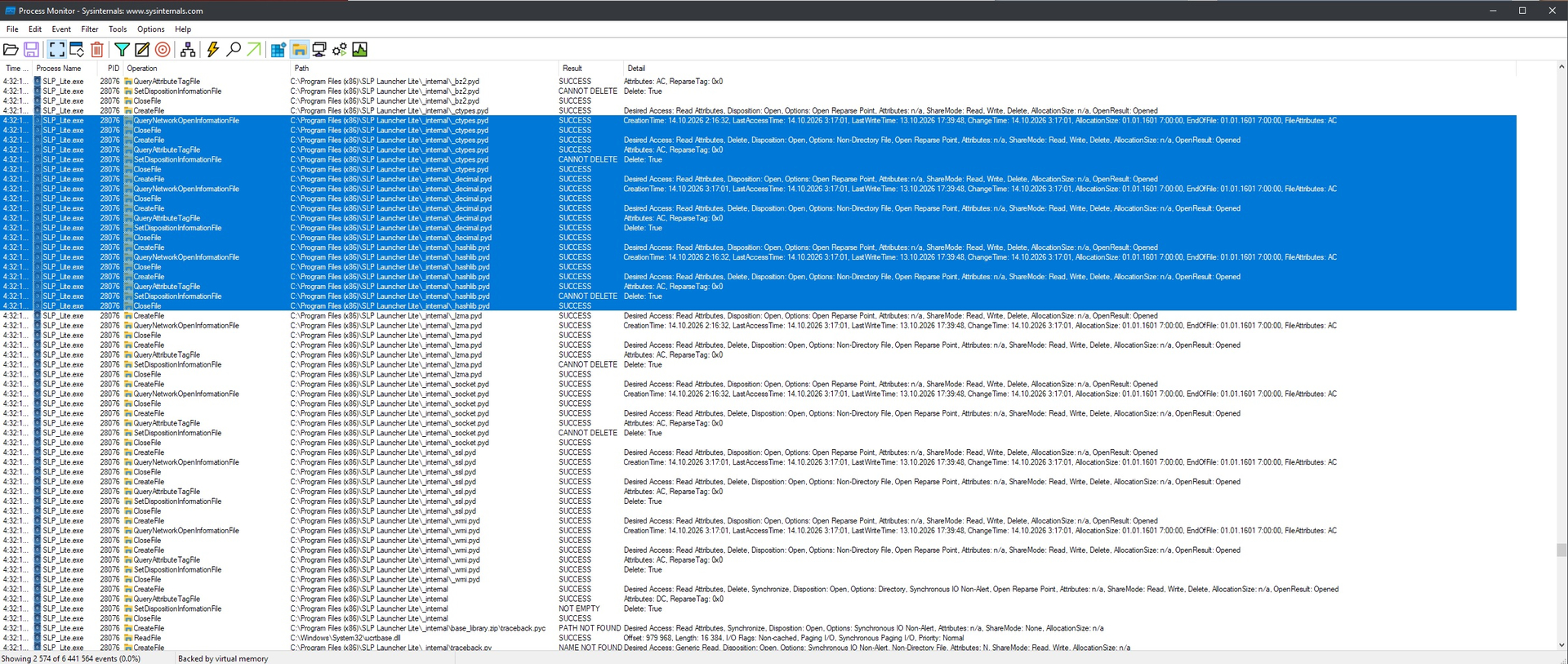
Issue remains in version 1.7.2, files disappears after exit from Launcher, Launcher can’t start second time.
