Please download and install the new version. All issues have been fixed, and I’ve made some additional improvements, including optimization settings and a Help section. Please share your thoughts on the new version after trying it out. Best regards.
My tests with 1.6.1 were successful, good job!
The values set by “optimize” button seem a bit ambitious, i. e. the chunk size. I put in a lower value there.
In my test I upscaled an 852x480 px video to double size 1704x960px, average fps was 0.75, complete render time was 5 hours, 36 minutes.
re: completed chunk log: It only shows the last 10 chunks, was that log supposed to be scrollable?
I actually set the “Optimize” button values based on what was discussed in the forum—meaning I entered the optimal settings for specific RAM and VRAM configurations. Of course, these are just recommendations; you can find full explanations in the Help section, and ultimately, anyone can enter their own values.
You can also scroll down to view the entire chunk list; if it is long, you can use the scrollbar on the right. If you can see it on your end, feel free to send me a screenshot.

SLP Launcher Lite v1.6.2
Improved — Completed chunks table
- The table now lists every completed chunk of the render instead of only the last ten — a render with 96 chunks shows all 96 rows, and a scrollbar lets you browse the full list.
- The newest chunk stays at the top; rows are appended without rebuilding the table, so the scroll position no longer jumps while a render is running.
- Starting a new file resets the table automatically.
Fixed — in-app update on versioned installers
-
The update flow mis-detected versioned setup filenames (e.g.
SLP_Lite_Setup_v1.6.2.exe) and tried to replace the running EXE directly, which fails inside Program Files with Access denied. The downloaded installer is now always detected by name and launched silently, closing only SLP Launcher Lite (Topaz and running renders are never touched).Release SLP Launcher Lite v1.6.2 · naxci1/SLP-Launcher-Lite · GitHub
The issue has been fixed; there was also a problem with the update process itself, which I have resolved in the new version. You currently cannot perform the update using the “Update” button, so please download and update from the website; however, you will be able to use the “Update” button for future versions.
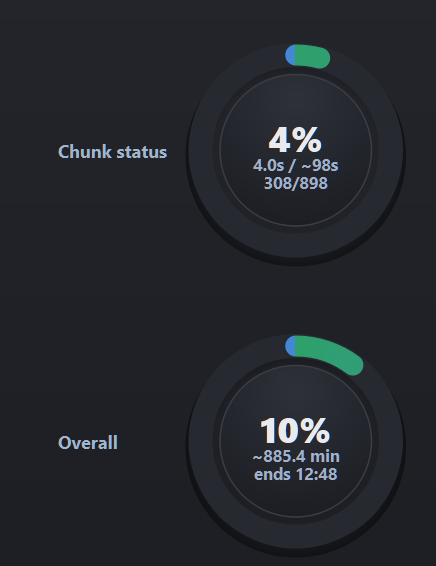
Please send a screenshot of the entire application.
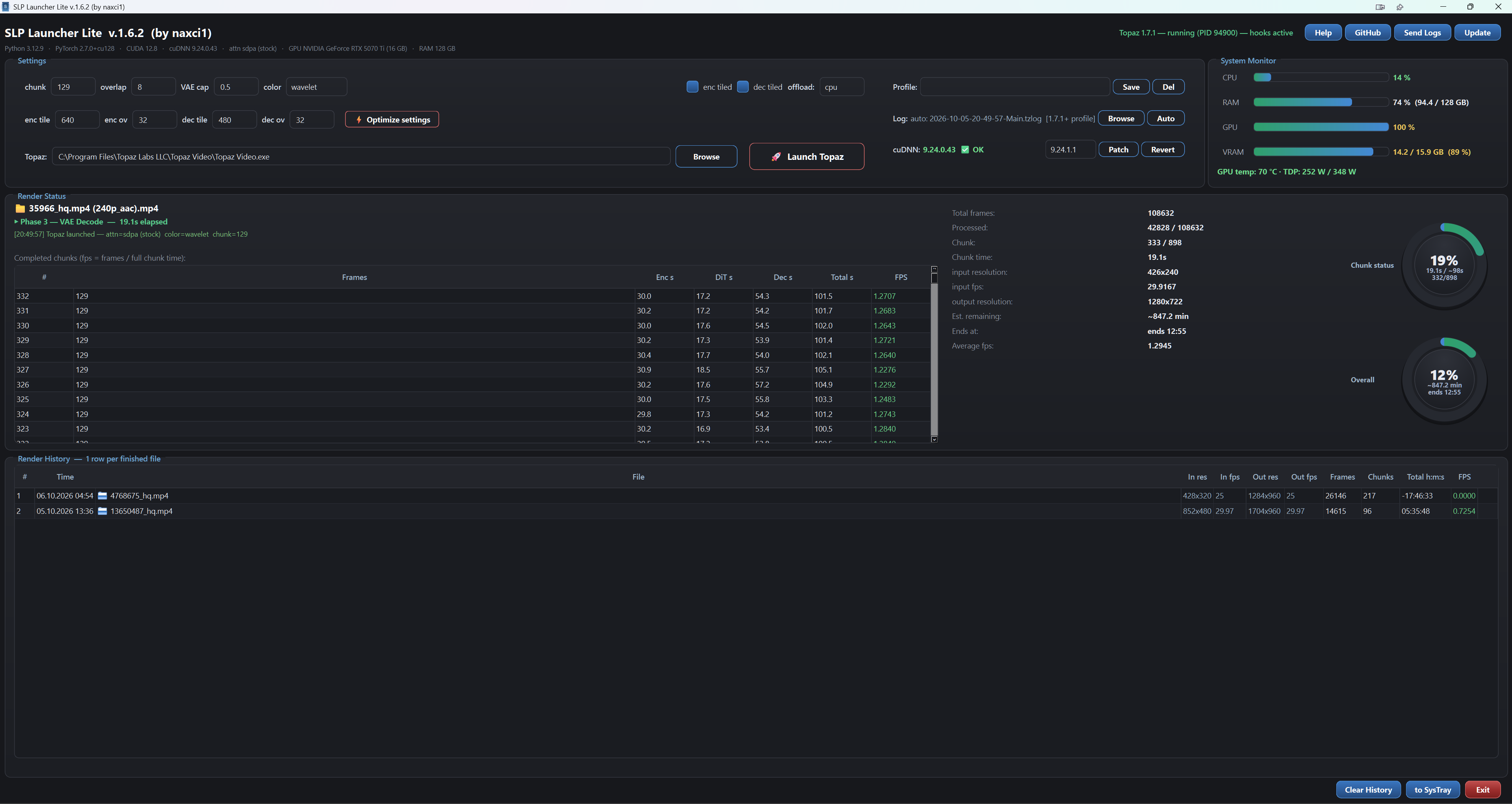
SLP Launcher Lite v1.6.3
Fixed — Overall progress ring
-
The Overall ring now always matches the numbers shown in the stats:
Processed / Total frames(a render at 42,828 / 108,632 frames correctly shows 39% instead of a stale 12%). -
The cause: the ring used the runtime’s internal frame counter, which can lag behind the actually processed frames once chunks start completing. That counter is now used only for the live display before the first chunk completes; after that, the processed-frames sum drives the ring, and the percentage is capped at 100%.
Release SLP Launcher Lite v1.6.3 · naxci1/SLP-Launcher-Lite · GitHub
The issue has been fixed. Please update the app using the “Update” button at the top right and verify that the problem is resolved. Feel free to leave a comment if you have any other issues or requests.
Thank you.

SLP Launcher Lite v1.6.4
Fixed — renders crossing midnight
- A chunk that finished after 00:00 showed 0 fps and poisoned the ETA and overall progress: the log’s clock resets at midnight while the launcher subtracted times across the rollover. Chunk timings now handle the day change — after this update the affected rows, average fps, ETA and the overall ring all show correct values (existing renders are re-read from the log, so old broken rows heal automatically too).
New — Render Status redesign
- Progress rings enlarged to 230 px, placed side by side and centered, with much larger in-ring text (percentage + ETA directly below it).
- Completed chunks list moved to the far right — spans the full height, more rows visible, and its scrollbar now sits right next to the FPS column.
- Total frames stats moved under the file info in a clean two-column table layout.
- Chunk table columns compacted (no more oversized empty columns); Render History / chunk list vertical split rebalanced.
Changed
- Default tile overlaps are now enc ov 32 / dec ov 32 (the values our testing showed best).
Fixed — Chunk status ring timing
- The Chunk status ring no longer resets at every phase change: it now measures elapsed time from the start of the current chunk and compares it against the last completed chunk’s Total s, keeping its progress stable through the encode → DiT → decode phases.
- Day rollovers (renders running past midnight) are handled with full date tracking, so long-running queues report correct elapsed times the next morning.
Improved — readability polish
-
Est. remaining switches to hours + minutes format when the estimate exceeds 60 minutes (e.g.
~14 h 7 m). -
“Chunk status” / “Overall” titles enlarged (18 px) to match the 230 px rings.
Release SLP Launcher Lite v1.6.4 · naxci1/SLP-Launcher-Lite · GitHub
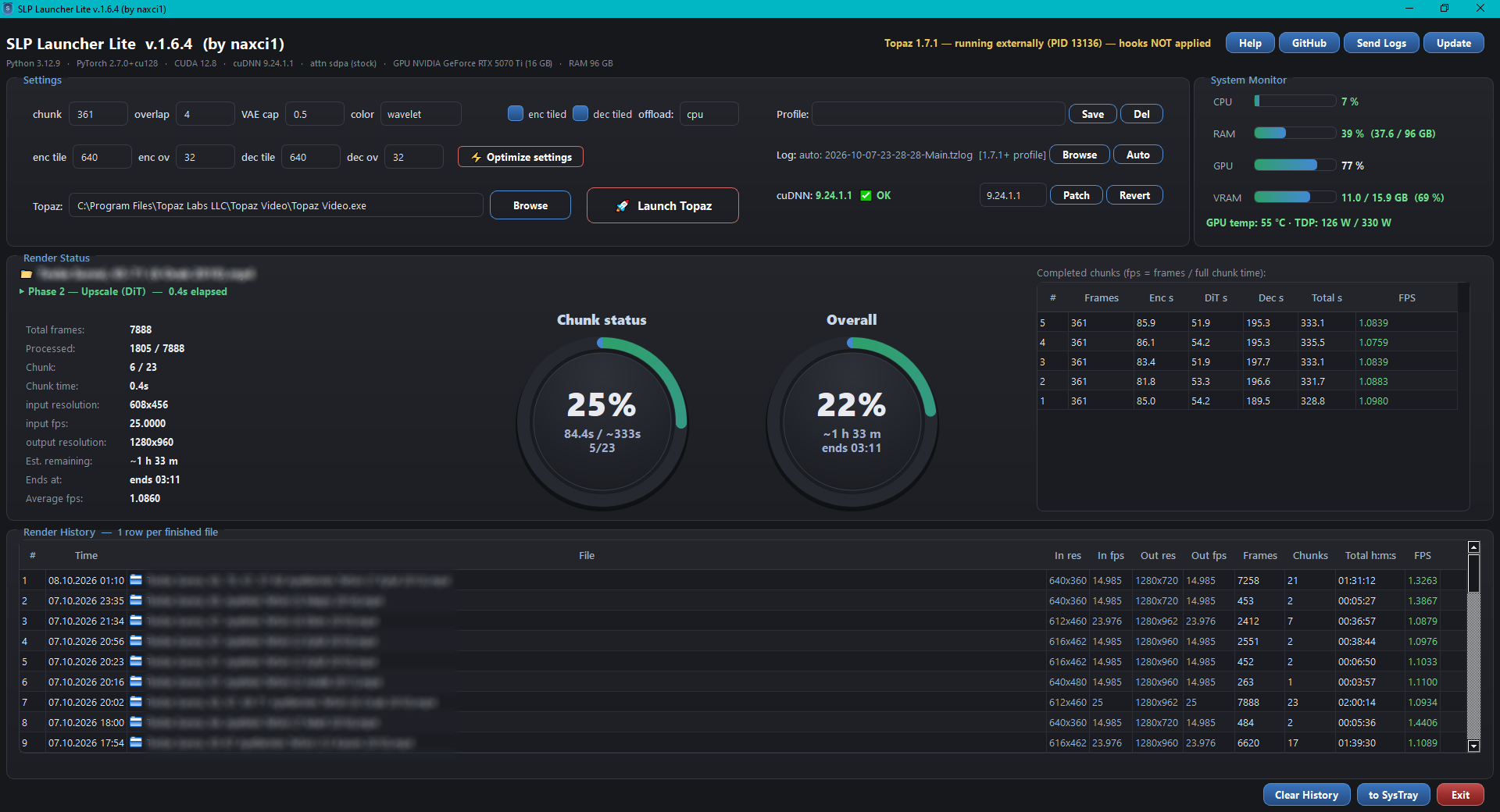
SLP Launcher Lite v1.6.5
Fixed — Render Status not updating during renders
- A structural defect in the log parser (a corrupted branch left from an internal
debug edit) made every model log line drop silently: the chunk list stayed
empty, phases showed “None”, and the status could display a previously finished
file while a render was running. The defect is removed — chunk tracking, phases,
ETA and the current file name now update live again. - Current file attribution is now authoritative: the launcher uses neuroserver’s
owninput_urifor the rendering file, with automatic recovery of corrupted
Turkish characters (number-token matching against the queued exports) — e.g.
6 Eylül 2011is restored correctly even when the log line arrives damaged.
Fixed — resilience against Topaz log rotation
-
Topaz periodically truncates its active log, which could erase the current job’s
identification lines mid-render (chunk list resetting to zero). The launcher now
keeps a persistent export map (export_map.json) and a previous-attribution
fallback, so identification and chunk tracking survive log rotation.Release SLP Launcher Lite v1.6.5 · naxci1/SLP-Launcher-Lite · GitHub
Note: You can easily install new versions by clicking the “Update” button at the top right.
SLP Launcher Lite v1.6.6
Improved — Query Status ring
- The queue model now counts the waiting jobs from Topaz’s own project database
(project.tvai) instead of log events — the counts survive Topaz’s periodic log
rotation, so the ring no longer degrades to1/1on long queues. - Remaining-time estimate refined: each waiting job is estimated with the session’s
average output size (frames per file) divided by the session’s average FPS. - Ring texts are fully English (
~6h 30m left,ends 09.10 06:18) — the finish
date appears only when the queue crosses midnight. - “Overall” ring renamed to File Status; titles unified to
Chunk Status / File Status / Query Status.
Fixed
-
Render Status could freeze on an empty state (“no render”) while a render was
running — an internal parser defect from earlier builds is removed.Release SLP Launcher Lite v1.6.6 · naxci1/SLP-Launcher-Lite · GitHub
Note: You can easily install new versions by clicking the “Update” button at the top right.
SLP Launcher Lite v1.6.7
New — Data Export
- New Export Data button (next to Clear History): export everything with a
format + folder of your choice. - CSV — Excel-ready render history and per-chunk tables (FPS columns in
XX.XXXXformat, Total asXh YYm). - XLSX — Excel workbook with two formatted sheets: History and Chunks
(same formatting rules as the CSV). - JSON — full raw data dump (history + current render + queue counters).
- All formats — one click writes everything.
Improved — Query Status accuracy
-
The queue remaining-time estimate now sums the real frame counts of the
queued files (from their export records) divided by the session’s average FPS,
instead of estimating per-file averages — long and short clips are now weighted
correctly. -
Finished-job counting is rotation-resilient (recounted from the whole session
log each refresh).Release SLP Launcher Lite v1.6.7 · naxci1/SLP-Launcher-Lite · GitHub
 Everything worked flawlessly, although I don’t quite understand the “query” gauge: I had exactly one file in the render queue. In your description you refer to Topaz’ own project database. What is that? And why does it show 66% but 1/3 - shouldn’t that be 33% then?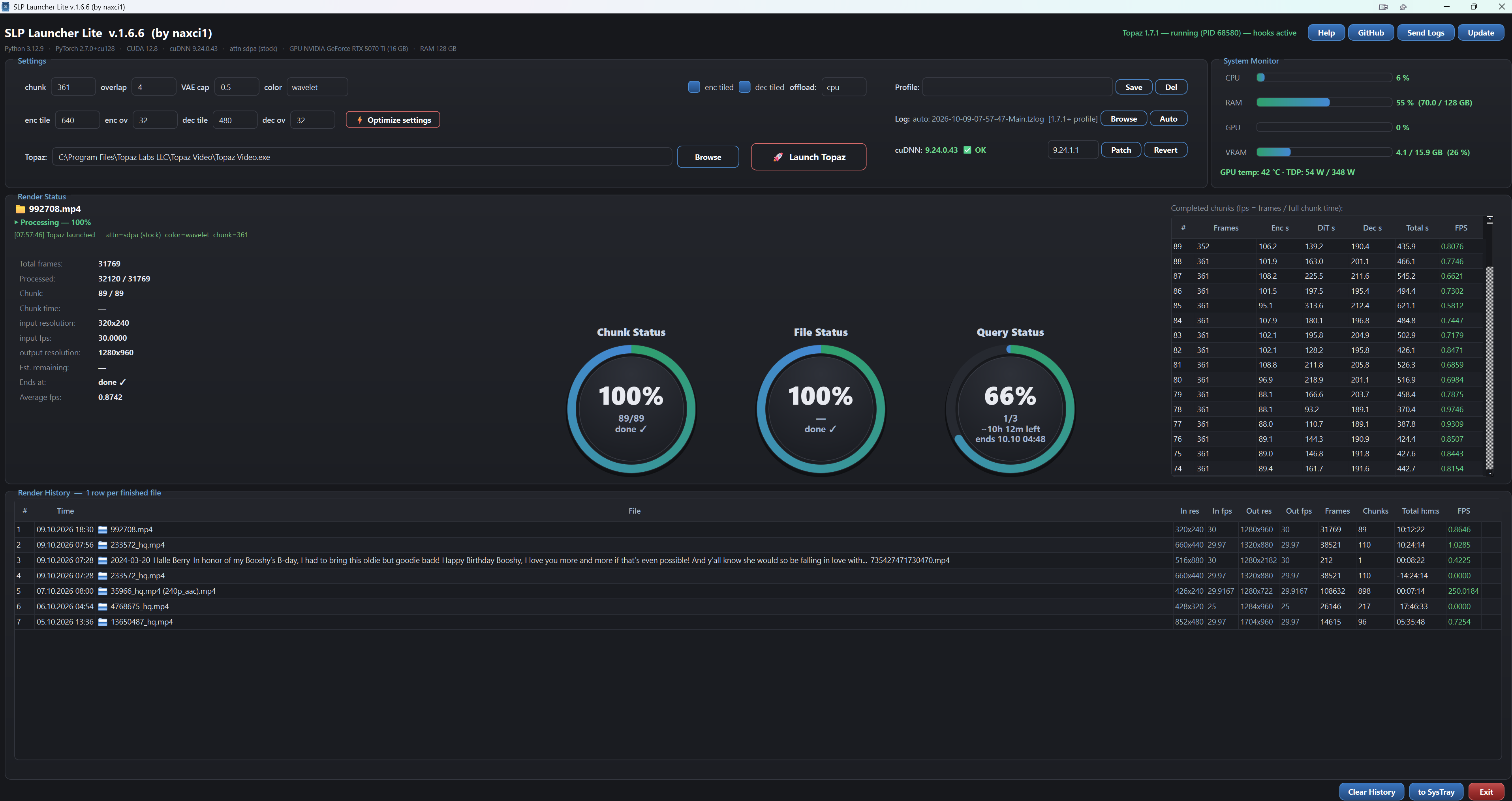
There was a bug in the query status; I fixed it and am testing it now. I’ll release the new version shortly.
SLP Launcher Lite v1.6.8
Query Status rework + Export fixes
Query Status — now fully automatic
- done/total is read live from Topaz: finished renders from Topaz’s own “total processing time” counter, queued files from Topaz’s export-queue events, the running job from the active render.
- Counts a file the moment you add it to the Topaz queue. Survives log rotation and app restarts; resets cleanly when the queue drains.
- Remaining-time estimate uses the median render speed — one slow file no longer skews it into absurd values.
Export Data
-
Fixed: choosing a format no longer silently fails — the folder picker opens and files are written (the folder opens afterwards).
-
XLSX export now includes a Chunks sheet (# / Frames / Enc s / DiT s / Dec s / Total s / FPS) next to the Render history sheet.
-
CSV export: history + chunks files (fps XX.XXXX, total as h/m). JSON: full raw data.
-
Any export error now shows a visible message instead of failing silently.
Release SLP Launcher Lite v1.6.8 · naxci1/SLP-Launcher-Lite · GitHub
Update your application. Issues with Query Status and Export Data have been fixed.
