If something is promoting a major speed boost. It’s should be clearly noticeable. It’s not. No matter what adjusts I make. I get the same render times (or worse) on a controlled timer. On 4060, 5070, 5080. It does however make Topaz rather unstable and crash a lot more. Perhaps you need specific hardware for this app to work correctly? But Starlight in 1.7 + Process Lasso is speedy as it gets on my machine. good luck in future updates.

I’ve experienced this a lot in the past; I couldn’t convince those who didn’t understand the job. They’re neither capable of doing the job themselves, nor do they appreciate those who can. There are a lot of abnormal people in the world.
I couldn’t reply to you because I’ve been very busy. My PC is rendering almost 24/7, and it hasn’t been turned off for two years. And I don’t earn a single penny from this. I couldn’t send you the logs for the VRAM explosion in version 1.0.1 of your application because they’re missing, but I’ll record a video and send it tomorrow, showing the actions in both versions. Version 1.0.1 is experiencing VRAM explosions; I think the AI has made changes to the code. You should contact the AI to find out what the differences are in the code during the DIT process between these two versions. Maybe they can find the problem for you. I also write applications with Vibe Coding, and the AI sometimes acts erratically, changing or adding code without you telling them.
Meanwhile, please add the option to display Shared VRAM in the Monitor section of the application.
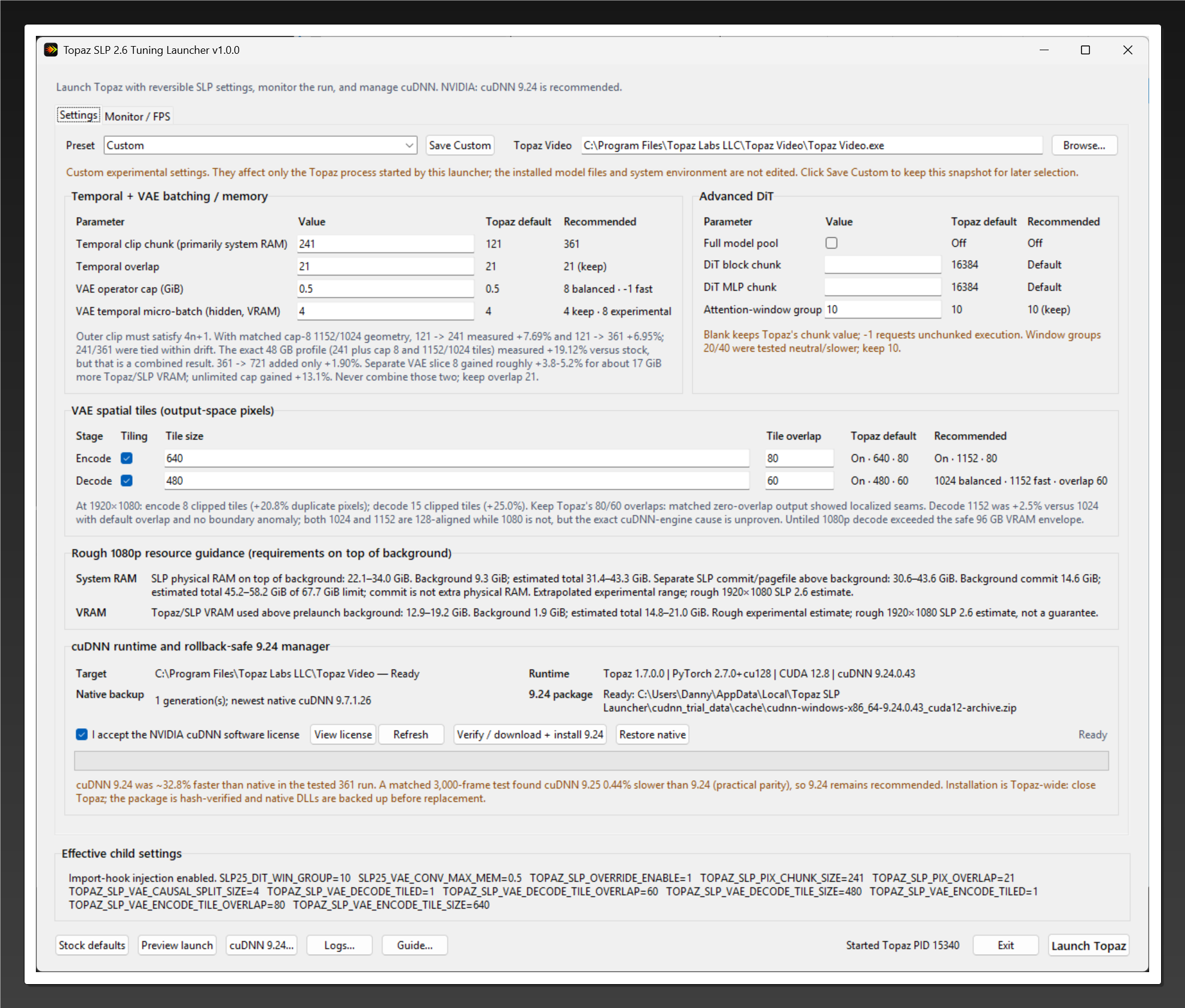

Same. It makes no difference what parameters I put. The only thing this app does is add an extra step to opening topaz lol. It being closed source is also leaving me suspicious. Be careful all.
No one is forced to use the app.
@skv89 has been working day and night for days, spending his time and money (AI credits) to do selfless and beneficial work for humanity. Instead of thanking him, you should be ashamed of your comment. Also, as the other user wrote, nobody is obligated to use it. One amateur has done what even the highly paid programmers of a billion-dollar company like Topaz couldn’t do; this person deserves nothing but thanks. It’s also beyond ridiculous that they’re still using old PyTorch, CUDA, and CuDNN; they don’t even bother to update them.
Funny, I thought the exact same thing when I read this drivel…
It’s impressive how often @skv89 makes himself available to help in any way he can.
And then we see this happening, inviting others to criticize him…
If your PC becomes unstable, it’s either because it’s configured like jerk or there’s a problem between the chair and the keyboard.
People like you and @skv89, who selflessly dedicate themselves to doing good work for others without expecting anything in return, should always be thanked. Some private companies do this work for money, and the people working in those companies develop applications for money, but the real heroes are those who do things for the benefit of people without expecting anything in return. There are millions of such projects on Github, all open source, without any monetary compensation. They are the real heroes. Unfortunately, some people are blind to this, as @skv89 said: people who criticize the free SeedVR2.5 praise applications that do the same job when they pay a lot of money.
I just want to make one thing clear: my results were posted with the hope of being helpful, not to criticize him or diminish his efforts.
Maybe there is something wrong with my setup, I don’t know.
I am really looking forward to future builds that will simplify user’s errors, like @skv89 mentioned.
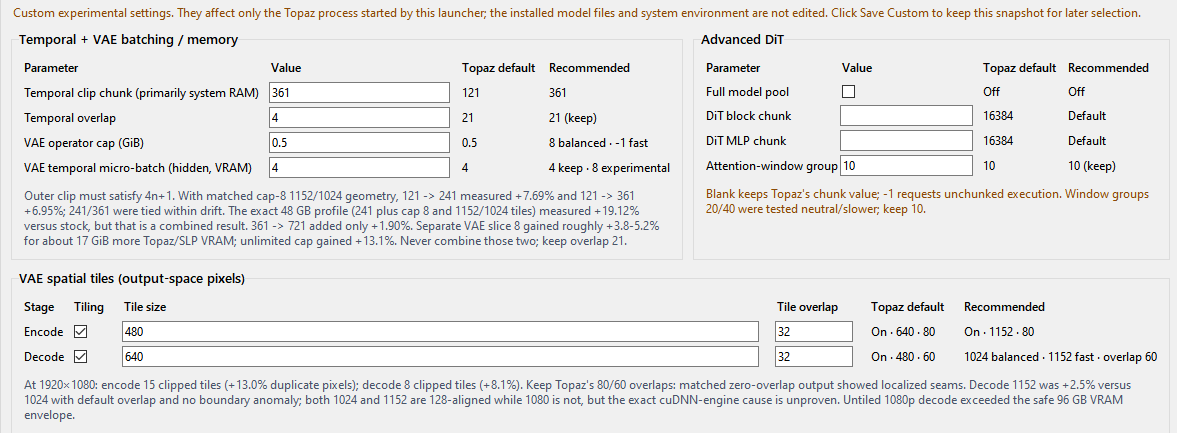
Tips for VAE settings in practice:
-
I always set Temporal Chunk to 361, which is actually the batch_size in SeedVR2.5. The larger this number, the faster the processing (because the chunk count is lower) and the better the temporal consistency.
-
Temporal Overlap = 4 is usually sufficient; there’s no point in making it larger. If the video is very fast-paced, you can set it to 8. Remember, the higher the number, the slower the processing speed will be.
-
VAE Encode - the main issue is actually the VAE tile settings. For example, I’m currently upscaling a 480x360 video minimally (1280x960), and I set VAE Encode to 480. The key point here is that if the video is very small, like 360x240, you don’t need to enable VAE Encode. If it’s a 360p or larger video, first enter the larger number so that it creates 1 tile. For example, I entered 480 for a 480x360 video, which creates 1 tile. If it’s a larger video and it gives an OOM error, enter the smaller number, for example, for me it’s 360.
-
VAE Decode - this is what you will adjust according to the output video size in SLP. First, add your video to SLP and check the output video size. Remember this number so you can adjust accordingly. Then close Topaz. You need to enter the settings in the loader, save, and then run Topaz SLP. In my case, it’s minimal (1280x960), so I add half the larger number for the minimum tile size, because if I use 960, 16 GB of VRAM won’t be enough. But if you have more VRAM, meaning you don’t get an OOM error, first enter the larger number (1280). If it gives an error, enter the smaller number (960). If it still gives an OOM error, then enter half the larger number (1280:2=640).
-
Tile overlap - I set it to 32 for both, and I also set it to 32 in SeedVR2.5. This is sufficient; larger values reduce processing speed and are unnecessary.
You can use these settings for 16 GB of VRAM. If you have 24 GB or more VRAM, first test with VAE Encode disabled. If you get an OOM error, adjust it using the formula I wrote above. You can do the same for VAE Decode. Remember, if you have a large amount of VRAM, disable VAEs; prioritize speed. If that’s not enough, set it to minimize tile splitting. In other words, the fewer chunks and tiles there are, the faster the process will finish.
Note:
From the moment you start the process (while performing at least 2 chunk operations), carefully monitor the launcher. It will only take a few minutes. Observe which operation is being performed and if an error occurs, which operation is causing the error (VAE encode, DIT, VAE decode). Close Topaz accordingly (usually the error occurs in the VAE settings), then reduce the settings (according to the formula above). Then open Topaz again from the launcher and export again. Monitor this until at least 2 chunks are finished. If 2 chunks work without problems, you can stop monitoring; it will continue as is.
We were not pointing your replies but andreastafari one
Thank you naxci1 and Alpheratz for your support. Yea I’ve been devoting every bit of my time trying to get this app idiot proof when I was originally planning to catch up with real work. I wanted to push out the new version before I get back to work because users were experiencing issues in v1.0.1. I agree there are so many self centered, entitled individuals in this world thinking the world owes them for the nothing they did for mankind. I wish they would just stay the F away from my apps. I just wish I have a way to ban these trolls from using my hard work.
Now an update for those interested in intellectual discussions: The new version should be almost ready but I encountered problems preventing me from releasing - or maybe they aren’t problems - that I cannot explain and still trying to figure it out before I release it incase some idiots going to attack me.
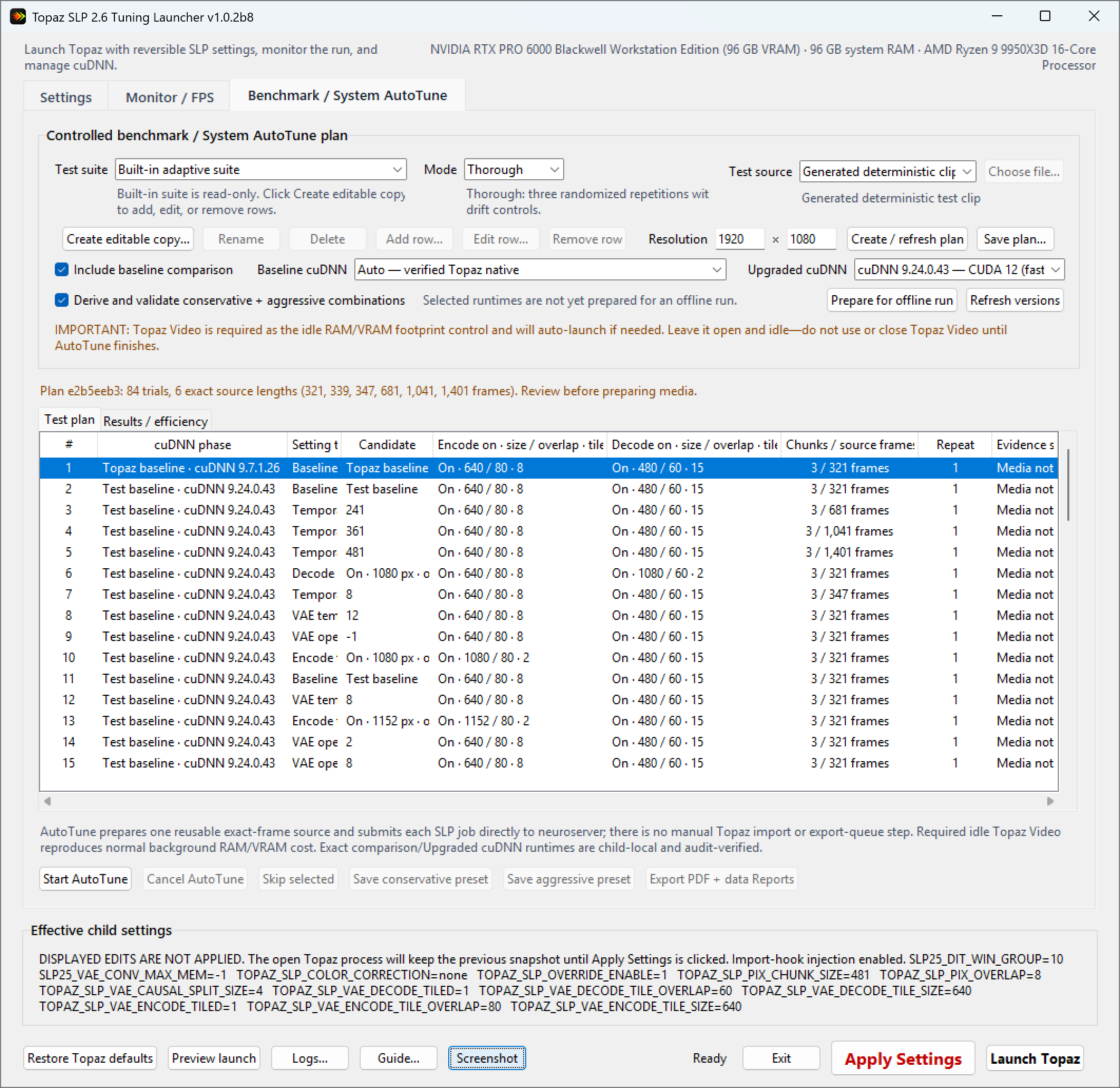
I used to think I knew exactly how SEEDVR2 behaves from a performance standpoint as I’ve tweaked parameters, processed videos, and recorded their speeds for nearly a year now. But after recently tuning SLP that is an enhanced SEEDVR2, I realize how little I understood how it works. From probably close to 100hours of back to back benchmarking with SLP in the last week, some of the things I thought were for certain actually are incorrect. When I developed the 1st 2 versions, I did alot of tedious manual tests/benchmarks and for the most part SLP responded to tuning the same as its predecessor SEEDVR2. However after I created this new automated testing suite and left my computer almost continuously running tests after tests, I am totally perplexed at how SLP responds to these parameters at different output resolutions.
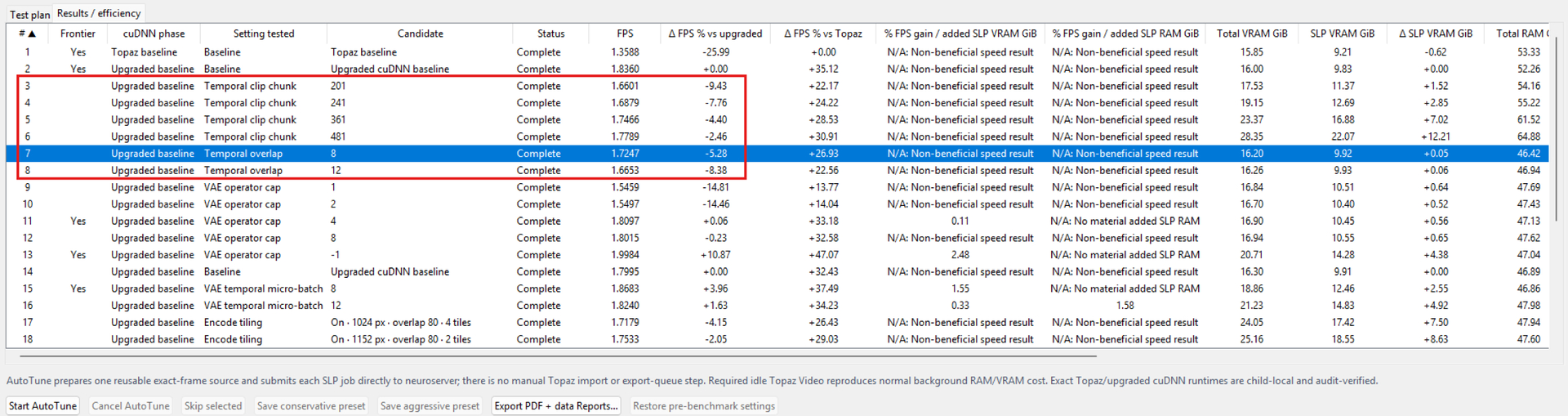
So I created 3 modes for testing, quick mode that test only 1 whole chunk, standard mode that tests 3 chunks while discarding the speed from the 1st chunk, and a thorough mode that is similar to standard but with more testing and redundancy tests to rule out random anomalies but is very time consuming. This table is the speed gains (or drops) that I saw, which got me scratching my head.
| Setting | 1920×1080 Thorough | 1440×1080 Standard | New 1920×1080 Quick |
|---|---|---|---|
| Chunk 201 | +8.26% | −9.43% | +13.94% |
| Chunk 241 | +10.36% | −7.76% | +16.91% |
| Chunk 361 | +13.87% | −4.40% | +20.85% |
| Chunk 481 | +15.38% | −2.46% | +22.66% |
| Overlap 8 | +12.82% | −5.28% | +12.61% |
| Overlap 12 | +8.75% | −8.38% | +8.97% |
Now my assumption is that resolution affects the tensor shapes causing SLP to handle memory functions like tiling, batch/chunks differently.
Cross-resolution Quick results:
| Setting | 1480×1080 | 1440×1080 | 1410×1080 | 1390×1080 | 1280×720 |
|---|---|---|---|---|---|
| Chunk 201 | +14.01% | +14.89% | +15.07% | +14.77% | +19.16% |
| Chunk 241 | +17.50% | +18.89% | +18.76% | +18.87% | +24.62% |
| Chunk 361 | +23.18% | +24.88% | +25.05% | +25.16% | +33.94% |
| Chunk 481 | +25.51% | +27.34% | +27.57% | +27.80% | +38.84% |
| Overlap 8 | +11.76% | +12.61% | +12.77% | +12.55% | +12.71% |
| Overlap 12 | +7.62% | +8.84% | +8.96% | +8.81% | +8.98% |
For those that are intimately familiar with SEEDVR2 understand that the 1st chunk/batch is not representative of the speed in subsequent chunk/batch because of the preloading. This is also true in SLP. So the Quick test mode is really only good for testing the peak RAM and VRAM usage to rule out settings that will cause oom slowdowns or crashes. But at a glance it is obvious that different output resolutions respond very differently to the parameters. So I recommend users to run tests at each resolution they frequently use and the app will determine the optimal preset for the tested resolution specific to their hardware based on benchmark results.
These are only some of the benchmarks I performed. I’m building a database of test data so I can better understand how SLP works as scientifically as possible despite my limited time and hardware resources.
I will likely create a similar automated benchmark suite to test SEEDVR2 to see if this behavior is similar, since the past week shattered my confidence in my understanding of how performance tweaks affect SEEDVR2.
During an extended 19 hour test, I saw a uniform drop in performance across all individual test somewhere within the test about 16-17%. I cannot figure out what caused it whether it was changing machine state—such as heat soak and reduced clocks/power, or background Windows activity. My computer was not completely unattended during testing as I am also doing light work on the computer. So I recommend for folks wanting to get the most reliable results to close background apps and disconnect from internet that could trigger activities like app live updates.
This test at 1440x1080 show how chunk size actually reduced performance from stock. I am still not sure if this was due to background activities or that I was using the PC (mildly) at the same time.
Here is a glimpse of what is to come
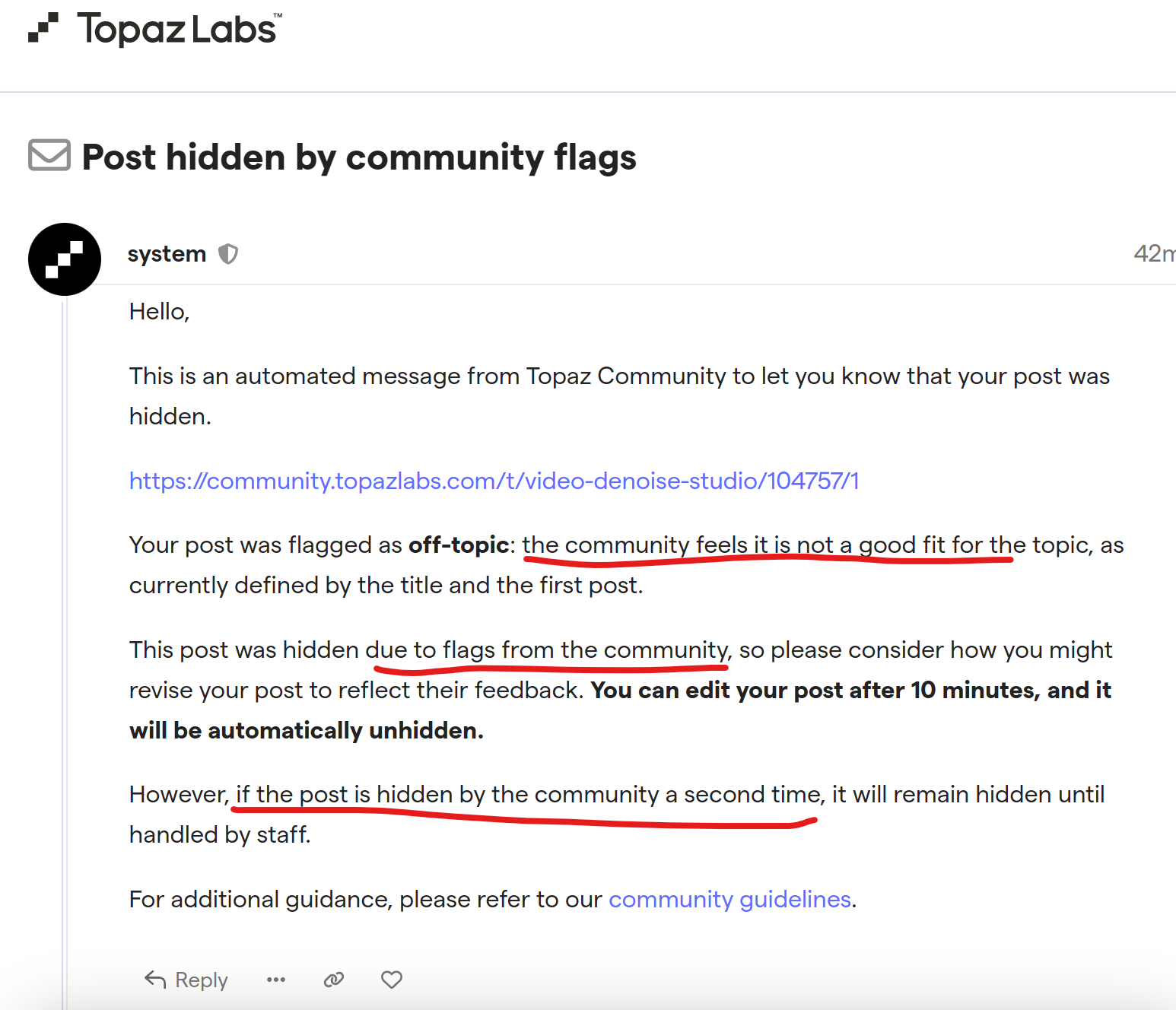
I am not sure if you guys can still access this thread as someone is looking for my posts to flag one after another. I’m guessing it is the same sour troll above because he couldn’t get my app to work. I’m thinking sooner or later this posts will be censored also.
I also posted on Reddit so if this post gets deleted, you can find it here unless that is also owned by Topaz and they don’t want me to be fixing the bugs in their software. My upcoming launcher fixes the extremely long load time for SLP and I was already testing a fix for a robust error resume feature for SLP that has worked perfectly for SEEDVR2. But to those sour trolls, please stay away. Don’t use my hard work.
reddit dot com/r/TopazLabs/comments/1vygtvi/comment/p70wf6z/
Great work! The first chunk is usually a bit slow due to warm-up, but subsequent chunks reach normal speed. I was just wondering, instead of the minimal upscaling setting in SLP, is it possible to upscale with your application using a specific factor? For example, I want to upscale by 2x, but SLP doesn’t do that. It has its own output metrics, and it doesn’t do it outside of those. However, in SeedVR2.5, you could enter the desired metric, which gave you both speed and metric freedom. For instance, I want 720p output, but SLP doesn’t allow that; it requires at least 960p, which makes it slower. Is it possible to adjust this with the given command?
I think it’s not just that guy; there were trolls here who attacked me back then, 3-5 of them. They even reported the previous SeedVR2.5 thread and got it shut down. They’re doing the same wicked thing again. They used to write at least 5 comments on the forum every day, but after you shared this application, they haven’t written a single comment. So it seems they’re up to something secretive.
They just shared this, but this topic is already related to SLP, no other application is being mentioned. It’s an SLP loader application.
Yes I already have a separate beta version that can do that (manual user entry of output resolution to override Topaz’s limited output resolution options) among many other new features such as automatic and manual resume on SLP processing errors/crashes and a way to shave off another 2.5gb of vram, which would be huge for gpus with 24gb and less. But I just want to get v1.0.2 out first so at least the community can have a launcher to do the very basic goal of this app reliably, which is speed boost.
Yes, I remember there were quite a few bitter individuals attacking SEEDVR2 in much the same way we’re seeing here, yet now some of those same people praise the hell out of SLP, which is itself descended from SEEDVR2. The irony is pretty hard to miss.
For normal folks like us who genuinely enjoy helping others, sharing information, and seeing technology move forward, it’s honestly perplexing to watch people become so personally invested in tearing something down. Normal folks like us will never understand the kind of ego or personal bitterness that makes these individuals want to discourage others, undermine useful work, or stand in the way of progress simply because they have some selfish axe to grind.
Am I understanding you correctly—that you’re working on a way to bypass the fixed resolution limits? That would indeed be an extremely exciting option for both very low-resolution and relatively high-resolution material. With its fixed settings of 2x, 3x, or 4x, SLP really does reach its limits there.
One feature I miss in the Topaz software for SLP and the other Starlight models is a comparison option.
I find it incredibly difficult to compare two videos rendered with different settings. I think that would also help users better determine whether the result is better with the standard SLP settings or using your tool. Right now, at least, it’s impossible for me to tell the difference.
Yes, I was able to restore the SEEDVR2 option that allows manual entry of the output resolution, bypassing the fixed resolution presets.
Since SLP is a generative restoration/upscaling model rather than a conventional pixel-scaling algorithm, there is no technical reason for the output resolution to be restricted to fixed integer scale factors such as 2×, 3×, or 4× the source resolution. The model reconstructs the output from the source content rather than simply enlarging the existing pixel grid, so an arbitrary target resolution does not create the same scaling or interpolation issues you would worry about with traditional resampling.
There may still be architectural requirements for the width and height to be divisible by a certain value, such as the model’s latent or VAE alignment factor, but that is very different from requiring the output to be a whole-number multiple of the source resolution. I don’t fully understand how it really works as this is something that just occurred to me with my recent extensive benchmarking. But as long as those internal dimensional requirements are satisfied and there is sufficient VRAM, there is little reason to impose an artificial fixed-resolution limit on the user. I never saw any issues using arbitrary resolutions in SEEDVR2 in terms of quality of the output. But speed is something I realize I don’t yet understand enough. Once I release the new auto benchmarking suite, we will get more data how SLP performs under different output resolutions.
