So what was the actual error? What is your actual environment? Go the Help-> Graphics info, press Copy and post the info here.
When saying the latest OS does that mean the Beta?
So what was the actual error? What is your actual environment? Go the Help-> Graphics info, press Copy and post the info here.
When saying the latest OS does that mean the Beta?
Please, everyone who just posts here looking for someone to solve their problem … please, oh please read the thread to see if your issue has already been reported and if there is a solution offered.
I have followed your advice (thank you for it ), pressing the Reset button in Preferences, and now OPENVino is selected. I do not understand well why the GPU is not selected (it has 4 GB additional memory and it is no so bad), but with only the CPU is twice quicker, so it will continue this way for sure.
Do you think I should also remove for this program the Discrete GPU selection in Windows settings?
No don’t remove it because you can then switch to it if you like. The reason I suggested doing a reset was that it would recalibrate the processing and I have a similar setup to your PC but I have a i7-7700HQ, same RAM, same GPU and vRAM and the CPU processing is faster than the GTX1050.
Topaz have stated that the nVIDIA GPU processing will get faster in future releases but you do need to reset so it can re-calibrate each and every time.
Per your request:
Application & Version: Topaz Sharpen AI Version 2.0.2
Operating System: macOS 10.15
Graphics Hardware: AMD Radeon Pro 5500M OpenGL Engine
OpenGL Driver: 4.1 ATI-3.5.5
CPU RAM: 16384 MB
Video RAM: 2047 MB
Preview Limit: 4492 Pixels
After the render completes the application gets the beachball… the program is not responding. This happens when I use the app within Lightroom classic and Photoshop (latest non-beta versions). Stand-alone it works sometimes.
Larry
I take it that you os version is 10.15.3 and not the Mac 10.15.4 beta preview.
Did you uninstall the previous version of Sharpem AI leaving version 2.0.2 as the only installed version?
Yes, non beta. Yes, I uninstalled the previous version and the 2.02 version. Then I installed the 2.0 version and the result was the same. I upgraded to 2.02 and still the app would freeze on exit when launched from within Lightroom classic.
I’ve found a work around. If I take an unedited by Lightroom raw file into Sharpen AI it processes and exists normally. If I do a slight crop first the app hangs on exit.
You should export from LR to Sharpen AI and apply the LR adjustments to a TIF or JPG and not PSD before sending to Sharpen AI.
Hi AiDon,
It is a TIF. I’m not sure where PSD came from in your recommendation. Bottom line, my workflow has not changed. Your product has.
1.X no issue. 2.X issue.
OK you will need to raise a support request at the main website as the only other thing I can think of is that there is insufficient permissions to be able to update the image passed.
This is a user to user website here, we are not Topaz employees 
What I like with rel. 2.0 (I started with 2.02 on MacOS Catalina) is keeping the previous (i.e. better) split view and having batch processing and finally masking where I want to sharpen.
What I don’t like and don’t understand:
Why can’t I do batch processing and have each image applied their individual “auto” processing. Same in AI Denoise.
In DeNoise I can switch to auto to see the values which the app will provide. I then have too (better than nothing) switch back to manual and still have the auto values so I can tweak from there. It does not work in AI Sharpen.
In Sharpen you always get 50, 50 for sharpen and noise. It’s bothering. You don’t know which values to start with.
What’s the difference in “clear” the mask vs. “delete” the mask?
Why can’t I set the default “save to” directory to the source directory. I don’t want to to this for each image because then I don’t need the batch option.
When opening an image after processing one already the open dialog does not highlight any longer all jpg files. Only some. Annoying.
After saving a file the “save” button is activated again and when clicking the button the output file format suddenly changes to “dng”. Is it a bug or a feature?
I mean these things hit me after working for 10 min with Sharpen AI. The simplest product test would bring this up. And why Sharpen AI 2 and DeNoise AI 2 behave so different would be task for the product manager.
It is if Auto is selected.
Only for the Manual default, select Auto and then click on Manual you will see a copy of the Auto settings which you can adjust:
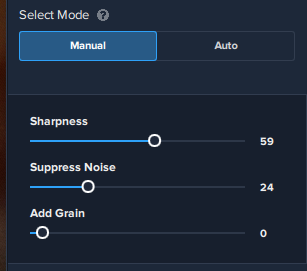
Clear the mask resets the current mask, Delete deletes the mask and returns to the main screen.
The other items you will need to raise a Product Feature request.
I also deleted unnecessary comments in your post. Sarcasm is not the way to ask for help.
Hello Don,
My apologies for not reading the entire thread. Thank you for all your tips, I have learned a lot about your products and graphics hardware / software in general.
I am new to Topaz (DeNoise & now Sharpen) I am very impressed by both products.
Regards,
Mike,
Don,
I’m not happy with the way you are deleting parts of messages criticizing Topaz. They have deserved a lot of criticism. I have been a forum mod and I would never have done that. You might be interested to know that your self-appointed censorship of this forum reflects poorly on Topaz Labs and makes me even less likely to do business with them in the future. I doubt if I am the only one.
On some images I get a result of a black picture. LR and PS both open it as black. In PR during import, the image shows briefly as it should (maybe a preview internal jpg?) and then goes black.
Saving the image takes 5+ minutes. In the version 1 (which does not exhibit the issue) - about 1 minute. In the bad result, the compressed file is 375K, the uncompressed file is 174MB
I’ve read a lot of the threads and do not see a posted solution - sorry if I missed it.
Application & Version: Topaz Sharpen AI Version 2.0.2
Operating System: Windows 10 (10.0)
Graphics Hardware: Intel(R) HD Graphics 630
OpenGL Driver: 3.3.0 - Build 26.20.100.7263
CPU RAM: 16242 MB
Video RAM: 1500 MB
Preview Limit: 3466 Pixels
Thanks Don for your feedback.
First there wasn’t any sarcasm from my site. Sorry if it came this way for you.
You can be sure that the problems are still existing. As I mentioned (and it was also serious why a product manager didn’t see the different behavior) I know from DeNoise AI how to switch between manual and auto. It doesn’t work in Sharpen AI 2.02. The split screen (which I mention it is good to keep the old one) doesn’t show any sharpening effect. Not with masking nor without. What I’ve seen so far others have the same issue.
When saving the file there isn’t applied any sharpening effect. What I see is, the original file size was 15.8Mb in size and after saving it’s 25Mb!
My goal was to address the issues I have. Most I have I also see here do others have. So I think it should help where to look after. Right now 2.02 isn’t usable. I still have to use 1.46.
You can delete some issues addressed but I think you’re aware about the tasks of product manager and test management, at least if Topaz Labs want to be a professional software development company. And that fact is the same regardless if developing software in a classical workflow or in a agile way. These issues came directly to my mind while using DeNoise AI 2 and Sharpen AI 2.
A number of times above it is claimed hitting Auto followed by Manual will show the Auto slider settings as a starting point. That certainly is not true in v2.02 running on MacOS 10.15.3. The sliders are always set to 50/50/0. This has made me fall back to 1.4.6.
Firstly does your pc have an alternate high-performance GPU? You can check in the device manager under display adapters, if it does allocate it to Sharpen AI using the Graphics settings in tge Settings panel.
Secondly, try going to preferences, under the file menu, and press Reset to recalibrate the processing options.
You need to raise a support request at the Topaz Labs website as the issues you are reporting seem specific to your install. In my case switching betweenAuto andManual works fine, saving retains the sharpening effect, split screen shows the effect when moving the bar.
make sure that if you are usingManual for updating the preview you update the preview before switching as the get the correct Auto settings the previewed area needs to be processed.
