using the HD→4K preset attached to this post (and most others too) i get much worse encoding performance on my RTX 5070 Ti compared to the RTX 4070 Ti SUPER (same Ryzen 9 7950X CPU and 64 GB RAM). While the RTX 4070 Ti SUPER can get between 11 and 12fps the RTX 5070 Ti only can get to about 7,5 fps, which is a significant drop. I get the same performance on my older RTX 4070 / Ryzen 9 3900X system.
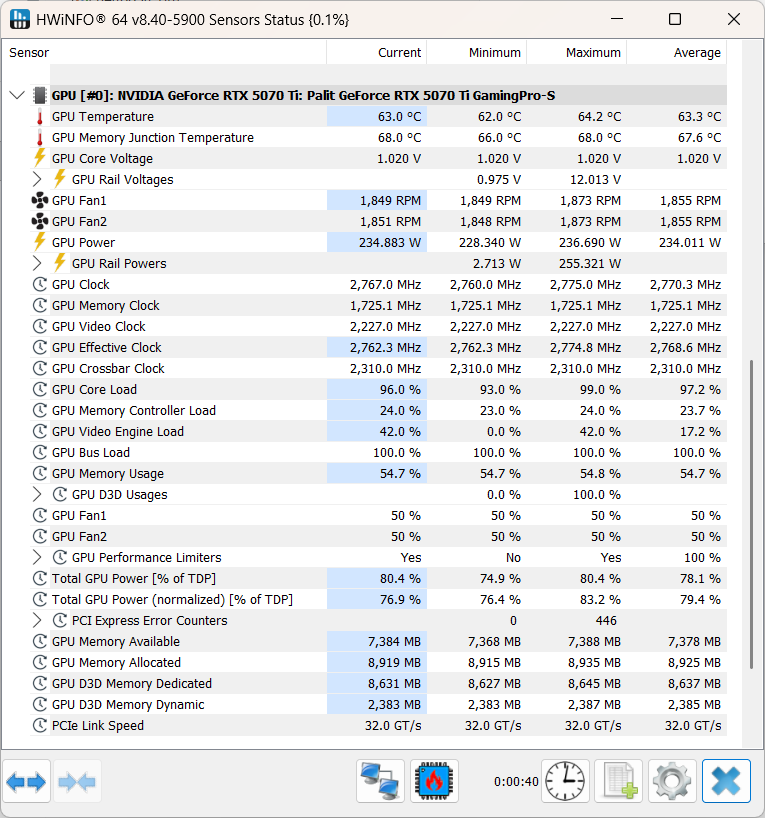
The GPU load and VRAM usage is about the same and there is no thermal throttling going on.
i just saw that the PCIex Error Counter is listed with 446 errors, which probably is a the reason for performance drops. Not 100% sure about this, but something to investigate.
thanks a lot for your input guys, i really appreciate it. After comparing both systems again it seems that there is indeed an issue with the RTX 5070 Ti system and the PCIex connection of the GPU. The GPU Bus Load is at 100% on this system, whereas on the RTX 4070 Ti SUPER system the bus load while running Topaz is only 2%-5%. It looks like the 5070 system constantly needs to correct data from reading/writing via PCIex. I have to investigate if there is a physical connection issue or something wrong with the configuration and bios settings.
After several days of testing the current conclusion is, that for some reason Topaz Video does not work well with the RTX 5070 Ti. I had an issue with the motherboard, but that was fixed. What i have done to rule out as much issues as possible.
exchanged the motherboard with an X870E MSI Tomahawk Wifi. The massive amount of PCIex errors went away with only a few appearing now and then. The GPU now runs at x16 speed on the new MB.
Test of an RTX 4070 on this system running the encoding with about 7,3fps (seems normal)
Test of the RTX 5070 Ti in the system results in only 7,4 fps
Put the RTX 5070 Ti in the B650 system which had the RTX 4070 Ti SUPER, resulting in only 7,4 fps, whereas the 4070 got 13,4 fps.
Did tons of other benchmark test, e.g. 3D Mark, FurMark, Gaming Benchmarks. In all of those benchmarks the RTX 5070 Ti got very good results with no issues, crashes whatsoever.
it seems that Topaz constantly moves data between VRAM and system RAM and thus blocks the GPU bus.
Thank you for this info! I’m currently looking for upgrade my 3070 and get new 5070 or 5070 TI and now reading this I’m thinking might better to found used 4070 TI. The 4090 BTW are way over my budget.
It’s actually more logical to plan for the future. Currently, software is increasingly focused on the Blackwell architecture. Look, macOS is now becoming incompatible with Intel and AMD GPUs. The ADA architecture will also slow down in terms of processing power over time. So, if you buy with future-proof in mind, you won’t regret it in later years. The 5070Ti is actually the most budget-friendly and best choice in terms of tensor and CUDA core count; I bought one last year.
i did all of this, there is no issue with the hardware PCI Bus transfer and the GPU slot does not share any lanes with the M.2 (only one installed). Every single test i did with gaming benchmarks and also OCCT bus and VRAM transfers show no issues. No matter what i swap in terms of GPU / Mainboard, the RTX 5070 Ti always is significantly slower while exporting with Topaz than the RTX 4070 Ti SUPER.
that is exactly what i was going for and the reason i bought the RTX 5070 Ti. So it was pretty disappointing to learn, that my second RTX 4070 Ti SUPER PC is much faster in Topaz Video and the RTX 5070 Ti is as “slow” as my RTX 4070 PC.
can you try my preset i have attached with my 1st post and try to upscale a HD 24p file to 4K with your RTX 5070Ti ? This should give you between 11 and 14 fps. I get between 7-8 fps.
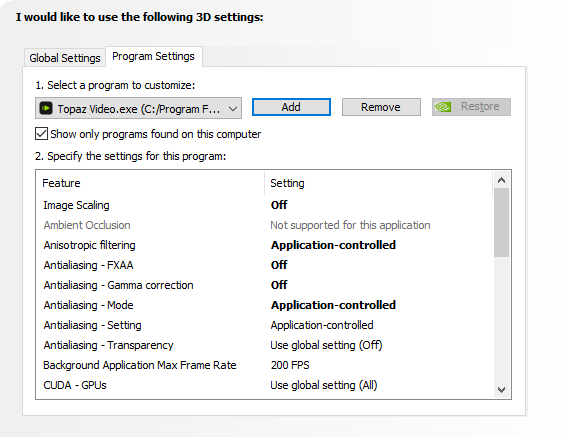
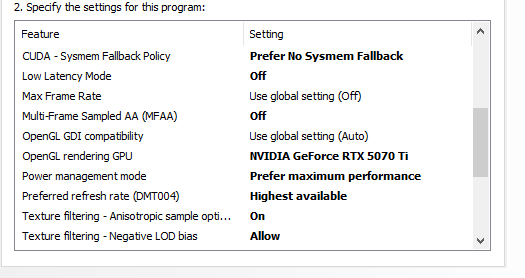
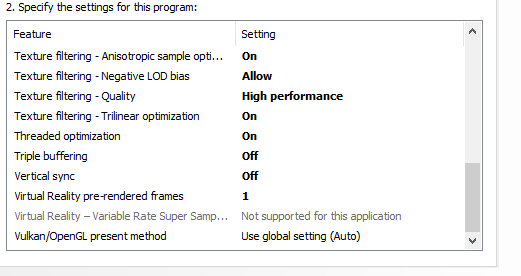
Nvidia optimization for the GPU is also very important, especially “Prefer No System Fallback” and “maximum performance” should be selected, try it with these settings and test again.
i have created a download folder on my server for anyone who is interested in testing this. I have included the following files:
JSON preset file incl. Export Settings
1min HD Test Video without audio
Two Topaz Benchmark snapshots from RTX 5070 Ti & RTX 4070 Ti SUPER
Render Export Snapshot showing 7,3fps on RTX 5070 Ti
The Topaz Benchmark actually shows the better performing RTX 5070 Ti with the exception of NYX 2x, which is slightly slower. The slowdown during export however is much higher, which may lead to the conclusion, that there is something going on with the export encoding in addition to the actual rendering. I have to do snapshots from the RTX 4070 and RTX 4070 Ti SUPER, but they are not available at the moment, so those will be uploaded later.
Here is the download Link. It would be extremely helpful if anyone of you can test out this on their specific PC and let me know what performance you get, even if it’s not a RTX 5070 Ti.
Hello, sorry i uploaded the wrong clip to the server. I have exchanged the file now with a _v2 version, which should now be HD 23.976 1min running time.