When using Photo AI 3, V 3.6.2, and Super Focus V 2, I get blocks text because the image is interpreting the pattern as text. Maybe we need a selection that explains that the image has no text?

Thanks! This is an issue our development team is aware and is looking into. Make sure to mask out these areas to avoid these artifacts, once Super Focus is rendered, use the Edit Selection to mask them off!
Wait, Topaz expect the end user to fix the problem created by Photo Ai? The original markings were not text but an critical part of the image. Attempts to understand what will happen in Photo AI in advance is out of the question. Masking them out after the improper rendering by Photo AI counters the reason for Super Focus, and devalues the image.
We would need to see the original to make sure if it’s a case for Super Focus. We notice these artifacts come up more in cases that are not meant for Super Focus. The AI Model is trained for missed focus cases. Let us know if you can provide the original and we can look if it is a case for Super Focus as well!
The text-like artifacts is still something that can occur on some cases for Super Focus, yes, and it is being looked into. The current workaround is to mask out the artifacts areas. This forum thread is marked as In Progress to reflect this.
IF YOU HAVE AN ISSUE:
-
Make sure you check this post first:
-
The fastest way to reach us is to send us an email at help@topazlabs.com


TO CREATE A FORUM TOPIC
- Give as many details as you can on the issue you are experimenting.
- Workflow steps you do, if using the standalone or plugin. File Type used is RAW or JPEG?*
Hi there,
after the last update, I have characters appearing in images after super focus (see attached example, that unfortunately did not upload :-().
Any idea where this comes from ??
Best
Peter
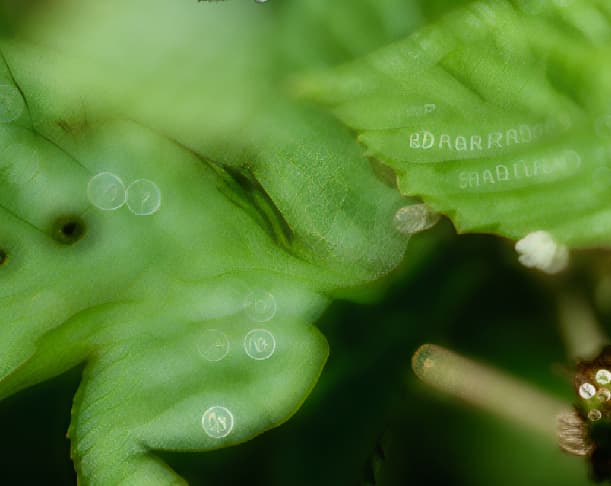
The image didn’t upload so I can’t see it. If you have a similar experience than the other user above, then we are investigating this. This is an artifact created by the Super Focus V2 model. It can also be because the image is over processed.
If your issue is different, please write to us at help@topazlabs.com and we will have a look 
Please have a look into the direct reply, there the image uploaded.
Best
Peter
It’s uploaded now, thanks!
This is the issue we are trying to fix. In the meantime, you can try Super Focus V1. It should not create the text.
1 Like
Hi: Not every time, but too often, strange jumbled parts of sentences appear all over the image after Super Focus. I can’t read them to see exactly what they are. I cannot reproduce it on a regular basis. The images are originally .orf and Topaz is a plugin for Lightroom Classic. It may happen more often with images that have been upscaled before using Super Focus. Maybe I should send a copy of the image next time?
Thanks
Donald
@Longcove2 I added you to the thread that is discussing this issue. We will message here once we release a fix for this.
For anyone experiencing this, here is a workaround:
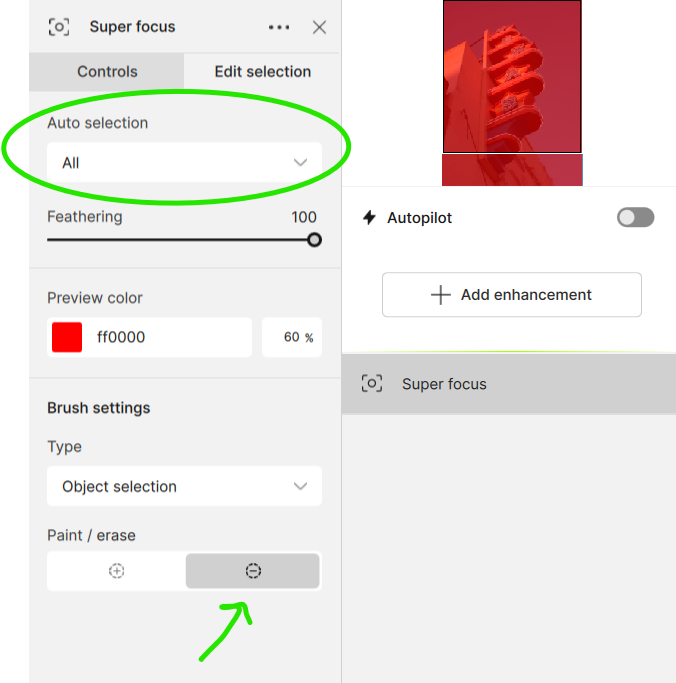
If you get these artifacts, it’s usually on a blurry area of the image. You don’t need Super Focus applied to that. You can try to change the selection after Super Focus is processed to remove those areas and prevent the issue.
In addition to the proposed workaround, I would like to mention that:
- Topaz Photo now defaults the Super Focus selection to “Subject” in v1.1.0 and above, when a clear subject is detected, this setting avoids artifacts in blurred backgrounds, as the background will no longer be affected by selecting.
- For anyone who is still on the Legacy Photo AI version, you can use the workaround that was provided earlier (Selection panel, to Subject)
2 Likes
