I have the same problems.
iPhone 16 Pro
iOS 18.0.1
Topaz Photo AI 3.2.2.
macOS Sonoma 14.7
I have the same problems.
iPhone 16 Pro
iOS 18.0.1
Topaz Photo AI 3.2.2.
macOS Sonoma 14.7
@nikondfans @maurice.chang @jeff.chin @TomTheThomse
Could you confirm this important information? Have you updated to iOS 18 on the phone that you are using to create these .heic RAW files?
If you did , unfortunately, in the iOS 18 update, Apple changed the way they encode HEIC in the latest release, which is not currently supported in Photo AI.
This means that until we support this new encoding, you will have to convert the HEIC files to TIFF or JPEG and set your file format to JPEG for future pictures (unless you want to convert all the files every time).
If you have not updated to iOS 18, the HEIC format should work while using Photo AI as a standalone application; if you can, please confirm.
Yes confirm update to ios18
Thanks,
Maurice Chang
I confirm the update to iOS 18.
Thank you for your information!
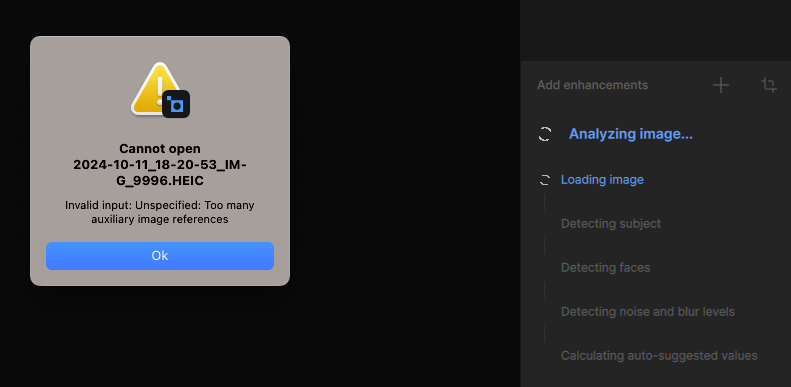
Topaz Photo AI doesn’t work with HEIC files captured on iPhone 16 Pro Max.
The following error dialog is displayed:
“Cannot open file <PATH/filename>
Invalid input: Unspecified: Too many auxiliary image references”

Steps to reproduce the issue:
Actual result: “Cannot open file <PATH/filename>
Invalid input: Unspecified: Too many auxiliary image references” dialog window is displayed.
Expected result: The photo is imported into the app and ready for processing.
Topaz Photo AI [v3.3.0] on [Windows 11 Pro 23H2]
I find that HEIC images from iPhone 16 pro open when opened directly from Topaz AI, but they do not open when opened from Lightroom. All other formats seem to open from Lightroom just fine. Help!
@jamesmac and @j.e_de_sequera - make sure to check the first post on top of this page for workarounds on this iOS 18 HEIC issue.
I tried to open a HEIC image taken on my iPhone 16 pro. I tried from Lightroom and directly in the desktop app. Each time I received the message:
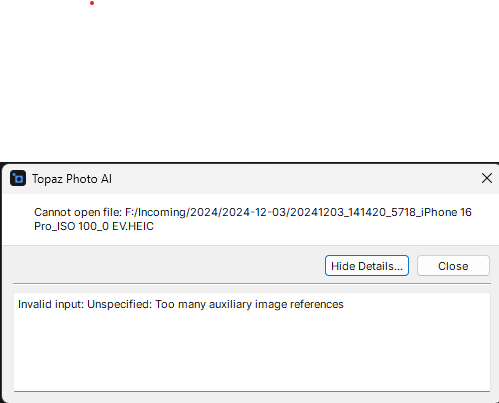
I have attached the offending image. I changed the extension to .png so I could upload it.
Still not fixed with the latest version of Photo AI 3.4.1 and MacOS 15.2. This renders to application useless when trying to use it as an extension to Apple Photos
Same for me.
I have a Mac mini m2 Pro, with the OS interface language in French. (if it matters)
Effectively Photo AI version of today Dec 21st, 2024 is not usable as a MacOs X Sequoia 4.2 add-in.
I followed the recommendations described in Topaz Photo AI section about plugins…
This problem has been ongoing for far too long. Obviously Topaz doesn’t care to fix it. Renders an otherwise great program useless unless we want to take lower res pictures, or change every picture to jpeg after shooting, which is not a pleasant option.
I have a PC and the same thing. WHEN WILL THIS BE FIXED, Topaz?
I have the same problem
This is really unacceptable, millions of iPhone 16 devices and none can use Photo AI. No other program (that I am aware of) has this issue (e.g. Luminar Neo, Photometer) so It should be easily fixed.
It’s even worse: the issue is not isolated to the iPhone 16 but apparently all devices running iOS 18.
@jrg63 - @roger.traill - @pascal-6073 - @mark.dickinson-0390 - @dbarclay6547 - @wolfgang.pezda
make sure to check my first post on top of this page for workarounds on this iOS 18 HEIC issue.
When will this be fixed. The work around is just that not a fix.
Dan Barclay
Osceola Hills
214-886-3889
There is no timeline for this open ticket, as the development team works on the tickets by priority of users affected. We will mark this thread as resolved once a fix is released that supports this new encoding of metadata.
For anyone that has HEIC from iOS 18 files, please see this new v3.5.0 release 
**Make sure to save as non-HEIC format for now, the development team is working on the HEIC export format, to save as JPEG/PNG/TIFF for now. Mentionned in v3.5.0 Known issues. We will keep this thread open until the HEIC export is fixed as well. *
