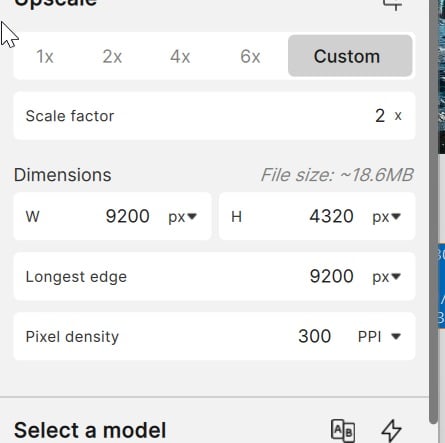
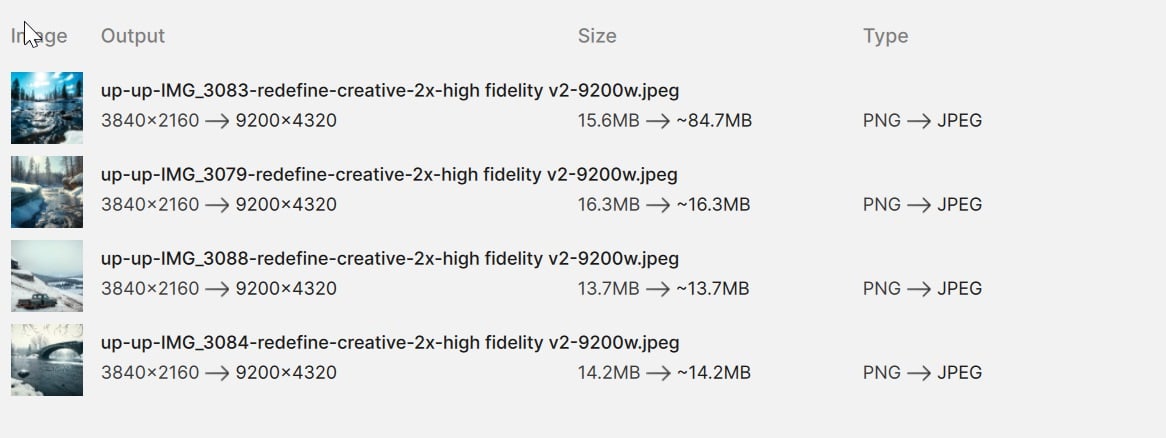
Load multiple smaller images of various sizes, then choose the “longest edge” say 9200 pixels, then export and all would end up … at 9200 pixels either height or width.
Now this seems totally ignored most of time and either a default 2x or something is applied EVEN though it says on export the size
Here’s example
I don’t want 2x here but I can’t remove, I am typing in 9200px below
Starting last week, Gigapixel is no longer changing the file. It shows increasing the file and saves exactly the same sized file. The old version worked fine for years. What’s up?
Topaz Gigapixel 1.0.7 is working as expected with the Standalone version and as a Plugin for myself.
I don’t work for Topaz but, I am curious to know are you using the Standalone version or as a plugin within Lightroom, Photoshop or similar software
Standalone version:
If you were using the Standalone version on saving the image Gigapixel adds information to the image file for example; you may have a Prefix added then > Image File Name then > a Suffix added then > very compressed-2x-faceai v2
Are you seeing that extra information on the saved files within the original folder and if you added a Prefix then the file will save in a different position within the Folder File list.
In addition, have you checked you’re not saving to a different location Folder.
Plugin:
If it’s a Plugin then can you provide more information on the steps you are taking before, during and after this behaviour.
In the meantime, have you tried running the Installation again in case you have missing models for instance.
Here’s some information from Topaz about Models
And Troubleshooting
Here’s the link for Gigapixel 1.0.7 for both Windows and Mac
And the link for all previous versions of you wish to Rollback and if you do decide to Rollback there’s no need to Uninstall, Remove or Delete your current version this will be done during the Installation Process.
Here’s the link to contact Topaz Support if these don’t resolve the issue
The new file is saved with the suffix, but the size has not changed. The file size is exactly the same and the dimensions have not changed. This is the stand alone version. I downloaded it again and it does the same thing. I’ve used the old version for years and it works. This is on Mac running the latest version and maybe that Mac update changed something.
I’ve checked all the settings and see nothing that would affect the enlargement.
The new file is saved with the suffix, but the size has not changed. The file size is exactly the same and the dimensions have not changed. This is the stand alone version. I downloaded it again and it does the same thing. This just started two days ago. Before th
Could possibly be a Mac issue as you say because, I’m using a Windows Machine and its working fine
The good thing is Topaz technical support are working today so, may I suggest contacting Topaz Support using the link I provided and explaine What’s happened Mac Update and you’re reinstall the application and hopefully their be able to help
Here’s the link to contact Topaz Support directly again for you
You can record a video if you want showing the issue and we can help. You can use the program of your choice to do a screen recording:
We recommend using Loom, which is a great free application. Here is a link to their page explaining how to download and use Loom. Once your Loom recording is ready, you will get a link to the video. Please send me this link here.
Awesome checking it out now. Sorry about lack of video, 2 things made it tricky: exact issue didn’t show up (similiar but not always when planned and felt was GPU memory getting corruped / closing app typically fixed).. 2 was I went away and didn’t use for about a month until last week.
yeah I hate to bring bad news but this is unbearably slow now for offline rendering. Most images to scale 2x times took about 20 seconds more or less. This estimates 19s but is stetching into 3 minutes now. Closed app and tried again. Going to reboot and see if make a difference. If still same will need to uninstall and see I can back down from this version